

Sections
- Page 1 BlackBerry Q10 Review
- Page 2 Interface, Usability, BBM, Browser and Camera Review
- Page 3 Multimedia, Apps, Battery Life, Connectivity and Verdict Review
Verdict


Pros
- Physical QWERTY interface
- Strong 8-megapixel rear camera
- Fluid keyboard and touchscreen combination
Cons
- Awkward 1:1 screen ratio
- Expensive
- Lack of BlackBerry 10 support
Key Specifications
- Review Price: £549.95
- BlackBerry's trademark QWERTY keyboard
- BlackBerry 10 operating system
- 8-megapixel rear-mounted camera
What is the BlackBerry Q10?
The BlackBerry Q10 is the Canadian manufacturer’s first QWERTY keyboard phone since it launched the BB10 OS with the touchscreen only BlackBerry Z10. It’s something of a hybrid, combining the old and the new of the BlackBerry formula in an attempt to tackle the era of superphones while staying true to the brand’s roots.
With a 1.5GHz dual-core processor, 3.1-inch touchscreen display and 8-megapixel rear-mounted camera, the Q10 is far from a direct Samsung Galaxy S4 or HTC One rival, however. It exists to delight business users with its messaging abilities, while offering just enough of the modern smartphone versatility and power.
Question is…as much as business users have been calling out for a phone like the BlackBerry Q10, can it live up to its lofty £600 price tag?
BlackBerry Q10 Video Review
Not yet made up your mind about the BlackBerry Q10? Watch our video review here.
BlackBerry Q10 Design
The BlackBerry Q10 centres on the handset’s physical QWERTY keyboard, and rightly so.
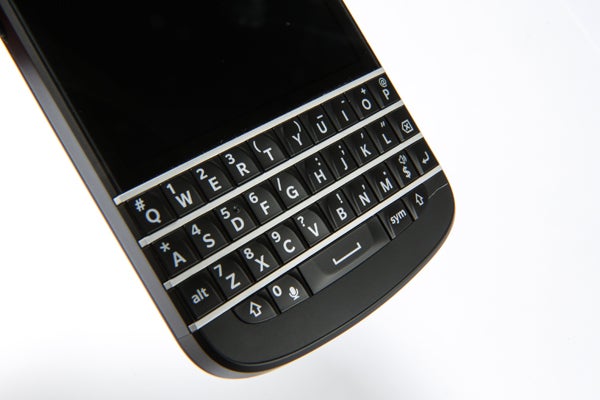
An iconic selling point, the physical QWERTY is easier to use for anyone not keen on the flat, digital keyboards of modern phones. The reassuring feedback of the BlackBerry Q10 keyboard is a welcome step back in time.
It feels as if BlackBerry has refined the feel further over recent QWERTY phones, such as the BlackBerry Bold 9900. The keys feel well spaced, with the left and right hand side keys slightly angled outwards for improved access. Metal frets also separate each row to reduce accidental presses. Anyone who struggles with a touchscreen will love it, and you’ll struggle to find another phone like this now.
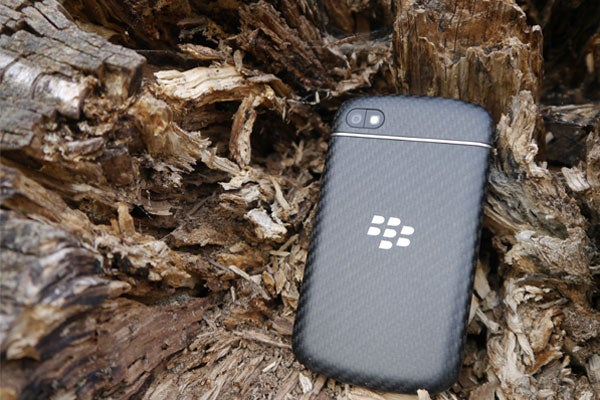
The BlackBerry Q10 is far more than just its keyboard, however. It looks and feels elegant, refined and professional. The Q10’s rounded edges and soft touch rubber rear make it sit comfortably in your hand. It’s a million miles from the palm-stretching HTC One or Sony Xperia Z.
The build quality is reassuring, too. It survived two weeks of use with no physical signs of wear and tear despite a couple of unplanned fumbles. It’s not the kind of phone you’ll instantly seek a case for.
It’s not without niggles, however. While the keyboard is top-notch, the Q10’s other physical buttons aren’t as pleasing. The metal nubbin that separates the up and down volume keys has unnecessarily sharp edges (an at times painful oversight that we experienced on more than one BlackBerry Q10 handset), and the lock/power button, located on the handset’s upper edge, feels cheap and hollow when compared to rest of the phone.
Although the Q10’s physical buttons and inbuilt speaker are positioned to avoid accidental presses or muffling, the camera’s location puts it in prime position to become smeared with fingerprints – a far from ideal design oversight when looking for grime-free snaps.
BlackBerry Q10 Screen
The BlackBerry Q10’s screen is a notable step up from BlackBerry 7 phones of old.
It’s a 3.1-inch Super AMOLED touchscreen, albeit with a square 720 x 720 resolution rather than a widescreen aspect like a typical touchscreen phone. It’s a necessary trade-off to fit in the keyboard, but it does mean any video you watch is squashed and hard to view. A multimedia phone this isn’t.
On the plus side, with 328 pixels per inch (the iPhone 4S retina display is 330ppi) text is just as sharp and readable as on any rival device, and the touchscreen’s accuracy is faultless. AMOLED screens use less power than their LCD counterparts, too, which should improve battery life.
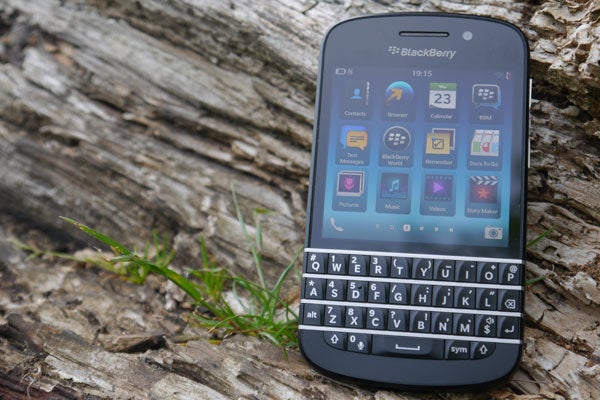
Like most Super AMOLED screens, blacks are intensely black but colours are a trifle over the top. Some websites look farcically oversaturated, but it’s not quite a deal breaker and the Q10 isn’t as bad as the notoriously extreme Samsung Galaxy S3.
Of greater concern is the brightness. Like the BlackBerry Z10, the Q10’s screen appears a little dim in bright sunlight – annoying if you’re trying to reply to an email on the move.
How we test phones
We test every mobile phone we review thoroughly. We use industry standard tests to compare features properly and we use the phone as our main device over the review period. We’ll always tell you what we find and we never, ever, accept money to review a product.


Editorial independence
Editorial independence means being able to give an unbiased verdict about a product or company, with the avoidance of conflicts of interest. To ensure this is possible, every member of the editorial staff follows a clear code of conduct.

Professional conduct
We also expect our journalists to follow clear ethical standards in their work. Our staff members must strive for honesty and accuracy in everything they do. We follow the IPSO Editors’ code of practice to underpin these standards.
Editorial independence
Editorial independence means being able to give an unbiased verdict about a product or company, with the avoidance of conflicts of interest. To ensure this is possible, every member of the editorial staff follows a clear code of conduct.
Professional conduct
We also expect our journalists to follow clear ethical standards in their work. Our staff members must strive for honesty and accuracy in everything they do. We follow the IPSO Editors’ code of practice to underpin these standards.
