

Verdict


Pros
- High-quality IPS display
- Excellent keyboard integration
- Great design and value
Cons
- Honeycomb-optimised apps are sparse
- Android 3.0 is a tad buggy
- No standard USB slot on tablet
Key Specifications
- Review Price: £429.00
Eee Pad Transformer Prime review
Best Tablets Of The Year 2011
Asus Eee Pad Transformer vs iPad 2
Android tablets have thus far often filled us with a special sort of dread. They’ve
tended to achieve a batting average well below what Apple’s iPad series has mustered,
and an honest reporting of their various failures has occasionally led to claims of
fanboy-ism, money hats and the sipping of elaborate cocktails served around Steve
Jobs’s Cupertino hot tub. None of which are remotely true, sadly. Thankfully, the Asus
Eee Pad Transformer is here to clean the slate.
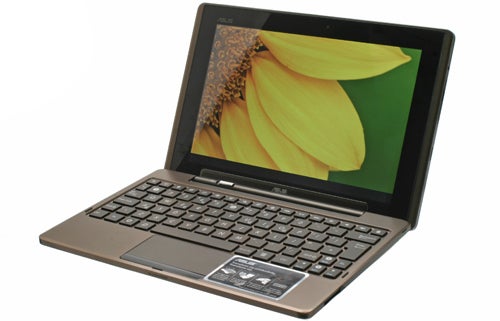
The Asus Eee Pad Transformer is an Android tablet that employs Asus’s netbook
expertise, including a keyboard dock that not only makes typing easier – it also
doubles the battery life and boosts connectivity. The package price is
£429, while a keyboard-less edition is also available for
£379, undercutting the
iPad 2 by a cool
twenty quid. Perhaps more importantly, it’s significantly cheaper than the
Android-powered Motorola Xoom, HTC Flyer and LG Optimus Pad.
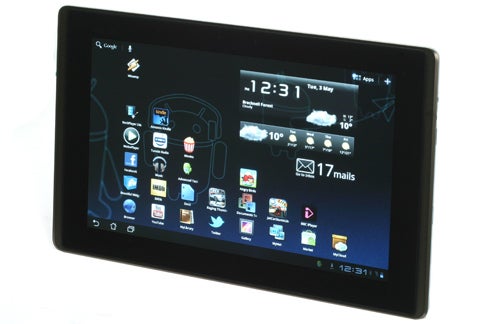
Removed from the keyboard dock, the tablet bears a face similar to many of the top
new-wave Android Honeycomb tablets. It’s glossy, black and rather iPad-like.
Surrounding the black bezel is a strip of bronzed metal, lending the Eee Pad
Transformer an impressive sense of quality that we missed in the all-plastic
Tab – last year’s top Android tablet. The back continues the bronze-brown colour
theme, but is made from embossed plastic rather than metal. This texturing improves
grip hugely, but falls some way behind the feel of the iPad 2’s anodised aluminium back
in the quality stakes.
It’s a classy product though, more so than we initially expected from Asus after
encountering Motorola’s and Samsung’s rival tablets at January 2011’s CES conference.
Build quality is great, and the sides of its body are tastefully minimal, in contrast
to the rather laden (but feature-packed) swiss army knife-style
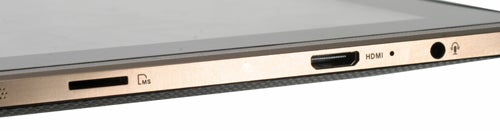
101. On the right edge are the 3.5mm headphone jack, miniHDMI slot, microSD slot and a
very low-key speaker grille. The big surprise about this tablet is that there’s no
standard USB on the tablet itself. Instead there’s a proprietary connector that doubles
as both power point and USB connector. This sits on the bottom edge of the tablet. Some
will hate the merging of power and data transfer duties into a single proprietary
connector (indeed we err towards this ourselves), but it does give the Eee Pad
Transformer a hint of that Apple flavour – that taste of simplicity.
Other features include Wi-Fi, GPS and dual cameras, it’s just 3G that’s missing in this
first edition.
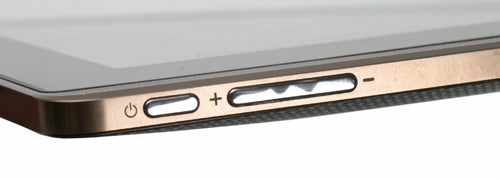
At 13mm thick, the Eee Pad Transformer is slim but not aggressively so. A laid-back
approach to dieting is seen in its curved back. This slight back bulge makes the tablet
more comfortable to hold, but doesn’t leave it rocking in either direction when laid on
a flat surface, unlike the original iPad.
At 680g, it’s a little too heavy to hold one-handed for significant periods. But of
course that’s what the keyboard’s partly here for – to remedy the need to constantly
keep your hands on the tablet to get it in an optimum position.
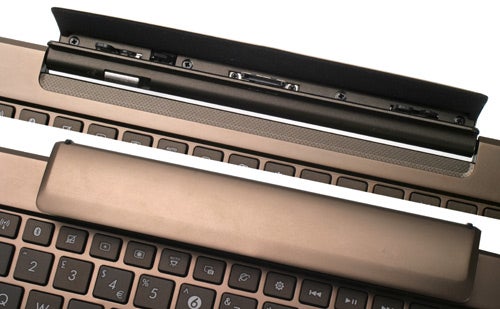
The Asus Eee Pad Transformer’s keyboard peripheral is one of its key differentiators that sets it apart from the rabid pack of Android rivals. It adds just £50 onto the price of the tablet, but improves the package and its flexibility hugely.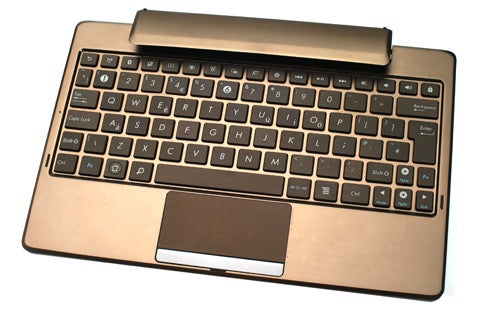
Build quality is just as impressive as the tablet too, surprisingly. The top of the keyboard is a metal plate, coloured in the same bronze hue used for the tablet’s screen surround. Similarly, the back uses the same embossed plastic as the tablet. When closed, there’s a pleasant cohesiveness to the design that reaffirms the Eee Pad Transformer’s position as a premium product.
The hinge is bound to become the part that takes the most wear if you’re planning on frequently transitioning between this device’s tablet and netbook forms, but we’re confident it can take the strain. The part that rests on whatever surface the Eee Pad Transformer is laid upon is made from metal and is protected by two little plastic feet that sit at each end of the hinge – which takes up the centre two thirds of the tablet, not the whole length.
The tablet slots into this hinge, which is fully lined in felt, and is held at three spots – the data/power connector and two stabilising clips. Unlike the now-obsolete iPad keyboard dock, this peripheral lets you angle the screen just as you would with a dedicated netbook, including closing it fully, thereby protecting the screen when travelling. The design and colouring of the Eee Pad Transformer are so consistent that we’re sure you could convince most of your less techy friends that it’s simply a laptop when in the dock. Those in the know may take its slightly bulbous hinge as a giveaway, but it’s no eyesore.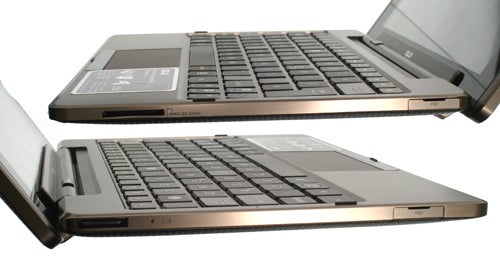
The keyboard dock uses an isolated-key keyboard with near full size keys. The key action is slightly mushy but certainly distinct enough for speedy touch-typing. Indeed it’s comparable to the best netbooks. All of which makes this attachment a huge boon over other tablets – the brilliance of having the ability to bash away at full speed on a proper keyboard really cannot be overstated.
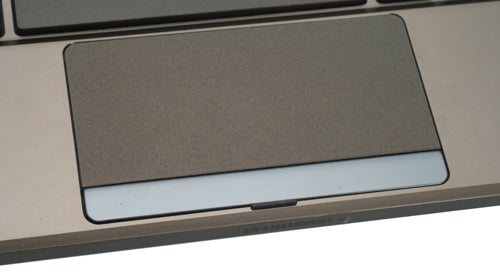
When dealing with casual keyboard duties, the temptation to tap away at the touchscreen rather than use the trackpad is very strong but for longer-form emails and documents the full keyboard obliterates an on-screen virtual alternative. We took the Asus Eee Pad Transformer out for a test drive in that traditional space of the netbook – the train commute – to see how it performs. As with any smaller laptop-style device, accidental disruptive touches of the trackpad were frequent, but there’s a hardware button that lets you disable the pad for more accurate typing – which we found indispensable.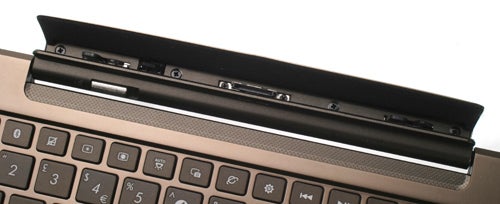
With the troublesome keypad silenced, the keyboard is very comfortable to use, while the docked tablet itself sits very happily on the knees. Unless your knees are completely straight, you’ll need to keep your hands on it to avoid it slipping off onto the floor – as all the “brains” of the Eee Pad Transformer are in the tablet rather than the dock, the weight distribution is more top-heavy than a traditional laptop. When laid upon a flat surface though, it doesn’t need any such stabilisation.
The benefits of the keyboard dock don’t end at typing. It houses a second li-on battery that Asus claims will boost battery life up to 16 hours – double the eight hours of the basic tablet battery. What’s more, the dock battery will charge that of the tablet, allowing you to boost its longevity when away from a wall socket.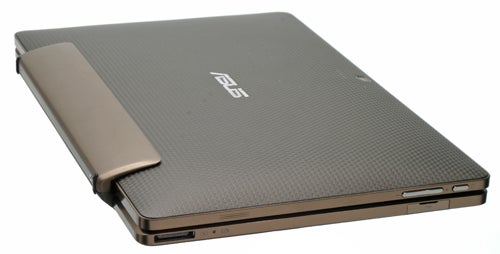
Unfortunately, it won’t charge over a simple connection to your computer, instead requiring the supplied USB adaptor. What’s more we found it wouldn’t charge using the USB cable and our standard selection of USB plugs designed for smartphones, suggesting it draws more power than the norm. This could be something of a deal breaker were it not for the Transformers other many merits.
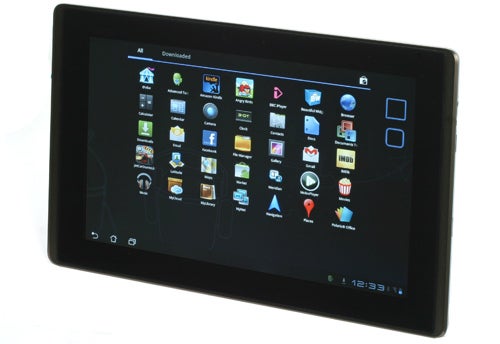
The Asus Eee Pad Transformer runs Android 3.0 Honeycomb, the latest version of Google’s tablet OS – and the first to be made specifically with tablets in mind. Although the differences over the previous 2.x editions are significant, the basic rules of Android still apply.
Your experience is based around a series of home screens that can be customised – or decorated if you like – with shortcuts and widgets. Widgets from previous versions of Android are still compatible with the Eee Pad Transformer, but dedicated Honeycomb baubles look better on the high-resolution screen. A handful of the essentials are included from the start, such as a clock and an attractive weather widget.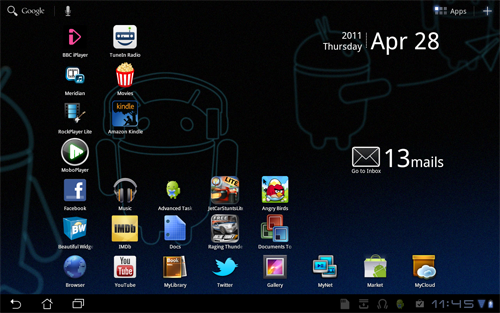
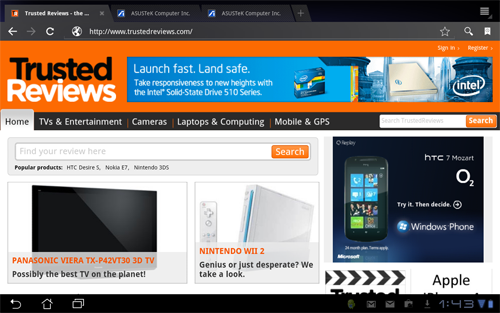
The most important improvements to Android are in the ways Honeycomb relays information. Most Android 2.x devices that aren’t stretching the OS’s functionality limits don’t use screens bigger than four inches or so, but the increased screen resolution and size of Honeycomb devices increases scope for packing more info in. Now, the notifications bar isn’t a pull-down menu, it’s a constant feature that’s more like the start menu of a “full” OS like Windows. From here, you can check out the latest updates – emails for example – without ever delving into the respective apps proper.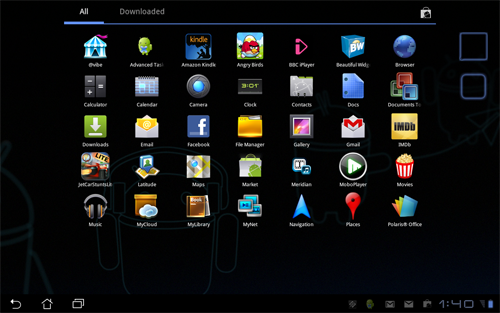
Also part of this bar are indicators for Bluetooth, battery life and Wi-Fi signal, as well as soft key-style buttons for the back, home and menu functions. These are nothing new, but the scale at which they’re implemented is completely different from the Android old guard. Honeycomb marks the operating system’s gradual merging with laptops – if only in UI terms.
This sense of Android “getting serious” is also boosted by the Asus Eee Pad Transformer’s keyboard, as it packs-in shortcut keys for many key features, including brightness, Bluetooth, Wi-Fi and playback controls. Although the apps you may use with the Transformer may not feel, or be, as fully-featured or complicated as Windows alternatives, with the keyboard in-tow the experience isn’t far removed from that of a full netbook or smaller laptop.
In this regard, it’s in stark contrast to the iPad that retains its very simplistic interface. There are merits to both but on principle we do prefer the more powerful Android approach. In practice it does slip up, but we’ll come to that in a moment.
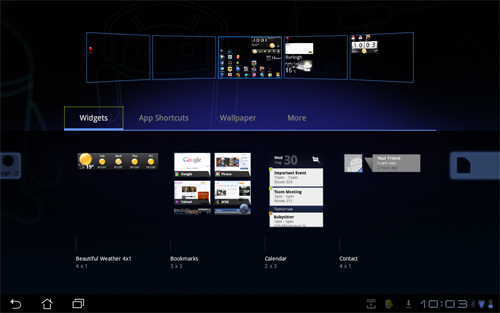
In a very broad sense, Android Honeycomb within the Asus Eee Pad Transformer is a complete success. It’s easy to navigate with the touchscreen, the keyboard or the trackpad and is very intuitive if you have some experience with the Android OS. It’s still early days for this tablet edition of the operating system though, and it shows, occasionally.
We encountered plenty of bugs, such as the volume controls suddenly not working properly, the touchscreen deciding not to respond and the predictable array of crash bugs when within apps. However, there was nothing that shouldn’t be fixed soon, or that wasn’t much of an irritation in the first place. Certainly if you’re more technically minded these few glitches will all feel both familiar and almost like part of the fun. However, this is precisely where Apple’s controlled and simple approach for the iPad has played dividends – it just works.
The Asus Eee Pad Transformer uses a 10.1in IPS display, with a 1280×800 pixel panel. IPS, or in-plane switching, is the screen technology used in the Apple iPad, and produces superb colours and viewing angles. This means that several people can comfortably crowd around the tablet without seeing a dull, poor-contrast image, as you’d get with the lesser TFT LCD panels of many cheaper tablets.
Also like the iPad though, the surface of the Eee Pad Transformer’s screen is highly reflective glass, so take it out on a sunny day and you’ll see as much of your face as whatever’s on-screen. However, we tested the tablet outside on a very sunny afternoon and found the tablet to be usable as long as the brightness is set to maximum.
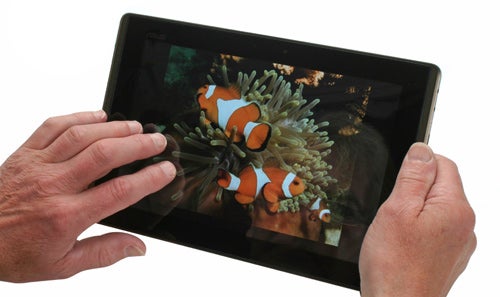
Contrast isn’t perfect, with a slightly grey cast to the screen’s blacks, but the overall quality of the display is excellent – especially at the very reasonable price point. It embarrasses many traditional laptops available for the same money that get by with poor viewing angles and basic TN (Twisted nematic) panels. There’s an automatic brightness setting, but you can also set it manually.
No doubt to keep battery life pendants happy, we found the auto setting set brightness slightly lower than we’d like. It’s a case of personal preference though, and the highest setting is powerful if not quite as retina-scorching as something like the Samsung Series 9 900X3A
. But then that tablet hybrid costs way over a grand.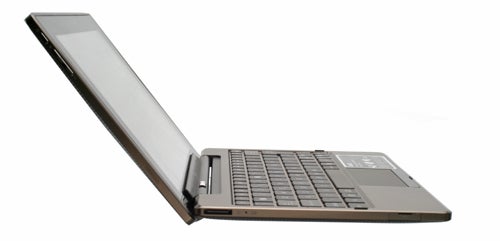
Arguably more important than the quality of the Asus Eee Pad Transformer’s display though is its touchscreen. The tablet uses a capacitive panel, now the standard for all but the lowest-end tablets and smartphones. It supports multi-touch and, partly thanks to the powerful dual-core Tegra2 processor, is extremely responsive. The lightest of touches are registered instantly and we found no accuracy issues.
While we prefer the keyboard for any hardcore typing duties, the virtual keyboard is more than capable of drumming-out the odd email or social networking update. The 10.1in screen is big enough to give each key plenty of space – there’s none of that cramped feel you may have experienced with smaller-screened smartphones.
Hardware-wise we have almost no complaints about the Asus Eee Pad Transformer, but what about its software? The most serious shortcoming of the tablet in use isn’t one that Asus has any control over – it’s Android 3.0 Honeycomb apps.
While many Android essentials, like Angry Birds, Twitter and Facebook, all work just fine on the Asus Eee Pad Transformer, very few are optimised for the tablet’s large, high-resolution screen at present. This is a symptom of the platform’s young age more than anything else, but it’s disappointing to see so few of the app scene’s biggest players step up a gear for the launch of the first Android 3.0 tablets. Some apps refuse to work properly too. 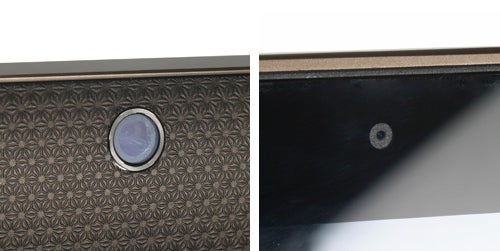
We couldn’t get the BBC iPlayer’s app to work properly, for one, while plenty of others just don’t look right – yet. Oddly enough, we found the app situation to be worse than an Android 2.2 tablet in some respects. Give it a month or two and this situation should improve significantly, fingers crossed.
Asus and Google both give the Eee Pad Transformer a nudge in the right direction, with some built-in Honeycomb-optimised apps. The YouTube app’s perhaps a bit snazzy for its own good, but the multi-pane email app and much-improved browser make excellent use of the tablet’s increased screen real estate. Like the structure of the Android Honeycomb OS itself, the browser demonstrates Android’s convergence with a larger-scale “full OS” experience. It introduces full tabbed browsing, which, along with full Flash support and multi-touch, provides a web experience on par with a proper computer and that far outdoes Apple’s iPad.
There’s one hugely disappointing omission in the Asus Eee Pad Transformer’s built-in apps line-up though – a decent video player. Asus offers a reasonably friendly DLNA interface through MyNet and there’s a basic media player too, but the codec support available here is below-par. Where awful no-name Android tablets often offer MKV, DivX and Xvid support, the Transformer seemingly offers only the Android basics of H.264, H.263 and MP4. When the screen and battery life of this tablet are so impressive, Asus’s decision not too boost its video skills seems a misstep.
There are solutions, naturally. Apps such as Rockplayer and yxplayer can provide non-native support for these other codecs, but performance and playback quality is below what we’d hope for. Some of our simple 720p video samples stuttered when played-back with these third-party apps – not what we’d expect from a dual-core Tegra 2 processor. Hopefully the VLC app will clean up this problem once it arrives in Honeycomb form on the Android Market.
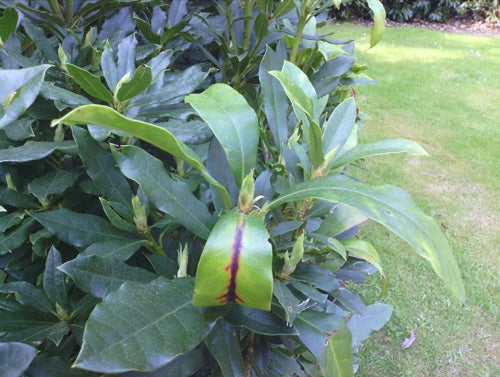
The built-in apps also do not make full use of the Asus Eee Pad Transformer’s dual cameras, but this is something we’re glad it has left to third-party app developers. With 1.3 megapixels and five megapixels a piece, they have unusually powerful sensors (for a tablet) too. By comparison, the iPad 2’s cameras are both less than a megapixel each, and the more expensive Motorola Xoom offers a 5-megapixel and 2-megapixel pair. To see the rear camera in action, check out our page of camera test images.
When we first saw the Asus Eee Pad Transformer pop onto the scene, we were sceptical. It seemed to promise everything, for less cash than the competition, and our spider senses are all too attuned to the pitfalls of setting hopes high. Yet it has pulled-off this feat, producing what is the best value Android Honeycomb tablet out there. Just like it did during the birth of netbooks, Asus has jumped in with both feet and the risk has paid off.
It’s cheaper than the premium tablet competition, such as the Motorola Xoom, while offering similar specs, and it far outclasses the cast of budget Android tablets we’ve seen so far. Not only that but the keyboard really sets the Asus Eee Pad Transformer apart – not only is this tablet capable, well built and stylish, it’s also practical. Android still has a few bugs that need ironing out and it’s probably a bit geeky for some but overall we think Asus has produced one of the best tablets on the market.
Verdict
The Asus Eee Pad Transformer is what we’ve been waiting for – a tablet that can truly replace a netbook or ultra-portable laptop. With the keyboard disengaged, it’s a slim, fairly light tablet with a great screen and touchscreen. With the dock in-tow, it’s a typing demon whose battery will outlast almost any laptop or tablet you can find. Android 3.0 Honeycomb apps need to catch up for it to compete with the iPad but we fully expect this to happen soon, and Android has its own trump cards like Flash video in the interim. What really completes the picture for the Transformer, though, is its ultra competitive pricing – this is an absolute bargain compared to its rivals.


How we test tablets
We test every tablet we review thoroughly. We use industry standard tests to compare features properly and we use the tablet as our main device over the review period. We’ll always tell you what we find and we never, ever, accept money to review a product.
Trusted Score
Score in detail
-
Performance 8
-
Value 9
-
Design 9
-
Features 8
-
Battery Life 9
Other
| Processor | Nvidia Tegra |


Editorial independence
Editorial independence means being able to give an unbiased verdict about a product or company, with the avoidance of conflicts of interest. To ensure this is possible, every member of the editorial staff follows a clear code of conduct.

Professional conduct
We also expect our journalists to follow clear ethical standards in their work. Our staff members must strive for honesty and accuracy in everything they do. We follow the IPSO Editors’ code of practice to underpin these standards.
Editorial independence
Editorial independence means being able to give an unbiased verdict about a product or company, with the avoidance of conflicts of interest. To ensure this is possible, every member of the editorial staff follows a clear code of conduct.
Professional conduct
We also expect our journalists to follow clear ethical standards in their work. Our staff members must strive for honesty and accuracy in everything they do. We follow the IPSO Editors’ code of practice to underpin these standards.
