

Verdict


Pros
- Remarkable speech recognition accuracy
- Up and running in five minutes
- Dictation wirelessly via iOS app
- Posts to social media, browses websites
- Learns quickly from corrections
Cons
- Accuracy drops quickly in noiser environments
- Some editiing can still be a faff
- Cheapest edition excludes app compatibility
Key Specifications
- Review Price: £120.00
- Five minute initial setup
- Over 99 per cent potential accuracy
- Dictate wirelessly using an iPad or iPhone
- Post straight to Facebook & Twitter
- Compose emails & search Google Maps
- Transcribe audio files
There is something undoubtedly cool about typing without using your hands. The problem is, what seems like such an elegant solution is often more trouble than it’s worth. Speech recognition software has been around for years, but lengthy voice training and hit and miss accuracy have scared many of us away from trying it again. That is a shame, because today it is a whole new ballgame.
Introduction
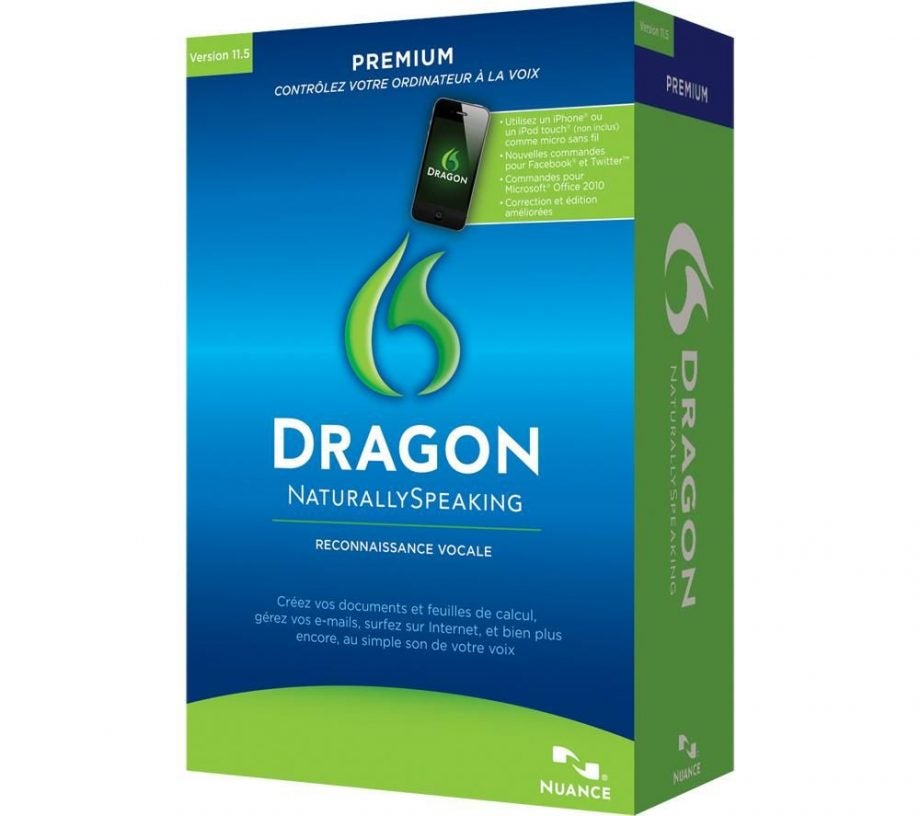
Nuance has been around since 1992 in various forms. Its technology powers Siri, the party trick behind the iPhone 4S, and it has been the dominant force in the voice recognition market virtually ever since. Dragon NaturallySpeaking 11.5 is the company’s latest attempt to teach us that speaking to our computers is not a waste of time. It succeeds.
Features
As a “.5” release you would think NaturallySpeaking is more about evolution than revolution, but happily that is not the case. Version 11.5 brings a host of new features including smartphone integration, support for social media, a raft of new commands, welcome refinements to the UI and further improvements to the accuracy and speed of the speech recognition engine. Arguably the most exciting of these is smartphone integration because it has the potential to revolutionise the way people use the software.
To coincide with 11.5 Nuance launched ‘Dragon Microphone’, an iOS app that uses the microphone on an iPhone or iPad to replace the need for a dedicated mic or headset. Furthermore the app connects to your computer wirelessly using a Wi-Fi network, meaning you can dictate while walking around the house or simply enjoy not being physically tethered to your computer.
Setup
Setting up the app is simple: install it, run Dragon NaturallySpeaking 11.5 on your computer, open the app and if you’re running the Apple Bonjour service (which comes with iTunes) it will automatically detect the computer and pair with it. If you’re averse to Apple’s beautiful walled garden, NaturallySpeaking will provide the information you need to connect manually. 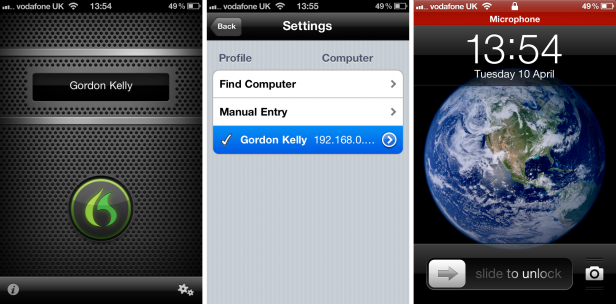
Sadly Nuance has yet to release an app for other operating systems, but it does bundle a simple Andrea Electronics NC-181 headset with the software. Unlike the iOS app however, it has no easy way of switching the microphone on or off.
As for the social media this includes simple commands such as ‘Post to Facebook …’ and ‘Post to Twitter…’ which can be detected whilst in any application and saves numerous mouse clicks. Beyond simple status updates there is also useful functionality such as ‘Search’, which works for Twitter, Amazon, Google Maps and others, though sadly you cannot manually add other sites. Other clever and useful tricks include ‘Send an email to…’ (it supports web mail) and ‘Open My Pictures…’ with Nuance adding more through software updates all the time.
Interface
Equally worthy of praise are NaturallySpeaking 11.5’s refined windows and sidebar. Long-time users will likely minimise both, but for new users they are a godsend. Most useful is the sidebar that displays commands and tips, which automatically change depending on the program you are using. For example if you’re using Word the sidebar will display editing, formatting, Office Ribbon and file commands. Switch to a web browser and the sidebar will display browsing and social networking commands while in Windows Explorer this changes again to highlight common computer browsing tools and how to manipulate windows and switch between programs.
As for the pop up windows, they follow a similar system to the sidebar adapting dynamically and showing only contextually-relevant information. A major improvement is the correction window, which not only allows you to make edits, but also spells out words. It also always displays a list of likely alternative words meaning most of the time you can select the correction option by simply saying the number alongside it.
Performance
So how does it all work? The good news is – remarkably well. What will strike new users and even those who own v11.0 is how quick this new version of NaturallySpeaking is to train itself to the voice of a new user. An obligatory section of reading is required, but it lasts roughly five minutes and cleverly one of the passage options is a basic guide on how to use the product allowing you to kill two birds with one stone. Nuance claims accuracy of up to 99 per cent and what recognition errors it does make the company says have been reduced by up to 35 per cent (that’s 35 per cent of one per cent). While this boast is incredibly bold we would say it is achievable.
Having completed just the five-minute training we found accuracy to be around 97 per cent when dictating 100 words. Of course training doesn’t just stop after this five-minute reading. NaturallySpeaking continually learns from every correction to refine its profile database (you can have multiple profiles for different users on the same computer and have it scan your email and documents to learn your writing style). After a few days we found reading another 100 word section produced 99 per cent accuracy with NaturallySpeaking even detecting when we mumbled or slightly mispronounced certain words. 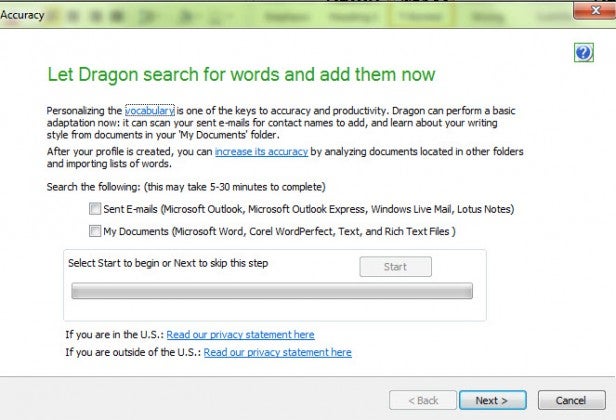
A great deal of credit here goes to the context aware system which looks at the whole of a sentence to determine which words you mean, eg: “cereal” not “serial” would be picked if it detected the food “eat” or “eating”, and it knows to capitalise “Windows” when “Microsoft” precedes it. Because of this Dragon NaturallySpeaking works best when you speak in whole sentences, regardless of speed, as opposed to speaking a few words at a time and watch to see if it got them right. This can seem strange at first, especially for more formal work, but gets easier with practice and we found the concentration it involves made us focus more and reduce our tendency to get distracted from the task at hand.
Given Nuance powers Siri, NaturallySpeaking also understands a great deal of natural language meaning there are a few instances where exacting formal language must be used to carry out a specific task.
Problems and niggles
Unfortunately no voice recognition system is ever perfect. Despite all the improvements in 11.5, making complex edits to sentences and paragraphs you have already spoken (particularly to sentences higher up a document) can take longer than simply returning to the keyboard and doing it manually. Patience is also required in the first few days, when NaturallySpeaking is still learning your voice and detecting the moments when you say certain common words in slightly different ways or tones, but persistence is well-rewarded.
We also found that while the ease and practicality of using the iPhone app makes us use NaturallySpeaking far more, for the best results you do need to keep the microphone within 30 cm of your mouth and talk towards it (albeit not in a forced or unnatural tone). This means using it like a handheld microphone rather than something you can put down and walk around.
Another issue is the app pairs to your Wi-Fi network not specifically to your computer. This means should you travel you will have to pair the app with each new Wi-Fi network you use. This will be a notable hassle for businessmen looking to dictate in hotels or conference rooms, but for those planning to use it primarily in one or two locations having the range of Wi-Fi means you don’t have to be close to your computer all the time.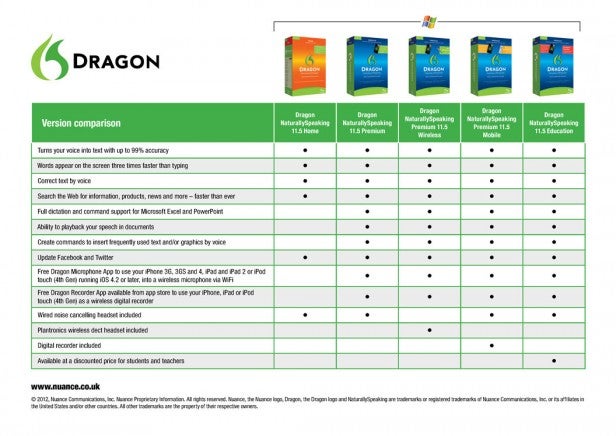
Where NaturallySpeaking’s accuracy does drop is in transcription. This is understandable given the original recordings often contain background noise and multiple or different voices not trained to be used by Nuance. It is a good way to cut down time spent on unimportant work, but we found it too unreliable for interviews. NaturallySpeaking always works best in a quiet environment, and accuracy dropped to around 80-85 per cent when used with the iRobot Roomba 780 robot vacuum operating in the same room. Admittedly this is still a pretty good figure.
Value
All of which brings us to value. This is subjective depending on how much you need to use voice dictation and the environment you work in, but the version we used (Premium) is available from £120, which means it is no impulse buy, despite the bundled headset and that the iOS app is free. There are two other primary versions. Cheaper is ‘Home’ (£70-£80) – this gives up transcription (not a great loss) but also, frustratingly, access to the smartphone app (and Nuance has announced other platforms will soon be supported). At the other end of the scale is the £400 ‘Professional’ edition, but the additional administrative tools will not be necessary for the vast majority of users. On the plus side, all 11.0 uses will get 11.5 for free.
Cost aside, it is undeniable Nuance has produced by far and away the most accurate and intuitive speech recognition software ever released. Need further proof? We wrote this review using it.
”’Verdict”’
Nuance NaturallySpeaking 11.5 delivers far more than its incremental version number would suggest. The addition of social networking support and compatibility with new programs and services is clever, but the show stealer remains its jaw-droppingly accurate speech recognition. Initial setup now takes less than five minutes and within a few days accuracy levels of 99 per cent and above are achievable. Being able to use your smartphone as a wireless microphone is the icing on the cake. Price remains a significant consideration, but NaturallySpeaking 11.5 will prove invaluable to all who take the time to harness it.
Trusted Score
Score in detail
-
Features 9
-
Value 8
-
Performance 9
-
Design 8
-
Usability 8


Editorial independence
Editorial independence means being able to give an unbiased verdict about a product or company, with the avoidance of conflicts of interest. To ensure this is possible, every member of the editorial staff follows a clear code of conduct.

Professional conduct
We also expect our journalists to follow clear ethical standards in their work. Our staff members must strive for honesty and accuracy in everything they do. We follow the IPSO Editors’ code of practice to underpin these standards.
Editorial independence
Editorial independence means being able to give an unbiased verdict about a product or company, with the avoidance of conflicts of interest. To ensure this is possible, every member of the editorial staff follows a clear code of conduct.
Professional conduct
We also expect our journalists to follow clear ethical standards in their work. Our staff members must strive for honesty and accuracy in everything they do. We follow the IPSO Editors’ code of practice to underpin these standards.
