

Verdict


Key Specifications
- Review Price: £289.00
We’ve had an influx of Freeview HD recorders on TrustedReviews over the last few weeks, which means at long last there’s a wide range for consumers to choose from. The latest model to come under the microscope is the Humax HDR-FOX T2, which was actually the first Freeview HD PVR to hit the shops. Humax is usually the brand to beat when it comes to free digital TV, so it’ll be interesting to see how its twin-tuner PVR measures up to rival machines from TVonics, Philips/Pace and Sharp.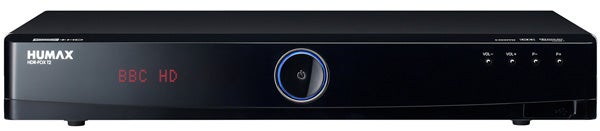
In terms of looks and build quality it measures up very nicely indeed. It’s much bigger than Sharp and Philips’ recorders and more conventional than TVonics, yet it’s still immensely attractive. There’s a glossy black finish covering the casing, which is a fingerprint magnet but deeply stylish, while the front panel is pleasingly uncluttered. It features a ring of blue light in the middle, four tiny silver buttons and a dimly lit orange display panel that’s quite hard to read. It shows the full channel name and an icon that tells you if the current channel is hi-def.
On the back you’ll find an excellent array of sockets, which unusually includes a common interface slot that allows you to add pay TV channels like Sky Sports 1 and 2. You also get HDMI, Scart, composite, optical digital and stereo audio outputs, plus Humax even chucks in two USB ports for uploading firmware updates or playing back MP3, JPEG and DivX from storage devices and external HDDs – it’s the only recorder of the four we’ve seen that will play MP3 and DivX. Also worth a mention is the on/off switch on the back which comes in handy if you don’t like leaving devices in standby overnight.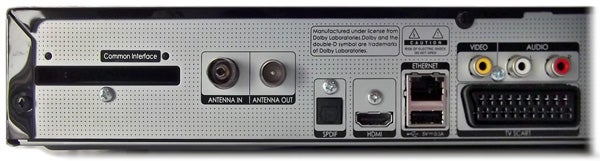
Another of the Humax’s unique features is its ability to hook up to a home network through the Ethernet port on the rear. You can stream music, video and photos from connected PCs and other devices, and when you combine that with the USB functionality the Humax is more of an all-round entertainment hub than a digital TV box. We tested out the network streaming by delving into a wireless Vista laptop packed full of files, and after some brief hesitation at the start the Humax played all of our files smoothly with excellent sound quality.
Soon Humax will introduce an Internet TV portal for the HDR-FOX T2, which will bring Sky Player, catch-up TV services and internet radio into your living room. The HDR-FOX T2’s feature list is already first class, but IPTV will make it unbeatable.
The rest of the spec is equally impressive. On board is a 500GB hard-disk, which equates to 125 hours of HD recordings or 330 hours of SD, and of course the inclusion of two DVB-T2 tuners means it’s flexible when it comes to recording. You can record one channel while watching another or record two channels while watching a third, which is always a bonus (something that even Sky+HD can’t do). And of course you can also watch a programme from the start while it’s still being recorded.
We’ve always been big fans of Humax’s slick, informative onscreen design and once again the menus and digital TV displays are first class – even better than the Sharp TU-T2HR32. The main menu is superimposed over live TV and uses attractive hi-res icons and funky fonts. From here you can investigate different types of media or make changes in the thorough setup menu.
It also boasts one of the better Freeview EPGs we’ve seen. This eight-day guide packs a live TV box, a truncated synopsis of the highlighted programme and a seven-channel programme grid into a single screen without seeming cluttered. It looks great and displays a row of handy colour-coded short cuts along the bottom. You can hit the ‘i’ button to see a full synopsis, hit the yellow key to search by keyword or hit the blue button to group channels – doing the latter helpfully allows you to single out the HD channels.
Select a programme block, hit OK and a dialogue box asks if you want to record the whole series, a single programme or set a reminder – exactly the sort of recording simplicity users are looking for, and an example of the user-friendly, no-nonsense onscreen design that runs through the entire operating system.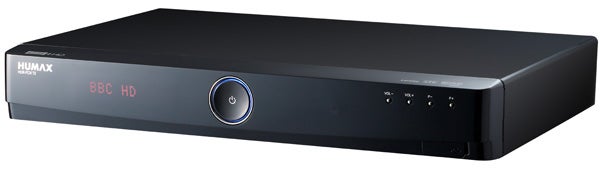
Elsewhere the Media key on the remote is a gateway to all your content, whether it’s recorded programmes, stuff squirreled away on USB stick or on a networked PC. The clear, user-friendly screen layout and the ability to switch between the different types of content and storage devices using the yellow and blue keys makes it an absolute breeze to find your content.
If you select the ‘HDD Video’ part of the media menu, the box lists your recordings using static thumbnails alongside the programme details. It’s clear and easy on the eye, and when you select a programme you can choose to restart or resume playback. Here you can also rename recordings or create a new folder and dump a group of recordings into it.
As for the onscreen info banners, they’re by far the best of all the Freeview HD PVRs we’ve tested. Aside from its jazzy appearance, what’s most impressive about Humax’s display (which they’ve dubbed ‘iPlate’) is that it provides every last detail about the selected programme, using small, colourful icons and large text (see picture). It can also be used to browse the next seven days’ worth of programmes on any channel, which is a very useful feature.
Rounding up the other features, the Humax can transcode HE AAC to Dolby Digital and offers Dolby Digital Pulse output, a broadcast audio codec that adds Dolby metadata to the HE AAC core. It also offers subtitles, Audio Description, interactive services and digital text, 720p, 1080i and 1080p upscaling for SD and HD channels and pause/rewind live TV, with five search speeds and a useful timeline to show your position.
The box is easy to control using the eye-catching remote. The gloss black finish and silver menu control ring look great on the coffee table and its button layout is generally intuitive – some of the keys are a bit small, particularly Record, but on the whole it’s fine.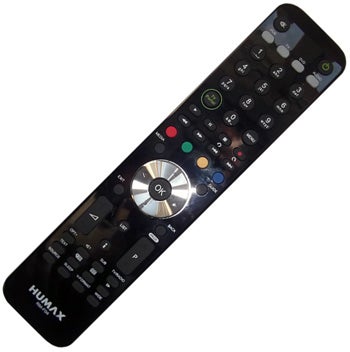
There can also be few complaints with the HDR-FOX T2’s picture quality. Live high-definition channels boast dazzling clarity, as demonstrated by BBC HD’s coverage of athletics at the Commonwealth Games. Members of the crowd are clearly resolved, likewise the texture of the track and intricate facial detail during post-race interviews.
Quick movement is also smoothly reproduced – sprinters in the 100m heats tear down the track without much by way of break-up or block noise – while colours are rich and nuanced and there’s pleasing depth and solidity to the picture. 
Naturally the standard-definition simulcast on BBC One looks softer and noisier, but the Humax keeps block and mosquito noise to an acceptable level and conveys bright colours, like the Jamaicans’ yellow vests, with admirable strength and depth. Other SD channels, like ITV1 and Five, look a little scruffier but noise is part and parcel of the Freeview experience and pictures are generally enjoyable. We couldn’t discern any difference between live and recorded programmes, testament to some excellent internal video encoding.
Verdict
After comparing the HDR-FOX T2’s considerable talents with those of its rivals, there can be little doubt that the Humax is the best of the bunch. The level of recording flexibility, immaculate onscreen presentation, slick operation and extensive feature list (with more to come) make it an irresistible proposition that its rivals can’t match.
The only downside, which for some may be the deal-breaker, is the price. It’s at least £70 dearer than the Philips/Pace and £40 more than the Sharp, which might put off buyers on a tight budget who may see its extra functionality as luxuries they could live without. But if you have the money, give the Humax a whirl – you certainly won’t be disappointed.
Trusted Score
Score in detail
-
Value 7
-
Features 9
-
Performance 9
-
Design 8


Editorial independence
Editorial independence means being able to give an unbiased verdict about a product or company, with the avoidance of conflicts of interest. To ensure this is possible, every member of the editorial staff follows a clear code of conduct.

Professional conduct
We also expect our journalists to follow clear ethical standards in their work. Our staff members must strive for honesty and accuracy in everything they do. We follow the IPSO Editors’ code of practice to underpin these standards.
Editorial independence
Editorial independence means being able to give an unbiased verdict about a product or company, with the avoidance of conflicts of interest. To ensure this is possible, every member of the editorial staff follows a clear code of conduct.
Professional conduct
We also expect our journalists to follow clear ethical standards in their work. Our staff members must strive for honesty and accuracy in everything they do. We follow the IPSO Editors’ code of practice to underpin these standards.
