

Verdict


Key Specifications
- Review Price: £108.00
There was a time when a portable external hard drive was an expensive luxury, but over the past couple of years these devices have become somewhat commodity items. The ability to carry hundreds of gigabytes of data around with you in a small, pocket-size device is compelling, but it also brings with it a potential issue – data security. Let’s face it, if you’ve got a portable hard disk stuffed with sensitive data, the worry of losing it, or having it stolen is very real, and potentially scary. 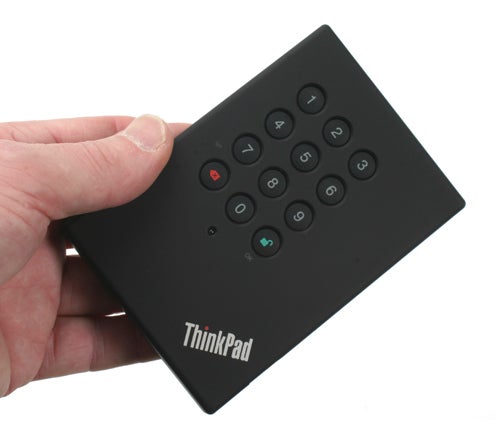
Lenovo is a company that has always taken data security seriously, which is why its ThinkPads have been the notebooks of choice for the corporate market for a very long time. ThinkPad notebooks have included features like biometric security and encrypted hard drive data for quite a while now, since for many, the data on a notebook is far more valuable than the hardware itself. Now Lenovo has turned its security conscious attention to portable hard drives, for those who wish to carry important data with them, but don’t want that data falling into the wrong hands.
The ThinkPad USB Secure Hard Drive (SHD) is, as its name suggests, a secure hard drive that connects to your computer via USB. This drive isn’t much larger or heavier than most other portable USB hard drives, but you can instantly tell that it’s a little special. Set into the front of the ThinkPad SHD is a numeric keypad, which is the key (no pun intended) to its security credentials. Basically, this external hard disk can be secured with a numeric code – the code must have a minimum of six digits and a maximum of 16 – Lenovo’s website claims a 24 digit maximum but the manual states 16, and I couldn’t get the device to accept a pass code with more than 16 digits. 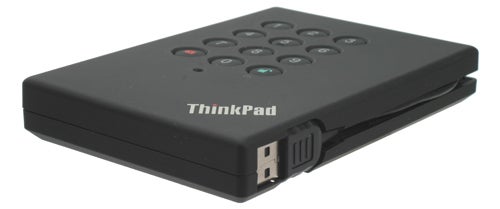
Of course having a code to access the drive is only half of the equation, since if you wanted to steal the data, the obvious solution would be to just crack the casing open and access the hard disk directly. This scenario hasn’t escaped Lenovo, and not only is the data on the drive password protected, it’s also encrypted. The ThinkPad SHD uses 128-bit AES encryption, so it should be more than adequate for most situations, unless you happen to work for MI6, and then you’ll keep your data unencrypted on your notebook and probably leave it on a train.
The ThinkPad SHD can have up to ten user access codes assigned to it, along with a single admin code. A user code will give you access to the data on the drive, while the admin code will let you create and delete user codes. The drive comes out of the box with the default code of 1-2-3-4-5-6, which should obviously be changed as soon as possible. Just make sure that you use something memorable, like I thought I had done, only to find that I’d thrown a random digit into the middle of my desired code. You’re probably thinking that you should have to verify the code you choose to avoid this kind of thing, and you’d be right. Unfortunately, in my case it appears that I verified the wrong number correctly, if you know what I mean. Maybe I should be working for MI6!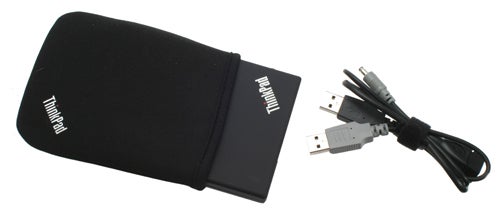
When you plug the drive into a PC it will go into Standby mode, which means that it’s powered up, but locked down. Standby mode is indicated by a solid red indicator light. Type in your passcode and, assuming the code is valid, the light will flash red a few times before turning green. Once the green light is activated, your computer will recognise the drive and you’ll be able to access its contents. The state of the ThinkPad SHD is completely independent of the computer itself, therefore if you restart your computer with the drive unlocked it will remain unlocked. Once the drive loses power it will lock itself and return to Standby mode once it receives power again.
The ThinkPad USB Secure Hard Drive is designed to complement a ThinkPad notebook. It has the same tactile black finish, which means that it’s less likely to slip out of your hand than a glossy finished portable drive. It also make it less prone to scratches, but even so Lenovo bundles a snug fitting fabric slip case. 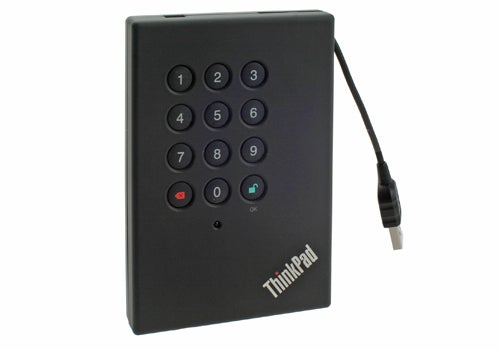
Unlike most portable drives, this one doesn’t sport a mini-USB port for connection. Instead the ThinkPad SHD has an integrated USB cable, that clips unobtrusively into the chassis. This means that you don’t have to remember to carry a cable with you, making it all the more pocketable. If you require a longer cable to reach a particularly remote USB port, that’s no problem either – there’s a USB extension cable bundled with the drive. And, if you find that a single USB port doesn’t provide enough juice to power the drive, you also get another USB cable that plugs into a DC input. The slip case even has a little pocket at the back to hold the extra cables, if you need to carry them with you.
I expected performance to be down on normal portable drives, since the data is having to be encrypted and decrypted when written and read, but the ThinkPad SHD still showed a good turn of speed. Writing a 1GB single file to the drive returned 16MB/s, while reading back the same file resulted in a transfer rate of 17MB/s. Firing up the read test in HDTune returned almost identical figures. This means that the ThinkPad SHD isn’t the fastest portable hard disk out there, but it also means that the encrypted nature of the drive hasn’t noticeably slowed it down either.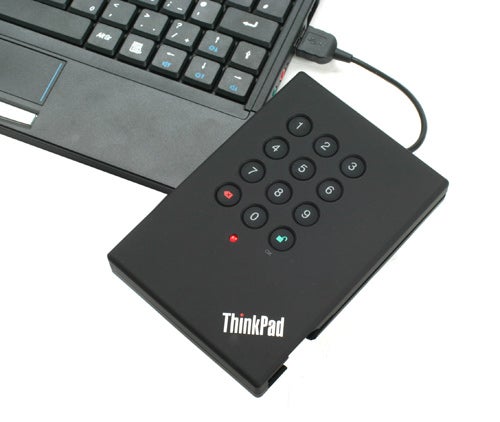
Unsurprisingly, the ThinkPad USB Secure Hard Drive doesn’t come cheap, with this 160GB version carrying a price tag of £108. To put that into context, something like a 320GB Western Digital Passport portable hard drive can be had for less than £70 online. So, you clearly won’t be buying the ThinkPad SHD for its cost per gigabyte. That said, if keeping your data secure is paramount, this Lenovo drive makes a very good case for itself.
”’Verdict”’
Like any niche product, you either need the security features of the Lenovo ThinkPad USB Secure Hard Drive or you don’t. The ThinkPad SHD offers simple, but extremely effective security in a portable storage device, and if you need to keep your data protected at all times it’s a dream come true. It may be more expensive than other portable drives, but none of them can protect your files from prying eyes.
Trusted Score
Score in detail
-
Value 8
-
Features 10


Editorial independence
Editorial independence means being able to give an unbiased verdict about a product or company, with the avoidance of conflicts of interest. To ensure this is possible, every member of the editorial staff follows a clear code of conduct.

Professional conduct
We also expect our journalists to follow clear ethical standards in their work. Our staff members must strive for honesty and accuracy in everything they do. We follow the IPSO Editors’ code of practice to underpin these standards.
Editorial independence
Editorial independence means being able to give an unbiased verdict about a product or company, with the avoidance of conflicts of interest. To ensure this is possible, every member of the editorial staff follows a clear code of conduct.
Professional conduct
We also expect our journalists to follow clear ethical standards in their work. Our staff members must strive for honesty and accuracy in everything they do. We follow the IPSO Editors’ code of practice to underpin these standards.
