

Verdict


Key Specifications
- Review Price: £80.00
Think of satnav and the chances are you think of what the industry likes to call PNDs – Personal Navigation Devices. These are standalone sat-nav units that you slap into your vehicle and that might also act as Bluetooth handsfree kit or play music at you in addition to routing you from one place to the next.
But if you’ve already got a smartphone or PDA then you have another option – buy a sat-nav application to use with it. If your smartphone or PDA already has GPS built in, so much the better, though a Bluetooth ‘puck’ is also a viable option.
CoPilot Live occupies this space, and in my view it dominates it. But it has been more than a year since the last major software revision, CoPilot Live 6. Times have moved on a lot since then and pressure has been on developer ALK to come up with some serious enhancements in order to stay ahead of the game.
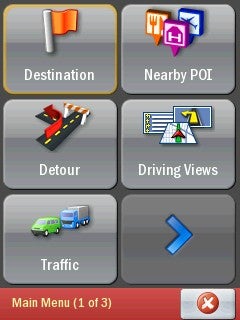
To make that happen ALK has done work on several fronts for CoPilot Live 7 for Windows Mobile. The user interface has been completely revamped. There are tweaks to many of the existing features, and the addition of some new ones. And there’s a new desktop companion, CoPilot Central which you get as part of the deal.
Let’s talk about CoPilot Central first. This is the desktop ‘hub’ for managing CoPilot Live 7. It’ll monitor for software updates, new POIs and so on, and download them to whatever device is running CoPilot whenever you connect it to your PC. This is rather nifty, as it allows ALK to ensure that you always have the latest information to hand.
CoPilot Central can also be used for trip planning in its own right, and you can pre-plan journeys and download them to your device later. I wouldn’t want to do this myself, but I can see that some people might like the approach. You can also use it to obtain and download updated safety camera information.
You don’t need a desktop computer or CoPilot Central to install CoPilot on your mobile device. It comes on ‘nested’ flash memory – microSD card in a miniSD card adaptor in an SD card adaptor. Pop the appropriate card in your device and the software sets itself up.
You can activate it over the air. I was up and running in a matter of a couple of minutes on my test device, Orange’s SPV M700 with built in GPS antenna.
There are some simple but very neat things about the revamped user interface, which is designed very much on the dual principals of ease of use and space saving rather than cramming all sorts of info onto the screen. 
Take the menu buttons, for example. These are large and very easily thumb-tappable, though the use of big buttons inevitably means there are plenty of submenus and you will need to get used to the nesting of menu options if you want to get around quickly.
I like that when you run the software the first thing you see is a set of four options: Destination (enter a place to go), Favourites (places you’ve already saved as faves), Drive (yep, the software opens into its map screen and monitors your progress), and Settings. You get to the main menu with all its settings from the map screen. 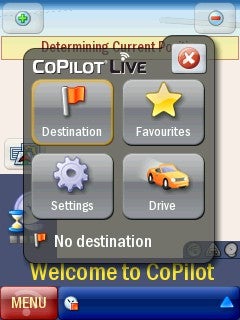
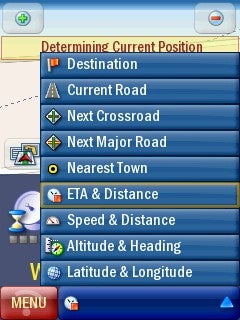
Another goody is the way the software handles things like ETA, distance to destination, altitude and heading info. Sat-nav systems tend to like to cram as much of this info as possible onto the main screen. But here a small row along the bottom of the map screen is all you get for this info, and you choose what you see from no less than nine options by tapping the map screen. It does mean that you can’t see speed and distance and altitude and heading at the same time, for example, but on the other hand, it does reduce map screen clutter.
Like other aspects of the device the map screen has been reworked. There are 2D and 3D map views of course, and you can force the software to use your preferred style at turns. This is great as some people prefer 2D and others 3D for the fine detail of junctions.
The map screen itself is clearer than it was before, with a simply vast icon showing your current position, yet it does manage to handle a seriously large amount of information.
There are various map styles, and a setting for Themes. At some point ALK intends to enable users to design themes styles which will be downloadable via CoPilot Central.
It is easy to minimise the software so you can pop off and do something else. An icon sits on the Windows Mobile Today screen. Tap it and CoPilot Live 7 comes to the fore once more.
None of this good stuff matters much if it is difficult to enter addresses in the first places. This is the point at which so many navigation applications, both PND and add-on, let you down. ALK has worked on this and allows things like user choice of keyboard style – A-Z, qwerty or azerty (used in France and other European countries) to help with data input.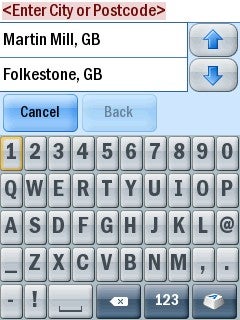
Full seven digit postcodes are used in the UK, and as you start to type the software narrows down its options so that you are presented with a picklist. If I have to grumble about something it is that the picklist only shows two options at a time. Now, clearly ALK needs to provide a large tappable keyboard and can’t compromise this for the picklist. But I wonder if there might be a way of offering longer picklists even if it’s just by making the font used smaller.
In use I found instructions to be loud, clear and precise. It is great that there is a settings area for turn warnings. You can choose any – or all – options to get instructions at two miles, one mile, 500 yards and at turns as well as what the software calls ‘near turn’ for local roads. You can even set the distance from turn warning between three and eight seconds from the point at which you turn, which seems a bit like overkill on the customisation front to me.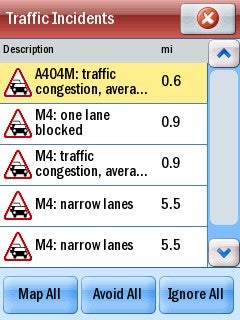
If you buy the TMC add-on (at £35) and delivered over the air, then you can choose for automatic routing around incidents.
”’Verdict”’
Before I saw CoPilot Live 7 I was sceptical that the improvements could really make much of a difference to what was already good software. But I was wrong. In my mind this sets the standard for Smartphone navigation that others have to challenge.
Trusted Score
Score in detail
-
Value 9
-
Features 9
-
Usability 9


Editorial independence
Editorial independence means being able to give an unbiased verdict about a product or company, with the avoidance of conflicts of interest. To ensure this is possible, every member of the editorial staff follows a clear code of conduct.

Professional conduct
We also expect our journalists to follow clear ethical standards in their work. Our staff members must strive for honesty and accuracy in everything they do. We follow the IPSO Editors’ code of practice to underpin these standards.
Editorial independence
Editorial independence means being able to give an unbiased verdict about a product or company, with the avoidance of conflicts of interest. To ensure this is possible, every member of the editorial staff follows a clear code of conduct.
Professional conduct
We also expect our journalists to follow clear ethical standards in their work. Our staff members must strive for honesty and accuracy in everything they do. We follow the IPSO Editors’ code of practice to underpin these standards.
