

Verdict


Key Specifications
- Review Price: £182.56
It’s not just graphics professionals that need wide-format printers; there are good reasons for small business customers to use them, too. Being able to print your own posters, or A4 spreads for brochures or price lists makes the extra width more than a luxury. HP’s A3+ OfficeJet 7000 Wide Format can handle everyday A4 printing tasks as well.
The top and front cover of the printer is gloss black, with the rest of it in a textured finish, including the input and output paper trays, which are both telescopic and don’t have to be extended, unless you’re printing A3 or A3+ pages.
Controls are simple, with four buttons along the curved front edge for network, job cancel, paper feed and power. There are four indicators, too, for the individual ink cartridges, showing low ink and charging cycles. At the back are sockets for USB and Ethernet, both of which are standard.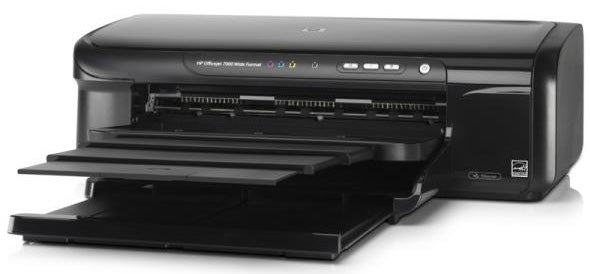
Physical set up involves lifting the printer’s lid and clipping the semi-permanent print head into the carriage, before pressing each of the four ink tanks into place in the head. It’s very straightforward and has more than an echo of the arrangement Canon has been using for years.
Software installation is very simple, with drivers provided for both Windows and OS X. There’s no Linux support on the CD, but the Web site directs you to the HPLIP driver, which should work.
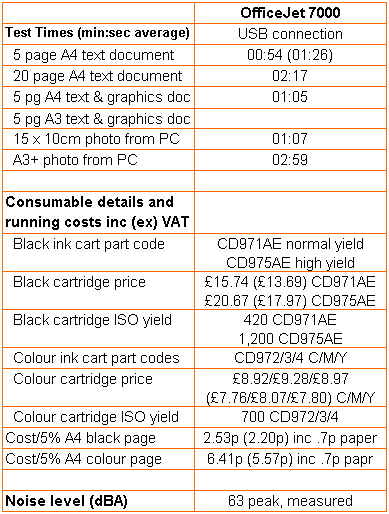
We’ve commented before on the amount of time new HP inkjets take before starting to print a job. The OfficeJet 7000 now holds the record. Sending it a five-page black text job, it took 52 seconds faffing around before feeding the first sheet of paper. Before we started testing, the printer had completed its charging cycles for the freshly installed ink cartridges and printed an alignment page, so should have been ready to go.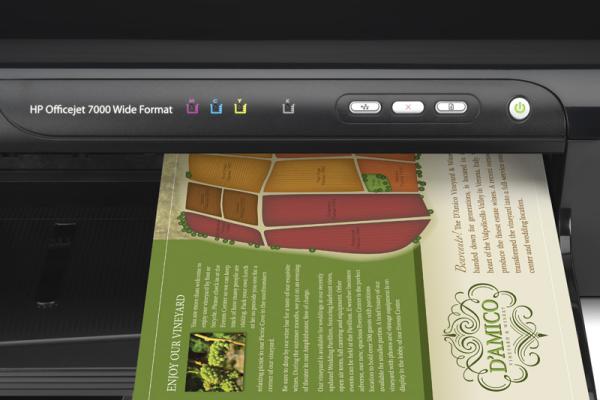
We printed again, as we normally do two runs and take the shorter time when testing, and the overall print time reduced from 1:26 to 54 seconds, largely because it took 23 seconds to process the job the second time – still annoying, but more in line with the competition.
So the five-page black text job returned a print speed of 5.56ppm on the second run and the 20-page test produced 8.76ppm. Guess what speed the machine is rated at? 33ppm for black text and 32ppm for colour, but HP doesn’t include processing time in its ISO speed results. Our five-page text and colour graphics page gave 4.61ppm.
Given the wide carriage, we obviously wanted to test the machine printing A3 pages. Unfortunately, the OfficeJet 7000 repeatedly mis-fed our A3 paper, causing the top inch or so to concertina. This is the same 80gsm Reymat paper we have used on all the other A3 printers we’ve tested in the last year and is stored in its packet, in our permanently heated lab. We’ve never had problems with it before.
There was no blockage in the paper path, as witnessed by the printer’s perfect handling of a sheet of A3+ Advanced Photo paper, onto which we printed a full-bleed image. This took 2:59, a very reasonable speed for this size of print, though we were surprised to find that the paper stop at the end of the telescopic output tray isn’t designed for A3+ paper, but only A3. Leave it up and your A3+ prints sit on the output tray with a large wave in them.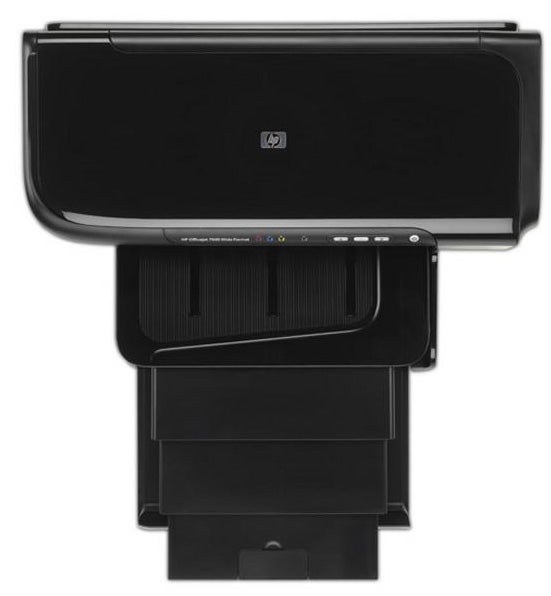
Print quality depends on what you’re looking at. Black text is well printed, though there is some feathering, which gives it a slightly less crisp appearance. Colour graphics are smooth and bright and there’s no sign of registration problems but, surprisingly, photo prints from the machine are less good than from other HP inkjets we’ve tested recently. In particular, much shadow detail is lost to black and in the large format print there’s a red cast, not apparent in the 15 x 10cm image.
Most people still think laser printers are significantly cheaper to run than inkjets, but in many cases this isn’t true. For example, the A4 black print cost of running this OfficeJet 7000 is just 2.53p, including 0.7p for paper, which is very competitive with similarly priced lasers and the colour print cost is just 6.41p, only around half the cost of many colour lasers costing £200.
The Standard black ink cartridge should print 420 ISO pages, but the Value cartridges are claimed to be good for 1,200 black and 700 colour pages, so even in quite a busy small office, you won’t need to be attending to the printer’s needs every week.
Verdict
We didn’t think we’d be saying this about an HP printer, but it really does look as if the company has taken its eye off the ball. Be it problems feeding A3 paper, inordinate processing times, dowdy photo prints or the A3 paper stop on an A3+ printer, it doesn’t do what it should and really can’t be recommended.
Trusted Score
Score in detail
-
Print Speed 6
-
Features 6
-
Value 6
-
Print Quality 6
Features
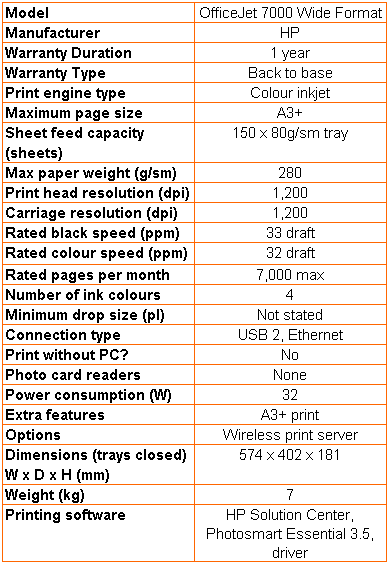
| Networking | Ethernet |
Printing
| Duplex | Manual |
| Paper Size | A3+ - 330 mm x 483 mm, A3 - 297 mm x 420 mm, A4 - 210 mm x 297 mm, A5 - 148 mm x 210 mm, A6 - 105 mm x 148 mm, B4 - 250 mm x 353 mm, B5 - 176 mm x 250 mm, B6 - 125 mm x 176 mm, B7 - 88 mm x 125 mm, 100 mm x 150 mm, 130 mm x 180 mm |
| Sheet Capacity | 150 sheets |
| Rated Black Speed (Images per minute) | 33 ppmipm |
| Rated Colour Speed (Images per minute) | 32 ppmipm |


Editorial independence
Editorial independence means being able to give an unbiased verdict about a product or company, with the avoidance of conflicts of interest. To ensure this is possible, every member of the editorial staff follows a clear code of conduct.

Professional conduct
We also expect our journalists to follow clear ethical standards in their work. Our staff members must strive for honesty and accuracy in everything they do. We follow the IPSO Editors’ code of practice to underpin these standards.
Editorial independence
Editorial independence means being able to give an unbiased verdict about a product or company, with the avoidance of conflicts of interest. To ensure this is possible, every member of the editorial staff follows a clear code of conduct.
Professional conduct
We also expect our journalists to follow clear ethical standards in their work. Our staff members must strive for honesty and accuracy in everything they do. We follow the IPSO Editors’ code of practice to underpin these standards.
