

Verdict


Key Specifications
- Review Price: £134.52
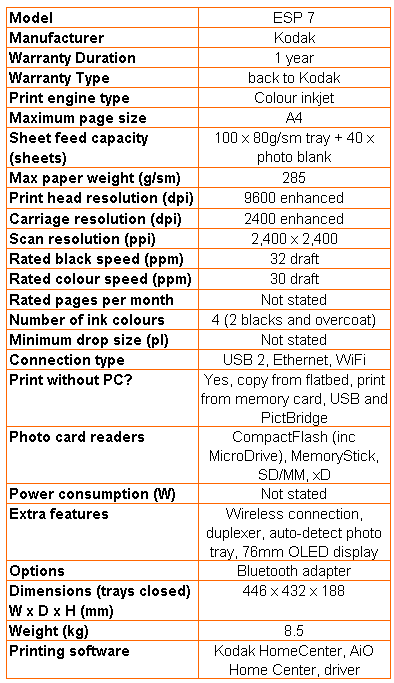
As we mentioned in our recent review of the Kodak ESP 9, all of Kodak’s inkjet all-in-ones since it first entered the market have been based around the same print engine. That’s true of the ESP 7, too, which is basically a cut-down version of the top of the range machine, without the Automatic Document Feeder (ADF) the touch-screen control panel and fax.
This is a smart, good-looking machine, decked out in frosted and high gloss black. The scanner’s top cover has smoothly rounded side edges and a simple pattern of inset squares in its lid.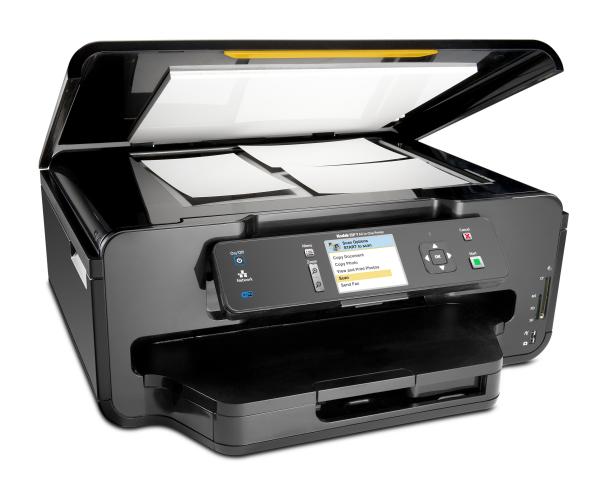
The control panel swings out from the front and, although it doesn’t have a touch panel, it does have the same size 76mm colour display. Here, though, it’s an LCD panel, rather than the brighter OLED in the more expensive machine.
The arrangement of twin paper trays, one taking 100 sheets of plain paper up to A4 and the other taking up to 40 sheets of photo paper, is identical to the ESP 9’s and works just as well, with automatic loading of photo paper when you request a photo print. At the back are sockets for USB 2.0 and Ethernet and the machine also has Wi-Fi built-in, which is unusual in a machine at this price.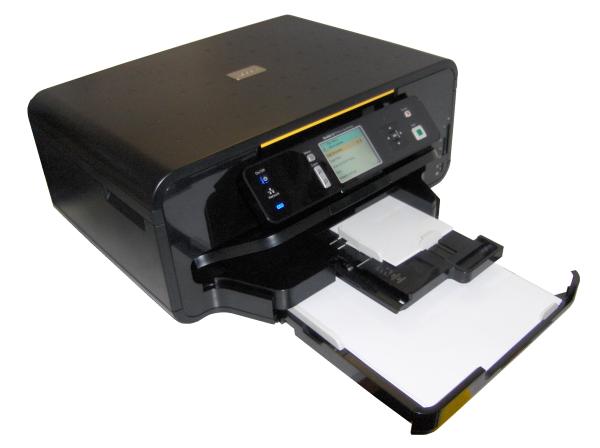
Installation involves plugging in the two cartridges, one black and the other five-ink, including photo black and a transparent coating layer. The same software suite of Kodak HomeCenter, AiO Home Center and a driver governs the machine’s functions. Wireless setup is surprisingly easy, as the ESP 7 searches for available networks and latches onto the selected one. Installing the software then makes the rest of the connection to your PC or Mac.
The print problems we noticed with the ESP 9 are visible on the ESP 7, too. There’s that millimetre chopped off headers on duplex pages and the strange blocky fills to characters in our coloured headline. If you want to see what these look like, check out the ESP 9 review.
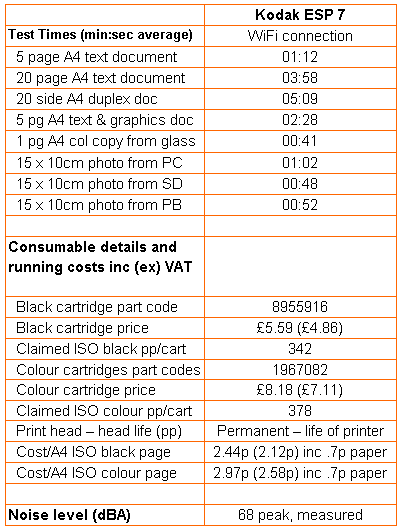
Kodak claims the same speeds for the ESP 7 as for the ESP 9, at 32ppm for black and 30ppm for colour. Both of these are draft speeds and even then we find it hard to envisage a document that will print that quickly. The best we saw was 5.04ppm for a 20-page black document, which took 3:58 to complete and 2.03ppm for colour, where our five-page print took 2:28. Duplex print slowed the machine down further, though the wait between printing front and back sides is shorter than on, for example, a Canon PIXMA.
Prints themselves are very similar to those from the more expensive machine, so black text is sharp and clean cut, while solid colour is reasonable, though with some mottling. Black registration over colour is generally good, though there is slight haloing.
Photo prints are quicker, relatively, than plain paper prints and offer good print quality, with well-defined foreground detail, some noticeable detail in shadows and good quality fountain fills in skies. Colour photos from SD card and PictBridge camera were also good, showing natural colours and high levels of foreground detail.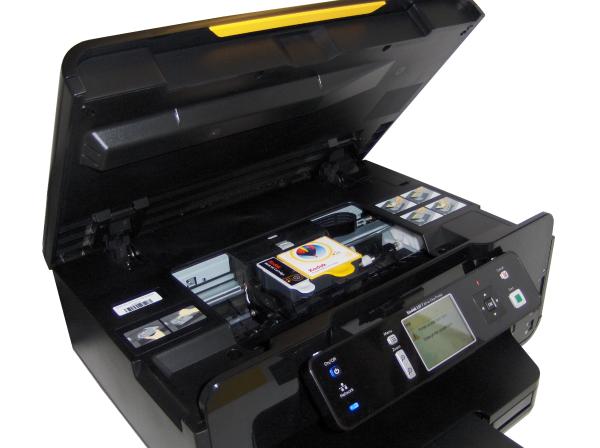
Noise levels, which are a problem with the ESP 9 for the number and intensity of them, are reduced in number on this machine, because of the lack of an ADF. If anything, though, they are slightly louder – we measured peaks of 68dBA – probably because the scanner mechanism isn’t buried under a lid with an Automatic Document Feeder on top of it.
Since it uses the same print head and ink cartridges as its bigger sibling, you might expect page costs to be identical. For black print, this is true, because the cheapest price we could find for the cartridge is the same as for the ESP 9. However, the colour cartridge has gone up a few pence, so the colour page cost has also increased.
Even so, costs per page of 2.44p for black and 2.97p for colour are still extremely good, with the colour cost being way below that of most other inkjet all-in-ones. You can also balance photo print cost with quality, by selecting from three different grades of photo paper.
Verdict
The ESP 7 is quite a bit cheaper than its bigger sibling and although it lacks the ADF, touch control panel and fax facilities, in all other respects it’s a very similar machine. As a home office all-in-one, it performs well, if not that quickly. Running costs are commendably low, which is always a factor in the purchase of an inkjet, and print quality, while not the best on the block, is more than passable.
Trusted Score
Score in detail
-
Print Speed 6
-
Features 8
-
Value 8
-
Print Quality 8


Editorial independence
Editorial independence means being able to give an unbiased verdict about a product or company, with the avoidance of conflicts of interest. To ensure this is possible, every member of the editorial staff follows a clear code of conduct.

Professional conduct
We also expect our journalists to follow clear ethical standards in their work. Our staff members must strive for honesty and accuracy in everything they do. We follow the IPSO Editors’ code of practice to underpin these standards.
Editorial independence
Editorial independence means being able to give an unbiased verdict about a product or company, with the avoidance of conflicts of interest. To ensure this is possible, every member of the editorial staff follows a clear code of conduct.
Professional conduct
We also expect our journalists to follow clear ethical standards in their work. Our staff members must strive for honesty and accuracy in everything they do. We follow the IPSO Editors’ code of practice to underpin these standards.
