

Verdict


Key Specifications
- Review Price: £73.18
It’s unusual for a top-of-the-range printer to cost under £75, but Canon’s PIXMA iP4600 is definitely a high-end inkjet and it’s available at this price. If you know the company’s well-regarded all-in-one range, you can think of this machine as an all-in-one without the scanner. Most of the other functions you’d expect in a Canon all-in-one are here.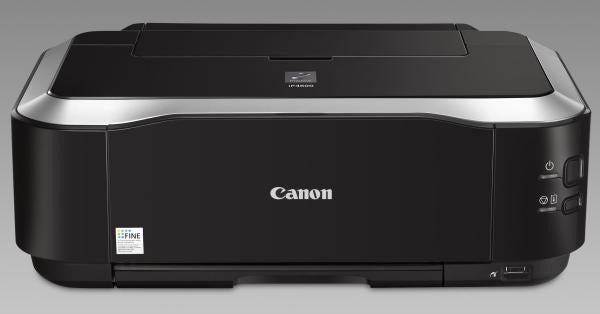
As with most Canon inkjets, the case is almost entirely finished in high-gloss piano black, which looks good until the minute you get fingerprints on it. It’s smaller than some earlier Canon printers, but this means the paper cassette, which fits under the printer, sticks out the front. Although it’s obscured by the output tray when you have the front cover down, it looks less sleek when the printer’s closed. There’s a second paper source, a rear tray brought into play when you fold up the top cover.
There are just two control buttons, for power and paper feed/resume, built into the curved right edge of the front panel and a single USB socket at the rear. A PictBridge socket, for direct camera connection, sits below the controls. An internal hinged cover folds down to become the guide for the CD/DVD carrier, which enables you to print directly on printable discs.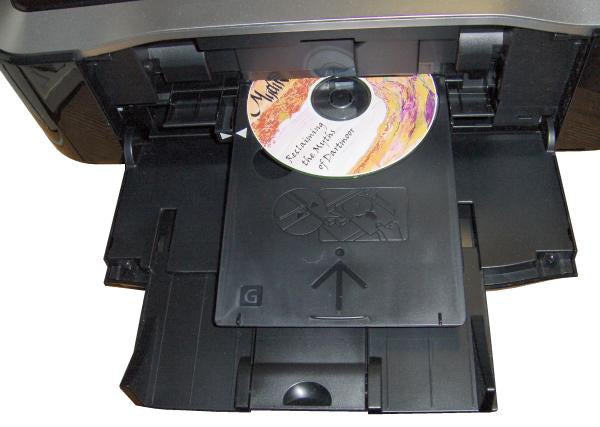
Lift the top cover and you can install the permanent print heads and the five ink cartridges. Canon provides two blacks, one pigmented for strong, black text and one dye-based, to be compatible with the other colours. As you clip each cartridge in place, a red led indicates it’s properly located; it also flashes when ink is getting low.
There appears to be some disagreement between Canon’s manual writers and their software people. While there are slips added to the manual advising you to load the rear tray only with photo paper and the cassette with plain A4 sheets, the installation routine for print-head alignment insists you load plain paper into the rear tray. We also saw error messages asking for paper in the rear tray, when we’d set ‘cassette’ as the paper source in the driver.
The safest advice is to run plain paper from either source, but to only run photo blanks from the tray, in case of paper jams. In Canon’s specs, the cassette is only rated up to 105gsm, while the tray can take up to 300gsm.
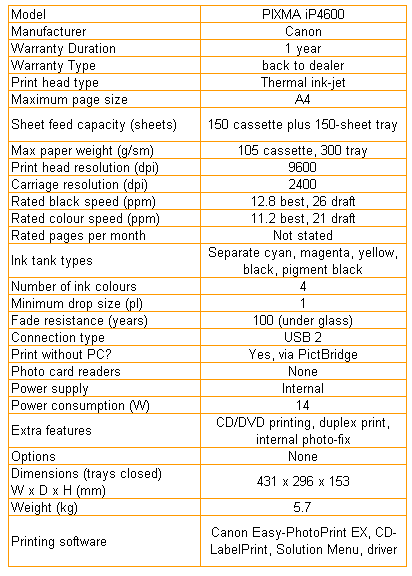
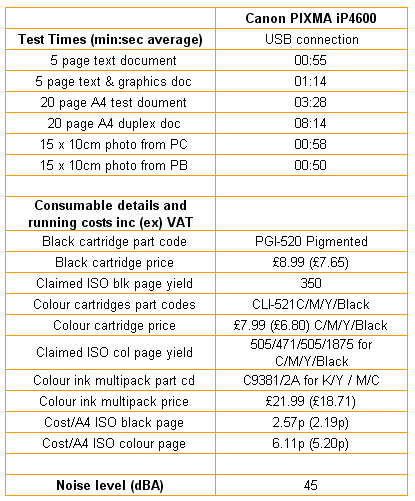
Print speeds, as usual, are on the optimistic side. Canon claims 12.8ppm and 11.2ppm in best mode for black and colour pages, while we saw 5.45ppm and 4.05ppm in normal print mode, on 5-page test prints. Even on the 20-page job, a lot larger than is typical for home or office documents, the black page speed only went up to 5.77ppm, still not close to the specified figure.
Photo printing, on the other hand, is more than respectable, with a 15 x 10cm photo coming out in 58 seconds in best print mode and a standard mode print, via PictBridge, taking just 50 seconds.
The PIXMA iP4600 has automatic duplex, but there are a couple of things to mention here. First is the delay between printing first and second sides. To allow for ink drying, the machine halts for around five seconds at the end of printing the first side, so our 20-side document took 8mins 14secs to complete, while the single-sided version of the same job took 3mins 28secs, less than half the time.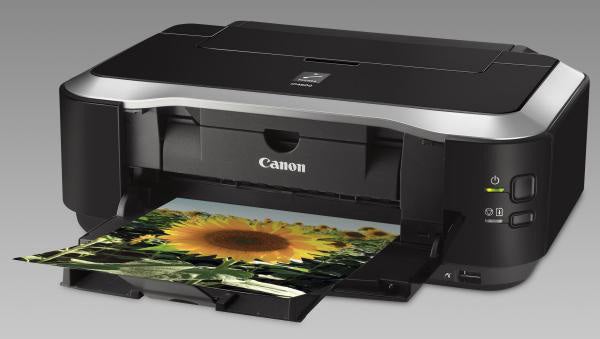
The second thing is that duplex documents appear to be printed using the dye-based black ink; either that or they’re printed ‘light’ with the pigmented ink. Whichever it is, duplex pages are a lot greyer, almost looking draft in comparison with single-sided ones. These two factors considerably reduce the advantages of double-sided printing.
The quality of the single-sided prints we produced was very good. Black text is crisp and clean, with no visible feathering of the pigmented ink. Colour graphics are also good, with vibrant colours and better registration of black text over colour than we saw on the PIXMA iP4500.
Photos came out with lots of detail in both bright and shadowed areas and colours look natural and precise, despite the speed at which they’re printed.
The cartridges in this printer are not quite as widely available as those in its predecessor and the cheapest price we could find for them was from Canon’s own online shop. Doing the maths gives a black text cost of 2.57p and a colour page cost of 6.11p. These are both higher than from the PIXMA iP4500, the next model down Canon’s range, and are not particularly good against many of its rivals.
”’Verdict”’
Overall, we’re not as impressed by the Canon PIXMA iP4600 as we were with its predecessor, the iP4500. The restriction on paper trays and the associated confusion in its firmware look to us like problems that have come to light since launch. Duplex print is slow and not as black as single-sided, making it only really suitable for internal documents.
Trusted Score
Score in detail
-
Print Speed 7
-
Features 7
-
Value 8
-
Print Quality 8


Editorial independence
Editorial independence means being able to give an unbiased verdict about a product or company, with the avoidance of conflicts of interest. To ensure this is possible, every member of the editorial staff follows a clear code of conduct.

Professional conduct
We also expect our journalists to follow clear ethical standards in their work. Our staff members must strive for honesty and accuracy in everything they do. We follow the IPSO Editors’ code of practice to underpin these standards.
Editorial independence
Editorial independence means being able to give an unbiased verdict about a product or company, with the avoidance of conflicts of interest. To ensure this is possible, every member of the editorial staff follows a clear code of conduct.
Professional conduct
We also expect our journalists to follow clear ethical standards in their work. Our staff members must strive for honesty and accuracy in everything they do. We follow the IPSO Editors’ code of practice to underpin these standards.
