

Verdict


Key Specifications
- Review Price: £130.91
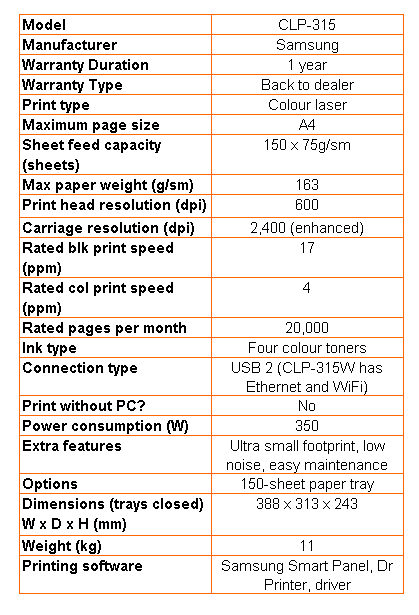
Colour laser printers are big, heavy, expensive pieces of kit that really need to be shared by a workgroup to make them viable… aren’t they? Apparently not. Samsung’s CLP-315 is a small, light, inexpensive colour laser printer, almost ideally suited for single use by a sole trader or the manager in a larger organisation.
The CLP-315 is smaller than many mono lasers we’ve tested over the years and really isn’t much bigger than a typical personal printer you’d use in the home or in a small office. Decked out in frosted and high-gloss black, the only thing that increases its very modest footprint is the paper tray, projecting from the front by around 80mm. With a translucent tray cover, it does mean you can see when you’re low on paper, but, there’s no multi-purpose tray, so printing letterheads and envelopes is fiddly.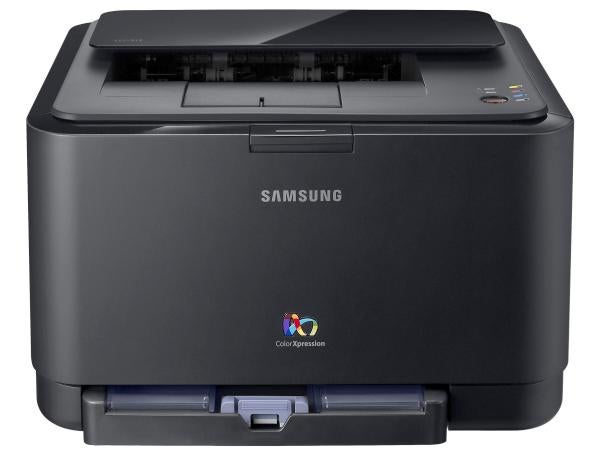
The top surface of the machine has an unusual high-gloss black panel over the paper exit slot, but this isn’t cosmetic, as it forms part of the feed mechanism. The control panel, such as it is, consists of six LEDs and a single button, which can be used to cancel a print job or to complete a manual duplex one.
At the back is a single USB socket, though there is a second version of the printer, the CLP-315W, which comes with Ethernet and Wi-Fi, too. The only other option is a second, 150-sheet paper tray, which fits under either printer.
One of the reasons for the small size of the machine is the neatly designed vertical array of print cartridges. Fold down the front cover and you can see all four of them lined up with toggle handles ready pull them out by. Replacing cartridges could hardly be simpler.
You’ll also need to replace the imaging unit and a waste toner bottle, periodically. The imaging unit slides out after you’re removed all the cartridges and the waste bottle slides in down the side of them.
Software support comprises SmartPanel, which shows current toner levels, Dr. Printer, which offers diagnostics, and the print driver itself. The driver offers a good range of options including watermarks, overlays and multiple pages per sheet. There are instructions for manual duplexing, too, though no automatic duplexer is available for this machine.
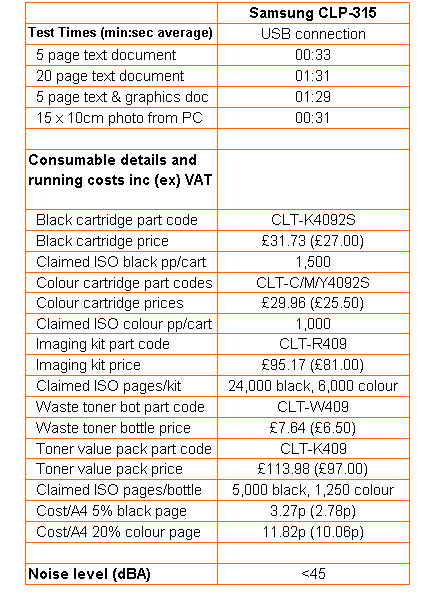
Samsung rates the CLP-315 at 17ppm for black print and 4ppm for colour. The colour speed is less than a quarter of the black, because the drum has to make four rotations to build up a colour image, one of the penalties of the compact design. In fact, under test, the printer took 33 seconds to complete our five-page black text print, with an extra 22 seconds for warm up, if it was waking from sleep mode.
Even without the wake-up time, this equates to 9.1ppm, not even close to the rated speed. Increasing the print run to 20 pages saw the printer complete it in 1:31, giving a speed of 13.2ppm. Since, according to Infotrends, the average business document is just four pages, the headline speed of this machine – and many rivals from other suppliers – looks over-optimistic.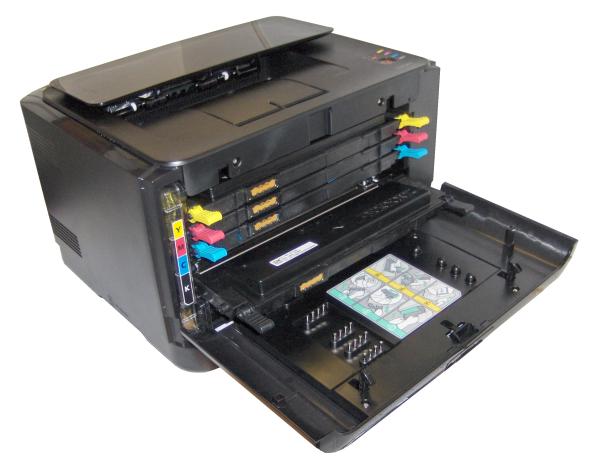
Running a five-page text and colour graphics job gave a print speed of 3.4ppm, a lot closer to the 4.0ppm quoted by Samsung. Our 15 x 10cm photo print took 31 seconds.
Print quality from the CLP-315 is good, with thick, dark characters and bold, bright colours. They’re sometimes a bit too bright, though, and text overlaid on colour shows toner spatter and poor registration, giving a slightly blotchy appearance. The photo print suffers from its colours being over-emphasised and some slight banding is visible, too.
Samsung claims very low noise levels for the printer, due to its No Nois (yes, you did read that correctly) technology. It’s certainly quiet for a laser printer, but part of this is due to its slow running speed. The faster the printer, generally, the more noise it makes.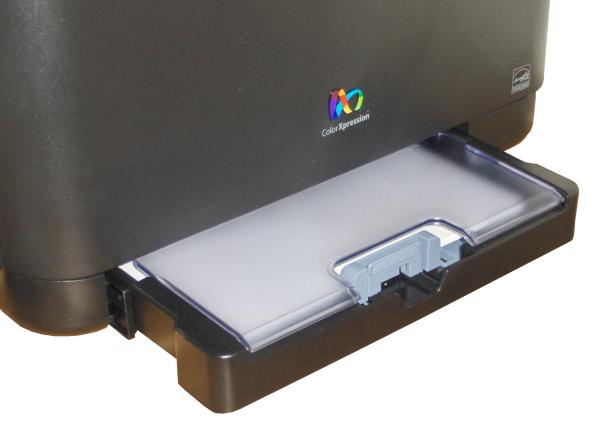
The online purchase price for the CLP-315 is very low for a colour laser printer, so you might expect there would be some claw-back of costs in the consumables. You’d be right.
Colour toner cartridges contain only enough toner for 1,000 ISO pages (1,500 pages for the black) and the imaging drum needs replacing every 24,000 pages, the cost of a colour page comes out at 11.82p, the highest page cost we’ve seen from a colour laser in at least a year. The black page cost, at 3.27p, is also on the high side.
.
Verdict
Samsung’s CLP-315 has good and bad points. On the good side, it’s accurately described as the world’s smallest colour laser printer, is easy to maintain, quiet when printing and has a very attractive purchase price. Against this, it’s slow, particularly printing colour, and at over 10p per colour page, comparatively expensive to run. The choice is yours and in the end it may well come down to how much space and money you have available.
Trusted Score
Score in detail
-
Print Speed 6
-
Features 8
-
Value 9
-
Print Quality 7
Printing
| Duplex | Manual |
| Paper Size | Letter, Custom Size |
| Sheet Capacity | 150 sheets |
| Rated Black Speed (Images per minute) | 17 ppmipm |
| Rated Colour Speed (Images per minute) | 4 ppmipm |


Editorial independence
Editorial independence means being able to give an unbiased verdict about a product or company, with the avoidance of conflicts of interest. To ensure this is possible, every member of the editorial staff follows a clear code of conduct.

Professional conduct
We also expect our journalists to follow clear ethical standards in their work. Our staff members must strive for honesty and accuracy in everything they do. We follow the IPSO Editors’ code of practice to underpin these standards.
Editorial independence
Editorial independence means being able to give an unbiased verdict about a product or company, with the avoidance of conflicts of interest. To ensure this is possible, every member of the editorial staff follows a clear code of conduct.
Professional conduct
We also expect our journalists to follow clear ethical standards in their work. Our staff members must strive for honesty and accuracy in everything they do. We follow the IPSO Editors’ code of practice to underpin these standards.
