

Verdict


Key Specifications
- Review Price: £89.00
Kodak’s launch of its first all-in-one machines last year was aimed pretty directly at the SOHO market. Both the EasyShare 5100 and EasyShare 5300 printers felt more business-oriented than they did home products. In contrast, the ESP 3 and now the ESP 5 are more obviously aimed at the home and family customer.
The ESP 5 looks very much like its less expensive sibling, with the most obvious difference being the 76mm LCD display behind the control panel on the right-hand side of the top panel. In other respects, this gloss and textured black machine is remarkably similar to the ESP 3, with the same concave front panel and fold-down and pull-out paper tray.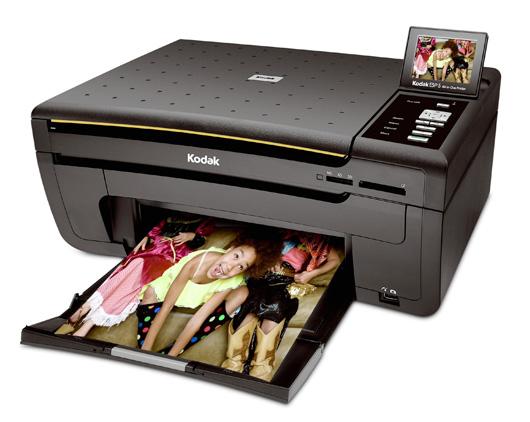
The tray serves both to feed paper and to receive printed pages, which end up lying on top of the paper pile being fed in. To change from A4 pages to 15 x 10cm photo blanks, you have to remove the A4 sheets from the machine first, which is fiddly.
Set into the front of the ESP 5 are twin memory card slots that between them take all the common card types. There’s also a PictBridge socket at the bottom for direct camera connection. Controls on the top panel include buttons to start and stop a job, call up the menu and increase or decrease the zoom level.
For navigating menus, which are shown on the LCD display, there’s a four-way button square with an OK button in the centre. In some ways, this isn’t as easy as using the ESP 3, which has dedicated buttons for scanning and copying. Here you have to select functions like this from a menu. At the back is a single USB socket and another for the external, black-block power supply, providing low-voltage, DC power.
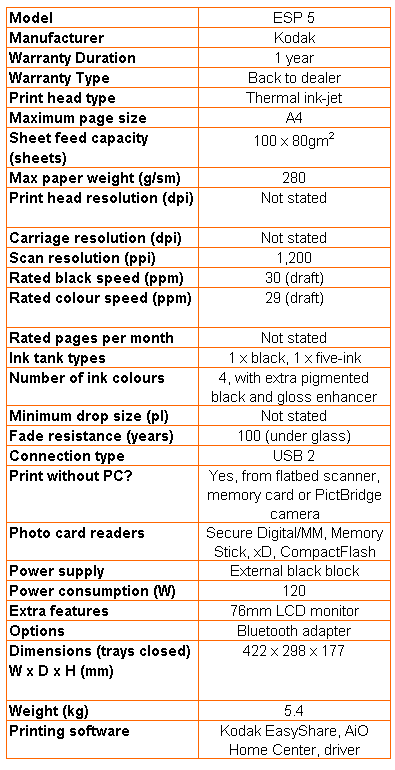
Lift the main scanner section of the ESP 5 and you have access to the print head carrier, into which you clip the lifetime print heads. The two ink cartridges, one containing pigmented black ink and the other, four dye-based colours and a clear gloss enhancer, clip into the print head.
Software comprises Kodak’s EasyShare software and the AiO Home Center, which between them handle all the standard functions you’re likely to need for this type of printer.
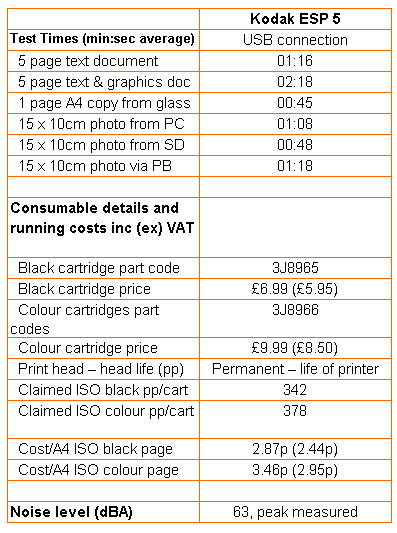
Kodak rates the ESP 5 at 30ppm for black and 29ppm for colour print. These speeds are silly and we look forward to the forthcoming ISO standards to set out a realistic testing regime. Our test prints in normal print mode took 1 minute 16 seconds for five pages of black text and 2:18 for five colour pages, equivalent to 3.95ppm and 2.17ppm. These comparatively slow speeds are partly due to the printer fidgeting around for between 15 and 20 seconds before starting each run.
A single-page copy from the Contact Image Sensor (CIS) scanner, which should have no appreciable warm-up time, took 45 seconds, so not that immediate, but the fastest time we got for a 15 x 10cm photo print was 48 seconds from an SD card, which is quick.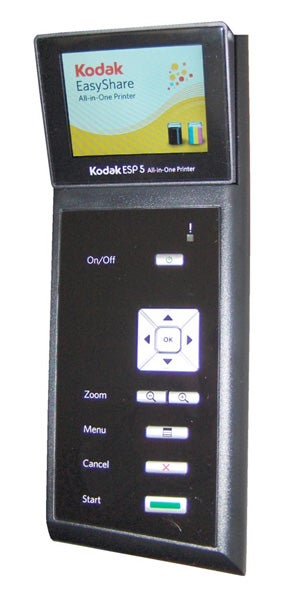
Print quality has been one of the Kodak printers’ strengths and this incarnation doesn’t break the pattern. Black text is light and reasonably crisp, though with slight feathering into the paper nap, and colours are well differentiated, though again a bit pallid. A colour photocopy of our colour text and graphics print was closer to the original than from the ESP 3, though the original wasn’t that strongly coloured in the first place.
Photo prints are sharp and clear, though a little strong in the red spectrum. Images are well-detailed and varying areas of solid colour are handled smoothly. Shadow detail isn’t as good as from some competitors, though, with darker shades tending to black.
The headline feature of Kodak’s entire range of all-in-ones is its page print cost. This is hardly surprising, as all four models use the same print engine and ink cartridges. Kodak uses its separate black cartridge for printing text and its four-colour one for printing colour graphics and photos. So, how close does the company get to its running-cost claims?
The two cartridges are priced at £6.99 (black) and £9.99 (colour) pretty much wherever you buy. Kodak quotes ISO page yields of 342 and 378 pages, respectively, so dividing price by page yield gives 2.04p for black and 2.64p for colour. All figures include VAT and we add 0.7p to all page rates, to cover the cost of a sheet of multi-purpose office paper. This gives figures of 2.87p for a black page and 3.46p for a colour one.
Kodak’s figures, off the box, of 1.6p and 4.7p, against 2.04p and 2.64p, show that the black print figure is over 25 percent high for black print, but 78 percent low for colour. Against the costs from similar machines, we rate both page costs as low, with the colour figure being particularly good. The 7p per photo print figure Kodak quotes is achievable too, but only if you buy ink and paper in its Photo Value Pack.
”’Verdict”’
If you look at the Kodak site at the moment, you’ll see that the ESP 5 and the 5300 sell for the same price. If we were buying an all-in-one and had earmarked Kodak for our money, we’d go for the 5300; it has all the features of the ESP 5 and a better paper-handling system. On the older machine there are separate feed trays for photo blanks and A4 paper and they’re covered, to keep the dust off.
The 5300 also has individual buttons for printing photo proof sheets and for starting Print, Scan and Copy jobs. None of these are present on the ESP 5, making it harder to use, standalone. The new machine is no doubt easier and cheaper to manufacture, but that’s no particular advantage to you or me.
Trusted Score
Score in detail
-
Print Speed 6
-
Features 8
-
Value 7
-
Print Quality 8
Features
| Networking | Bluetooth, Ethernet (10/100 Mbps) |
| Card slot | Secure Digital, Secure Digital High Capacity (SDHC), MMC, Memory Stick, Memory Stick PRO, xD-Picture Card, CompactFlash (CF) |
Printing
| Duplex | Yes |
| Paper Size | 4" x 6", 4" x 12", 5" x 7", 8" x 10", Letter, A4 |
| Sheet Capacity | 130 sheets |
| Rated Black Speed (Images per minute) | 30 ppmipm |
| Rated Colour Speed (Images per minute) | 29 ppmipm |


Editorial independence
Editorial independence means being able to give an unbiased verdict about a product or company, with the avoidance of conflicts of interest. To ensure this is possible, every member of the editorial staff follows a clear code of conduct.

Professional conduct
We also expect our journalists to follow clear ethical standards in their work. Our staff members must strive for honesty and accuracy in everything they do. We follow the IPSO Editors’ code of practice to underpin these standards.
Editorial independence
Editorial independence means being able to give an unbiased verdict about a product or company, with the avoidance of conflicts of interest. To ensure this is possible, every member of the editorial staff follows a clear code of conduct.
Professional conduct
We also expect our journalists to follow clear ethical standards in their work. Our staff members must strive for honesty and accuracy in everything they do. We follow the IPSO Editors’ code of practice to underpin these standards.
