

Verdict


Key Specifications
- Review Price: £73.76
Kodak was a late arrival in the ink-jet all-in-one market when it introduced its 5300 and 5500 models last year. Its big claim to fame at that point was that printing costs would be much lower than those of its competitors. Now it has followed up with two further machines, the ESP 3 and ESP-5 and here we are reviewing the cheaper ESP 3 device.
In a break with the design of the earlier machines, the ESP 3 is kitted out entirely in black with the occasional silver and Kodak-yellow highlight. The textured top cover of the flatbed scanner is bordered on the right by a strip of high-gloss, which contains the device’s controls.
These include buttons to select colour or black print, to automatically fit an original to the printed page and to scan, copy and cancel a job. What is conspicuous by its absence is any form of colour LCD display. In its place, you get a single, amber, seven-segment, numeric display for the number of copies (up to nine).
This lack of a pixel-based screen is reasonably common in entry-level all-in-ones, but Kodak’s is a bit expensive for entry-level. Most offer a contact print facility, too, so you can print out thumbnails and mark up those you want to print as photos. Without this, you can’t print from memory cards without having a PC connected and running, which limits the ESP 3’s convenience.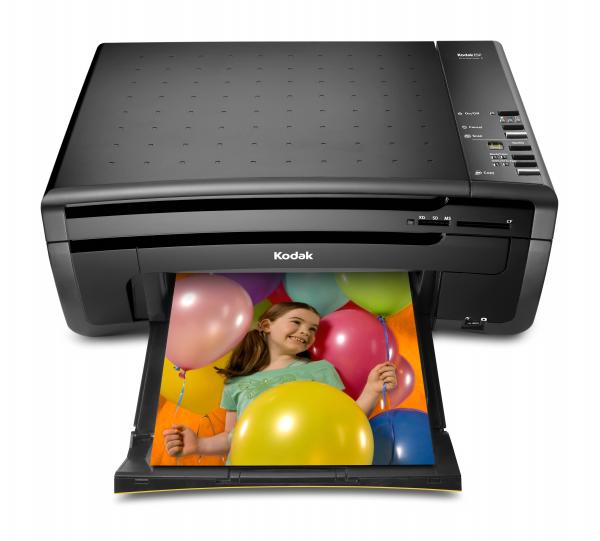
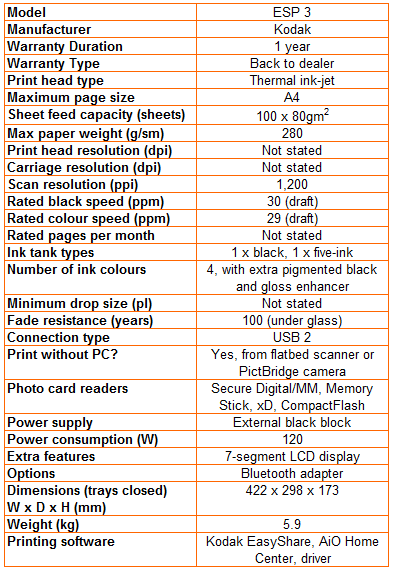
The front cover of the Kodak printer pulls down and then out, to provide its paper feed tray. This can take up to 150 sheets, but without a cover for the paper you’ll probably want to fold it up again when you’re not printing, to prevent dust entering the mechanism.
That mechanism consists of a very similar print engine to Kodak’s earlier machines and uses the same black and five-ink cartridges, too. This isn’t a six-colour printer, as the five inks are cyan, magenta and yellow, plus a second dye-based black and a clear coating layer for photos.
Setting the printer up is easy enough, but you do have to clip in the machine’s print head, before seating its two ink cartridges. There’s then a quite prolonged charging cycle, in which a fair amount of ink is used to charge the print head. This only happens with the first cartridges you install, though.
Kodak provides its EasyShare software to control the device and this includes scanning and OCR software, as well as a well-featured printer driver. The device auto-detects the type of paper used, though only if you stick to Kodak photo papers.
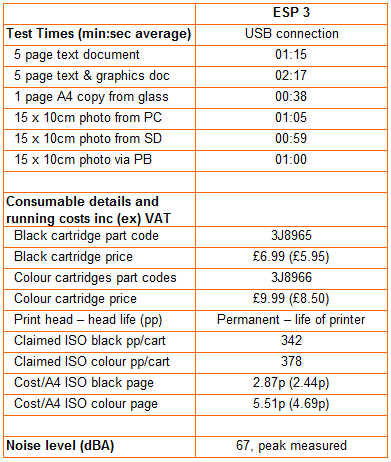
Kodak claims 32ppm for black or colour printing in draft mode from this machine. The fastest times we saw for printing our black text and text and graphics documents in normal mode were 1:21 and 1:38, the equivalent of 3.7ppm and 3.1ppm. We suspect Kodak speeds are derived from printing large documents and are measured without rasterisation or paper feed times. This measurement technique is not restricted to Kodak, of course, but it does produce very unrealistic figures.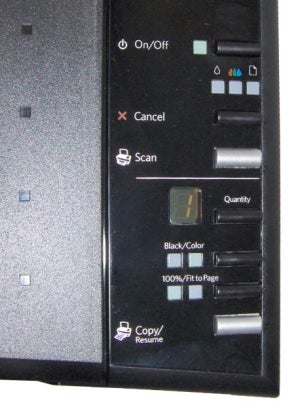
The quality of plain paper text prints from the ESP 3 is generally reasonable, without much spatter or bleed into the paper fibre. Colour prints are also good, though with lightened tints in areas of colour fill. A colour photocopy produced good quality output from the 1,200dpi CIS scanner, though colours were further lightened, in comparison with their originals. Kodak doesn’t quote print resolutions for its all-in-one machines.
Photo prints are of very good quality, with neutral colours, close to those on-screen and with a fine level of detail. Areas of varying tint, like skies, are smooth and show little noticeable dithering. It’s impressive to see photos of this quality from a comparatively low-priced all-in-one.
Kodak is quite selective in the costs it quotes to get its ‘Save up to 50%’ headline on consumables. You have to be printing photos and buy ink and paper in Kodak’s Photo Value Pack. When printing on plain paper – the main use of an all-in-one for most people – we calculate black print costs at 2.87p and colour at 5.51p, both using standard ISO test pages and including 0.7p for paper. For comparison, under the same conditions, we measured the HP Photosmart C5280 at 2.58p and 5.12p and the Epson Stylus DX8400F at 2.72p and 6.61p, respectively. 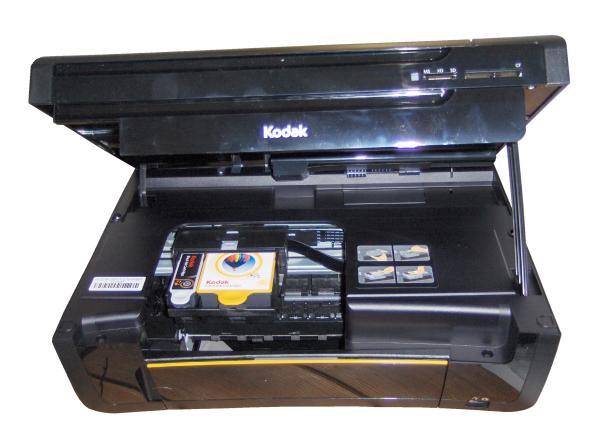
Verdict
The ESP3 does its job well, but with an asking price of £70, you have to compare it with other all-in-one in the same price bracket. If you look at the HP Photosmart C5280 or Epson Stylus DX8400F, both costing much the same as the ESP 3, they both have colour LCD displays, which makes standalone photo prints easier. The HP also has twin, covered paper trays for plain and photo paper and can print CDs, too.
You do, of course, save money on ink with the Kodak machine, but the savings aren’t that spectacular, unless you’re printing photos on Kodak’s standard photo paper, bought in its special media pack. In the end you have to assess what you want from a £70 all-in-one: photo economy or feature-set.
Trusted Score
Score in detail
-
Print Speed 7
-
Features 6
-
Value 6
-
Print Quality 7


Editorial independence
Editorial independence means being able to give an unbiased verdict about a product or company, with the avoidance of conflicts of interest. To ensure this is possible, every member of the editorial staff follows a clear code of conduct.

Professional conduct
We also expect our journalists to follow clear ethical standards in their work. Our staff members must strive for honesty and accuracy in everything they do. We follow the IPSO Editors’ code of practice to underpin these standards.
Editorial independence
Editorial independence means being able to give an unbiased verdict about a product or company, with the avoidance of conflicts of interest. To ensure this is possible, every member of the editorial staff follows a clear code of conduct.
Professional conduct
We also expect our journalists to follow clear ethical standards in their work. Our staff members must strive for honesty and accuracy in everything they do. We follow the IPSO Editors’ code of practice to underpin these standards.
