

Verdict


Key Specifications
- Review Price: £189.93
Canon’s range of PIXMA multifunction printers are well made and have good feature sets, but most of them are aimed at digital photo enthusiasts, using six, coloured inks and a second black to provide high-quality photo prints and fast plain paper printing.
These printers are in the MP range, but there is a parallel MX range, too, with a slightly different emphasis. The MX four-colour printers, again with a second black, are aimed at the SOHO market, though they’ll still make a good attempt at a photo. 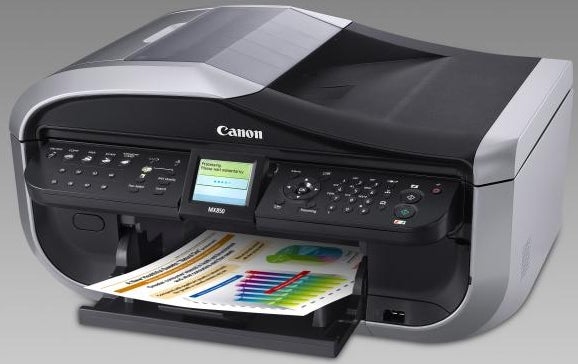
This PIXMA MX850 is the top of this second range and offers pretty much everything you would expect from an inkjet all-in-one. It’s a big printer, particularly in its depth; its footprint is nearly square on the desk. It’s styled in silver and black, with a nicely integrated Auto-Document Feeder (ADF) on top. There’s a 150-sheet paper tray at the back and a paper cassette of the same capacity slots in underneath. Both paper trays can take media from 15 x 10cm up to A4, providing flexible paper feed for plain and photo paper.
A well-designed, full-width control panel juts out from the front of the machine, offering a 62mm LCD display, a series of fast-dial buttons for the integrated fax facility and a full number pad, together with a four-way wheel of controls for menu navigation. Four, illuminated function buttons select Copy, Fax, Scan and Memory card modes and big buttons at the right-hand end initiate black and colour copies.
There are two, multi-format memory card slots behind a cover on the right-hand side of the front panel, with a PictBridge socket below these. The printer can also handle direct CD/DVD print; just flip down an internal cover and slide in the supplied disc carrier.
Setup is straightforward, thanks to the neat little head carrier. You plug the lifetime head into the carrier and plug each of the five cartridges into the head. When they’re correctly inserted, a red LED shines up through the translucent clip for a useful bit of positive feedback. When ink is low, the corresponding LED flashes, too.
Canon provides capable software with the PIXMA MX850, including Nuance OmniPage for OCR and Presto! PageManager for document management. As well as that there’s a surprisingly well-featured CD/DVD label utility, which is well tailored to the printer’s direct disc printing. 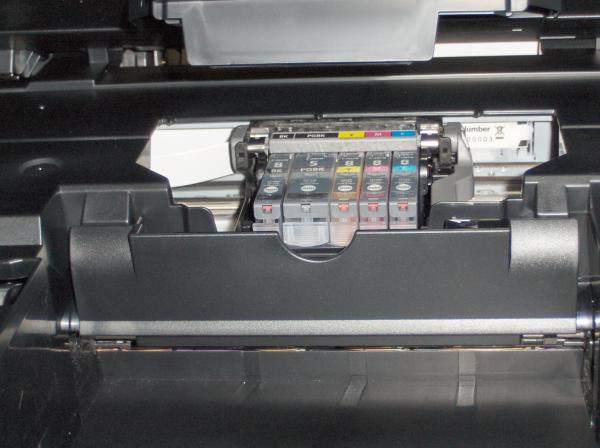
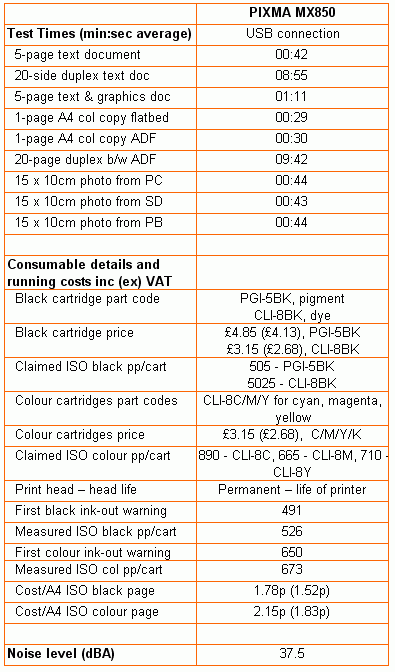
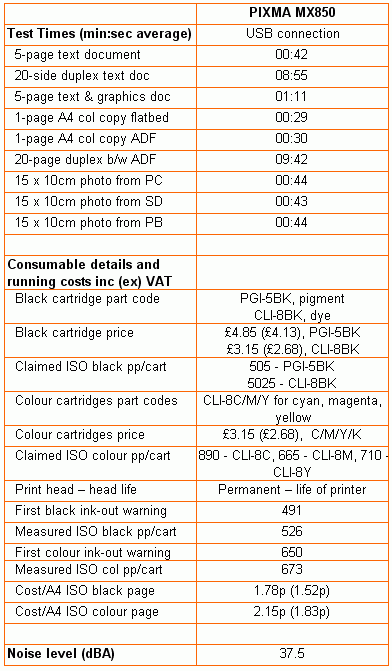
Canon has taken to quoting both normal and draft mode print speeds, which is a very honest approach and something other manufacturers could copy, to customers’ benefit. It rates the PIXMA MX850 at 14.9ppm for black print and 11.7ppm for colour. Our tests rated the machine at 7.1ppm and 4.2ppm, respectively, so there are still some differences in the way we measure speeds.
Single-sided printing is quick enough, compared with other machines at a similar price point, but one of the key selling features of the Canon machine is that it has both duplex print and duplex scanning. Other PIXMA multifunction machines – such as the MP610 and MP970 – offer duplex print, but no others offer double-sided scanning as well.
Unfortunately, all three machines share a very slow duplex print speed, mainly because of a nine second pause between finishing the first side of each page and starting the second. Our 20-page test file took 8:55 to complete and a 20-page duplex copy extended this time to 9:42. As well as the slowness of duplex copying, a collated source document ends up uncollated, which is annoying for a large job.
The printed output is good quality, with black text coming through crisp and clean. At least, it does for single-sided documents, but with duplex ones, the black ink is much less dense, more a dark grey, and the edges of text are more jagged. We suspect this is because single-sided documents use the printer’s pigmented black ink, while double-sided ones use dye-based black.
Photo prints are well up to Canon’s normal standards, with well-differentiated colours, good detail in areas of low light and smooth, gradated colours in areas of sea and sky. Although they don’t have quite the delicacy of hue that the six-colour PIXMA MPs can produce, photo quality is still more than adequate.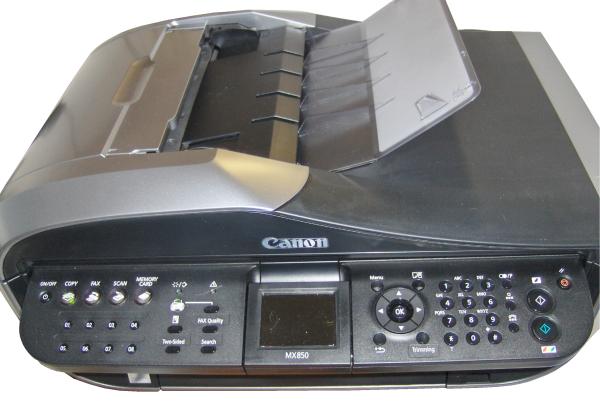
We always hunt for low prices for original cartridges when assessing print costs, but were surprised to the point of marginal incredulity at the £3.15p we found colour cartridges for on Amazon. Checking them out, they aren’t remanufactured or third-party, so we can quote a particularly low cost per colour page of just 2.15p. This is a very good figure, compared with the competition, which averages nearer to 5p.
Pigmented black ink, from the same source, costs £4.85p, giving a cost per page of 1.78p. This is also a good figure, though more in line with the printer’s rivals. The print heads should last the lifetime of the printer, so ink cartridges are your only consumable cost.
Verdict
This is a serviceable SOHO multifunction printer, with a good feature list for most uses. Unfortunately, two of the machine’s key features, duplex printing and copying, are flawed. Not only does black print on double-sided documents not have the same density and blackness, but the speed of duplex print is so low that most people won’t choose to make the resource savings and will opt for single-sided print, instead.
Trusted Score
Score in detail
-
Print Speed 6
-
Features 10
-
Value 7
-
Print Quality 7


Editorial independence
Editorial independence means being able to give an unbiased verdict about a product or company, with the avoidance of conflicts of interest. To ensure this is possible, every member of the editorial staff follows a clear code of conduct.

Professional conduct
We also expect our journalists to follow clear ethical standards in their work. Our staff members must strive for honesty and accuracy in everything they do. We follow the IPSO Editors’ code of practice to underpin these standards.
Editorial independence
Editorial independence means being able to give an unbiased verdict about a product or company, with the avoidance of conflicts of interest. To ensure this is possible, every member of the editorial staff follows a clear code of conduct.
Professional conduct
We also expect our journalists to follow clear ethical standards in their work. Our staff members must strive for honesty and accuracy in everything they do. We follow the IPSO Editors’ code of practice to underpin these standards.
