

Verdict


Key Specifications
- Review Price: £70.00
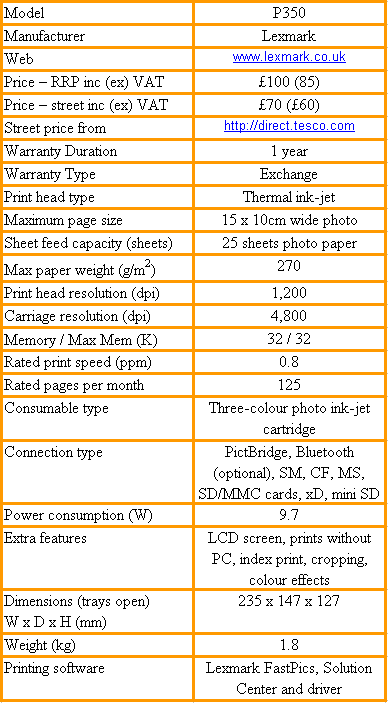
The P350 can be seen as a second generation photo printer, where Lexmark is trying to increase value in what is basically a simple design. By keeping the asking price low and introducing extra functionality, in this case a colour LCD monitor display, the company hopes to maintain its market share in this highly contested field.
The P350 has a simple, clean-white design, which is almost cuboid, apart from slightly bowed front and back faces. At the front are two slots, which between them can take Secure Digital/MultiMedia card, Memory Stick, xD and CompactFlash memory cards. There’s also a PictBridge socket, so you can connect a camera directly.
Below these slots and sockets, centred in the front of the case is the output slot for prints. The P350 can produce photos up to 15 x 10cm and a small support slides out from under the slot to provide a simple output tray. On the right, a hinged cover folds down to provide access to the single, tri-colour ink cartridge.
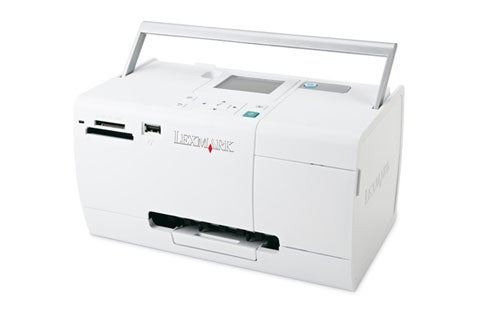
At the back, a feed tray pulls out to enable you to stack up to 25 sheets of Lexmark’s PerfectFinish photo paper into the printer – a small paper support slides up to keep the sheets in order. There’s also a power socket for the separate power supply block and a USB connection. Unlike its predecessor, the P450, the P350 can be connected to a PC for printing, as well as working on its own from camera or card.
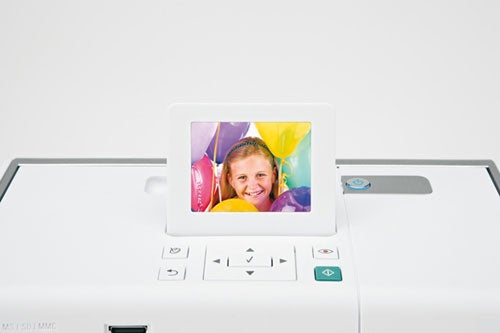
The top surface of the printer boasts a 6in LCD monitor screen, which may not be large by today’s standards, but is unusual in a photo printer at this price. Immediately in front of the screen are five buttons and a multi-way selector. As you might expect, the selector is used for navigating the printer’s menu system, with a button in the centre to confirm selections.
The four other buttons invoke automatic red-eye removal, call up setting screens, cancel or pause operations and start a print task. Finally, there’s a power button to the right of the LCD screen and a fold-up carrying handle, so you can transport the printer.
Installation involves fitting the ink cartridge, loading paper and, if you want to work from a PC, setting up application software. Lexmark provides FastPix, a simple photo applet but, other than this and the driver, there’s not a lot of software.
Working with the printer is straightforward, as its menu system is well-designed and there are plenty of text prompts. There are quite a few editing functions that can be called up from within the printer and these include five different frame designs in 20 different colours and facilities to crop and zoom, rotate and auto-enhance photos. They can be given colour rendering, such as sepia tint, too.
Photo quality is good, though not as clear and stipple free as from the best Canon, Epson or HP can offer. You’re paying considerably more for photo printers from these rivals, though, and the quality here is good enough for holiday pictures or to capture a special event. Lexmark claims an archival life of 100 years under glass for its new evercolour 2 inks and this is the first printer to make use of them.
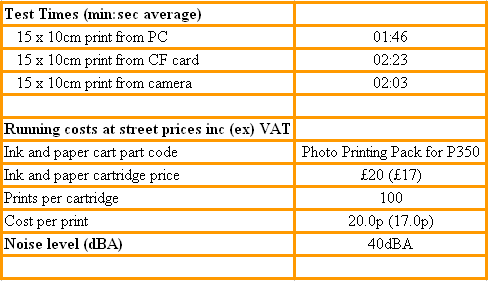
Lexmark also claims to print 15 x 10cm images in 75 seconds, but we couldn’t better 100 seconds. Even so, this isn’t too bad and puts the P350 closer to the print speed of some of its rivals than earlier models. 106 seconds is the print time from a PC, though; printing standalone takes between 20 and 40 seconds longer.
Print costs are very simple to calculate, with just a single cartridge and paper to buy. Lexmark has made it even easier than this, by introducing a £20 Photo Printing Pack, containing all you need for 100 prints. This gives a cost per print of 20p, pretty much in the middle of the range for photo prints.
You may even get a few extra images from the ink cartridge, as Lexmark will have catered for photographers specialising in landscapes with a high percentage of green content and portraits, making heavier use of flesh tints. If you take a range of different subjects, you may be able to squeeze extra use prints out of the available ink. Cartridges and paper can also be bought separately.
”’Verdict”’
This is a surprisingly good photo printer for £70. If what you want is a printer with a simple design and no fuss operation and you don’t need to print anything larger than 15 x 10cm, you should be very happy with the P350. Print quality could be a little clearer and it’s annoying to have to carry the power supply separately from the printer, but otherwise there’s little to niggle about.
Trusted Score
Score in detail
-
Print Speed 6
-
Features 8
-
Value 9
-
Print Quality 8


Editorial independence
Editorial independence means being able to give an unbiased verdict about a product or company, with the avoidance of conflicts of interest. To ensure this is possible, every member of the editorial staff follows a clear code of conduct.

Professional conduct
We also expect our journalists to follow clear ethical standards in their work. Our staff members must strive for honesty and accuracy in everything they do. We follow the IPSO Editors’ code of practice to underpin these standards.
Editorial independence
Editorial independence means being able to give an unbiased verdict about a product or company, with the avoidance of conflicts of interest. To ensure this is possible, every member of the editorial staff follows a clear code of conduct.
Professional conduct
We also expect our journalists to follow clear ethical standards in their work. Our staff members must strive for honesty and accuracy in everything they do. We follow the IPSO Editors’ code of practice to underpin these standards.
