

Verdict


Pros
- Lightweight and compact
- Simple controls
- Can connect multiple devices
Cons
- Lacks an external aerial
- Long time to charge
- LEDs lack clarity
Key Specifications
- 90g
- 1500mAh battery
- microSD card slot
- Mini-USB port
- WiFi 802.11 b/g
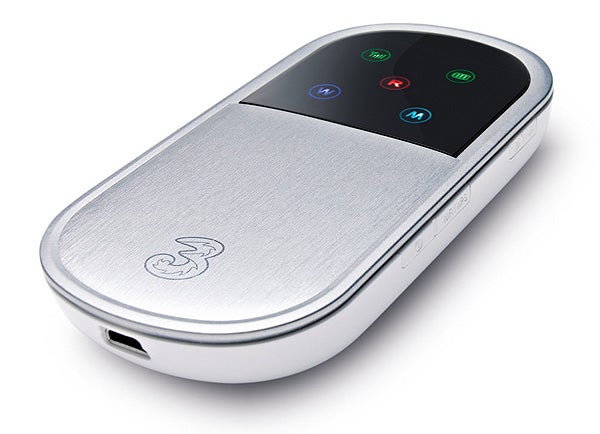
It seems that 3 can’t quite make up its mind about what to actually call this device. On the company’s website it’s billed as the Mobile Broadband MiFi, while on the box it’s simply titled Mobile Wi-Fi. Whatever the company finally settles on calling it, one thing is for sure, it does a hell of a lot more than your standard broadband modem. This is because the MiFi (which is really a rebadged Huawei E5830) combines the functions of a mobile broadband dongle and a battery powered Wi-Fi router into a single device.
MiFi Huawei E5830 mobile broadband device on white background.” width=”300″ height=”217″ class=”align size-medium wp-image-218587″ srcset=”https://www.trustedreviews.com/wp-content/uploads/sites/54/2009/10/12007-3mifiimg1-1.jpg 600w, https://www.trustedreviews.com/wp-content/uploads/sites/54/2009/10/12007-3mifiimg1-1-300×217.jpg 300w, https://www.trustedreviews.com/wp-content/uploads/sites/54/2009/10/12007-3mifiimg1-1-320×231.jpg 320w” sizes=”(max-width: 300px) 100vw, 300px” />
The benefit is that unlike a standard USB modem you can connect multiple devices to it at the same time to share the connection. It’s handy to have around the home to share broadband with, say, a couple of laptops and an iPod Touch, or business users could call on it to quickly set up a Wi-Fi network at an away site. In fact, the more you think about it, the more useful it seems to be.
What’s more, the MiFi’s small size means it’s very easy to carry around. It’s around two thirds the size of an ordinary mobile phone (if there’s such a thing these days) and is also extremely light at just 90g, so you can easily stuff it in a laptop bag without worrying about it weighing you down.
MiFi Huawei E5830 mobile Wi-Fi hotspot device.” width=”300″ height=”103″ class=”align size-medium wp-image-218593″ srcset=”https://www.trustedreviews.com/wp-content/uploads/sites/54/2009/10/12007-3mifiimg2-1.jpg 400w, https://www.trustedreviews.com/wp-content/uploads/sites/54/2009/10/12007-3mifiimg2-1-300×103.jpg 300w, https://www.trustedreviews.com/wp-content/uploads/sites/54/2009/10/12007-3mifiimg2-1-320×110.jpg 320w” sizes=”(max-width: 300px) 100vw, 300px” />
The entire body of the device is made from plastic, although the bottom half of the front panel is finished with an aluminium paint job. The white rear cover snaps off to reveal the removable 1500mAh battery and underneath this is the holder for your mobile broadband SIM. The MiFi’s controls are extremely simple as it only actually has three buttons mounted on the right hand edge. These are used to turn the device on, start and stop the broadband connection and switch the Wi-Fi on and off. There’s also a microSD card slot on the left that acts as a card reader when it’s connected to a PC via the mini-USB port on the bottom of the device (which also doubles as the charging port).
The MiFi doesn’t have an LCD screen, but instead communicates information to users via five LEDs. One shows whether the MiFi has a mobile signal or not, another shows you whether you’re currently roaming, while a third shows you whether the Wi-Fi transmitter is turned on or off. There’s also a simple battery indicator and a broadband status light. Unfortunately, these LEDs simply don’t provide you with enough information. For example, the signal LED simply shows whether the mobile network’s signal is being received; it doesn’t show the current signal strength. Similarly, the battery indicator shows you only when the battery needs to be recharged. It doesn’t indicate the actual battery level.
The broadband mode indicator is also troublesome. It switches between light blue and dark blue to show whether it’s connected via HSDPA or slow 3G. However, the first time you use the MiFi you’ve got no frame of reference as to which is dark blue and which is light blue so you’ve simply no way of knowing which mode it’s actually operating in. A simple one-line LCD display would have gone a long way towards solving these issues. MiFi Huawei E5830 mobile broadband device on white background.” width=”300″ height=”210″ class=”align size-medium wp-image-218598″ srcset=”https://www.trustedreviews.com/wp-content/uploads/sites/54/2009/10/12007-3mifiimg4-1.jpg 400w, https://www.trustedreviews.com/wp-content/uploads/sites/54/2009/10/12007-3mifiimg4-1-300×210.jpg 300w, https://www.trustedreviews.com/wp-content/uploads/sites/54/2009/10/12007-3mifiimg4-1-320×224.jpg 320w” sizes=”(max-width: 300px) 100vw, 300px” />
That said, getting the device up and running is very straightforward. It’s simply a matter of holding down the on button and waiting for the MiFi to kick into life. Then you press the connect button to activate the mobile broadband link and finally you press the Wi-Fi button to turn on the Wi-Fi connection. Sensibly, the device is set up by default to use encryption and 3 provides the SSID name and WEP Key on a small card, so you don’t have to configure any settings to get it up and running.
Obviously, with only three buttons on the device there’s no way to change the MiFi’s configuration without plugging it into a PC. Once you do plug it into a computer it automatically launches the installer for loading all the necessary drivers plus the 3 Wi-Fi Manager. This application gives you pretty comprehensive control over the MiFi allowing you to change the SSID and WEP key, adjust the firewall defaults and alter the DHCP settings. You can also use the app to store contact numbers, send and receive SMS messages and turn on and off the device’s broadband and Wi-Fi connections. On top of this it enables you to monitor the status and signal strength of the broadband connection.
During our test period using it in East London we managed to clock up an average download speed of around 1.8Mbit/s, with the highest in our test coming in at 2.2Mbit/s. For uploads we got around 0.25Mbit/s. This is pretty much in line with what we’d expect as 3’s network is only capable of a maximum speed of 3.6Mbit/s, with the company stating that it expects users to get up to 2.8Mbit/s.
Wi-Fi support is limited to Wireless B and G, as the latest and faster N standard isn’t supported. As the device is small and lacks an external aerial you wouldn’t expect its Wi-Fi range to be as good as a standard, larger Wi-Fi router. However, it’s range wasn’t all that bad as it managed to cover most rooms in the three-bed, Victorian terraced house we tested it in, although at the further extremities its speed and signal strength did drop off pretty dramatically.
MiFi Huawei E5830 Wireless Modem” width=”187″ height=”300″ class=”align size-medium wp-image-218603″ srcset=”https://www.trustedreviews.com/wp-content/uploads/sites/54/2009/10/12007-3mifiimg3-1.jpg 249w, https://www.trustedreviews.com/wp-content/uploads/sites/54/2009/10/12007-3mifiimg3-1-187×300.jpg 187w, https://www.trustedreviews.com/wp-content/uploads/sites/54/2009/10/12007-3mifiimg3-1-199×320.jpg 199w” sizes=”(max-width: 187px) 100vw, 187px” />
The MiFi takes quite a long time to charge, but once it’s full of juice it’ll keep running for around five hours, which is good but not great. Furthermore, when its running on battery power it’ll turn itself off after a short period of time when it detects a long lull in Internet activity, which isn’t ideal when you simply want it to stay active over a working day. That said, running it from the mains using the small mobile phone-sized charger will prevent the MiFI from powering down.
”’Verdict”’
We were very impressed with the MiFi. It’s extremely small, very easy to set up and use, yet delivers in terms of performance. It really is incredibly liberating being able to get all your devices online, via your own personal hotspot, pretty much anywhere you can get a mobile signal. If you’re thinking of getting mobile broadband, we’d seriously suggest you get the MiFi instead of a bog standard USB dongle.
”’Pricing”’
The MiFi device is also currently available:
”From free on £12/month, 18-month contract, with 1GB data and 20 text message allowance every month.
From free on £17/month, 18-month contract, with 5GB data and 20 text message allowance every month.
At £99.99 Ready-to-go, preloaded with 3GB data (top-up and convert to add-on when preload runs out).”
Trusted Score
Score in detail
-
Value 8
-
Features 8
-
Design 8


Editorial independence
Editorial independence means being able to give an unbiased verdict about a product or company, with the avoidance of conflicts of interest. To ensure this is possible, every member of the editorial staff follows a clear code of conduct.

Professional conduct
We also expect our journalists to follow clear ethical standards in their work. Our staff members must strive for honesty and accuracy in everything they do. We follow the IPSO Editors’ code of practice to underpin these standards.
Editorial independence
Editorial independence means being able to give an unbiased verdict about a product or company, with the avoidance of conflicts of interest. To ensure this is possible, every member of the editorial staff follows a clear code of conduct.
Professional conduct
We also expect our journalists to follow clear ethical standards in their work. Our staff members must strive for honesty and accuracy in everything they do. We follow the IPSO Editors’ code of practice to underpin these standards.
