

Verdict


Key Specifications
- Review Price: £143.75
Logitech has a well-deserved reputation for making some of the best gaming peripherals around. All the way from its G5 Gaming Mouse to the recently-reviewed G13 Advanced Gameboard, its G-Series has consistently won TR recommended awards. Today we’re looking at the brand-new G19 Gaming Keyboard, the sequel to Logitech’s well-regarded G15 Keyboard, which received our highest accolade. Let’s find out if the G19 can keep the pedigree intact.
So first of all, what has changed? Obviously the design has been updated to make this keyboard far more streamlined. Basic keyboard layout remains identical, but the multimedia and gaming keys have been moved about and the programmable G-keys have been doubled from six (on the 2007 revision of the G15, not the original which offered 18) to 12. Backlighting has also been reworked, but the single biggest upgrade is to a colour “GamePanel” LCD-screen with a resolution of 320 x 240.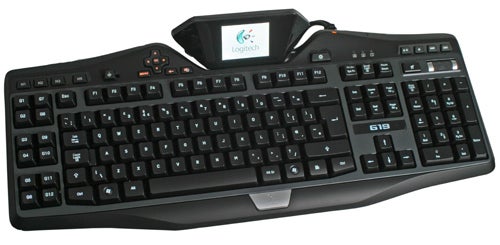
In terms of looks, the G19 has it all. The keyboard comes in a combination of matte and glossy blacks, bluish silver and metallic insets that not only looks cool but also matches Logitech’s other G-series peripherals perfectly. Logitech’s versatile backlighting also helps to make this keyboard a stunner. The M-keys and LCD-control keys to the left of the GamePanel remain invariably orange, but the backlighting on every other key can be changed to any colour you wish, to match your mood, other peripherals, or you can just link a specific colour of backlight to a specific game or application. 
There are no dimming controls, but if the lighting is too bright simply choose a darker shade. There’s also a dedicated button to turn the backlighting off altogether, though this also turns off the LCD. Unlike with Razer’s Lycosa Gaming Keyboard, the G19’s keys are still perfectly visible in sunlight, whether the backlighting is turned on or not.
Funnily enough, compared to ‘regular’ keyboards like Logitech’s Cordless Desktop Wave Pro, the layout of the G19 is more conservative, with the Delete/Home/End/Page keys in their traditional positions. As far as all the keys you’d find on a normal keyboard go then, things are pretty standard. Though I’d hoped for a movable number pad a la Microsoft’s SideWinder X6, realistically the chances of this happening were slim.
The G19’s high-profile keys have more directional give than most, meaning they ’tilt’ a bit in the direction you push them. However, they’re by no means loose, and indeed feedback is quite soft. Despite this you’re never in doubt as to when you’ve pressed a key, thanks to a positive, audible click.
Though they lack a rubberised coating, keys have a relatively soft feel to them that combines with their slightly concave surface to provide excellent grip. In general their slightly narrow top surface compared to many other keyboards (even from Logitech itself) is not a problem, with one exception: due to the large distance between keys I found it more difficult to accurately hit the shift key in the midst of FPS shootouts than on most other keyboards I’ve used. It’s a minor niggle, though, and something you get used to over time.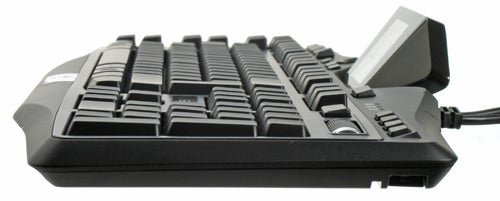
Build quality of the keyboard itself is excellent, with the tiltable LCD screen attached not to a plastic hinge but a thick metal bar and protected from wear, tear and scratches by a clear plastic shield. The only cause for concern is the detachable wrist-rest. It is held on by relatively flimsy plastic clips, similar to ones which have broken on previous Logitech keyboards I’ve owned.
As already mentioned there are 12 fully programmable G-keys, arranged in a two-by-two grid and raised higher than the typing keys to avoid mistakes. When combined with the M1 to M3 keys, this gives you a total of 36 different keys to which you can assign keystrokes, macros, shortcuts or even your own scripts using Logitech’s G-series Key Profiler. As with the G13, this is easily accomplished thanks to a visual map of the keys where you only need to click on one to assign it a function. You can also record macros on the fly using the MR (Macro Record) key. 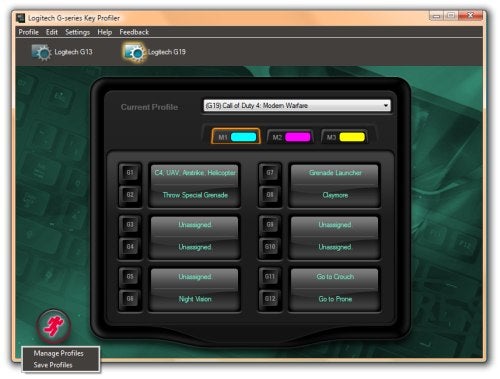
However, after using the G13 the G-keys on the G19 come across as a bit of a disappointment, since they’re not quite as easy to use or as well laid out. Of course, you do have all the standard keyboard keys, but I can’t help wishing Logitech had taken a page from Razer’s design manual and made all the keys programmable.
A set of custom profiles for each of your games can be assigned to a limitless number of profiles, and as with the (linkout:https://www.trustedreviews.com/peripherals/review/2007/11/26/Logitech-G9-Laser-Mouse/p1G9) and G13, the G19 has its own on-board storage so you can take your settings with you to LAN-parties and the like. As with the G13, the G-keys are also very useful for work as well as play, allowing you to automate tedious key combinations and assign profiles to each program you use.
Above the G19’s number pad are media and volume controls. Rather than the flat volume wheel on previous Logitech G-keyboards, the G19 has a roller with a rubberised, finned surface. This does make changing the volume slower than with the previous system, but works well nonetheless. The game switch (which toggles the Windows key on or off) has also been redesigned to be easier to move, and it now lights up when in ‘gaming’ mode. 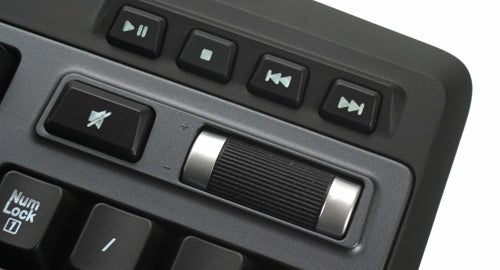
At the top of the keyboard you’ll find two powered USB 2.0 ports. This is a major improvement on the G15, where the ports were USB 1.1 and not powered. Under the keyboard are channels for routing cables to the front or side, giving a good degree of flexibility.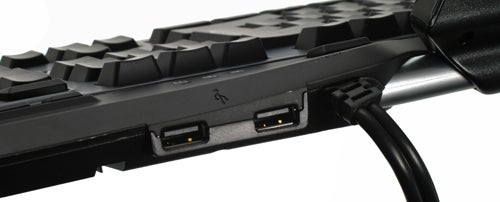
Together with the multi-coloured backlighting, the G19’s unique selling point is of course its full-colour LCD screen – an industry first. Despite its transparent cover, the high-contrast screen remains sharp and clear. It has excellent viewing angles both horizontally and when viewed from the top (though not from below), and colours are rich without being oversaturated. 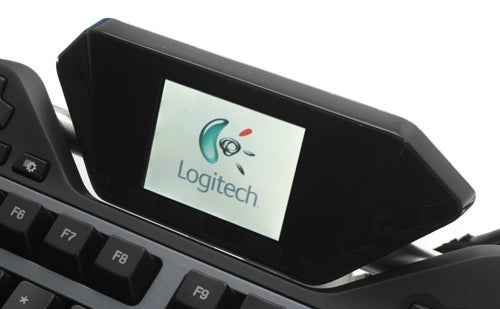
Its beauty is more than skin-deep too, as unlike its simplistic two-tone predecessors it’s actually powered by an embedded version of Linux. This allows more applications than ever before to be programmed for it and it’s backwards compatible with most of the ones developed for the G15’s GamePanel.
Though more applications will become available over time, right now the ones offered by Logitech’s LCD Manager software are a timer, RSS Reader, clock with calendar, PC performance monitor, picture viewer, movie viewer (it should play all WMP-compatible videos) and even Video Player for Youtube. This all works flawlessly and is fully configurable through software. Because of its advanced functionality, the screen also has its own set of eight dedicated controls, including a four-way D-pad with an ‘OK’ button at its centre which makes navigation a breeze. 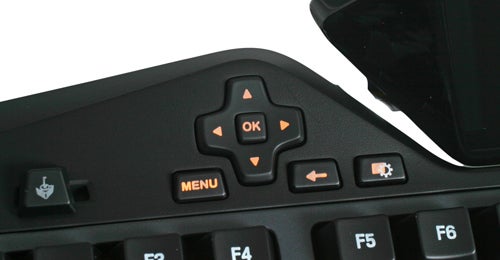
The screen works beautifully for video, with never a hint of artefacts or ghosting, but beyond impressing your friends and after the novelty has worn off, watching this kind of content on it instead of your main display doesn’t hold much appeal. However, the GamePanel certainly does have practical uses, such as keeping an eye on your inbox or IM while gaming or watching a film.
As you would hope, it can also add to your actual gaming experience. Anyone who fondly remembers the separate optional screen in the Dreamcast’s controllers will be delighted with the GamePanel, as it can show stats and other information in compatible games to leave your main display free for the action. Tilted at the right angle, the G19’s big and clear screen only requires the quickest of glances to see the required information, and is especially suited to slower, stat-heavy games such as RPGs. Right now 80 games are supported, with more on the way.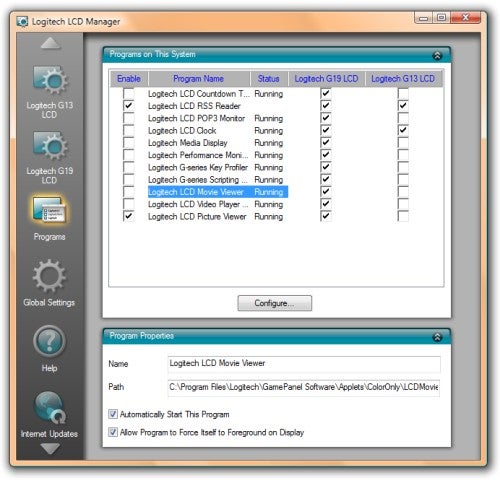
It’s not all good news, however, as the colour screen and inbuilt OS with the hardware required to run it don’t come cheap, both in terms of power usage and actual price. The G19 is so power hungry that it requires its own power adapter, though it will work as a basic keyboard when not plugged into the mains. 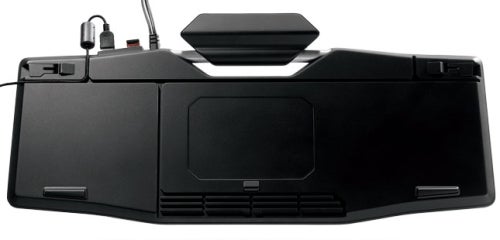
Though not actually available to buy yet, the G19 has a pre-order price of £143.75. Hopefully this will go down when stock becomes widely available, but don’t count on it. The biggest question is, is it worth it? There’s no doubting that it’s an excellent product and that it offers unique features, potentially enhancing both gaming and productivity. But if you’re on a budget and have a good keyboard already, you might just want to get the G13 Advanced Gameboard instead, which offers many of the same features for less than half the price. 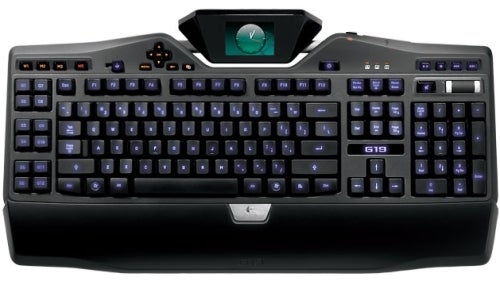
‘Lesser’ yet more affordable gaming keyboards such as the Microsoft SideWinder X6 (currently a steal at £43) or even Logitech’s older G11/15 are also worth checking out. If money is no object on the other hand, the G19 is the cream of the crop and you could even consider getting the G13 to go with it.
Verdict
With multicoloured backlighting and a full-colour screen running its own embedded Linux OS, the impressive and stylish G19 is a high-end gaming keyboard demanding a high price to match. If you have the cash and don’t mind its few minor flaws this is the keyboard to get, but there are cheaper ways to get your gaming fix.
Trusted Score
Score in detail
-
Value 6
-
Features 10
-
Design 10


Editorial independence
Editorial independence means being able to give an unbiased verdict about a product or company, with the avoidance of conflicts of interest. To ensure this is possible, every member of the editorial staff follows a clear code of conduct.

Professional conduct
We also expect our journalists to follow clear ethical standards in their work. Our staff members must strive for honesty and accuracy in everything they do. We follow the IPSO Editors’ code of practice to underpin these standards.
Editorial independence
Editorial independence means being able to give an unbiased verdict about a product or company, with the avoidance of conflicts of interest. To ensure this is possible, every member of the editorial staff follows a clear code of conduct.
Professional conduct
We also expect our journalists to follow clear ethical standards in their work. Our staff members must strive for honesty and accuracy in everything they do. We follow the IPSO Editors’ code of practice to underpin these standards.
