

Verdict


Key Specifications
- Review Price: £1765.00
If the ToughBook CF-29 is the Land Rover Defender of rugged notebooks, then the CF-W4 would have to be the Ferrari F430. The CF-W4 is a semi-rugged notebook, so it’s not as big, heavy and tough as its big brother. Instead it’s far thinner, lighter and sleeker, just like an F430. Of course just like the F430, the CF-W4 can’t take as many knocks as its more robust sibling, but that’s not to say that it can’t withstand the trials of life as a notebook computer.
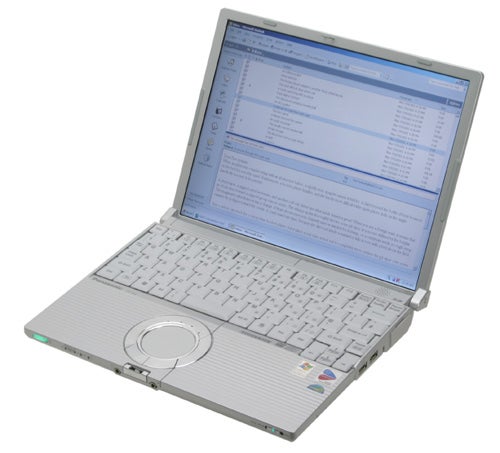
Being a semi-rugged notebook, the CF-W4 can’t survive a drop of one metre like the CF-29 and CF-18. However, Panasonic will guarantee that it can withstand a drop of 30cm, which is more than you’ll get with most other notebooks. The great thing is that Panasonic hasn’t had to make the CF-W4 any larger or heavier to make it that little bit more robust. The CF-W4 can also withstand up to 100kg of pressure – so you could stack things on top of it, or use it as a seat cushion if you really wanted to.
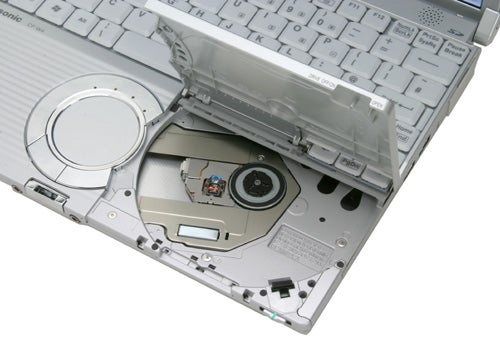
The CF-W4 is one of those notebooks that causes a bit of a stir when you take it out. Its svelte dimensions will definitely get admiring glances from your colleagues and once you open the optical drive, you’ll probably find that you have a crowd around you. To be fair, the optical drive placement is nothing new, the CF-W2 that I looked at a couple of years back pioneered this, but it hasn’t lost any of its impact. Basically the DVD-ROM/CD-RW drive is located under the right side of the palm rest – flicking a switch at the front of the machine causes the whole right side of the palm rest to flip open and reveal the drive. Another nice little trick is that flicking the switch the opposite way will actually power down the optical drive, thus saving you battery life if you’re not using it. It’s a little disappointing that this is a DVD-ROM/CD-RW combo drive and not a DVD writer, but it depends on how important DVD writing on your notebook is to you.
One thing that has often plagued ultra-portable notebooks is noise. Many models that I’ve looked at may be almost invisible, but they’re far from inaudible. Squeezing high-end components into a super-slim chassis can often result in noisy fans spinning up when you’re pushing the hardware a bit. This however is not the case with the CF-W4 – this little beauty is completely passive, so there are no fans to spin up, no matter what you happen to be doing. If you’ve ever found yourself stuck in a hotel room late at night working, you’ll know exactly why a totally silent notebook is a good thing.
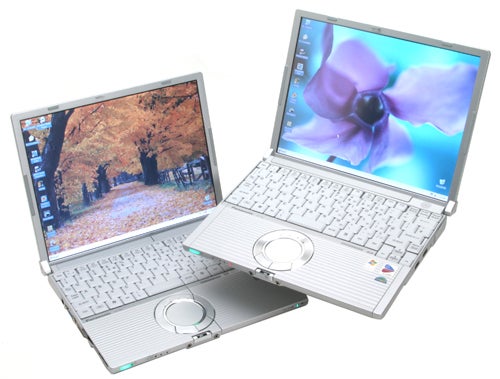
The CF-W4 is finished in matt silver, and although you get a lot of silver notebooks these days, this one really does look a bit special. The magnesium alloy, reinforced lid gives this machine a unique look when it’s closed, while highlights like the chrome silver lid release button and touchpad surround add to the stylish effect.
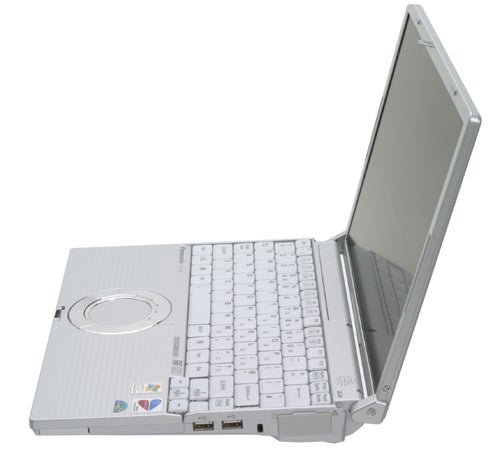
Opening the lid reveals a 12.1in TFT display in standard 4:3 format rather than the widescreen format that is becoming increasingly popular. The 1,024 x 768 resolution is nothing spectacular by today’s standards, but pretty much every 4:3 aspect ratio screen of this size will be running the same resolution as this. Quality wise, this screen is as good as any I’ve seen – it doesn’t have a high-contrast coating, but since ToughBooks are primarily aimed at business users that’s not a huge surprise. To be honest, I really like high-contrast screens but I also know a lot of people who find them too distracting and reflective – it’s a matter of personal preference.
When I reviewed the CF-W2 I was a little disappointed with the keyboard. I found that the whole keyboard flexed considerably when typing at speed, but thankfully the same can’t be said of the CF-W4. I was able to hammer the keys on this machine without the slightest hint of flex rearing its head. That’s not to say that this keyboard is perfect though – the travel on the keys is a little shallow and the actual key sizes are quite small. That said, with notebooks shrinking all the time, keys this size are no longer unusual and I found my hands becoming accustomed to the dimensions very quickly. One particular annoying aspect though, is the tiny Return key, while the reduced size Spacebar may also cause problems for some users.
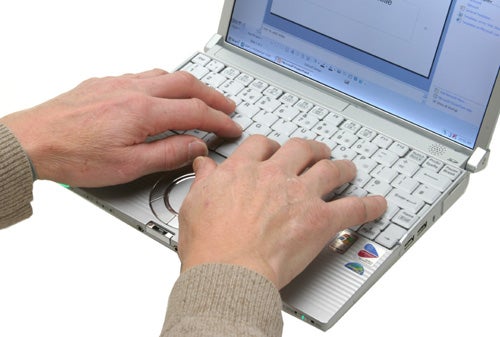
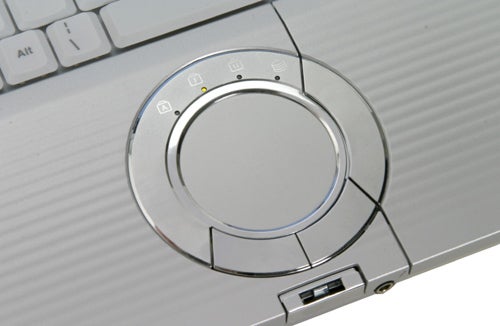
Below the keyboard is a round touchpad. Now, I’m not usually a fan of strangely shaped touchpads since they often make pointer manipulation a pain, but this is one of the best examples I’ve ever used. Despite the unusual shape it’s easy to move the pointer to anywhere on the screen simply and quickly. Although most notebook touchpads are pretty good these days, this one just feels that bit more sensitive and accurate. Surrounding the touchpad is a silver ring which houses the left and right selector buttons and four indicator lights – hard disk activity, NumLk, CapsLock and ScrLk.
The ToughBook CF-W4 is Centrino branded, but it doesn’t have one of the new dual core chips in it. What you do get is a 1.2GHz ultra low voltage Pentium M backed up by 512MB of DDR2 memory. The 40GB hard disk could be bigger, although it’s unlikely that an ultra-portable notebook user will need more than this.
The Centrino branding means that you’ve got an integrated Intel wireless adapter, in this case the Pro/Wireless 2915ABG, which provides 802.11a,b and g support. There’s also a 10/100Mbit Ethernet adapter and a 56K modem thrown in for good measure, but Bluetooth is conspicuous by its absence.
Graphics come courtesy of the Intel integrated chipset, which will grab some of your system memory. With this in mind, you might want to factor in a memory upgrade at purchase – there is a spare SO-DIMM socket allowing for an increase to 1GB of RAM.
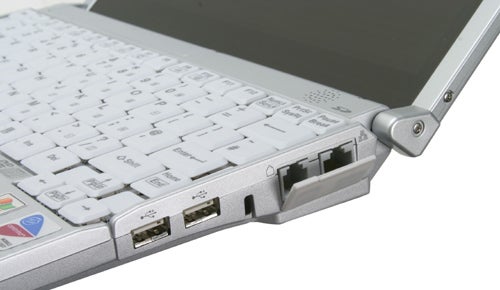
On the right side of the chassis you’ll find the Ethernet port and modem socket hiding behind a rubber bung, along with two USB 2.0 ports. At the front is the power/open switch for the optical drive, a hard switch for the wireless adapter, a headphone socket, a microphone socket and finally the power switch. The power switch glows bright green, which is a pleasant change to blue.
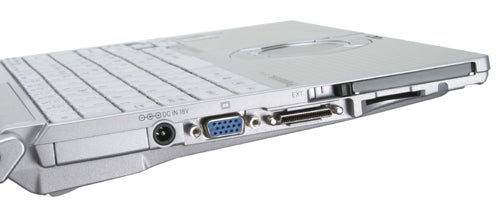
At the left is a PC Card slot, an SD card slot, the power connector, a D-SUB port and a port replicator socket. The rear is completely barren, since half of the back is taken up by the battery.
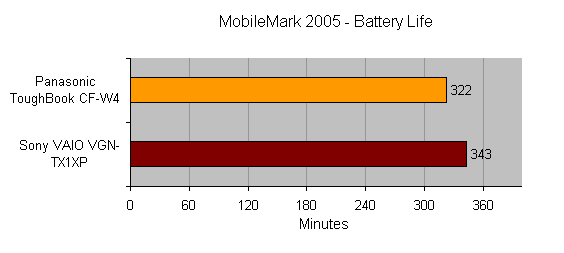
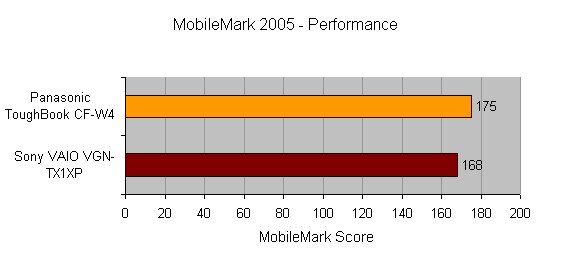
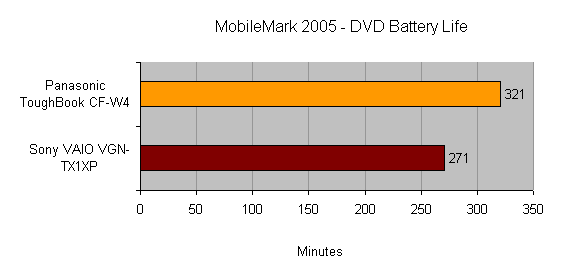
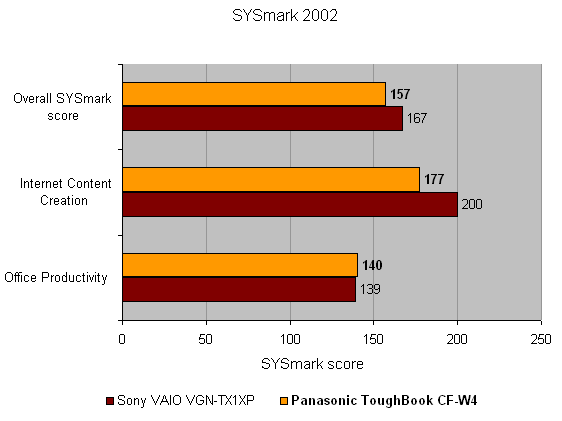
Although many notebooks are now arriving with Intel’s Core Duo dual core chip inside, there’s no need to write off machines that still use the older Pentium M processors. The CF-W4 is testament to this and turned in some very impressive results when I benchmarked it. The MobileMark 2005 score was particularly impressive, with a battery life of five hours 22 minutes. Even more impressive was the DVD playback time of five hours 21 minutes – so you’ll have no problem watching the Director’s cut of your favourite Lord of the Rings movie on this little machine. The application battery life is still slightly behind the Sony VAIO TX1XP, but the DVD playback time is the best I’ve seen – somewhat strange for a business orientated notebook though. Also the MobileMark performance score of 175 beats both the Sony TX1XP and the Fujitsu-Siemens P7120. The SYSmark score of 157 is a little behind the other two machines, but not enough to make a difference to your working experience.
The CF-W4 measures only 268 x 210 x 44mm (WxDxH) and weighs in at a very svelte 1.29kg. That’s lighter than the Fujitsu-Siemens P7120 and only a fraction heavier than the Sony TX1XP. So, if you do need to carry a notebook around with you absolutely everywhere, the CF-W4 should fit the bill very well.
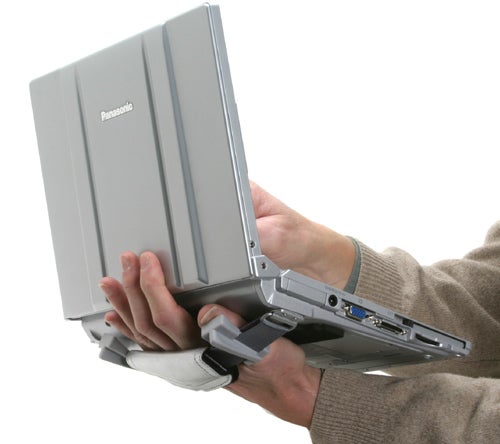
Of course being that this is a Panasonic ToughBook, there are bound to be some kind of bespoke builds that no other manufacturer would ever consider – such a machine is the CF-T4. The CF-T4 was designed to be used by airline flight crew, with its integrated touch screen making it easy to perform tasks such as passenger counts. The CF-T4 has a handle on the underside that you slide your hand through, allowing you to balance the notebook on your palm while you stab at the screen.
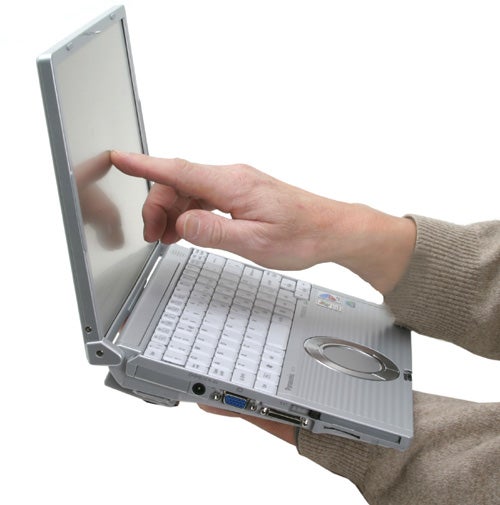
Having recently reviewed the CF-29 and CF-18 I’ve become a real convert to touch screens, I love being able to just tap icons or drag windows around with my finger. The simplicity of using custom software with a touch screen just makes it all the more compelling. Of course you could just use a normal tablet PC for this kind of duty, but the CF-T4 has the added advantage of being a full ultra-portable notebook as well.
However, the CF-T4 does have one major disadvantage – it doesn’t have an integrated optical drive. I’m not sure why the optical drive could not be squeezed into the CF-T4, but it’s a real shame. Personally I would like to see a cross between the CF-W4 and CF-T4 allowing me to have the convenience of a touch screen as well as the integrated optical drive.
ToughBooks never come cheap, so it’s no surprise that you’ll have to dig pretty deep for the CF-W4. I managed to find it on Expansys for £1,764.95, which places it slightly higher than the Sony but considerably more expensive than the Fujitsu-Siemens. I couldn’t find the CF-T4 on sale anywhere, but Panasonic gave me a suggested price of £1,807.15 – although to be fair, that’s cheaper than the price Panasonic gave me for the CF-W4, so you may be able to find it cheaper on the street.
”’Verdict”’
The Panasonic ToughBook CF-W4 is a great little ultra-portable notebook. The design and build quality are both first rate, while the novelty factor of the hidden optical drive is a bonus. Battery life is staggeringly good and exactly what you want from a machine like this. However, the price is high, the hard disk small and the lack of DVD writer may put some prospective buyers off.
If you’re looking for a thin and light machine that can withstand the bashes and knocks of a life on the road, the CF-W4 will suit perfectly, just be prepared to pay for that privilege. That said, if Panasonic could squeeze a touch screen in as well, the price would be easy to swallow.
(table:features)
How we test laptops
Unlike other sites, we test every laptop we review thoroughly over an extended period of time. We use industry standard tests to compare features properly. We’ll always tell you what we find. We never, ever, accept money to review a product.
Trusted Score
Score in detail
-
Performance 9
-
Value 7
-
Features 7


Editorial independence
Editorial independence means being able to give an unbiased verdict about a product or company, with the avoidance of conflicts of interest. To ensure this is possible, every member of the editorial staff follows a clear code of conduct.

Professional conduct
We also expect our journalists to follow clear ethical standards in their work. Our staff members must strive for honesty and accuracy in everything they do. We follow the IPSO Editors’ code of practice to underpin these standards.
Editorial independence
Editorial independence means being able to give an unbiased verdict about a product or company, with the avoidance of conflicts of interest. To ensure this is possible, every member of the editorial staff follows a clear code of conduct.
Professional conduct
We also expect our journalists to follow clear ethical standards in their work. Our staff members must strive for honesty and accuracy in everything they do. We follow the IPSO Editors’ code of practice to underpin these standards.
