

Verdict


Pros
- Easy to set up
- Connects to home network
- Extensive format support
Cons
- Lack of iTunes support
- Uninspired design
- Preview load lag time
Key Specifications
- Review Price: £86.24
- Excellent media support
- Network connectivity
- Remote control
Ever since its launch at the beginning of December last year, the Western Digital WDTV has been our favourite way to quickly and easily playback multimedia files on your TV – just plug in a USB storage device and away you go. Then, more recently, we were impressed by the Popcorn Hour A110 that added network streaming capabilities as well as local storage potential by way of an internal hard drive bay. At nearly double the price of the WDTV, you paid a high price for that extra functionality though. So, today we’re looking at a product that takes the basic USB playback features of the WDTV and adds in network support but at a very modest cost increase.
First impressions of the Asus O!Play HDP-R1 are somewhat underwhelming. The box itself looks alright from a distance but it’s clearly been made to a very tight budget with basic plastic panels used throughout. We’re also concerned by the two blue status LEDs on the front. They’re very bright even when viewed from an angle and face-on they’re positively dazzling. Added to this, the remote looks distinctly cheap and toy-like, with its overly curved profile and rubber buttons. On a more positive note, the unit feels quite sturdy and, once hidden away amongst all your other AV gear, its looks are hardly going to be of great concern. 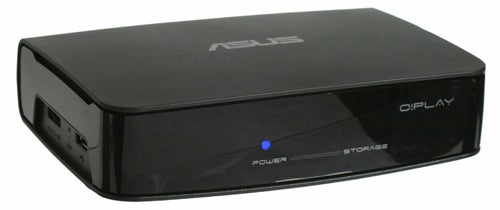
Unlike devices such as the Popcorn Hour A110 and A.C. Ryan Playon! DVR TV, the HDP-R1 doesn’t have internal storage. Instead you playback your media either from a USB stick or over the network connection. As such, setup can be as simple as plugging in a TV connection, the power cable, and a USB stick. There are two USB ports on the left side but one of them doubles as an eSATA port so there are plenty of storage connection options. 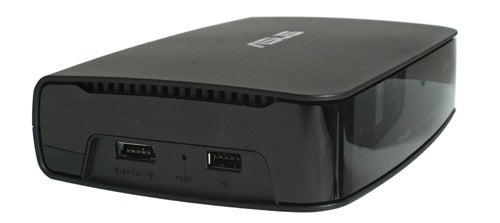
If you want to connect to a network, there’s an Ethernet port round the back but sadly no built-in Wi-Fi. Also on the back are sockets for stereo analogue audio, composite video, optical digital audio, HDMI, and of course power. The lack of component video output may be of concern to those with older TVs but we can forgive Asus for this as HDMI is just so ubiquitous nowadays. 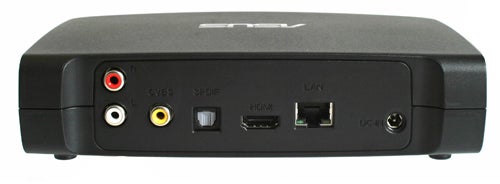
Setup is as simple as it gets. You just connect your choice of video and audio connection to your TV, plug in the power adapter, and press the power button on your remote and away you go. You’ll be greeted by a basic menu system that just manages to stay the right side of the ugly line. It’s clear and functional but a rival to Apple TV, it certainly isn’t. 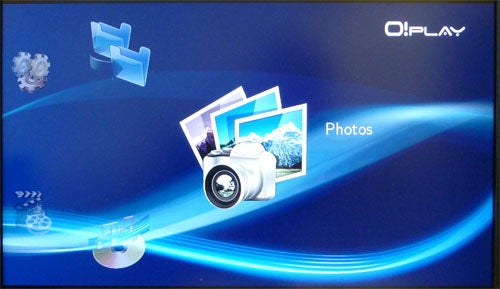
From here you can either plug in a USB/eSATA device or connect the HDP-R1 to your home network. By default the network interface uses DHCP to have an IP address automatically assigned but you can set up a manual IP address if you like. Once added to the network, you’ll be able to see any standard windows workgroups and any attached devices and their shared folders. These you can then browse for your multimedia files.
Back to the menu system and there are three basic routes to your media; photos, music, and videos. Each option opens up the same folder-driven interface, whereby you’re given a choice of either a storage or network device and you browse the devices just as though they were folders on your computer. There’s no scanning of your media and creation of a media library as you get in iTunes or the like – you just trudge through the folders until you get to the files you need. When files are sorted into Photos, Music, and Videos, unrelated file types are simply hidden from view so if you have a folder containing multiple file types and browse it through Videos it will only show video files; through Music, only music files, etc. 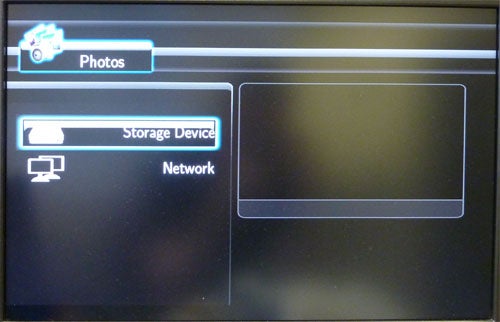
It’s all pretty basic and it can take a while to get to the folder/file you want if it’s buried deep in a folder tree. However, assuming you keep your files reasonably organised it is a simple and intuitive system to get around, which is more than can be said of some seemingly more sophisticated interfaces on other devices.
One particularly useful addition, courtesy of the network connection, is the ability to copy files between USB/eSATA devices and network locations. This makes it possible to swap and share files without the need to start up a computer. Transfer speeds are also pretty decent with it taking 35 seconds to transfer a 108MB video file from our USB drive to a folder on our NAS box. 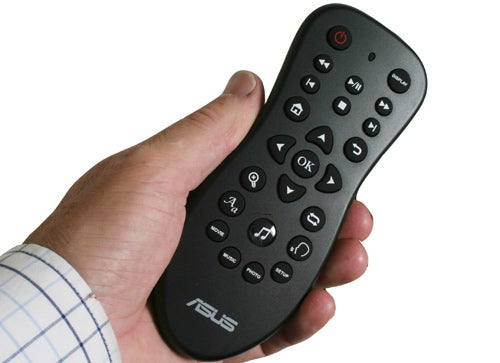
When browsing video and photo files, previews appear in the right panel, which is quite useful though we would prefer a proper thumbnail view instead. Also, this preview mode suffers in the same way that the Seagate FreeAgent Theater did: you must wait until the preview has finished loading until you can actually tell the player to play it. The wait is only a second or two but it’s enough to be mildly frustrating at times. 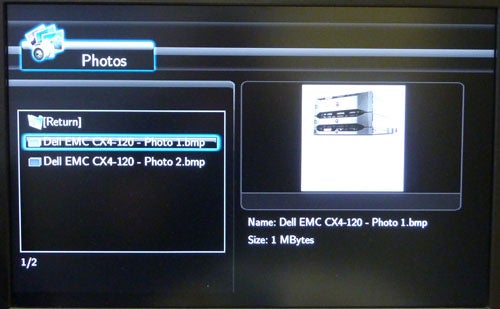
Other features include the ability to zoom up to x16 into video and photos and pan around them. There’s also support for multiple audio tracks and subtitles for those video formats that support it. Repeat and shuffle functions are available for music, and like the other features just mentioned, there are dedicated buttons on the remote to control this. Indeed, the clear plastic shuffle button is the most prominent button on the whole remote.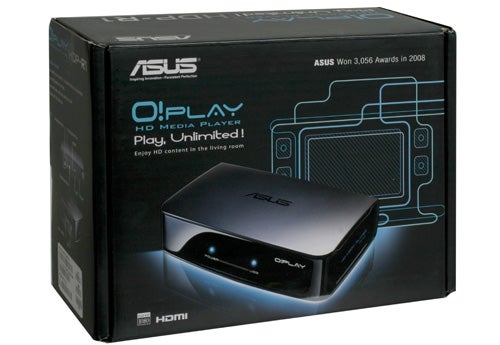
Finally we come to how the HDP-R1 actually performs when it’s playing all your precious multimedia and in this respect we can find no fault whatsoever. All the major video file formats are supported including mkv and rmvb and resolutions of up to 1080p are all playable. Playback is smooth and loading times are near instantaneous. Likewise music and image format support is also up there with the best (for a full list, see the next page).
There is little in the way of extra video processing going on, like that found on high-end AV equipment, but assuming you use the digital connections you can always rely on your TV’s and/or AV receiver’s processing to do its best with the digital signal.
”’Verdict”’
The Asus O!Play HDP-R1 is in many ways a fairly uninspiring HD media player; its interface is very stark, the device itself and the remote are hardly works of art, and there’s no support for more sophisticated network functions like reading iTunes servers etc. However, if all you want is a cheap media player for browsing your network folders and playing just about any file you throw at it then we have no problem recommending the HDP-R1.
”’ Video containers: ”’
- mp4
- mov
- xvid
- avi
- divx
- asf
- wmv
- mkv
- rm
- rmvb
- flv
- ts
- m2ts
- dat
- mpg
- vob
- mts
- tp
- trp
- iso
”’Video codecs:”’
- mpeg 1/2/4
- h.264
- VC-1
- RM/RMVB
”’Audio formats:”’
- MP3
- WAV
- AAC
- OGG
- WAV
- FLAC
- AIFF
- LPCM
- WMA
- Dolby Digital AC3
- Dolby Digital Plus
- DTS Dolby Digital & DTS pass through
”’Photo formats:”’
- JPEG
- BMP
- PNG
- GIF
- TIFF
”’Subtitle formats :”’
- SRT
- SMI
- SUB
- SSA
Trusted Score
Score in detail
-
Value 10
-
Features 8
-
Design 6


Editorial independence
Editorial independence means being able to give an unbiased verdict about a product or company, with the avoidance of conflicts of interest. To ensure this is possible, every member of the editorial staff follows a clear code of conduct.

Professional conduct
We also expect our journalists to follow clear ethical standards in their work. Our staff members must strive for honesty and accuracy in everything they do. We follow the IPSO Editors’ code of practice to underpin these standards.
Editorial independence
Editorial independence means being able to give an unbiased verdict about a product or company, with the avoidance of conflicts of interest. To ensure this is possible, every member of the editorial staff follows a clear code of conduct.
Professional conduct
We also expect our journalists to follow clear ethical standards in their work. Our staff members must strive for honesty and accuracy in everything they do. We follow the IPSO Editors’ code of practice to underpin these standards.
