

Verdict


Key Specifications
- Review Price: £120.00
DFI’s popularity has risen steadily ever since it launched its Lanparty range of motherboards a couple of years ago. Since then the Lanparty family has grown with the introduction of a ‘lite’ version in the shape of the Lanparty UT.
DFI hasn’t stripped out all of the features of the Lanparty boards to create the Lanparty UT range with only minor changes to the hardware. The only thing you really lose out on is the extra accessories such as the Front-X and the case carrying straps.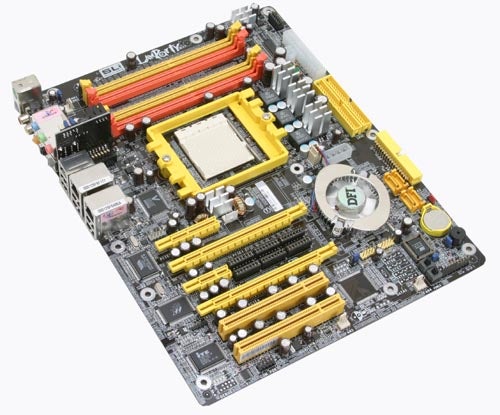
The first board we’ve looked at in this new series of products from DFI is the Lanparty UT nF4 SLI-D, which is a rather unusual SLI motherboard in several ways. The most obvious difference between the Lanparty UT nF4 SLI-D and the other SLI boards is the layout, as the CPU socket has been placed below the memory modules. There could potentially be problems with this layout with certain cases such as the SilverStone TJ06 and Enermax CS-718-S, which have a special cooling setup. This is only an issue with a few cases on the market, but it’s worth highlighting.
From this it’s clear that DFI didn’t follow the nVidia reference design and further proof of this is that the little piece of PCB that most SLI boards use to change between SLI and none SLI mode is missing. Instead DFI is using six blocks of jumpers that have to be moved to change to SLI mode. The problem with this is that the jumper blocks are quite hard to remove, even with the included tool. As the tool hasn’t been specifically designed for removing jumpers – it is a BIOS chip removal tool – it takes time and patience to remove the jumper blocks. However, re-fitting them is easy enough and it’s not a task that you’ll perform more than once or twice in the lifetime of the board anyhow – unless you review graphics cards for a living.
The third and final major difference between the Lanparty UT nF4 SLI-D any most other motherboards we’ve looked is the Karajan audio module. Rather than having the audio codec on the motherboard DFI have moved it to a small plug-in module, attached to the motherboard via a set of pins. This is meant to reduce EMI interference and other kinds of noise that might be picked up. However, I have to admit that my untrained ears didn’t pick up any more noise on other SLI boards than it did with the DFI Karajan module. The Realtek ALC850 AC97 audio codec might hold back the full potential of DFI’s audio setup as it is not the best audio codec on the market partly because it’s not HD compliant.
This is also one of few boards available so far with an x4 PCI Express slot, which is physically longer than a x1 slot. How significant that is at the moment is hard to tell, but I have heard whispers about PCI Express soundcards needing a x4 slot to work properly so there might have been some wisdom here on DFIs side. 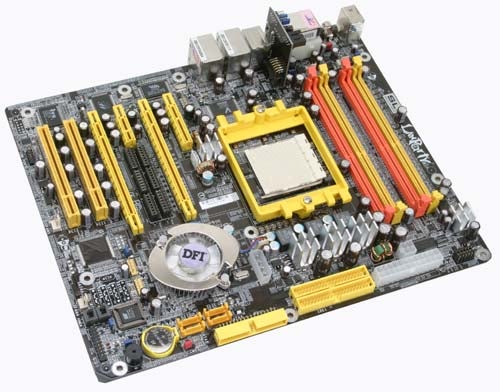
The x4 slot though only works in x4 mode when SLI is enabled. If you’re not familiar with how PCI Express bandwidth works this can be tricky to explain so bear with me. The nForce 4 SLI chipset has a total of 20 data lanes at its disposal. In non-SLI mode on the Lanparty UT nF4 SLI-D this is split up into one x1 slot, one x2 slot and one x16, meaning that the x4 slot only operates in x1 mode, as there’s only one lane of bandwidth left available to it. In SLI mode however, the x2 and x16 each become x8 slots – leaving four lanes of bandwidth, which are then assigned to the x4 slot. The x1 slot is then disabled.
Further expansion comes in the shape of two PCI slots, which could be restrictive. However, the board does have plenty of onboard features to make up for this. All the plastic details such as the PCI and PCI Express slots – apart from the power connectors – are UV reactive, which is likely to be a hit with the case modders out there.
The nForce4 SLI chipset offers support for up to four IDE devices and four SATA devices all of which can be set up in various RAID configurations. Integrated Gigabit Ethernet is also part of the nForce4 SLI chipset and this comes with a built in hardware firewall. A second Gigabit Ethernet controller from Marvell is connected via the PCI bus, but this is not compatible with the built-in firewall. DFI has also added FireWire 400 to the mix with a single port around the back and a header for a second port available.
No less than six USB 2.0 ports are part of the rear I/O alongside the two Ethernet connectors, the FireWire 400 port, the six audio connectors of the Karajan module, coaxial S/PDIF in and out and finally two PS/2 ports. If you’re still using serial and parallel devices you’re out of luck as neither of these ports are present. There is a header on the board for a serial port, so this could be bought as an upgrade option, but there’s no such option for a parallel port.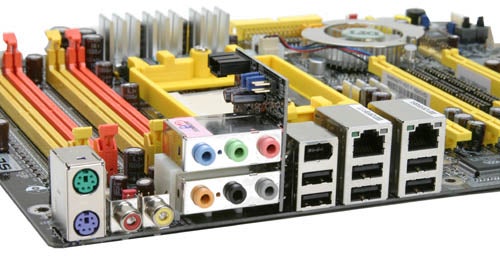
A couple of interesting and useful features that DFI has equipped the Lanparty UT nF4 SLI-D with are four small debug LEDs that works in a similar fashion to MSI’s D-LED modules.
My favourite feature though, is the onboard power and reset buttons. These make it much easier to test that the system is working when you’re tinkering around inside your case. There are also plenty of fan headers spread around the board although the location of a couple of them could do with a re-think. If you’re using SLI you need to connect either a Molex or a floppy connector to one of the two power connectors on the board. Being given a choice to use one or the other is rather unusual, but it might make it easier to route the cables from your PSU. Two spare USB headers are also available for front mounted USB ports on your case.
Apart from the odd layout with the memory modules above the CPU socket, the design works quite well. The power connectors are grouped together at the upper front part of the boards and all the MOSFETs are covered by some solid looking heatsinks. The only complaint here would be that the case connectors aren’t colour coded but at least they’re clearly labelled.
You don’t get a whole heap of accessories in the box, as this is reserved for the full-on Lanparty version. Two rounded IDE cables, a rounded floppy cable, two SATA cables, a SATA power splitter, the jumper removal tool, an SLI bridge connector and the Karajan audio module is all you get.
The printed manual is pretty poor and doesn’t even cover all the features on the board. There are also a couple of loose sheets of paper in the box with errata.
The BIOS has an interesting feature called CMOS Reloaded. This allows you to save up to four different BIOS settings which can be easily accessed and changed between, something that is very likely going to appeal to the overclockers out there. You could use one highly overclocked setting for gaming and one regular setting for when your doing critical work and stability is imperative. 
DFI has also implemented another overclocking feature that enables you to increase the memory voltage above 3.2V, when most boards don’t go beyond 2.9V. This could potentially damage your memory modules, so obviously this is done on your own risk. The BIOS that shipped with the board we received was an early one and didn’t work with our tests, which a later BIOS corrected. I recommend that you ensuring the board has the latest BIOS after you build your PC.
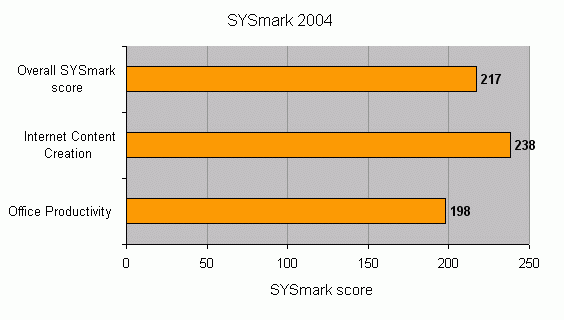
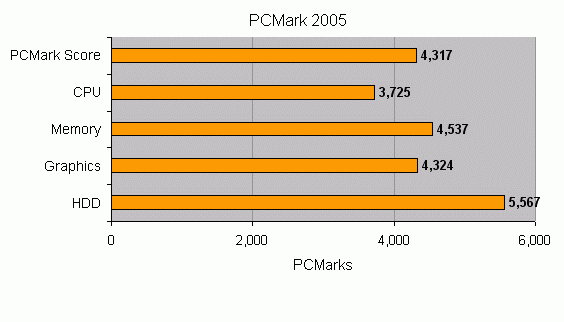
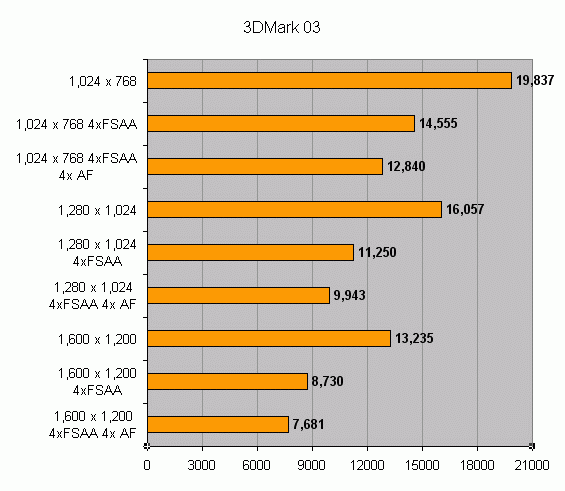
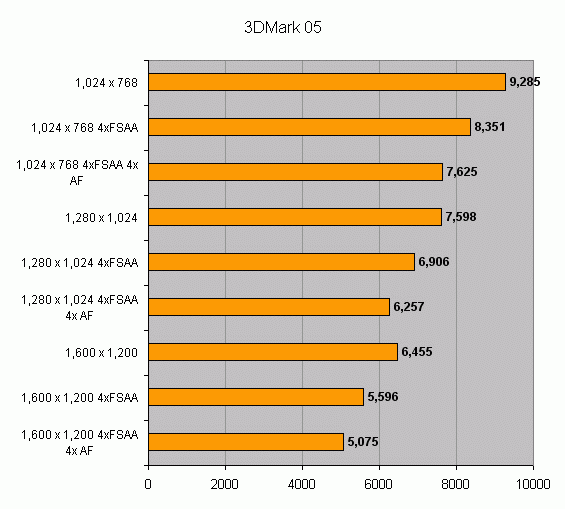
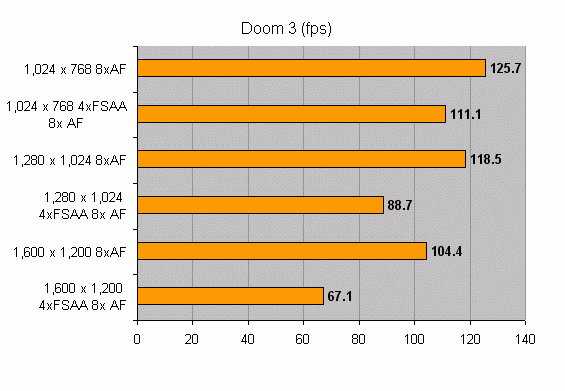
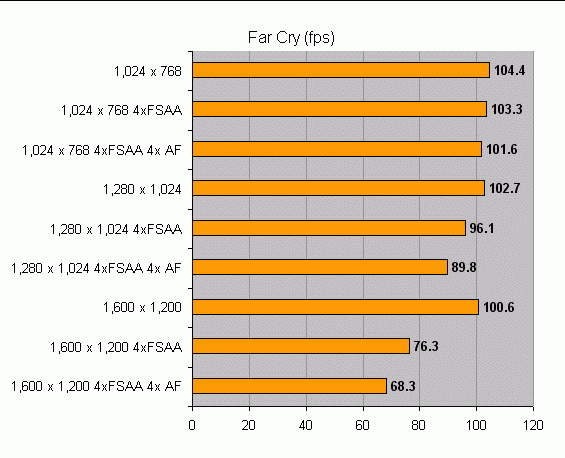
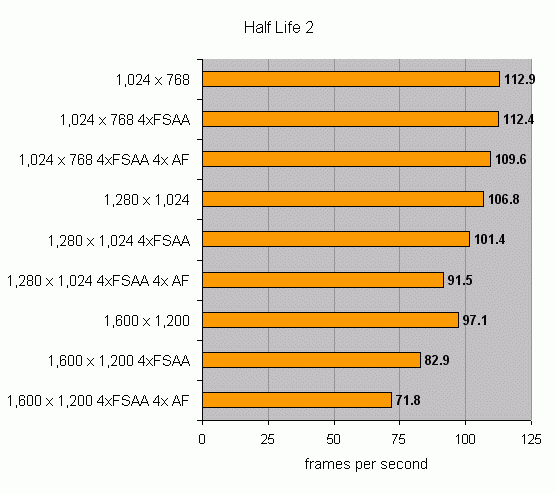
So what about benchmarks? Our test bed consisted of an AMD Athlon 64 FX-55 processor, 1GB of Crucial Ballistix PC3200 DDR memory, a Maxtor MaxLine III 250GB hard drive and two nVidia GeForce 6800GT graphics. The Lanparty UT nF4 SLI-D scored an overall score of 217 in SYSMark 2004 cards in SLI. Moving on to PCMark 05 it managed an overall score of 4317, slightly disappointing. On the other hand the 3D scores are nothing but impressive in SLI mode and I have no complaints at all here. You can have a closer look at those numbers on the results page.
Overall, the Lanparty UT nF4 SLI-D has managed to impress me, although there are improvements that could be made. At £120.44 this is not one of the cheapest SLI boards around, but it does have a solid range of features which makes up for the slightly higher price.
”’Verdict”’
The DFI Lanparty UT nF4 SLI-D differentiates itself from the rest of the SLI boards by having a unique design and some interesting features, especially for overclockers, while offering good application and gaming performance.
(table:features)
Trusted Score
Score in detail
-
Value 8
-
Performance 8


Editorial independence
Editorial independence means being able to give an unbiased verdict about a product or company, with the avoidance of conflicts of interest. To ensure this is possible, every member of the editorial staff follows a clear code of conduct.

Professional conduct
We also expect our journalists to follow clear ethical standards in their work. Our staff members must strive for honesty and accuracy in everything they do. We follow the IPSO Editors’ code of practice to underpin these standards.
Editorial independence
Editorial independence means being able to give an unbiased verdict about a product or company, with the avoidance of conflicts of interest. To ensure this is possible, every member of the editorial staff follows a clear code of conduct.
Professional conduct
We also expect our journalists to follow clear ethical standards in their work. Our staff members must strive for honesty and accuracy in everything they do. We follow the IPSO Editors’ code of practice to underpin these standards.
