

Verdict


Key Specifications
- Review Price: £999.00
About two years ago I looked at the 30in Apple Cinema Display and was amazed at how useful a 2,560 x 1,600 desktop display could be. At the time there wasn’t a competing product available, and the price of the panel was over £2,000. Since then, other manufacturers have got in on the 30in display act, with Dell making the biggest splash and also helping bring the price down. Now Samsung has entered the market with the SyncMaster 305T and as is usually the case with Samsung these days, it has got pretty much everything right.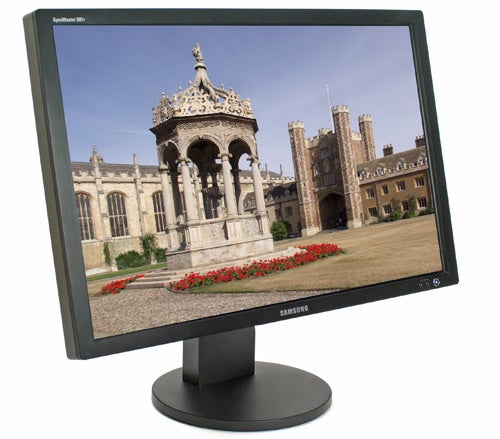
The SyncMaster 305T looks surprisingly sleek for such a large screen. Since having this display on my desk, I’ve become somewhat desensitised to its size, and now it doesn’t seem in any way large. In fact, I’ve gone as far as to put a 21in 1,600 x 1,200 screen next to it in portrait mode, in order to make my desktop space even bigger. At only 20mm, the bezel surrounding the panel is pretty slim for a screen this size, while the matt black finish gives it a suitably stealthy look. The bezel has also been kept quite clean, with a single Samsung logo at the bottom in the centre, and the model name at the top left.
At the bottom right are the power button and brightness controls, and these are the only controls you’ll find on the monitor. There’s no OSD and no controls over colour, contrast or anything else. The 30in Apple Cinema Display was completely void of adjustment options too, as is the Dell 30in screen. This isn’t as big a handicap as you may first think though, since pretty much all graphics card drivers will let you adjust the colours, gamma curve, contrast and just about anything else that you may want to tweak.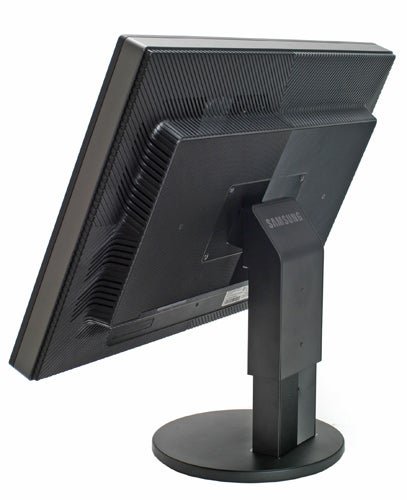
Even without tweaking the settings using the graphics card driver, the 305T turns in a stunning performance when it comes to image quality. For heavy Photoshop work this screen is the perfect companion. Not only does it provide you with copious amounts of canvas space to view very large images, but the images are reproduced with unprecedented sharpness.
Loading up a batch of high-quality 8-megapixel images, taken with a Canon EOS 1D MkII and L-Series glass, the 305T performed flawlessly. This screen manages to pull every ounce of detail out of low-light areas of an image, but not at the expense of vibrancy or even black levels. In fact for anyone that does a lot of high resolution image editing, the 305T will be a godsend, not just from an image quality standpoint, but also when it comes to productivity – as anyone who uses Photoshop will tell you, the more of a high resolution image you can fit on the screen, the easier it is to edit.
Throwing DisplayMate at the 305T did nothing to diminish my high opinion of this monitor. I’ve seen very few displays that have put in a better performance than this one. Both colour and greyscale gradations were smooth as silk, while the Colour Bars test showed no signs of compression at the high intensity end, but still managed a completely uniform tail off at the low intensity end. But where the 305T really excelled was in the Scaled Fonts test, where even 6.8 point text was clearly readable, with every letter perfectly formed and every curve smooth and well resolved.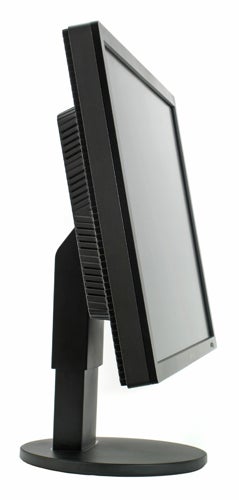
Video is also surprisingly good on the 305T, considering that there’s a massive amount of scaling going on. Even 1080p high definition content comes nowhere near the native resolution of this screen, so the fact that video still looks pretty damn impressive is testament to the electronics driving this huge panel.
There’s also very little in the way of motion smearing in evidence when watching video. This is testament to the quoted 6ms grey-to-grey response time, which is quite low for a screen of this size. Also impressive is the 1000:1 contrast ratio, which is well above the average LCD monitor and higher than some LCD high definition TVs. Of course the latest generation of LCD TVs have started quoting dynamic contrast ratios, due to the use of dynamic backlight technology, but it’s worth remembering that this is primarily a data monitor, not a video display.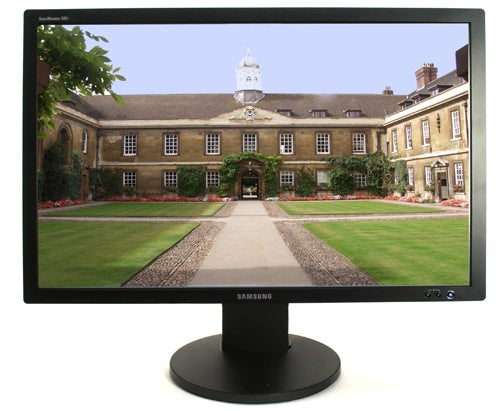
But even general Windows work on the 305T is an absolute joy. You can just have so many windows open concurrently, without needing to overlap everything. If, like me, you constantly have loads of active windows on your desktop, a screen with this kind of resolution gives productivity a real boost, and doesn’t leave you wishing that you were working on a Mac with its Exposé function.
When I reviewed the Apple 30in Cinema Display I complained about the total lack of adjustment, with the screen sitting too high for comfortable viewing. Thankfully Samsung has equipped the 305T with height adjustment, allowing me to drop the panel as low as it will go in order to achieve a pretty much perfect viewing angle. There’s also a pivot-pad built into the stand, so the screen will pan left and right with minimum effort. The panel will also tilt forwards and backwards, again helping the end user to achieve that all important ideal viewing angle.
At the rear there’s a single dual-link DVI port, so you’ll need a dual link equipped graphics card to drive this screen. Thankfully that shouldn’t be too much of an issue, since both ATI and nVidia have been shipping dual-link cards for at least a year and a half. There’s also a four-port USB 2.0 hub built-in, which is particularly useful for connecting up your phone, MP3 player, or any other USB device, without having to rummage around behind your PC.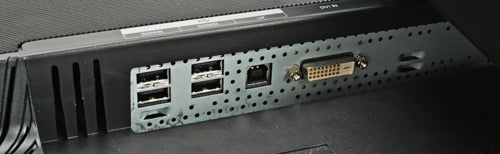
When it comes to pricing, Samsung has been pretty aggressive with the 305T. A quick look around online revealed a price of £999 including VAT – this compares favourably with Dell’s 30in 3007WFP-HC, which comes in at around £970 including VAT. That said, the Dell isn’t as bright as the Samsung at 300 cd/m2 compared to 400 cd/m2. The Dell also can’t quite match the Samsung’s response time, at 8ms compared to 6ms – not that I put a massive amount of stock in mega-low response times anyway.
Ultimately, you either need a 30in 2,560 x 1,600 monitor on your desk or you don’t. But even if you don’t need this screen, it’s not going to stop you wanting it, and if you happen to have a grand burning a hole in your pocket, the SyncMaster 305T will definitely improve your PC experience.
”’Verdict”’
Samsung has built a strong reputation for itself when it comes to widescreen monitors, from the superb 215TW and 226BW, to the equally impressive 244T. Now the Korean giant has topped an already impressive range with the SyncMaster 305T.
If you think that a 30in screen is too large for a desktop display, think again. Once you get used to having this much desktop real estate, along with bright and vibrant colours and crystal clear image quality, you’ll never want to use another screen again – I know that I don’t want to!
Trusted Score
Score in detail
-
Image Quality 10
-
Value 9
Specs
| Screen Size (inches) (Inch) | 30 in |
| Aspect Ratio | 5:4 |
| Response Time (Millisecond) | 6 ms |
| Brightness (Lumen) | 400 Nitlm |
| Dot Pitch | 0.250 mm |
| Horizontal Viewing Angles | 178? |
| Vertical Viewing Angles | 178? |


Editorial independence
Editorial independence means being able to give an unbiased verdict about a product or company, with the avoidance of conflicts of interest. To ensure this is possible, every member of the editorial staff follows a clear code of conduct.

Professional conduct
We also expect our journalists to follow clear ethical standards in their work. Our staff members must strive for honesty and accuracy in everything they do. We follow the IPSO Editors’ code of practice to underpin these standards.
Editorial independence
Editorial independence means being able to give an unbiased verdict about a product or company, with the avoidance of conflicts of interest. To ensure this is possible, every member of the editorial staff follows a clear code of conduct.
Professional conduct
We also expect our journalists to follow clear ethical standards in their work. Our staff members must strive for honesty and accuracy in everything they do. We follow the IPSO Editors’ code of practice to underpin these standards.
