

Verdict


Key Specifications
- Review Price: £149.99
Samsung hasn’t exactly been shouting from the rooftops about its C6625 Windows-powered smartphone, but that doesn’t mean that the handset isn’t worthy of consideration. In fact, on the surface at least, it looks like a pretty decent messaging phone, thanks to its sturdy build quality, full QWERTY keyboard and onboard GPS. In the UK this phone was originally exclusively available on BT’s rather obscure Talk Time tariff which is targeted at small businesses, but it can now be picked up on a range of networks or bought SIM-free for around £150.
The C6625 is clearly aimed at those who would traditionally buy a BlackBerry-type device as it follows the standard messaging phone layout – with a large screen at the top and a full QWERTY keyboard sitting beneath – quite closely.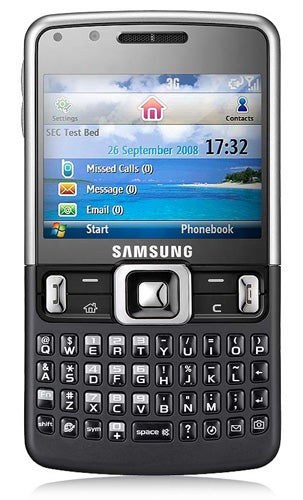
The phone’s 2.6in display has a widescreen aspect ratio, but it only has a resolution of 320 x 240, which is disappointing by today’s standards. We’re used to seeing much higher resolution displays on the likes of the BlackBerry 8900. The low resolution is especially noticeable in applications such as the mobile versions of Excel and Internet Explorer where you find yourself having to do a lot of scrolling because not all that much of the page is visible at any one time. That said, the screen is reasonably bright and produces good, strong colours so pictures and videos look somewhat better than you’d expect.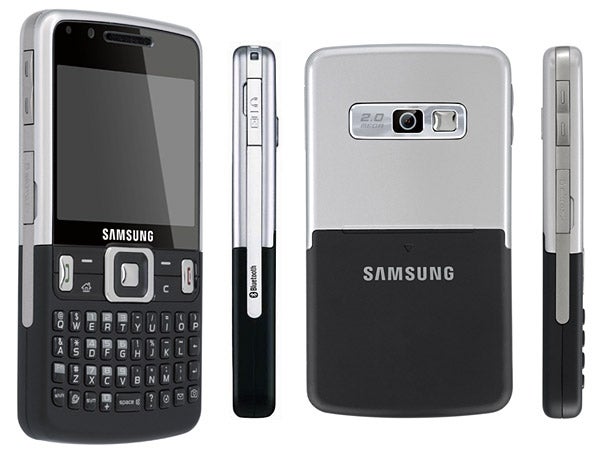
Rather than opting for fancy touch buttons or an optical track pad, Samsung has stuck with mechanical keys and a standard four-way D-pad on this model, but that’s no bad thing as these more tactile buttons feel much better to use in our opinion. Along with the traditional, centre-mounted D-pad there are two software keys positioned directly below the screen, plus a home button, back button and two call control keys. The only other buttons on the handset are the volume rocker switch on the left hand edge and the power button that sits on the top left hand corner.
Of course, one of the most important aspects of any messaging phone is its keyboard. Here Samsung has done a reasonable job, but we have to say that the keyboard isn’t up to the standards of the ones found on the HTC Snap or BlackBerry’s range of devices. The keys are reasonably large, nicely spaced and the general layout is pretty good. However, they just don’t feel as responsive as those on some other models we’ve used. Nevertheless, we did get used to them quickly and after a while, we found ourselves tapping out emails and text messages at a decent speed.
As the C6625’s display isn’t a touchscreen the phone runs Windows Mobile 6.1 Standard rather than the Professional edition. One of the key differences here is that the Office suite of applications can only be used to edit documents, as there’s no facility for creating new documents from scratch. However, there’s nothing to stop you from saving a simple template on your phone and then editing this to use it as the starting point for any new documents you want to create. 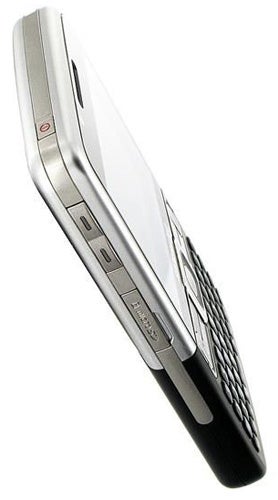
In some ways, we find the Standard edition of WinMo a bit easier to use than the Pro one mainly because the menus are laid out in a more straightforward fashion. We also like the sliding panels interface that Microsoft has added to the Standard edition as it gives you quick access to many of the phone’s key features directly from the home screen. That said, by default this phone uses Samsung’s own take on the Sliding Panels concept, but its version is sadly rather sluggish to use so you’re much better switching back to the standard Microsoft one in our opinion.
On the connectivity front, the C6625 is a bit of a mixed bag. It supports HSDPA but only at speeds of up to 3.6Mbps and unlike most of today’s smartphones its tri-band rather than quad-band, so it’ll work in fewer countries around the world than other handsets. Samsung has also decided to leave out Wi-Fi so you’re completely reliant on the mobile network for downloads. However, Bluetooth V2.0 with EDR is present and there’s also onboard GPS, plus an FM tuner. 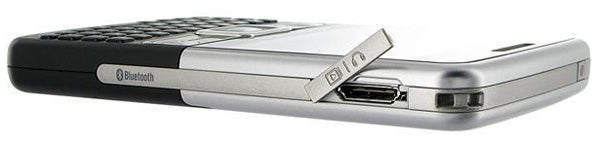
As with most business-focused handsets, the camera on the C6625 comes across as a bit of an afterthought. It’s only got a 2-megapixel resolution, which is pretty tardy in this day and age, and while it does have a micro-mirror for framing self-portraits (for vain business folk?), it lacks a flash and autofocus. Unsurprisingly, given the low resolution, the shots it takes look pretty ropey when they’re transferred to a desktop PC and viewed on a standard monitor.
The phone runs on an Arm 926EJ-S Nomadik processor that ticks over at 393MHz and there’s just under 100MB of space free for storing your files, but you can bump this up using microSD cards (the slot is hidden behind an easy to get at flap on the left hand edge). In general, the phone feels relatively quick in use and battery life isn’t too bad either. From a full charge we got around two days of medium usage from it. However, it’s annoying that the charging connector (which doubles as the headphone jack) is of a non-standard Samsung type – really it should be a standard micro-USB type used on most new smartphones. 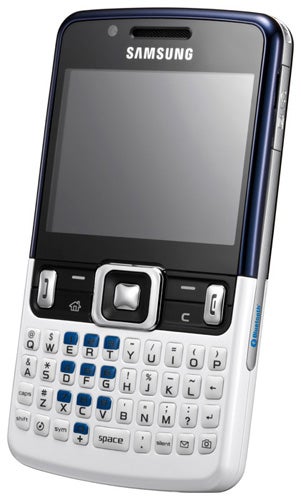
”’Verdict”’
We like the C6625’s slim and light design, good battery life and attractive price tag, however the handset is somewhat marred by its poor camera and the lack of Wi-Fi, the latter of which may be a deal breaker for many. The biggest issue, however, is that while the C6625 comes across as a perfectly decent phone, it definitely lacks the flair and wow factor of similar devices like the Blackberry Curve 8900 and HTC Snap. If your budget is tight it’s still worthy of consideration, but if you’ve got a bit more cash to spend then we’d recommend you consider the other two handsets first.
How we test phones
We test every mobile phone we review thoroughly. We use industry standard tests to compare features properly and we use the phone as our main device over the review period. We’ll always tell you what we find and we never, ever, accept money to review a product.
Trusted Score
Score in detail
-
Performance 7
-
Design 7
-
Value 8
-
Features 6


Editorial independence
Editorial independence means being able to give an unbiased verdict about a product or company, with the avoidance of conflicts of interest. To ensure this is possible, every member of the editorial staff follows a clear code of conduct.

Professional conduct
We also expect our journalists to follow clear ethical standards in their work. Our staff members must strive for honesty and accuracy in everything they do. We follow the IPSO Editors’ code of practice to underpin these standards.
Editorial independence
Editorial independence means being able to give an unbiased verdict about a product or company, with the avoidance of conflicts of interest. To ensure this is possible, every member of the editorial staff follows a clear code of conduct.
Professional conduct
We also expect our journalists to follow clear ethical standards in their work. Our staff members must strive for honesty and accuracy in everything they do. We follow the IPSO Editors’ code of practice to underpin these standards.
