

Verdict


8-megapixel cameraphones are getting more and more common. Only last week I took a look at Sony Ericsson’s first Walkman branded mobile with an 8-megapixel camera, the W995. Now this week I have a new addition to the Samsung 8-megapixel line-up. Following on from the M8800 Pixon and the i8510 Innov8 comes the i8910 HD, which you will also see referred to as the Omnia HD.
This is a stunner of a mobile phone. It boasts some superb credentials as a multimedia handset and while it won’t slip easily into a small, tight pocket, the upside of that is a vast screen. At 144g, it’s a bit heavy, which is surprising given the amount of plastic used in the casing. For a top-notch handset at this kind of weight, I would have expected a little more metal, though I can’t fault the build quality. At 123mm tall, 58mm wide and 12.9mm thick it’s the height that’s noticeable in both pocket and hand.
Still, as I said, the size means there is room for a huge screen. Measuring 3.7in, it dwarfs almost every other mobile phone touchscreen available. Its resolution is good, too, at 360 x 640 pixels, and the AMOLED technology makes it clear, sharp and very readable in most situations. It was not outstanding in strong sunlight, but otherwise it did very well.
The touchscreen is capacitive and responsive. It is a little jarring that some elements require a double tap to select while others require one. For example, on the main applications menu you tap an icon to select it. On the next screen, you tap once to highlight a choice, the second time to select it. Then on the next screen, if there is one, you again need to tap twice, once for highlighting, once for selection. It may take you a short time to get used to the convention.
Samsung has implemented its Widgets system again. As usual, you tap a tab on the left edge of the main screen, and out pops a scrolling vertical menu of widgets that you can drag onto the screen. There are plenty of them, but their icons are large and I found I could only get away with about three on screen at any one time. That is dealt with by having three screens you can flick between using an on-screen selection bar. There aren’t any live widgets such as a weather feed, which is a bit of a missed opportunity.
From the home screen, you can fingerpan left and right to get to the main menu screen and photo contacts, and there is a row of four buttons running along the bottom of the main screen for dial pad, contacts, messaging and the main menu. With that lot at hand, only three small front buttons are needed for Call, End and again bringing up the main menu.
Samsung has not stinted on the specifications with this handset. It runs on version 5 of Symbian S60, though there is absolutely no way that it looks like a Nokia handset thanks to Samsung’s skinning. The use of Symbian helps with the vast array of applications that are here. You can add more to them if you want to, and if the 8GB of storage on the Orange version of this handset is not enough, then you could look around for the 16GB version. There is a microSD card slot for adding further storage located on the left side of the casing where it is protected by a hinged cover.
This is an HSDPA device supporting a full 7.2Mbps download speed and quad-band GSM. There is a front button for two-way video calls. GPS and Wi-Fi are built in, and there is Bluetooth too, of course. 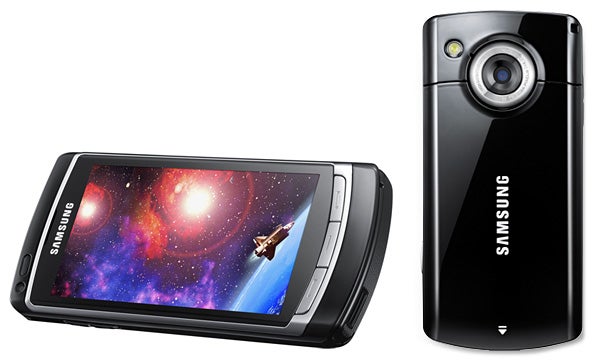
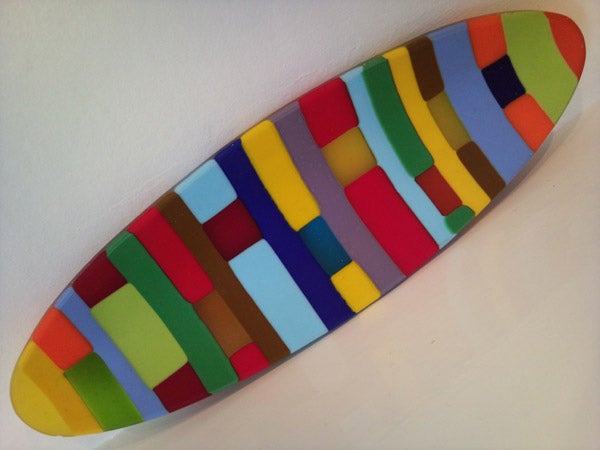
The camera takes very respectable images. I’ve said before that 8-megapixels on a phone is not like 8-megapixels on a dedicated camera, but if you are lured by the numbers you shouldn’t be disappointed with the results. The coloured dish, photographed indoors under household lights, is sharp and clear, and the yellow flowers were shot using the macro facility.
The flash is LED rather than Xenon, which is a shame, but there are plenty of shooting controls and among them are face, smile and blink detection. Jarringly these aren’t all in the same place in the settings menu, so you may need to fiddle around a bit to find precisely what you are looking for. It is fortunate, then, that the controls are very easy to navigate with large finger-friendly icons with left and right side-mounted icon menus ready for tapping when you want to change settings. And of course there is a side-mounted shutter button. There’s no lens cover, and even though the lens is slightly recessed it is likely to get scratched.
Furthermore, if you are a video fan you will also like i8910 HD’s ability to capture (and decode) footage at a maximum HD Ready resolution of 1,280 x 720 pixels, at 24fps. Video format support covers DivX, XviD, H.263, H.264, WMV, MPEG4, RV.
One area where that large screen excels is web browsing and another is text entry. You can enter URLs and other text using a QWERTY on-screen keyboard that sits very nicely indeed in landscape mode. It was comfortable to work two-thumbed. There is also a handwriting recognition system, though I found it unwieldy. And of course you can also use an alphanumeric tappable keypad if you prefer.
The accelerometer is great for switching between landscape and portrait web page views, while finger panning around pages is easy, aided by a nice zoom slider you can call up to get closer or further away from page content. A menu button brings up lots of options such as setting bookmarks, returning to your home page, keyword search within pages and even RSS subscription. 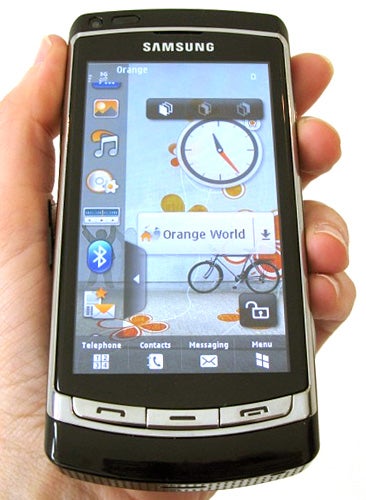
Music playback is another central feature of a modern multimedia handset. Here, there’s a 3.5mm jack on the top edge of the casing so headphones won’t snag at your pocket when they are in place, unlike those proprietary side-mounted connectors found on other handsets. It is a shame that Samsung’s headset is one-piece, though, as I’d have liked the opportunity to use my own headphones past the microphone for better quality output when using hands-free. For those into their radio, the i8910 HD comes with an RDS-enabled FM one.
The phone just managed over 10 hours of music from a full battery charge. Samsung quotes 13.5 hours of talk and 600 hours on standby. Use the Wi-Fi and GPS sparingly and you may approach the two and a half days between charges that I got.
Sadly, there is no Google Maps to take advantage of the GPS, though you can add it easily. There is plenty of other additional software here including a digital compass, voice recorder, podcasts manager, the RealPlayer, mobile email, calculator, clock, unit converter, notes taker, calendar, an application called Smartreader for converting business cards to the contacts app via the camera, QuickOffice for working with Word, Excel and PowerPoint (reading not creating), and PDF reader.
”’Verdict”’
There are some negative points with the i8910 HD such as the one-piece headset, no Google Maps, and slightly unwieldy size. But the good points far outweigh the bad, and if you are after a large-screened phone this could be a super choice.


How we test phones
We test every mobile phone we review thoroughly. We use industry standard tests to compare features properly and we use the phone as our main device over the review period. We’ll always tell you what we find and we never, ever, accept money to review a product.
Trusted Score
Score in detail
-
Design 9
-
Usability 9
-
Value 8
-
Features 9
General
| Height (Millimeter) | 123mm |
| Width (Millimeter) | 58mm |
| Depth (Millimeter) | 12.9mm |
| Weight (Gram) | 148g |
| Available Colours | Black |
Display
| Screen Size (inches) (Inch) | 3.7in |
| Screen Resolution | 360x640 |
| Touchscreen | Yes |
Battery
| Talk Time (Minute) | 390m |
| Standby Time (Hour) | 450hr |
Storage
| Internal Storage (Gigabyte) | 8/16GB |
| Camera (Megapixel) | 8 Megapixel |
| Front Facing Camera (Megapixel) | CIF Megapixel |
| Camera Flash | LED |
Connectivity
| Bluetooth | Yes |
| WiFi | Yes |
| 3G/4G | Yes |
| 3.5mm Headphone Jack | Yes |
| Charging/Computer Connection | microUSB |
Processor and Internal Specs
| CPU | 600MHz ARM Cortex A8 |
Misc
| GPS | Yes |


Editorial independence
Editorial independence means being able to give an unbiased verdict about a product or company, with the avoidance of conflicts of interest. To ensure this is possible, every member of the editorial staff follows a clear code of conduct.

Professional conduct
We also expect our journalists to follow clear ethical standards in their work. Our staff members must strive for honesty and accuracy in everything they do. We follow the IPSO Editors’ code of practice to underpin these standards.
Editorial independence
Editorial independence means being able to give an unbiased verdict about a product or company, with the avoidance of conflicts of interest. To ensure this is possible, every member of the editorial staff follows a clear code of conduct.
Professional conduct
We also expect our journalists to follow clear ethical standards in their work. Our staff members must strive for honesty and accuracy in everything they do. We follow the IPSO Editors’ code of practice to underpin these standards.
