

Verdict


Key Specifications
- Review Price: £109.00
Nokia’s XpressMusic range of handsets keeps getting quietly augmented with new additions. The 5220 XpressMusic is not the flagship mobile of the range by any stretch of the imagination. That accolade goes to the touch-screened 5800, but it is, nonetheless, a mobile with some innovation to recommend it, and, in these cash-strapped times, its circa £100 SIM-free price tag might appeal too.
The Nokia 5220 XpressMusic has a quirky physical design based on a non-uniform candybar scheme. The handset is very light at just 78g. It is tall and thin, with official dimensions of 108mm tall, 43.5mm wide and 10.5mm thick. That’s only half the story, as the handset is taller on its left side than its right one, by some margin. I measured it at 114mm tall on the left, 108mm on the right. 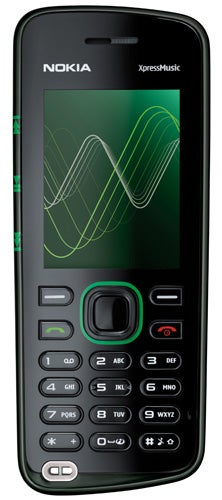
The disparity between the two length measurements makes very little difference as far as hands or pockets are concerned, but it does lend the phone a rather quirky look.
The 5220 comes in two colour schemes direct from Nokia’s online store. Whichever you choose the majority of the front fascia is black with the colour – green or red – providing a frame for the navigation button. The colour also forms a band around the handset and lies behind the music control icons that sit to the left of the screen. The back cover in our green sample is a bright creamy white. Totally out of kilter with the more sedate front fascia it may be, but I rather like it.
Those icons to the left of the screen are a key 5220 XpressMusic feature. They very clearly indicate the positioning of the play/pause, forward and back control buttons on the left edge of the handset. Those buttons are big and would be easy to find by touch without the icons, as they sit along the tall edge pretty much directly in line with the screen.
The icons have another role. When you are listening to music they happily pulse along with the tones. I’m not a big fan of the idea, but it is easy enough to turn them off if they annoy.
Music playback is obviously a key feature of this handset, and there are some good and less good points to consider here. The presence of a 3.5mm headset jack on the top edge of the handset is among the goodies with its location being the least troubling for the pocket. Still, the one-piece headset is a bit disappointing as it lacks music controls and can’t accommodate your own favourite headset beyond the microphone. That last point is a real shame. The provided headset is fairly good, but when you do plug in a better set the high music quality on offer is immediately noticeable.
Music file support covers MP3, M4A, eAAC+, AAC and WMA formats and if you fancy tweaking the output, an equaliser and stereo widening options help things along nicely. An FM radio is also included to boost the musical ability of this phone, but its mere four presets simply aren’t enough.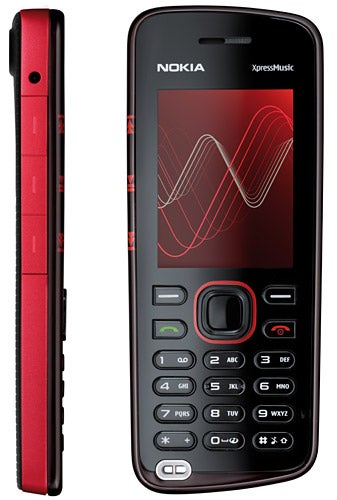
There is just 30MB of internal memory, which is paltry for a music-focussed handset, but at least there’s an easily accessible microSD card slot on the right edge of the phone. Nokia provides a 512MB card – again paltry in this day and age and you are likely to want a larger capacity card pretty quickly.
Incidentally – Nokia says that the handset supports microSD cards up to 2GB in size, suggesting that it does not support SDHC. But it coped with a 16GB card of mine without a hitch, albeit slowly when accessing the folder/file listing in the file manager.
A quick word on battery life. A music-oriented phone needs to offer plenty of it. From a full charge, I got eight and a half hours of music playback, which is far from exceptional for a Nokia handset, but it is respectable enough for a low-cost phone like this one.
No matter what its price, good ergonomics are essential to any mobile phone. Here, screen and keyboard are both a little disappointing. The screen measures just 2in diagonally and although its 320 x 240 pixels are clear and sharp enough, it’s just a bit on the small side.
Nokia has missed an easy trick with the keyboard design. The lozenge shaped number keys are large enough, but the are barely raised from their surroundings. Just a little more elevation would have made texting at speed a great deal easier.
The 5220 XpressMusic runs Symbian S40. It is not a 3G device, which makes web browsing a little painful at times and the small screen isn’t much of a help here. The wait for websites to load complete with images was interminable. In the real world, I certainly wouldn’t be browsing on this handset even though there is a copy of Opera Mini on board.
The camera is not a highlight. It lacks a dedicated key so you have to activate it via the main menu and shoot using the central D-pad button. Furthermore, with no flash and minimal effects and filters, the camera’s use is rather limited.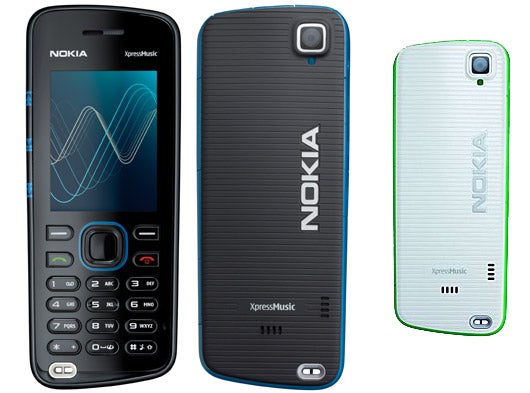
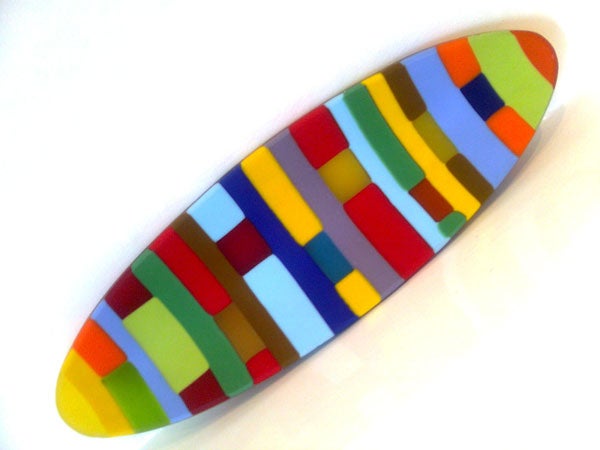
That said, it shoots stills at 2-megapixels and considering the resolution, it did OK, though I am amazed at the whiteness of the background in the coloured dish test shot. Photographed, as ever, under normal household lights, its colours are bright but a little too over-saturated, and that background is far whiter than any I can recall seeing – and indeed whiter than in real life.
The chair, photographed outside on a bright sunny day, is uniform in colour and definition is quite good, while the giant poppy’s colour reproduction is again a little over-saturated, but at least the background detailing is not that bad.
Applications in addition to those already mentioned include mobile email, voice recorder, calendar, alarm clock, Nokia Maps, to do list manger, notes app, calculator, countdown time, stopwatch, and Flickr uploader. The phone ships with Nokia’s PC Suite software and a connectivity cable.
”’Verdict”’
If you are a cameraphone fan, the Nokia 5220 XpressMusic is a no-go area. But for music-lovers there are several plus points, not least being good quality music output and a well placed 3.5mm jack. There are niggles, but for £109 plus the price of a 16GB microSD card you’ve got yourself a competent music phone here, albeit one that is average at everything else.


How we test phones
We test every mobile phone we review thoroughly. We use industry standard tests to compare features properly and we use the phone as our main device over the review period. We’ll always tell you what we find and we never, ever, accept money to review a product.
Trusted Score
Score in detail
-
Design 7
-
Usability 7
-
Value 7
-
Features 6
General
| Height (Millimeter) | 108mm |
| Width (Millimeter) | 43.5mm |
| Depth (Millimeter) | 10.5mm |
| Weight (Gram) | 78g |
| Available Colours | Black with blue/red/green trim |
Display
| Screen Size (inches) (Inch) | 2in |
| Screen Resolution | 240x320 |
| Touchscreen | No |
Battery
| Talk Time (Minute) | 315m |
| Standby Time (Hour) | 406hr |
Storage
| Internal Storage (Gigabyte) | 0.03GB |
| Camera (Megapixel) | 2 Megapixel |
| Front Facing Camera (Megapixel) | No Megapixel |
| Camera Flash | No |
Connectivity
| Bluetooth | Yes |
| WiFi | No |
| 3G/4G | No |
| 3.5mm Headphone Jack | Yes |
| Charging/Computer Connection | microUSB |
Misc
| GPS | No |


Editorial independence
Editorial independence means being able to give an unbiased verdict about a product or company, with the avoidance of conflicts of interest. To ensure this is possible, every member of the editorial staff follows a clear code of conduct.

Professional conduct
We also expect our journalists to follow clear ethical standards in their work. Our staff members must strive for honesty and accuracy in everything they do. We follow the IPSO Editors’ code of practice to underpin these standards.
Editorial independence
Editorial independence means being able to give an unbiased verdict about a product or company, with the avoidance of conflicts of interest. To ensure this is possible, every member of the editorial staff follows a clear code of conduct.
Professional conduct
We also expect our journalists to follow clear ethical standards in their work. Our staff members must strive for honesty and accuracy in everything they do. We follow the IPSO Editors’ code of practice to underpin these standards.
