

Verdict


HP’s first Windows Smartphone was the cheap and cheerful 514 Voice Messenger. This follow up is an altogether more expensive and luxurious affair and costs almost double the price weighing in at around £330 SIM-free. As its name implies the handset is a voice centric device aimed at those looking for a phone first and smartphone second.
It has to be said that this new Voice Messenger is quite a sexy looking phone, with HP having dumped the boxy, retro styling of its predecessor in favour of a much sleeker and more modern design. Its petite dimensions and narrower girth mean it feels more comfortable to hold in your hand than a lot of the other smartphones around at the moment.
Along with the usual volume rocker switch and dedicated camera button, HP has kitted the handset out with two welcome additions. The first is a keylock button and the second is a sliding control to put the handset in and out of silent mode. 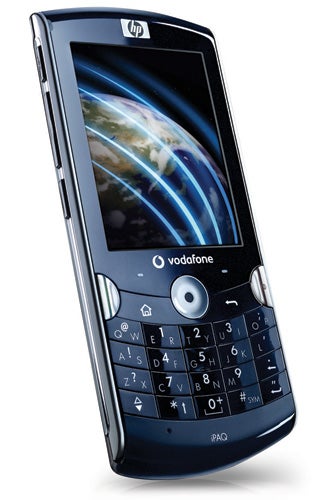
For text input HP has opted for a hybrid keypad that’s clearly been copied from RIM’s range of Blackberry mobile emailers. It’s laid out as a half QWERTY configuration with two letters per key. To enter the first letter on a key you tap once and to access the second letter you simply double tap the same key. Alternatively you can just single tap each key and leave it up to the phone’s predictive text system to work out what word you’re trying to spell out. Both methods take a little while to get used to, but once mastered they allow you to work up a decent speed when typing out emails or text messages.
Resting above the main keypad you’ll find the phone’s four-way optical controller, which is one of the handset’s unique features. Unlike a traditional d-pad this controller doesn’t rock back and forth across both axes. Instead, to move around in menus you simply glide your finger or thumb in the direction your want to travel. It all sound very straightforward, but unfortunately it’s a real pain to use. The problem is that it’s just very unreliable. Sometimes it registers movements perfectly, but other times it takes three or four goes to get it to respond. It really is horrible to use and one of the worst design decisions we’ve come across in a long time. Plus, as the phone’s display is not a touchscreen, you have to rely totally on the optical controller to drive the OS.
Although it’s not touch-sensitive, the Voice Messenger’s screen is actually pretty good. It takes up just over half of the front real-estate on the phone and thanks to its 320 x 240 resolution text and icons look very crisp and sharp. It also does a good job of displaying pictures and videos as colours look bright and vibrant.
The handset is built around Windows Mobile 6.1. By default this is set to use a slightly tweaked version of the Sliding Panels home screen, which looks good and is easy to use. However, the traditional Window Mobile mess of menus behind this home screen still remain in place. On the plus side you do get the mobile Office suite of applications including Word and Excel so you can edit work documents while you’re on the go. HP has also loaded some extras including the welcome addition of the Opera Mobile Browser (v8.65) and the Westek Jetcet viewer for displaying PDF files. 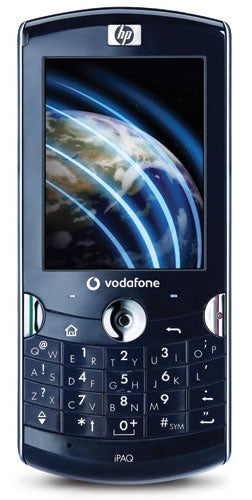
The phone’s Qualcomm 7201A processor is clocked at 528MHz and keeps everything ticking over at sprightly pace, plus there’s 128MB of RAM and 256MB of flash memory for storing files. You can supplement this using microSD cards of up to 8GB in size, but the card slot is rather awkwardly placed. It’s mounted on the side of the phone, but you have to take the battery cover off to get at it. It would have been much more sensible to provide access via a simple flap like on most other handsets.
Browsing the web with Opera is suitable speedy as the handset supports both Wi-Fi and HSDPA. The latter can’t be used for video calls, however, as HP has only included a single rear-facing camera. This has a 3.1-megapixel resolution and features both autofocus and an LED flash for taking pictures in low light. The quality isn’t too bad – it’s certainly good enough for taking the odd picture for your blog or something similar – but snaps don’t really stand up that well to really close scrutiny.
The phone’s other key feature is its onboard GPS support. Unfortunately HP doesn’t supply any navigation software to make use of it. However, we tried it out with Googlemaps and it was very quick to pickup satellites and find a lock on our location.
Unfortunately, the phone uses a non-standard 2.5mm headphone jack so you can’t easily swap the supplied headset for your own pair of cans. However, the bundled headphones don’t sound too bad and are handy because they also double up as a hands-free kit. Nevertheless it would have been nicer if HP had provided a standard headphone adaptor in the box.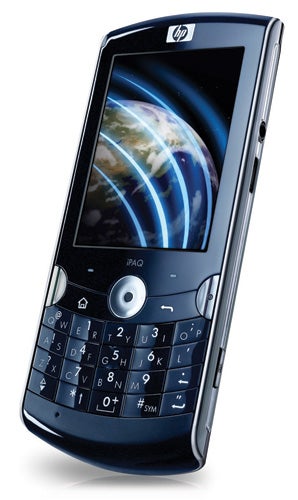
When it comes to call quality we’ve got no complaints as callers sounded crisp and clear through the phone’s ear piece. It’s also good at holding on to a connection, even in weaker signal areas. Battery life was pretty much par for the course for a Windows Mobile device. We got around two days out of it with occasional usage of Wi-Fi, HSDPA and normal phone calls, which isn’t too bad.
”’Verdict”’
There’s plenty to like about the Voice Messenger. Style-wise it’s right on the button and it’s got a good range of features and speedy performance. However, HP has hit a real bum note with the optical control pad which has affected our scores. It’s so crucial to the handset’s operation, yet so unreliable that it ends up making the phone quite frustrating to use. With a different control system this would be a fine little smartphone, but as it is we find it hard to recommend.
How we test phones
We test every mobile phone we review thoroughly. We use industry standard tests to compare features properly and we use the phone as our main device over the review period. We’ll always tell you what we find and we never, ever, accept money to review a product.
Trusted Score
Score in detail
-
Performance 7
-
Design 6
-
Value 6
-
Features 7


Editorial independence
Editorial independence means being able to give an unbiased verdict about a product or company, with the avoidance of conflicts of interest. To ensure this is possible, every member of the editorial staff follows a clear code of conduct.

Professional conduct
We also expect our journalists to follow clear ethical standards in their work. Our staff members must strive for honesty and accuracy in everything they do. We follow the IPSO Editors’ code of practice to underpin these standards.
Editorial independence
Editorial independence means being able to give an unbiased verdict about a product or company, with the avoidance of conflicts of interest. To ensure this is possible, every member of the editorial staff follows a clear code of conduct.
Professional conduct
We also expect our journalists to follow clear ethical standards in their work. Our staff members must strive for honesty and accuracy in everything they do. We follow the IPSO Editors’ code of practice to underpin these standards.
