

Verdict


While I wait to get my hands on Sony Ericsson’s 5 megapixel K850i I’m going to take a look at the Tri-band 3G K810i, a predecessor model which is still a good seller.
The K810i is a Cyber-Shot mobile. While not up to the 5 megapixels of the K850i its 3.2 megapixel sensor is a notch up from the widespread 2 megapixel models in the numbers game, should shoot a passable picture and has a fair few neat tricks up its sleeve for the photographically inclined.
There is nothing remarkable about the format of this handset. Its 103g makes it quite light but not excessively so, while it s 106 x 48 x 17 mm dimensions mean it needs a reasonably sized pocket but feels comfortable in the hand.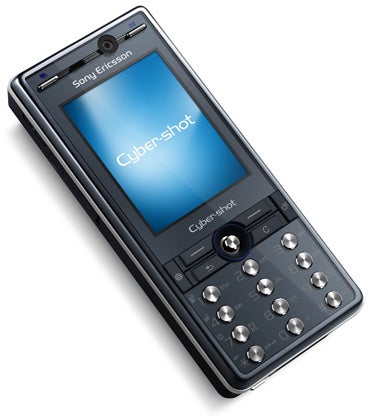
I am pleased to say that the ergonomics of use are much improved over some other Sony Ericsson models. I found the tiny number pad keys of the W880i simply too small for comfort and even the slightly larger keys of the K550i were sometimes a challenge.
Here we have a number pad whose round and very well-spaced keys are easy to find and hit while still managing to look distinctive, sitting as they do like silver gems in their black surround.
Sony Ericsson has made the shortcut keys that sit above the number pad somewhat small in size but they are raised from their surroundings which is an aid to use. My least favourite navigation system – a miniature joystick which you push and pull about and press to make selections – has been chosen. It works well enough; I just wish it were a flat pad instead.
Sitting in the central band that contains the Call, End, Back and Clear buttons are two further keys. On the left is what Sony Ericsson calls the Internet Key, which opens the Web browser. 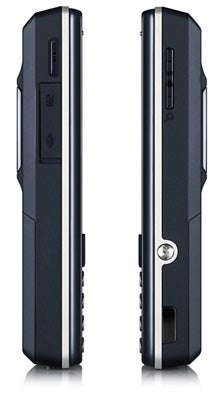
On the right is the Activity Menu key. Press it and the Activity Menu pops up. This offers you four tabbed windows that you scroll through using the mini joystick. The first of these lists ‘new events’ such as missed calls and messages. The second is the running applications list and you can use this to either close running apps or switch to them quickly.
The third tab is the My Shortcuts list. You can configure this to include whatever applications, settings or other features you like, and can set the order in which they appear.
The fourth tab is for Internet related features and can be used to manage bookmarks for quick access. This Activity Menu system is really easy to use, and if configured to your taste and requirements will make using the K810i a doddle.
Above the screen and sitting either side of the small video calling camera are two more keys of the long, thin variety rather than the rounded variety. These are both camera related.
One opens the camera album as thumbnails, pushing the screen into landscape format for better viewing. When you are running the camera software the same button toggles you through the built-in scene modes. Interestingly the scenes include a ‘document’ mode among the range.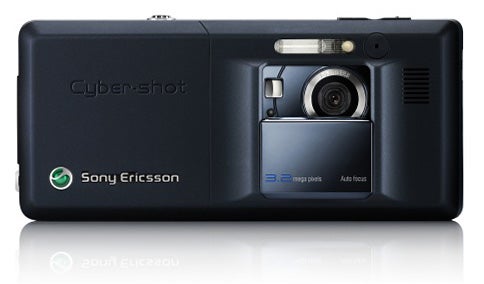
The other button opens images in full screen view and with the camera running toggles through the various shooting modes: normal, panorama, frames (of which there are 14) and BestPic. This latter one is Sony Ericsson’s auto shooting mode. Nine pictures are taken in the space of a second, and you can choose which to keep.
The screen is bright and clear. Its 262 thousand colours are ample and it measures 2 inches from corner-to-corner across the diagonal. It works well both for framing and shooting photos as well as for viewing information more generally.
With all this emphasis on photography what about actually using the camera and image quality?
Well, to get the camera software running you just slide the back-mounted lens cover away from the lens. This reveals the self portrait mirror too. The sizeable Xenon flash unit is permanently outside the cover. Other camera related trickery include a redeye reduction mode and support for picture blogging, so you can see that as a camera phone the K810i touches a lot of bases.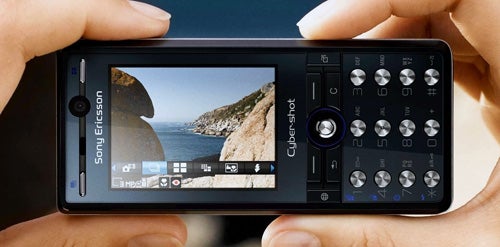
Using the camera was straightforward. As well as the shortcut buttons already mentioned (the ones above the screen), the 1, 4, 7 and * keys double up to provide access to megapixel size, macro, self-timer and flash settings, making it really fast to flick between these and also easier to take candid shots – a task that’s far from slick with some mobiles.
During testing I left the camera on its auto mode and it had no trouble with some tight close-ups. The image stabiliser helped with the cat photo, which was taken at close range and also highlights how well the autofocus coped.
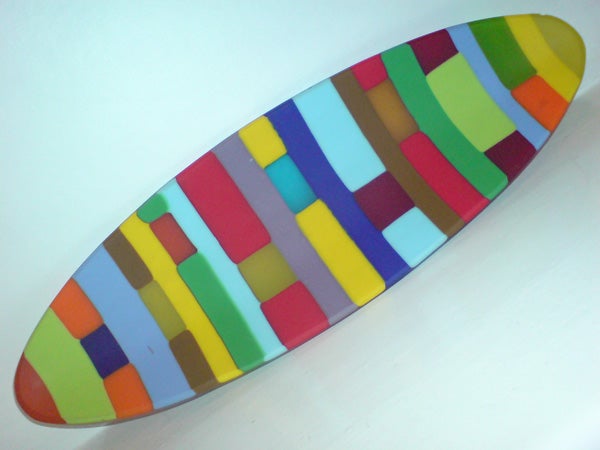
The coloured dish, shot under normal household lighting conditions, is, if anything, overly bright. There is certainly no problem with colour reproduction. The flowers are vibrant and sharp too.
Of course this handset plays music. There is 64MB of memory in the phone itself and it will accept Memory Stick Micro cards so you can add up to a further 2GB of storage. The handset will send music to a stereo Bluetooth headset. Unusually these days there is an infra red port too.
You get a stereo headset but both this and the USB cable (used with the copy of PC Suite to share information with your PC) hook up to Sony Ericsson’s horrid proprietary connector which sits on the bottom of the handset. This is also used for battery charging, and it is a real pain to have to carry a charger just for this phone when so many other devices are standardised on mini USB. If you don’t want to use PC Suite then the K810i works in Mass Storage mode too.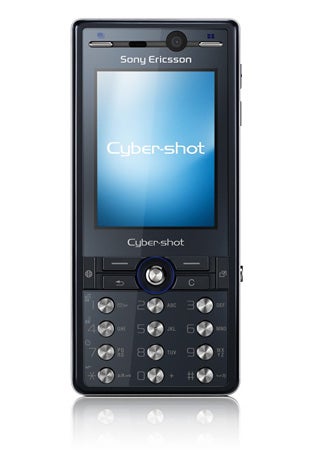
Other applications include an FM radio, RSS feed reader, sound recorder, email support, alarm clock, calculator, calendar, notes taker, stopwatch, tasks manager and timer.
Time constraints meant I didn’t have the time to do a full music playing battery rundown test of this phone, but during the review period I found it performed fairly well. I’d say if you shoot a few photos, make a few minutes of 3G usage and listen to half an hour of music or so every day you should get by with a charge every other day.
”’Verdict”’
The K810i is a comfortable mobile phone to use. A cliché, I know, but it really is very ‘user-friendly’. And it is ideal for those who want a competent cameraphone.
—-
—-
—-
How we test phones
We test every mobile phone we review thoroughly. We use industry standard tests to compare features properly and we use the phone as our main device over the review period. We’ll always tell you what we find and we never, ever, accept money to review a product.
Trusted Score
Score in detail
-
Usability 8
-
Value 8
-
Features 8


Editorial independence
Editorial independence means being able to give an unbiased verdict about a product or company, with the avoidance of conflicts of interest. To ensure this is possible, every member of the editorial staff follows a clear code of conduct.

Professional conduct
We also expect our journalists to follow clear ethical standards in their work. Our staff members must strive for honesty and accuracy in everything they do. We follow the IPSO Editors’ code of practice to underpin these standards.
Editorial independence
Editorial independence means being able to give an unbiased verdict about a product or company, with the avoidance of conflicts of interest. To ensure this is possible, every member of the editorial staff follows a clear code of conduct.
Professional conduct
We also expect our journalists to follow clear ethical standards in their work. Our staff members must strive for honesty and accuracy in everything they do. We follow the IPSO Editors’ code of practice to underpin these standards.
