

Verdict


The last handset I looked at from Sony Ericsson was the W880i. Hailed as an ultra small, ultra thin mobile, my main problem with it was that the number dialling buttons were simply too small to use comfortably. This problem marred what was otherwise for me a rather nice little phone.
So, into my hands comes the Sony Ericsson W610i. As I write it is available on O2, Orange and Vodafone and with each operator you can get it at prices from free upwards. It is a quad-band handset with GPRS and EDGE and comes in two colour schemes. My review sample had a black frontage with silver and orange highlights and a superbly brash bright orange back. A version with a white front and black back is also available.
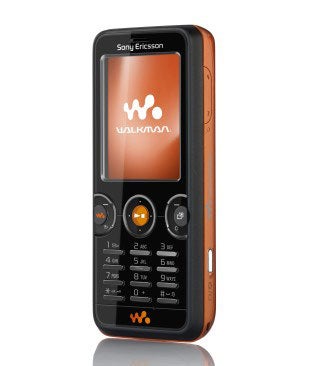
At 93g the W610i weighs about 20g more than the W880i. It is also a heck of a lot thicker – 14mm compared to 9.4mm. It is just a single millimetre shorter and narrower at 102mm tall and 46mm wide. The single millimetre variations are so little as to be insignificant if you are comparing the two handsets.
What matters more in a straight comparison is the size of the number keys. Sony Ericsson has gone for similar keys to the W880i but I found the W610i’s number keys a little easier to use thanks to a small amount of extra width. However, if you do a lot of texting, you really should try them out for use at speed before plumping for this mobile.
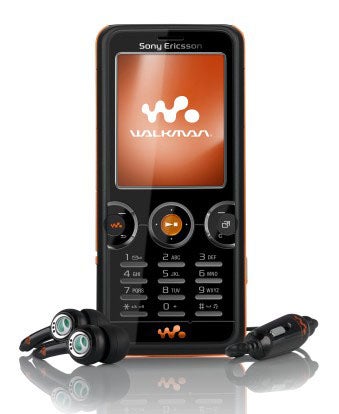
If you decide you can live with the small number keys, then the rest of the buttons probably won’t give you any trouble. The navigation button is a thin silver circle raised a fair way from the fascia. To its left and right are two incomplete circles similarly designed. Their upper edges can be pressed for the softmenu functions, their lower edges for Back and Clear.
There are buttons in the centre of each of the circles on the left and right. The one on the left is the Walkman key, the central one is a pause/play button, which doubles as a select button when you are not listening to music. The one on the right calls up the Activity Menu. There is another pause/play button on the left edge of the handset and a volume rocker on the right edge.
I rather like the Activity Menu. It appears on a lot of Sony Ericsson mobiles. Call it up and you get a series of tabbed screens. Between them these allow you toM see ‘events’ such as missed calls or messages, view a list of applications currently running and switch to them, manage a series of shortcuts to applications and settings and access your Web bookmarks. Master the use of this and it can become a very handy tool.
As a Walkman phone, the usual Sony Ericsson headset connector is on the left edge of the phone. It is shared by the mains power adaptor and the provided USB PC cable. The adaptor is as chunky as ever.
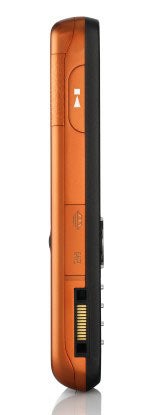
The main power adaptor lacks the through-port of the W880i, so you can’t charge the phone and listen through headphones at the same time. On the other hand, the headset is two-piece, with a 3.5mm jack just past the microphone, so you could use your own earphones instead of Sony Ericsson’s in-ear buds. You can also use your own earphones with the built in FM radio as the antenna for that is in the section of the headset that connects to the handset.
The Walkman software is just as good as it is on other current range Sony Ericsson Walkman mobiles in terms of ease of use, and sound quality is perfectly acceptable too. I found there to be plenty of volume. I’m not convinced that the stereo widening effect does a great deal, but the equaliser has a noticeable impact.
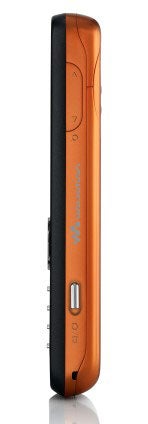
There is 73MB of memory on the phone itself and a 512MB Memory Stick Micro card ships with it. Its slot is on the left edge of the handset. You can’t get to the slot when anything is plugged into that headset /mains/PC cable socket as the connector obscures its cover, which is just poor design. Sony Ericsson’s Disk2Phone software is provided. This can reduce the bit rate of tunes on the fly allowing you to cram more onto phone memory or memory card.
Sony Ericsson absolutely stuffs its mobiles with software and features. The PC Suite software that is provided on CD can be used to synchronise the phone’s calendar with Outlook on your PC. Meanwhile on the handset itself there are features including mobile email, five alarms, calculator, notes taker, stopwatch, tasks manager and timer. There is a utility that lets you blog direct from the handset. The rather clever TrackID system which can identify songs from a short snippet of a recording is also here. An RSS reader complements the Web browser.
The Sony Ericsson W610i doesn’t deliver the greatest of Web browsing experiences. Its browser has a ‘Smart-Fit feature which wraps web pages to the screen width to avoid the need for horizontal scanning, and it coped with the TrustedReviews Web site. But the screen delivers just 176 x 220 pixels, and is small at 2-inches corner to corner. If you think you’ll be using the web a fair bit, there are better options than this handset.
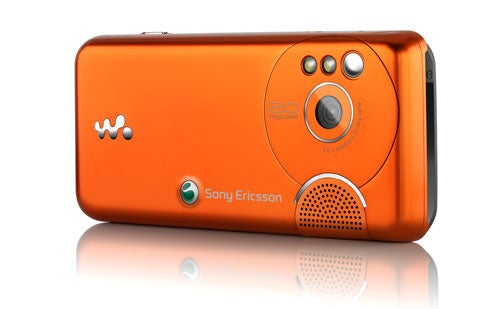
Of course, there is a camera. It captures stills at resolutions up to 2.0 megapixels which is a little low-key for Sony Ericsson. Its twin LED flash can be used as a very effective torch. There is a macro mode and also an infinity setting for the focus. The autofocusing system takes a short time to kick in when you press the shutter button on the right edge of the casing, but the pictures themselves are reasonably sharp.
The coloured dish, which is my standard shot, photographed indoors under ordinary household lights doesn’t have quite the colour clarity that I’d have liked, but it is certainly good enough. The white flowers have reproduced rather well, though the effect of compression is more noticeable in the pink flowers. Colour reproduction here is realistic, though.
You have the right to expect very good battery life from any handset in the Walkman range. The Sony Ericsson W610i played music continuously for ten hours 22 minutes, which is pretty good. The screen goes off automatically after about 20 seconds to conserve power.
”’Verdict”’
The Sony Ericsson W610i is a pretty average Walkman phone. The presence of an FM radio is a treat, but the screen and camera are both a little below par, and the small buttons might be too fiddly for some.

—-

—-

—-
How we test phones
We test every mobile phone we review thoroughly. We use industry standard tests to compare features properly and we use the phone as our main device over the review period. We’ll always tell you what we find and we never, ever, accept money to review a product.
Trusted Score
Score in detail
-
Usability 7
-
Value 8
-
Features 8


Editorial independence
Editorial independence means being able to give an unbiased verdict about a product or company, with the avoidance of conflicts of interest. To ensure this is possible, every member of the editorial staff follows a clear code of conduct.

Professional conduct
We also expect our journalists to follow clear ethical standards in their work. Our staff members must strive for honesty and accuracy in everything they do. We follow the IPSO Editors’ code of practice to underpin these standards.
Editorial independence
Editorial independence means being able to give an unbiased verdict about a product or company, with the avoidance of conflicts of interest. To ensure this is possible, every member of the editorial staff follows a clear code of conduct.
Professional conduct
We also expect our journalists to follow clear ethical standards in their work. Our staff members must strive for honesty and accuracy in everything they do. We follow the IPSO Editors’ code of practice to underpin these standards.
