

Verdict


Nokia’s new N95 is a tri-band GSM handset with 3G and HSDPA support. Like others in the N series it makes a big noise with its numerous bells and whistles, not the least of which is built-in GPS and a 5-megapixel camera.
I’ve found phones in the N series to be a bit hit and miss both in terms of design and how all the features are managed. Take the superbly designed N73, for example, and compare it with the over complicated N93.
Yes I know, I know, the Carl Zeiss lens in the latter demanded more space, but was all that tilt and swivel really necessary? Maybe not, as Nokia has managed to drop a 5-megapixel camera with some Zeiss optics into the N95 without all that swivelling malarkey.
The N95 is a slider, a format which can cater for quite small phones, but not in this case. One reason is that the phone has to house a fairly large screen measuring 2.6 inches corner to corner. Sadly, Nokia has not crammed in the pixels – you get a fairly standard 320 x 240 resolution.
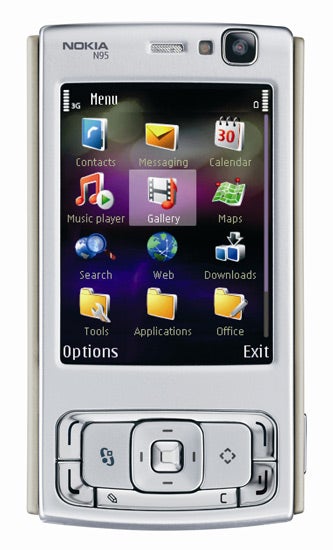
Overall, this means that the N95 is chunky at 99mm tall, 53mm wide and 21mm thick. It’s not all that heavy, though at 120g and this is largely down to the plastic casing, which I have to say is a rather poor choice. On such a high end handset Nokia really should have chosen materials with a more substantial feel.
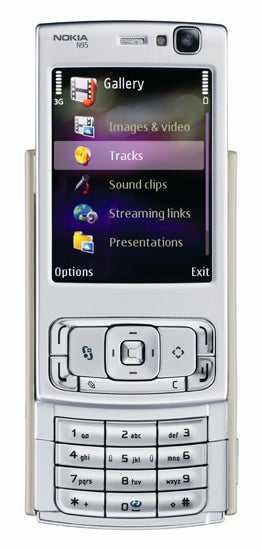
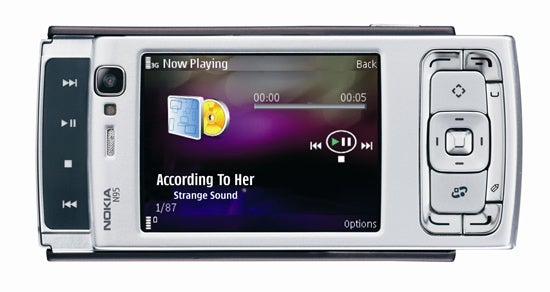
The other reason the N95 is fairly large is that it has two slider mechanisms. Pushing the top section of the phone upwards in the usual slider way reveals the number pad. There’s nothing especially odd about that; its keys are pretty large and I found using them perfectly fine. But you can also pull the upper part of the phone downwards and reveal a separate set of multimedia controls. These are not individual buttons but a flat area marked with forward, back, play/pause and stop icons, which you press to get the desired effect.
Nokia has not done itself justice with the feel of the sliding action. The main slider in particular feels less smooth than it should be, almost as if there was grit in the runners.
When you slide the phone to reveal these keys the screen flips into landscape format and offers a selection of multimedia options – the same selection you get when you press the front facing ‘Multimedia key’ that sits to the left of the navigation button. Use the navigation key to page through and find the feature you want and its centre button to select it. You use the keys to control music or video playback or the built in FM radio. I found that closing this slider was not enough to get the screen to flip back into its ordinary portrait format, you have to slide the number pad into view before that happens.
You can use the front mounted navigation button for music playback control too, but it can’t mange playback while you are in another application. Use the slider buttons when in another app and you get a little window on screen showing the name of the track you have just jumped forward or back to, or restarted after a pause.
Twin speakers sit on the upper left and right of the casing and apparently provide stereo output with 3D sound effect. Frankly, they are so close together that this isn’t noticeable. They do, though produce a lot of volume and quality isn’t bad.
The provided headset is better than many in quality terms. If you want to use your own headphones instead of Nokia’s in-ear buds there is a 3.5mm jack just past the in-line controller. You did read that right. There is no Pop-Port connector. Nokia has finally seen the light and along with the 3.5mm connector is a mini USB connector for a PC link (a cable is provided) and a mini jack for mains power. The 3.5mm connector can be used with the provided AV cables to send the screen’s content to a TV. Beware though that the handset connecting section contains the antenna for the Visual Radio equipped FM radio.
The N95 has a GPS antenna built into it. I suspect this is the start of something big for Nokia. Its presence is part of an attempt to sell Sat Nav via its Smart2Go system launched in January.
The idea is that you can use maps for free and purchase a license to use the navigation side of things for limited periods. Payment is via the handset. A year’s UK and Ireland navigation costs £47.68, a 7-day license £4.42 and there are other fees in between. You can add this to your phone bill or pay by credit card.
The antenna is in the underside of the N95. Nokia doesn’t say what make it is, but it needs a little more TLC than usual. For it to have a clear view of the sky you need to have the bottom slider opened and the numberpad visible, and Nokia suggests you tilt the N95 at an angle of 45 degrees. All of which is a bit of a pain.
You need to download maps to the N95 and I’d suggest using the phone’s built in Wi-Fi or a PC to do this for free over your broadband connection rather than paying your network operator as you are talking about a lot of data. I don’t have space for a full review of the navigation software here, but on the few trips I tried it was OK but not outstanding.
If you want to use the N95 for Sat Nav, music playing or extended Wi-Fi use then battery life is important. And you may well be disappointed as it only managed to give me five hours of continuous music from a full charge.
There is a 160MB of built in memory and fresh out of the box my review sample (from Orange), had 105MB free. A microSD card slot sits on the left edge ready to provide an additional memory boost. Bluetooth, Wi-Fi and infra-red are all here and the Wi-Fi benefits from a scanner that can sit on the main screen and be used to quickly search for available networks.
The N95 has a 5-megapixel camera. The last mobile phone I looked at with 5-megapixel capability was LG’s KG920, and that performed very well indeed. I found this autofocus and flash equipped camera slightly less forgiving than LGs on its auto settings, though it is very easy to use.
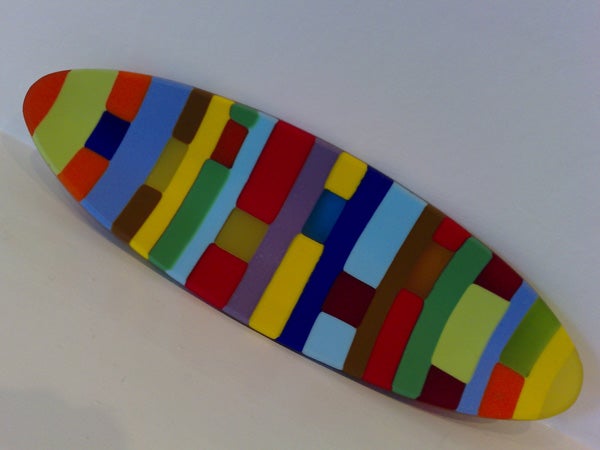
The coloured dish photographed indoors under standard household lighting is less vibrant than I’d have liked. The cat was moving slightly when her photo was taken and there is no discernable blurring, while the colours of the hanging basket are pretty close to true. You will most likely need more than 1MB of storage for each photo shot at the highest quality.
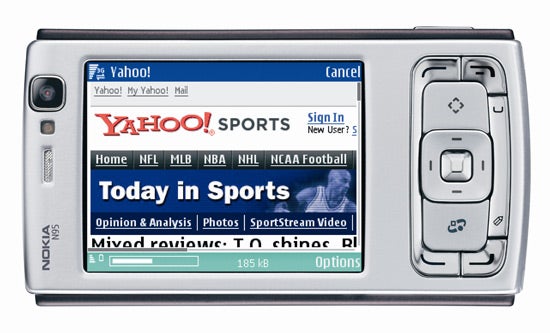
UPnP support makes it easy to share data such as music or photos across a wireless network and the other software includes the usual Web browser and mobile email with readers for PDF, Microsoft Word, Excel and PowerPoint. There’s also a voice recorder, a unit converter and a calendar.
”’Verdict”’
The N95 is certainly packed with features, but more isn’t necessarily better. The phone is large, its software seemed to run a bit slow at times, the build quality is not that good, battery life is poor and the GPS antenna was not as efficient as some. On contract it might be attractive, but SIM free it’s vastly overpriced.
—-
—-
—-
How we test phones
We test every mobile phone we review thoroughly. We use industry standard tests to compare features properly and we use the phone as our main device over the review period. We’ll always tell you what we find and we never, ever, accept money to review a product.
Trusted Score
Score in detail
-
Usability 7
-
Value 7
-
Features 8


Editorial independence
Editorial independence means being able to give an unbiased verdict about a product or company, with the avoidance of conflicts of interest. To ensure this is possible, every member of the editorial staff follows a clear code of conduct.

Professional conduct
We also expect our journalists to follow clear ethical standards in their work. Our staff members must strive for honesty and accuracy in everything they do. We follow the IPSO Editors’ code of practice to underpin these standards.
Editorial independence
Editorial independence means being able to give an unbiased verdict about a product or company, with the avoidance of conflicts of interest. To ensure this is possible, every member of the editorial staff follows a clear code of conduct.
Professional conduct
We also expect our journalists to follow clear ethical standards in their work. Our staff members must strive for honesty and accuracy in everything they do. We follow the IPSO Editors’ code of practice to underpin these standards.
