

Verdict


Pros
- 60mm touchscreen with touch buttons
- AirPrint support for iPhone/iPad users
- Good running costs for budget printer
Cons
- Messy paper stop design
- Awkward memory card slot
- Paper tray restricted to 80 sheets
Key Specifications
- Review Price: £58.00
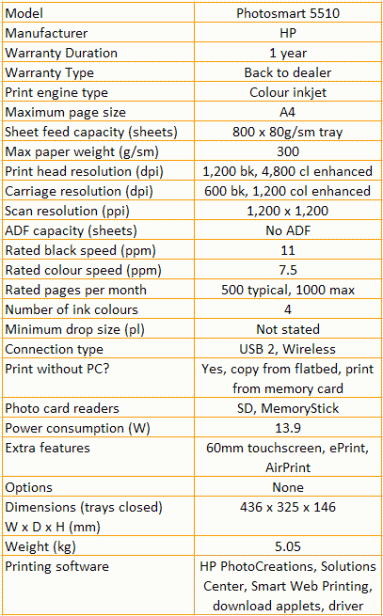
- SD and MemoryStick card slots
- Wireless connection as standard
- ePrint remote printing
- Four separate ink cartridges
- WPS automated quick wireless setup
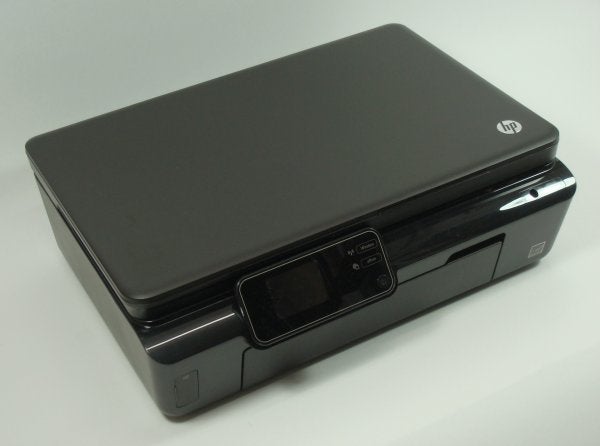
As new technology finds its way into printers, it slowly filters down from the premium to the budget models. This seems to happen more quickly with HP printers than some other makes and the Photosmart 5510 is a good example of the kind of technology you can now buy for under £60.
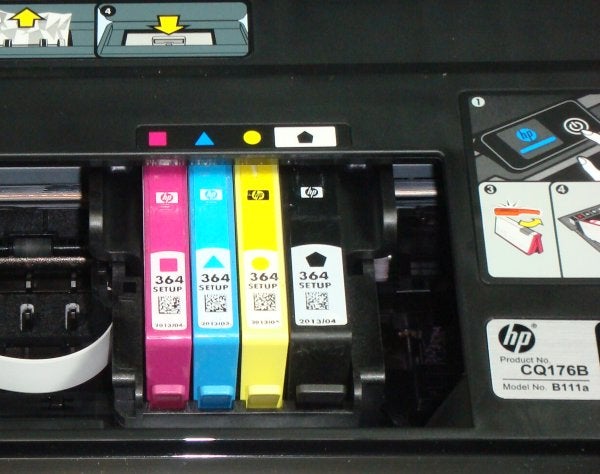
This is a long, low machine, with simple and practical lines. The top of the flatbed scanner lifts without problem and the whole scanner section hinges up equally easily to get at the four, independent ink cartridges.
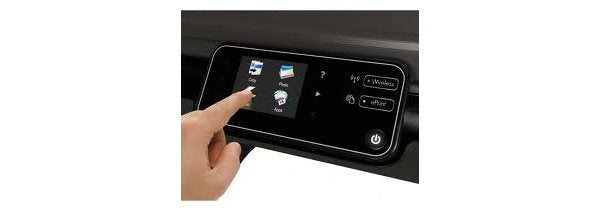
The small, neat control panel is touch-sensitive, with a 60mm touchscreen boarded down either side by three touch buttons. It’s very easy to use and has separate indicators for wireless connection and HP’s remote printing ePrint function.
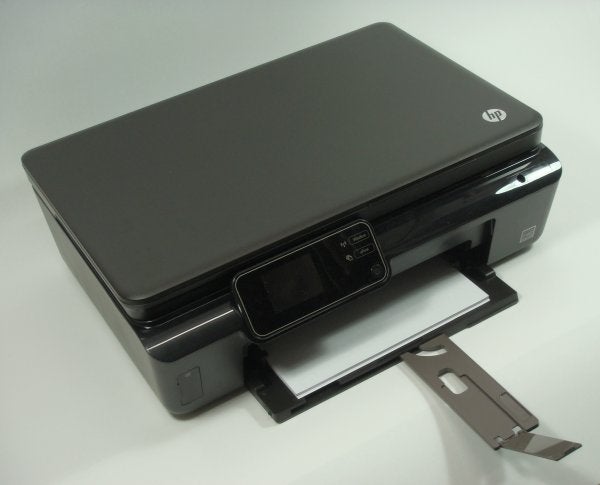
Directly below the control panel is the fold-down front cover, which becomes the paper feed tray. To the left of this is a flip-open cover for the dual memory card slot, which takes SD and MemoryStick cards. Unusually, this slot is very fiddly to work a card into. There are a couple of other slightly unfortunate design features in this machine.
For a start, printed pages stack up on top of the input tray. This is a common enough way of doing things with inexpensive all-in-ones, but here there’s a swivel-out paper support, for some reason coloured brown against the black livery of the rest of the machine, and with a long flip-up paper stop, which is both flimsy and ineffective. As pages come through, they ride up the angled paper stop and often overcome the little ridge at the top which is supposed to stop them.
Then there’s feeding 15 x 10cm photo blanks. It’s not at all obvious that the paper feed tray pulls out, like a skeletal paper cassette, so you can feed small paper sizes into the bowels of the machine. It’s in the manual, but if you’re the type who likes to work things out from first principles, it’s easy to get confused.
The printer can be connected via USB or wireless, though wireless is the easier option, particularly if your router supports WPS setup. The ink cartridges clip into the head carrier very easily and the support software includes HP PhotoCreations and support for ePrint.
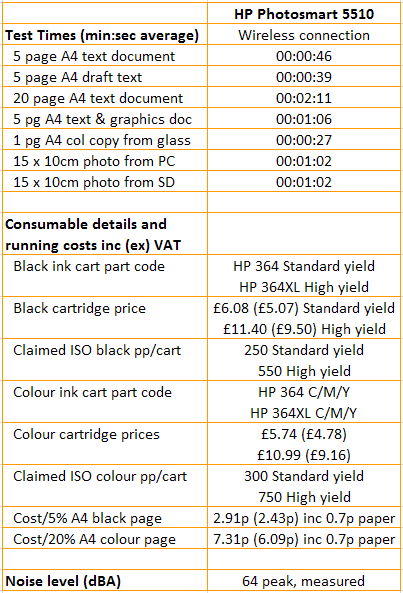
The HP Photosmart 5510 is rated at 11ppm printing black and 7.5ppm printing colour. In our tests it didn’t reach either of these throughputs, though the 5-page black text test produced a speed of 6.5ppm, which rose to 9.2ppm on the longer, 20-page test. This is not far off the speed claim and is a very good speed for a low-cost all-in-one.
The text and colour graphics print gave 4.6ppm, not quite so close to the 7.5ppm claim, but still a worthwhile speed for this class of machine. A single page colour copy took a very reasonable 27s and 15 x 10cm photos took identical times of 1:02 from both a PC and an SD card; again an above-average result.
Print quality is surprisingly good, with little sign of black ink feathering, even on emboldened headings, and no signs of head pass misalignment. Draft mode print, while very slightly more jagged, only reveals this on close examination and for most purposes could save you time and ink.
Colour prints are excellent, with good bold colours, no signs of banding or dither patterns and excellent alignment of overprinted black text. Our test photocopy was hard to tell from an original under most conditions, with very little lightning of colours in the copy; outstanding for a budget machine.
Finally, photo prints were clean and smooth, with plenty of shadow detail and natural colours showing only a slight preference for blues over reds.
Ink cartridges are available in two yields and using the higher capacity XL cartridges gave running costs of 2.9p for black and 7.3p for colour. Both these are very good for a low-cost machine and HP is obviously not trying to recoup to much of its low asking price in the Photosmart 5510’s consumables.
Verdict
HP did very well for itself in our recent reviews of its DeskJet budget all-in-ones and this Photosmart 5510 does the same for home and photo-enthusiast customers. In all the important areas, it goes much further than most of its rivals, from its touchscreen controls to its high-quality print and low-cost consumables. Slight problems with the paper stop and card slot don’t detract enough to prevent a recommendation.
Trusted Score
Score in detail
-
Print Speed 8
-
Features 8
-
Value 10
-
Print Quality 9
Features
| Networking | Yes |
| Card slot | SD, MemoryStick |
| Connection Type | USB |
| Extra Features | 60mm touchscreen, ePrint, AirPrint |
Physical Specifications
| Height (Millimeter) | 146mm |
| Width (Millimeter) | 436mm |
| Depth (Millimeter) | 325mm |
| Weight (Gram) | 5.05g |
Printing
| Type | Inkjet |
| Duplex | No |
| Paper Size | A4 |
| Colour | Yes |
| Number of Catridges | 4 |
| Sheet Capacity | 800 sheets |
| Print Resolution (Dots per inch) | 4800 x 1200dpi |
| Rated Black Speed (Images per minute) | 11ipm |
| Rated Colour Speed (Images per minute) | 7.5ipm |
| Max Paper Weight | 300g/sm |
| Print Without PC | Yes |
Functions
| Scanner | Yes |
| Copier | Yes |
Scanning
| Scan Resolution (Dots per inch) | 1200 x 1200dpi |


Editorial independence
Editorial independence means being able to give an unbiased verdict about a product or company, with the avoidance of conflicts of interest. To ensure this is possible, every member of the editorial staff follows a clear code of conduct.

Professional conduct
We also expect our journalists to follow clear ethical standards in their work. Our staff members must strive for honesty and accuracy in everything they do. We follow the IPSO Editors’ code of practice to underpin these standards.
Editorial independence
Editorial independence means being able to give an unbiased verdict about a product or company, with the avoidance of conflicts of interest. To ensure this is possible, every member of the editorial staff follows a clear code of conduct.
Professional conduct
We also expect our journalists to follow clear ethical standards in their work. Our staff members must strive for honesty and accuracy in everything they do. We follow the IPSO Editors’ code of practice to underpin these standards.
