

Verdict


Key Specifications
- Review Price: £188.00
It’s been a long time since we reviewed a Sony DVD/HDD recorder (but not for the want of trying) so we’re pleased to have finally got our hands on a model from its latest range. The RDR-HXD890 features both a DVD recorder and hard-disk, giving you the flexibility to record, edit and then back-up your recordings on disc. However, this deck is also packed with loads of other cool features that make it much more than a simple video recorder – and at under £200 online, it’s keenly priced.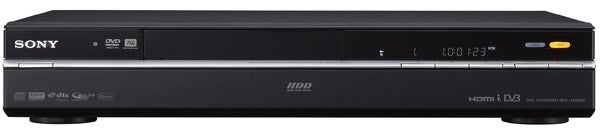
It’s available in black or silver, and our black sample is hardly the pinnacle of hi-tech glamour but still looks quietly classy, and its build quality is superb. The fascia is split into two sections – the top half features the display panel, which helpfully shows the name of the current channel as well as the recording time, and illuminated buttons to switch between the HDD and DVD, while the entire lower section drops down to reveal a generous range of connections and buttons. 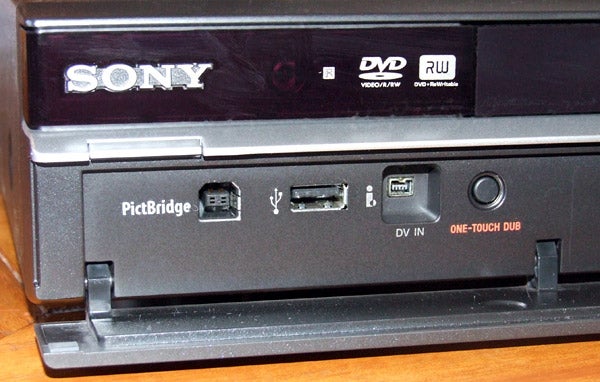
These include two USB ports, one of which allows you to play video, music and photos or copy them to the hard-disk, and another that lets you connect a PictBridge compatible device and print photos. These are joined by an i.Link (FireWire) input (for DV camcorder dubbing), plus composite, analogue stereo and S-video inputs, but unlike some of the step-up models, there’s no Conditional Access Module slot for adding pay TV channels to the Freeview line-up.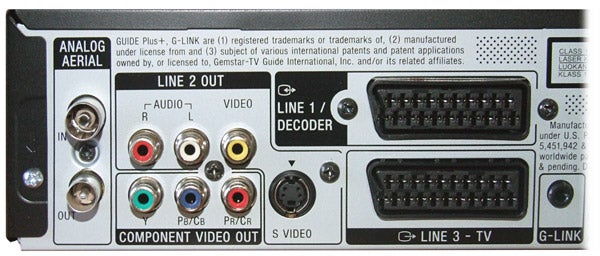
The rear panel is similarly well-equipped. You get two SCART sockets, one of which outputs RGB, S-video or composite video to your TV, while the other one accepts RGB, S-video or composite from external devices – great news if you want to make high-quality recordings from a Sky receiver. For playback purposes there are also component, S-video and composite video outputs, and on the audio side you’ll find coaxial digital and analogue stereo outputs.
Two sets of aerial inputs and outputs cater for the built-in Freeview and analogue tuners, while the G-Link port lets you connect an infrared transmitter and make recordings from external TV receivers. G-Link works in tandem with the Guide Plus+ EPG, and changes the external TV box to the correct channel and starts the HXD890 recording at the correct time. Last but not least, there’s an HDMI output, which supports upscaled 1080p pictures and BRAVIA Sync CEC functionality.
The hard-disk is 160GB, which isn’t huge by today’s standards but if you need more then Sony also offers 250GB and 500GB models. However, with a recording time of 455 hours in the lowest-quality mode or around 35 hours in the highest setting, it should still be enough for normal viewing and recording habits. As for DVDs, the unit can record onto DVD-RW/-R, DVD+RW/+R plus dual-layer DVD-R and DVD+R discs, but not DVD-RAM – although you can play RAM recordings made on other machines.
In fact the list of compatible playback formats is lengthy – it handles all of the disc types above plus CD, CD-R/-RW, VCD/SVCD, MP3, JPEG and DivX, but there’s no mention of WMA. It’s also worth noting that DivX files cannot be played or copied from devices connected to the USB port, which may be a bone of contention for those hoping to connect a USB HDD drive and have permanent access to their PC movie library. 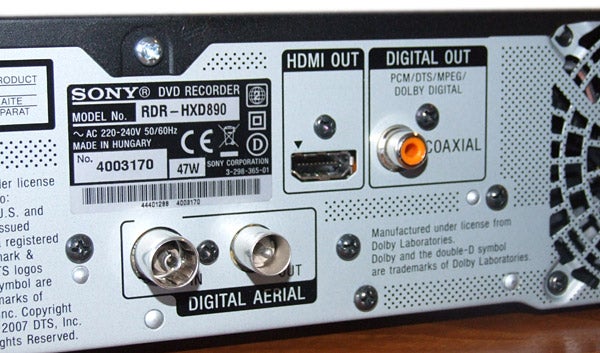
However, you can copy MP3s and JPEG files to the hard-disk and manage them using the helpful Jukebox and Photo Album features, plus the nifty x-Pict Story feature allows you to create slide shows of JPEG files, add sound and transition effects, then burn the results onto DVD.
When making recordings there’s a choice of nine recording presets, ranging from the best-quality HQ down to the lowest quality SEP mode, making it easy to trade off picture quality for recording time. Additionally, there’s a manual recording mode that provides even greater flexibility when trying to fit recordings onto a disc. You can choose from 32 incremental steps, plus it adds an HDD-only HQ+ mode, which records at 15Mbps, plus a version of HQ that records audio in LPCM as opposed to Dolby Digital. Sound familiar? That’s because these features are also found on Pioneer’s latest recorders, which is hardly surprising given that this Sony is a rebadged Pioneer (but the Pioneer decks also support DVD-RAM recording).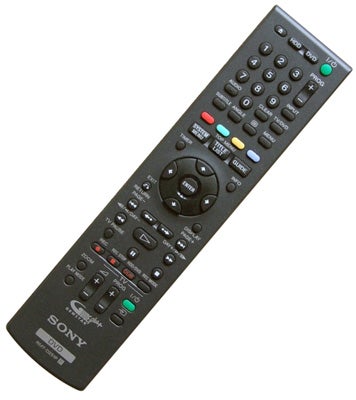
There’s an abundance of other convenient recording features that make it hard to miss your favourite programmes. These include series recording and the terrific EPG Link feature, which allows you to search for alternate broadcasts, other episodes in the series and ‘recommended’ programmes based on existing timer settings, all presented in an easily digestible list. It also alters recording start and stop times automatically when broadcast times get delayed.
Elsewhere, there’s chase play and a pause live TV mode, which is useful but records the programme onto the hard-disk and resumes playback in the currently selected recording mode – not good news if you’ve left it in poor-quality SEP. Meanwhile the extensive editing functionality enables you to create playlists, erase a section, divide/combine titles and edit chapters, although many of these functions are only available on the HDD and VR formatted DVD-RW discs.
The user interface is identical to the one found on Pioneer’s latest recorders, but it’s excellent nonetheless. In the Initial Setup menu, the options are clearly presented in friendly pastel-coloured boxes and go into obsessive detail, while the ‘picture adjustment’ menu offers a bunch of presets for different display types (it’s basically Pioneer’s Video Adjust menu).
The ‘digital’ EPG is also very easy to use thanks to the straightforward grid structure, and far superior to the cluttered, cumbersome Guide Plus+ EPG. But because it’s not superimposed over live TV you can’t keep watching the current programme as you browse. Recordings are selected from the Title Menu, which shares the user-friendly logicality of the other onscreen displays.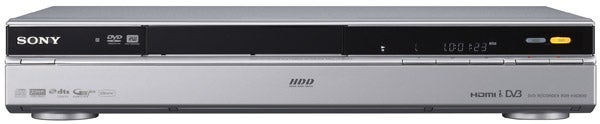
In action the RDR-HXD890 is fantastic. Channel changing and digital text are very fast, and it delivers sharp, stable live Freeview pictures. With the upscaling set to 1080p, colour and detail levels are high, edges are crisp and fast-moving objects are reproduced without much evidence of block noise or break-up. And like any digital recorder worth its salt, these pictures are captured on the hard-disk in top-quality HQ mode without any reduction in quality. Pictures recorded in HSP and SP look almost identical to HQ but use up less space, making them the most useful presets of the lot.
When you dip down to LP, the recorder uses the 720 x 576 resolution used by the higher modes, which means it retains more detail than you’d normally expect from an LP mode, but the lower bitrate makes the picture start to look soft. In EP mode and lower, the 352 x 288 resolution combined with the rock bottom bitrates make the image look really rough round the edges, but strangely they’re still quite watchable.
As a DVD player it’s fairly competent, turning in a sharp and vibrant performance with movie discs but it trips up on the HQV DVD, displaying significant jaggies on the diagonal filter and flag tests. It does handle detail very well though, both with test patterns and moving video clips. As for audio there are no problems – CDs and MP3s sound perfectly enjoyable and stereo Dolby Digital recordings are clean and audible through TV speakers or a home cinema system.
”’Verdict”’
With great recording quality, a slick operating system, loads of features and an alluring price tag, we think this is one of the best DVD/HDD recorders on the market, which is hardly surprising given its similarity to the Pioneer’s machines we already know and love. There are a few niggles, such as the removal of RAM recording and the inability to play DivX from USB devices or transfer them to HDD, and as ever the inclusion of a single Freeview tuner on board is a major limitation – but none of these factors greatly affects our admiration for an otherwise excellent recorder.
Trusted Score
Score in detail
-
Performance 8
-
Features 9
-
Value 9
-
Design 7


Editorial independence
Editorial independence means being able to give an unbiased verdict about a product or company, with the avoidance of conflicts of interest. To ensure this is possible, every member of the editorial staff follows a clear code of conduct.

Professional conduct
We also expect our journalists to follow clear ethical standards in their work. Our staff members must strive for honesty and accuracy in everything they do. We follow the IPSO Editors’ code of practice to underpin these standards.
Editorial independence
Editorial independence means being able to give an unbiased verdict about a product or company, with the avoidance of conflicts of interest. To ensure this is possible, every member of the editorial staff follows a clear code of conduct.
Professional conduct
We also expect our journalists to follow clear ethical standards in their work. Our staff members must strive for honesty and accuracy in everything they do. We follow the IPSO Editors’ code of practice to underpin these standards.
