

Verdict


Pros
- Neat paper tray cover
- Close to claimed speed
- Scan to searchable PDF
Cons
- No duplex print
- No wireless connection
- Only single-sheet multi-purpose tray
Key Specifications
- Review Price: £147.00
- Very quick <5s start to print
- Very low 3W sleep mode
- Single-piece, quick-change cartridge
- 35-sheet ADF
- Small footprint for spec
Introduction
Canon has always made a lot more laser printer engines than completed machines, but increasingly has ranges nearly as good as companies like HP and Brother. The Canon i-SENSYS MF4450 clocks in at under £150 and still offers a four function, mono machine with a very neat design, for a home or small office.
Design
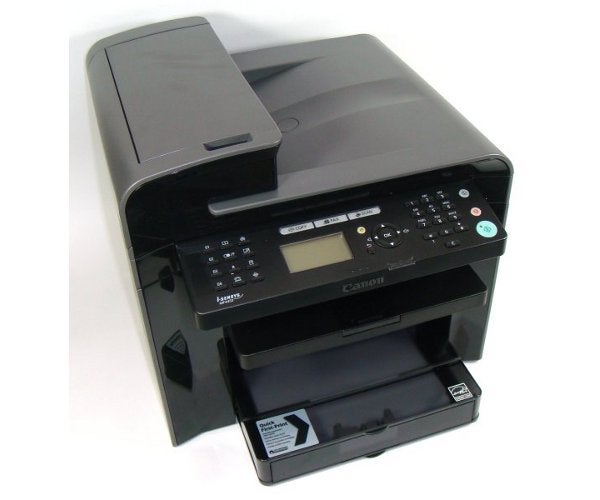
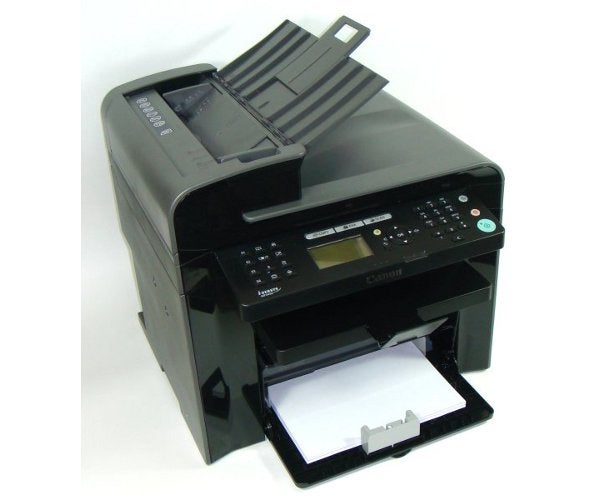
The machine has a textured grey top and sides, with a glossy black concave front, looking slightly like the La Défense building in Paris. The 35-sheet Automatic Document Feeder (ADF) sticks up at the left-hand end of the top cover and its top flips over to become the feed tray.
The control panel projects nearly horizontally from the front of the machine. It’s well-designed, with a five-line, backlit LCD display to the left of a circular navigation ring and with long, illuminated mode buttons for Copy, Fax and Scan, behind. To the right is a numeric pad for dialling fax numbers and task buttons to start and stop copies and scans. At the extreme left are fax and other controls, as well as four quick-dial keys.
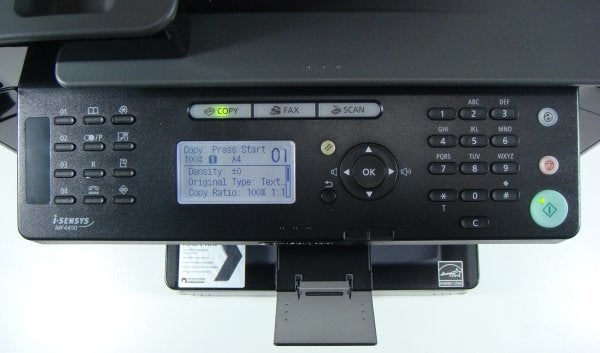
Below the control panel is a small balcony with a pull-out and flip-over extension. This is the output tray, although it sits high above the main paper tray. The paper tray has a clever cover, which can fold up inside the printer when you close its front panel, but still provides protection from dust and spillages when it’s loaded with paper. There’s a single-sheet multipurpose feed which uses the top of the tray cover as its platen.
Features
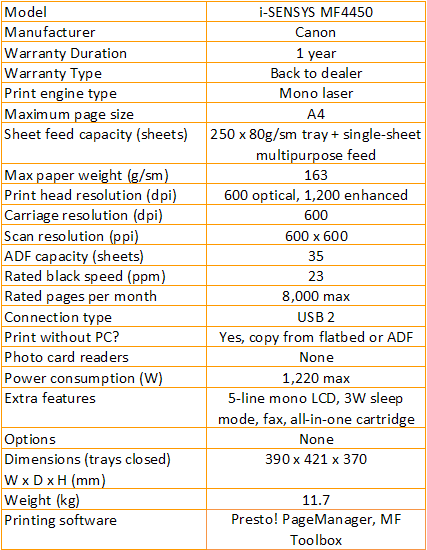
At the back are USB and phone sockets, as well as one for a mains kettle lead. USB is the only data link on the Canon i-SENSYS MF4450, though the MF4580dn also has a network connection and both it and the MF4570d can print duplex pages, which this machine can’t.
When we tried to install drivers on our 64-bit, Windows 7 PC, Windows claimed it couldn’t install into the environment. This appeared to be because there were only 32-bit drivers on the supplied CD. We downloaded 64-bit drivers from the Canon site, but are surprised the CD didn’t include them.
Software supplied with the machine includes Presto! PageManager and Canon’s own MF Toolbox.
Performance
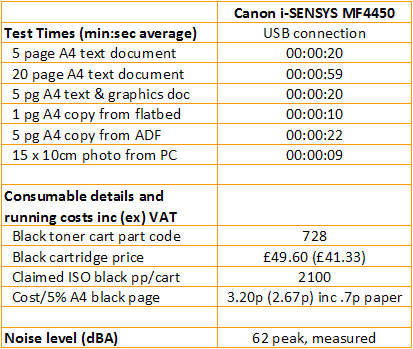
The Canon i-SENSYS MF4450 is rated at 24ppm and, although both our five-page text and text and graphics documents returned 15ppm, the longer, 20-page test produced 20.3ppm, which is not far off the manufacturer’s claim. This is quick for a printer in this class.
At least part of the speed is due to the fast start-up the machine manages. We’re a little cynical of claims to produce quick first prints from laser printers, when they also have low-power sleep modes. In this case, though, there’s little argument, as the printer starts up from sleep and produces its first page in around seven seconds.
This increases the measured speed on our tests quite considerably and it applies equally to copies from flatbed and ADF. A single page from the flatbed took 10 seconds and a five-page document ran through the ADF in 22 seconds. A 15 x 10cm photo on an A4 sheet came through in 9 seconds.
Print quality is up to Canon’s usual standard, with very clean text from the 600dpi head which, with enhancement, gives 1200 x 600dpi. Graphics are also well reproduced with smooth greys, though there’s not much variation between mid-grey levels, so colours with similar greyscales may be hard to distinguish. Reversed text is well formed, with no missing descenders.
Copies are also good, though copies of fills are poor, with a lot of blotches and some loss of density in lighter shades. Canon is not alone in this shortcoming, though and its photo reproduction is better than most, with smooth grey gradations, though a little loss of detail in dark greys.
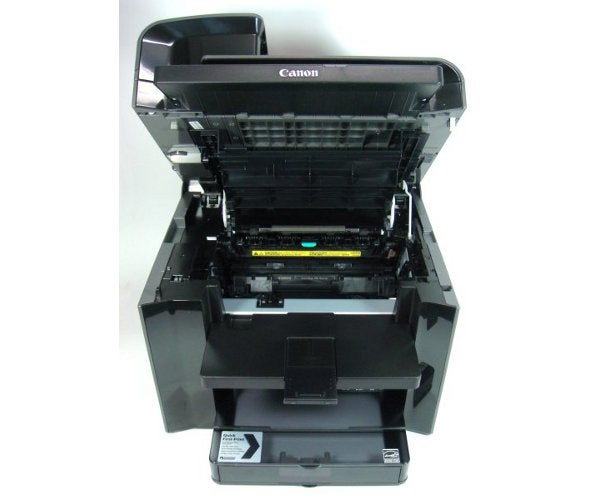
The printer uses a single, integrated drum and toner cartridge, available in one capacity only. Using this 2,100 page consumable gives a cost per page of 3.2p, which is better than the 3.5p of the similarly priced Samsung SCX-3405FW
Verdict
The Canon i-SENSYS MF4450 is a good SOHO laser multifunction, which is surprisingly quick, prints well – though greyscale copies are a bit ropey – and is relatively cheap to run. Fax, copy and scan are all well supported, but the machine can’t print duplex and doesn’t have a wireless connection. If you can live without these facilities, there’s no other reason to go elsewhere.
Trusted Score
Score in detail
-
Print Speed 9
-
Features 7
-
Value 8
-
Print Quality 8
Features
| Networking | No |
| Card slot | None |
| Connection Type | USB |
| Extra Features | 5-line mono LCD, 3W sleep mode, fax, all-in-one cartridge |
Physical Specifications
| Height (Millimeter) | 370mm |
| Width (Millimeter) | 390mm |
| Depth (Millimeter) | 421mm |
| Weight (Gram) | 11700g |
Printing
| Type | B&W Laser |
| Duplex | No |
| Paper Size | A4 |
| Colour | No |
| Number of Catridges | 1 |
| Sheet Capacity | 250 sheet tray + single-sheet multipurpose feed |
| Print Resolution (Dots per inch) | (enhanced) 1200 x 600dpi |
| Rated Black Speed (Images per minute) | 23ipm |
| Rated Colour Speed (Images per minute) | N/Aipm |
| Max Paper Weight | 163g/sm |
| Print Without PC | Yes |
Functions
| Scanner | Yes |
| Copier | Yes |
| Fax | Yes |
Scanning
| Scan Resolution (Dots per inch) | 600 x 600dpi |


Editorial independence
Editorial independence means being able to give an unbiased verdict about a product or company, with the avoidance of conflicts of interest. To ensure this is possible, every member of the editorial staff follows a clear code of conduct.

Professional conduct
We also expect our journalists to follow clear ethical standards in their work. Our staff members must strive for honesty and accuracy in everything they do. We follow the IPSO Editors’ code of practice to underpin these standards.
Editorial independence
Editorial independence means being able to give an unbiased verdict about a product or company, with the avoidance of conflicts of interest. To ensure this is possible, every member of the editorial staff follows a clear code of conduct.
Professional conduct
We also expect our journalists to follow clear ethical standards in their work. Our staff members must strive for honesty and accuracy in everything they do. We follow the IPSO Editors’ code of practice to underpin these standards.
