

Verdict


Key Specifications
- Review Price: £109.99
Most people buy a DVD recorder to replace their old analogue VCR, but what do you do with all those irreplaceable VHS tapes once your player has been consigned to the scrapheap? The sensible option is to transfer them to DVD, but when you do, all that horrible analogue noise and jitter gets transferred onto your shiny digital discs in the process. LG’s latest DVD recorder, the DRT389H, addresses this problem using technology that aims to remove such nasties before they reach your disc.
The deck’s DVFX Recording feature uses an advanced 3D digital video process called Motion-Compensated Temporal Filtering (or MCTF) to remove colour breaks and jitters from the original video signals frame-by-frame, before they’re processed by the main video chipset. The technology isn’t new and has appeared on several previous generations of LG recorders, but since many people will be in the process of archiving old tapes, we thought it was worth highlighting – and we’ll test its effectiveness in due course.
It’s worth clarifying that the DRT389H is a straight-up DVD recorder with no hard-disk on board, making it best suited to those who prefer the tangibility of removable media, or owners of hard-disk PVRs who like to back up their recordings. The beauty is that the LG can record and play back any type of rewriteable DVD, which means there’s no umming and aahing when you’re faced with rows and rows of discs in your local store – this deck does it all.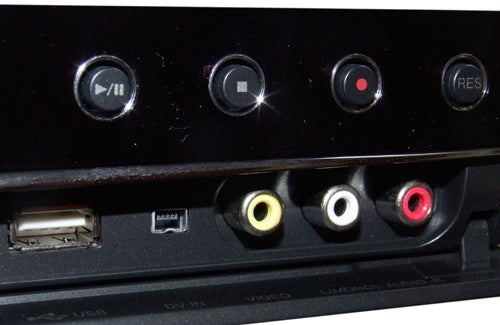
As for write-once discs, the LG can record onto DVD+R, DVD-R and DVD+R Double Layer, the latter doubling (and sometimes tripling) the amount you can fit onto a conventional single-layer DVD+R. There’s no mention of DVD-R Dual Layer discs but who needs two dual-layer formats anyway?
On the outside the DRT389H looks like a simplified version of the RHT-399H DVD/HDD combi, stripped of all the hard-disk related logos and its central silver panel. But it’s still a very attractive and well-made machine, dressed in a glossy black finish with a silver strip horizontally bisecting the fascia. Above this strip, you’ll find a cluster of buttons, including one to change the HDMI output resolution, plus the disc tray and hard-to-read display panel, while the lower half features a flap hiding the DV, composite, stereo audio inputs and USB port.
You won’t be stuck for places to stick your cables thanks to the extensive range of sockets on the rear panel. We start, as ever, with the HDMI output, which is specified as v1.3 and lets you watch upscaled pictures on suitably equipped TVs. The deck offers 720p, 1080i and 1080p output and will upscale everything, including pictures from the built-in Freeview and analogue tuners. 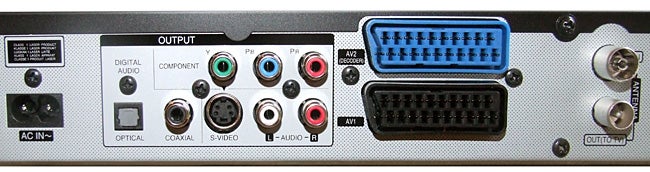
The HDMI port is ably assisted by prog-scan capable component video output, RGB-capable SCART output and S-video output, while a second SCART socket accepts RGB, composite and S-video signals from external sources. For audio, there’s a choice of optical and coaxial digital audio and analogue stereo outputs.
The aforementioned Freeview tuner brings with it Freeview+ support, including Series Recording and alternate instance recording, which alerts you when programmes clash and suggests other times when they’re being shown. 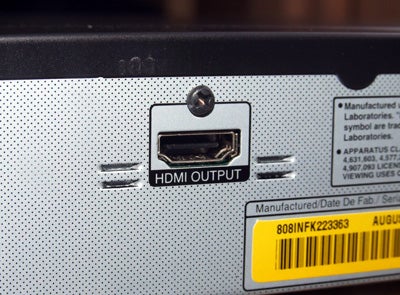
There’s also an 8-day EPG, which is neatly laid out and easy to navigate using the colour-coded keys on the remote, plus it’s superimposed over live TV so you can keep track of what you’re watching. Despite its friendly layout, setting the timer from the EPG is a bit odd, just as we found on the RHT399H. Highlight the desired programme, hit the red button to record and four options appear written in pidgin English (‘It can be recorded as series’ being the best example). It’s an annoying niggle in what is an otherwise impressive EPG, and LG should really sort this out on next year’s models.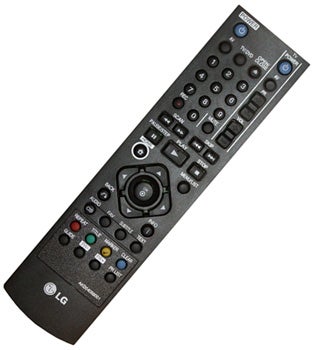
The rest of the onscreen graphics are fantastic, making it easy to find recordings and media files stored on disc, but what we like most is the way the screens dissolve when you exit. Press the Home menu button on the remote and a bar appears at the top of the screen, listing movie, music, photo submenus, each illustrated by a charming animated icon. You’ll also find the Setup and Recording Mode menus, but annoyingly the latter offers the only way to alter the recording quality as there isn’t a dedicated button for it on the remote.
The remote itself isn’t great, sporting a cluttered layout and burying the important programme change and EPG keys at the bottom, but the Home menu button is easy to spot and the menu controls are intuitively placed.
In operation, the deck responds instantly to remote commands and performs everyday digital TV tasks (such as channel changing and digital text access) quickly and smoothly, while Freeview pictures are consistently stable. In fact, our only gripe is that subtitles suddenly pop up from time to time, but it’s no hassle to turn them off.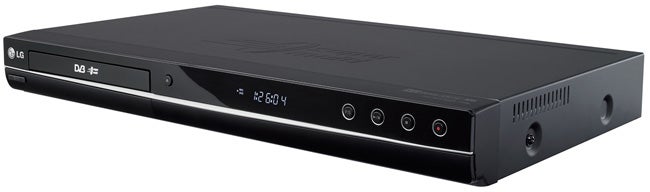
Live Freeview TV pictures are OK, boasting strong colours and good detail resolution, but the levels of block and mosquito noise in the picture are higher than we’d normally expect from a Freeview receiver and subsequently have a negative impact on its overall clarity, particularly when handling busy or fast-moving scenes. But we don’t wish to paint an overly negative picture of the LG’s pictures, as they’re far from a disaster, and some of these artefacts have more to do with the poor quality of the original broadcast – but we have seen better picture quality elsewhere.
Sadly, the block and mosquito noise is evident on DVD recordings but the recorder’s excellent encoding in the top-quality one-hour XP mode means no further artefacts are added. SP mode displays only a slight increase in noise, while the lower-bitrate LP and EP modes offer watchable results but you’ll have to endure increased softness and MPEG noise. The MLP mode might offer 14 hours on a single-layer DVD (or 21 on dual-layer) but anyone who can tolerate its excessively blurred pictures for more than 30 seconds deserves a medal. 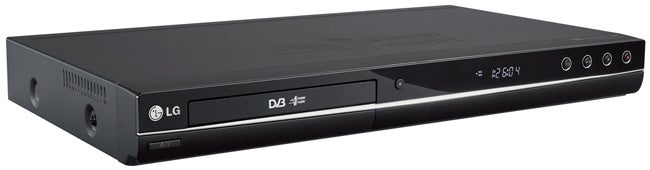
To investigate its recording performance further, we embarked on a ‘real world’ archiving project, creating a DVD-R of programmes that were clogging up our Sky HD box’s hard-disk. We fed the pictures into the RGB SCART input and set the recording mode to SP (offering two hours’ recording time). The deck made the whole process simple and the quick-start recording enabled us to accurately capture the start of each programme with the resulting picture quality looking crisp and richly saturated. Renaming the recordings is time-consuming but hassle-free thanks to the responsive virtual keyboard, and the default menu display authored on the disc (which appears on other players) is immensely attractive, but it’s a shame that there are no options to further customise the look.
Next up we dusted off the JVC VCR, connected it to the LG’s SCART input and recorded some episodes of ”I’m Alan Partridge” on VHS in XP mode. There can be few complaints about the resulting recordings, which look faithful to the original source, but it couldn’t smooth out some of the bigger blips and wobbles on the tape and it was quite hard to tell what difference DVFX recording actually made.
However, the LG makes a terrific multimedia player – DVD picture quality is superb and boosted by some smooth 1080p upscaling, while DivX, MP3, WMA and JPEG files played back from a flash memory drive or DVD are smoothly handled. It also makes a passable CD player, although the rough edges make it clear that LG isn’t catering for the audiophile market.
”’Verdict”’
If you’re in the market for a DVD recorder, the DRT389H ticks all the boxes – multi-format recording, Freeview+, 1080p upscaling and dual-layer support – and for just over £100 online you can’t say fairer than that. Some aspects of the deck’s operating system are a bit clumsy, and we’re not exactly enamoured by its Freeview picture quality or the performance of DVFX, but in all other respects the LG is an impressive proposition.
Trusted Score
Score in detail
-
Performance 7
-
Features 9
-
Value 8
-
Design 8


Editorial independence
Editorial independence means being able to give an unbiased verdict about a product or company, with the avoidance of conflicts of interest. To ensure this is possible, every member of the editorial staff follows a clear code of conduct.

Professional conduct
We also expect our journalists to follow clear ethical standards in their work. Our staff members must strive for honesty and accuracy in everything they do. We follow the IPSO Editors’ code of practice to underpin these standards.
Editorial independence
Editorial independence means being able to give an unbiased verdict about a product or company, with the avoidance of conflicts of interest. To ensure this is possible, every member of the editorial staff follows a clear code of conduct.
Professional conduct
We also expect our journalists to follow clear ethical standards in their work. Our staff members must strive for honesty and accuracy in everything they do. We follow the IPSO Editors’ code of practice to underpin these standards.
