

Verdict


Key Specifications
- Review Price: £276.10
I don’t like TN LCD panel technology. That’s a rather broad and generalized proclamation, but the simple fact is that switching back to a TN after using something like IPS or PVA is a bit of a let-down in 99 per cent of cases. Basically, despite recent improvements you still get worse viewing angles and ”real” contrast, and in most cases worse colour fidelity. So why do manufacturers still bother with TN? Well, there is some interrelation between the technology’s lower quoted response times and (totally mistaken) consumer perception that this is the most important factor in a monitor purchase – but the main reason can be summed up in one simple little word: price. 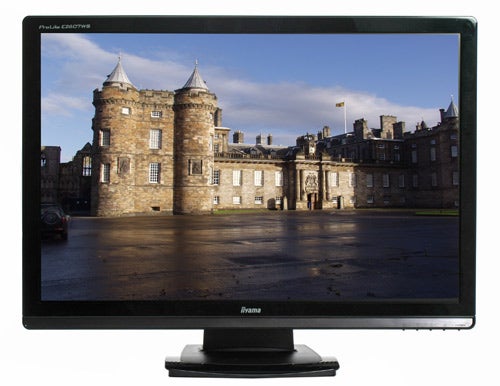
Which brings us to Iiyama’s ProLite E2607WS, a new 26in monitor available for around £280. Though it’s still a great price for a 1,920 x 1,200 monitor this large, I would have been far more impressed by this figure if I hadn’t recently looked at the £260 28in Hanns-G HG281DJ 28in LCD Monitor, which won a recommended award through sheer value for money. However, despite featuring more screen acreage than you might have any right to expect for the price, the Hanns-G did have a few flaws and a lot of room for improvement. So will the Iiyama be able to beat it?
Initial impressions on getting it out of the box are quite good. It’s simply packaged, and comes in two parts; the monitor and the base. Clicking these together is a simple matter, although getting them apart again is a bit of a hassle. There’s also a small cable clip, though you can easily route cables along the protruding ‘ledge’ beneath the connectors which might as well have been placed there for this very purpose.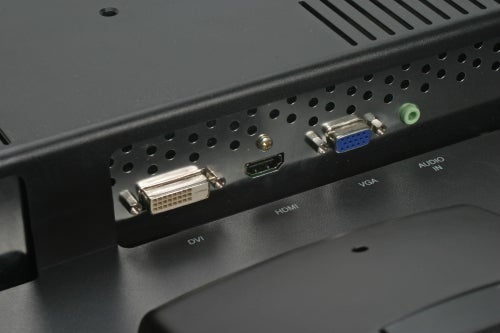
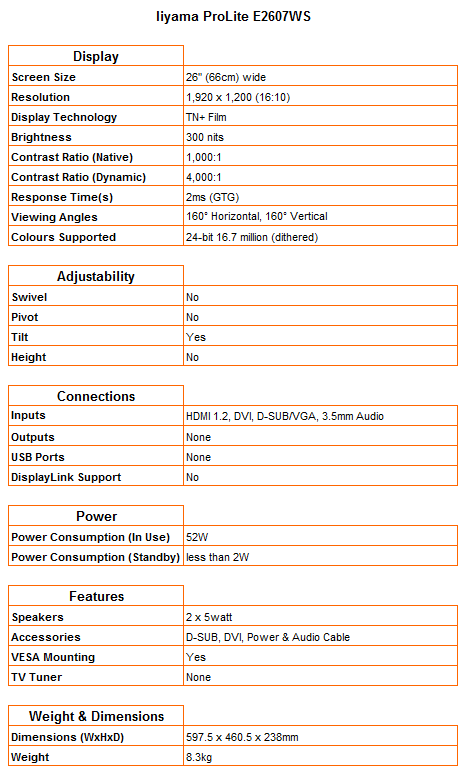
Speaking of cables, you get a 3.5mm audio cable, power, VGA and DVI. Nothing to complain about then, although it doesn’t compare favourably with Hanns-G’s provision of an HDMI cable and VGA-Component adapter (which admittedly was not that useful considering the screen’s lack of aspect ratio controls). Also, the HG281DJ featured audio in and out, letting you hook up speakers or headphones for all its sources, while the E2607WS only comes with audio in to feed its twin five watt speakers.
On the other hand, you do get better video connectivity on the Iiyama, with the presence of both DVI and HDMI offering an extra digital input compared to Hanns-G’s display. Obviously, more ports is the preferable option, since you can’t add more connectivity while cables can always be purchased separately.
Getting onto design, this newer, bigger Prolite is a step up from the Iiyama ProLite B2403WS 24in LCD Andy reviewed last year. The bezel is now a par-for-the-course glossy black, with a narrow inlay strip of brushed metal finishing off the attractive look at the bottom. The monitor’s base protrudes a bit more from the front than I would have liked, but matches the chassis well with a two-tone glossy surround and matte centre.
The bezel is also relatively thin, and is kept clean of stickers or excess branding. The LED is an unusual pale purple-blue, which looks classy against the brushed metal, and the button icons are unobtrusive and stylish enough not to detract if noticed. Apart from the somewhat clunky-shaped base, the E2607WS can match the look of any other display in this price class. 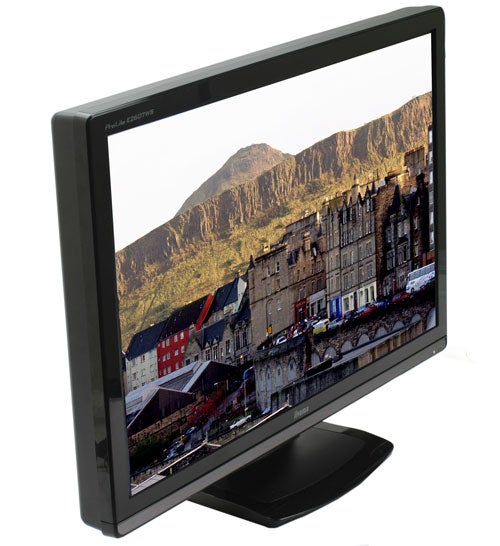
Not only does this 26in monitor look far more attractive than its 24in cousin, but it’s only around £20 more expensive! So what gives? Unfortunately, the cost cutting has gone into a stand with minimal adjustability, and this time round Iiyama offers only a little tilt compared to the B2403WS’s additional height, rotation and pivot. And though it’s rare enough to find good adjustability on most monitors above 24in, it’s worth noting that the Hanns-G managed to include swivel and height for less money.
At least build quality is pretty faultless, with strong solid plastics throughout, and no sign of flex or creak. The entire back of the monitor is a print-resistant matte black, and the screen produces very little heat.
Button implementation is also very good, with the labels on the front making them really easy to identify. There are four main buttons – menu/back/1, down, up and enter/select/2 – allowing for simple one-handed operation, and their logical layout even makes them usable in the dark. Cleverly, ‘down’ acts as a shortcut to Contrast, Brightness, ACR and ECO. ACR refers to Adjustable Contrast Ratio (this disables brightness), while ECO reduces the backlight output permanently to use less electricity (and disables both brightness and contrast adjustments).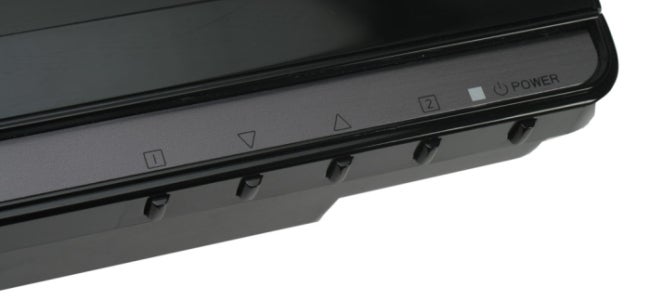
‘Up’ switches between Standard, Office, Movie, Game and Picture presets. Menu/back unsurprisingly calls up the menu, while enter/select switches inputs. Unfortunately, this is not something you’ll want to do often or in a hurry, since switching is agonizingly slow – a failing many monitors share. The OSD is rather ugly, but at least colourful, clear and easy to understand. Though manual colour adjustment is available, options like sharpness are disabled when running at native resolution over a digital input.
While so far Iiyama has left little room for complaint – barring the lack of adjustability of the stand – it’s now crunch-time as we look at the most important factor of any monitor: image quality. On paper, the ProLite E2607WS is very decent, with a claimed native contrast ratio of 1000:1 and a 2ms GTG response time. And fortunately, subjective impressions after playing with contrast and brightness aren’t actually too bad – always taking into account that we’re dealing with a TN here.
In our tests the Iiyama did display most of the traditional TN weaknesses, but none excessively. While it couldn’t quite distinguish between the lightest and darkest shades in our grey-scale test and contrast shift is a bit of a problem once you deviate from the ideal viewing angle, there was very little sign of colour shift.
There was only minimal backlight bleed along the screen’s bottom edge, and only a hint of banding on colour gradients. A slight red contamination across dark tones was easily remedied by manually adjusting colour balance, and text is clear and sharp all the way down to 6.8 points (nine pixels). 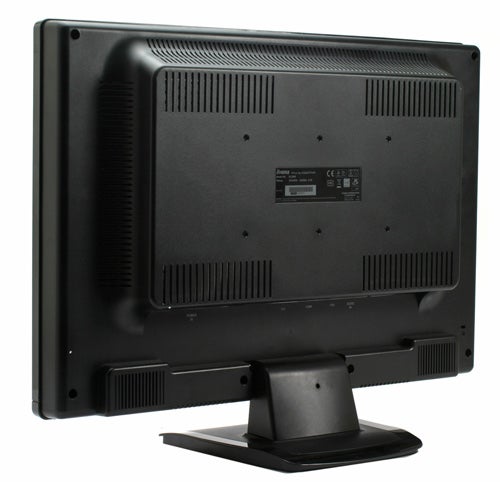
If you don’t mind losing some detail in the brightest and darkest parts of the image, the E2607WS makes for a pleasant movie and gaming experience. As is so often the case, Dynamic Contrast (in this case ACR) is a bit of a gimmick, just making the screen darker overall. Sure, blacks become a little deeper, but you lose the vibrancy of bright tones and whites become a tad grey. Anyway, thanks to the intelligent shortcut buttons, you can turn it on or off easily, and the Movie preset doesn’t turn it on by default either. The only other complaint is dithering in films, but once again this is common for TN panels and easy enough thing to ignore, especially at a distance. Just keep in mind that like any display using this type of panel, work requiring colour accuracy is a no-go.
The biggest annoyance is once again the lack of 1:1 pixel mapping. Although this ProLite ”does” have aspect ratio controls, the only useful one is a 4:3 mode which can only be activated when feeding the screen a 4:3 or 5:4 source. So again, 720 or 1,080 content from non-PC sources will be stretched, making this monitor unsuitable for use with a majority of AV equipment and consoles.
Finally, ending the assessment on a positive note, the five watt speakers are actually better than I was expecting. This by no means makes them good, thanks largely to a complete lack of bass, but they do an adequate job of voices and treble and manage impressively audible volumes without distortion. Though they won’t match even a decent set of headphones, at least you can watch a film with someone or play a game without making your ears bleed. 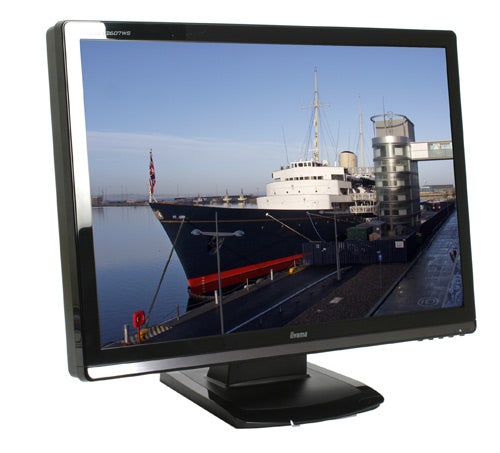
All told, the E2607WS is a solid effort. It offers slightly better image quality than the Hanns.G HG281DJ and offers an extra digital input, but it’s not as large, lacks a little adjustability, has no audio output and is obviously smaller than the Hanns.G. It’s also slightly more expensive and with cheap 24 inch monitors, like the Samsung SyncMaster 245B and Iiyama’s own Prolite B2403WS offering similar image quality for slightly less money, it’s left in a slightly precarious situation.
”’Verdict”’
There’s nothing much wrong with the E2607WS. It offers good value for money, is reasonable to look at the has decent enough image quality, but there are enough competitive alternatives that are worth looking at first.
Trusted Score
Score in detail
-
Image Quality 7
-
Design 7
-
Value 8
-
Features 7


Editorial independence
Editorial independence means being able to give an unbiased verdict about a product or company, with the avoidance of conflicts of interest. To ensure this is possible, every member of the editorial staff follows a clear code of conduct.

Professional conduct
We also expect our journalists to follow clear ethical standards in their work. Our staff members must strive for honesty and accuracy in everything they do. We follow the IPSO Editors’ code of practice to underpin these standards.
Editorial independence
Editorial independence means being able to give an unbiased verdict about a product or company, with the avoidance of conflicts of interest. To ensure this is possible, every member of the editorial staff follows a clear code of conduct.
Professional conduct
We also expect our journalists to follow clear ethical standards in their work. Our staff members must strive for honesty and accuracy in everything they do. We follow the IPSO Editors’ code of practice to underpin these standards.
