

Verdict


Key Specifications
- Review Price: £157.28
Buffalo was one of the first manufacturers to bring draft 802.11n wireless products to market and its latest Nfiniti router now delivers more wireless options than you can shake a stick at. Not only do you get support for 802.11b/g/n but the WZR-AG300NH also incorporates an 802.11a access point as well. Operating in the 5GHz range the router actually delivers two separate access points, so you could have clients that need a more stable, uncontested connection using 802.11a whilst others, typically those with older adapters, can go with 802.11b/g.
The WZR-AG300NH is a hefty slab of plastic with a most unusual aerial array. Looking more like a rotor assembly from an Apache gunship this component is hard wired to the router at the end of an 11cms cable. It can be clipped to the router body on the side or top but also placed away from it. You get an extra wall mount bracket but the cable really isn’t long enough to take advantage of this. Plenty of status LEDs are provided with indicators for the LAN and WAN ports and both access points.
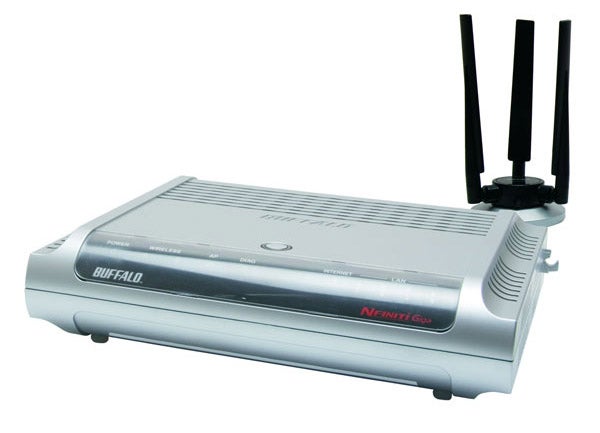
There’s more on Buffalo’s menu as you also get a quad of Gigabit Ethernet ports to play with and the LEDs show the connection speeds negotiated on each one. The router offers a standard RJ-45 WAN port so you’ll need to source a separate ADSL or cable modem and a small switch alongside this port enables the router to be swiftly changed to access point mode only. Naturally, Buffalo’s AOSS (AirStation One-touch Secure System) is included which offers a one stop shop for setting up the best wireless security. To use this you press the button on the top of the router, which causes it to flash. With a Buffalo dual-band wireless PC Card installed in a 1.6GHz Fujitsu Siemens notebook running Windows XP SP2 we selected the AOSS soft button on the accompanying Client Manager utility and watched the two communicate with each other and set up an encrypted connection with no further intervention.
Initial installation is handled smartly by the CD-ROM based setup wizard that steps through the physical connections, setting up security for both wireless access points and verifying Internet access. So far, so good but we found the web interface a bit of a mess and initially very tricky to navigate. Plenty of assistance is provided in a side bar but it could benefit from a more sympathetic design to make the various features more accessible. It was also annoying that the timeout for administrative access is set to around five minutes and can’t be changed.
The SPI firewall can’t be switched off but you can customize it with your own filters. This is made all the more complex as the router supports IPv6 as well as IPv4 and separate filters are created for each type of source and destination address. Intrusion detection can also be activated and alerts send via email or as a pop-up to systems running the Client Manager utility. Basic QoS (quality of service) is provided where you can specify eight applications and choose from three priorities for each one.
Along with the full gamut of wireless security measures the router also supports the fledgling WPS (Wi-Fi Protected Setup) which is designed to make secure connections even easier. However, the main user guide doesn’t even acknowledge WPS and Buffalo advised us this feature is currently only supported by Vista’s built-in Wireless Manager tool and is provided to allow clients using PC Cards other than Buffalo’s to enjoy a one-touch configuration. The Client Manager utility supplied with the PC Card only supports AOSS which is the preferred method when using an all Buffalo setup.
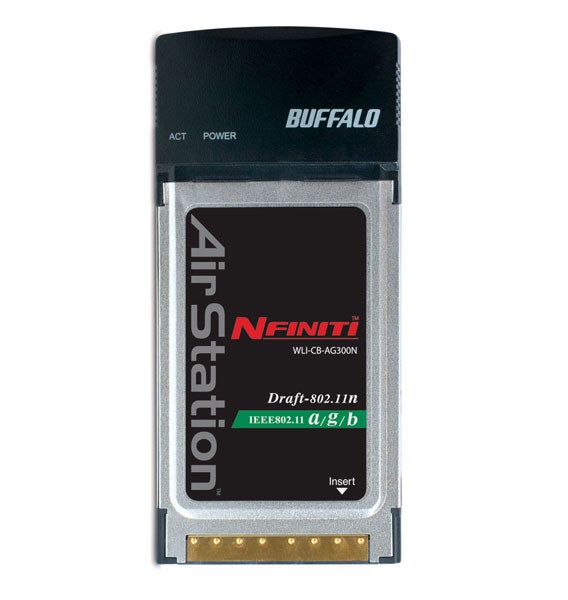
Wireless performance was good as with an 802.11a connection we saw the open source Iometer utility report an average raw read rate of 84Mbps over a one metre link to a Supermicro 3.2GHz Pentium D PC on the LAN. Moving the laptop to the floor below the router with three brick walls in the way saw this fall to 33Mbps. Speeds over 802.11g were in the same ball park with Iometer reporting 80Mbps over a close range link and 36Mbps over the longer range. Alas, real world performance dropped significantly as copying a 690MB file to the PC over close range 802.11a and 802.11g links returned respective averages of 40Mbps and 36Mbps. We also tested with both access points active by simultaneously streaming music to an iTunes client over 802.11g and running Iometer with the laptop linked over 802.11a and saw no drop in performance for the latter.
”’Verdict”’
There has been a mass of controversy surrounding the draft 802.11n standard but the fact that the mighty Cisco has recently announced support will give it a huge boost in acceptance for business use. Note that the WZR-AG300NH is only draft 1.0 compliant but it is offering a veritable feast of wireless features. However, this router is comparatively expensive so unless you really feel the 802.11a support is of benefit then consider D-Link’s DIR-655 as this offers a lot more features and equally good performance for a lot less hard cash.
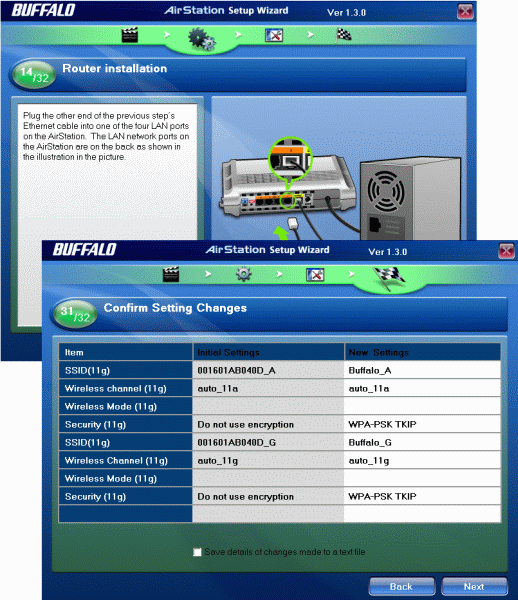
(centre)The startup wizard helps with cabling conundrums and setting up security for both access points.(/centre)
—-
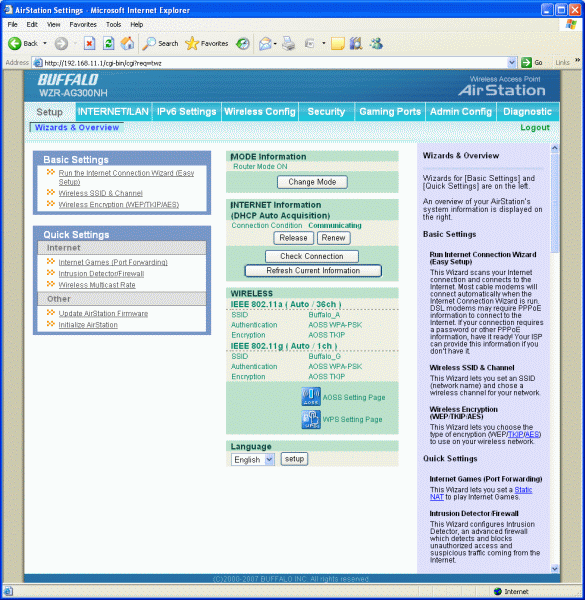
(centre)The router’s web interface is a busy affair that could be better designed.(/centre)
—-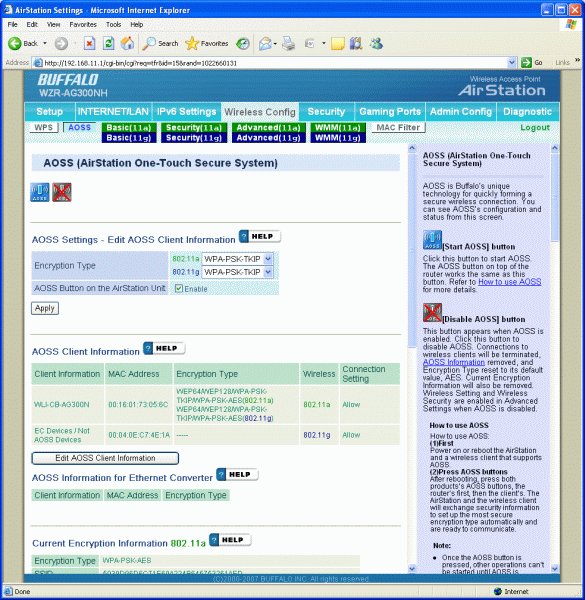
(centre)Separate sections are provided for 802.11a and 802.11b/g configuration and here we have AOSS activated successfully.(/centre)
—-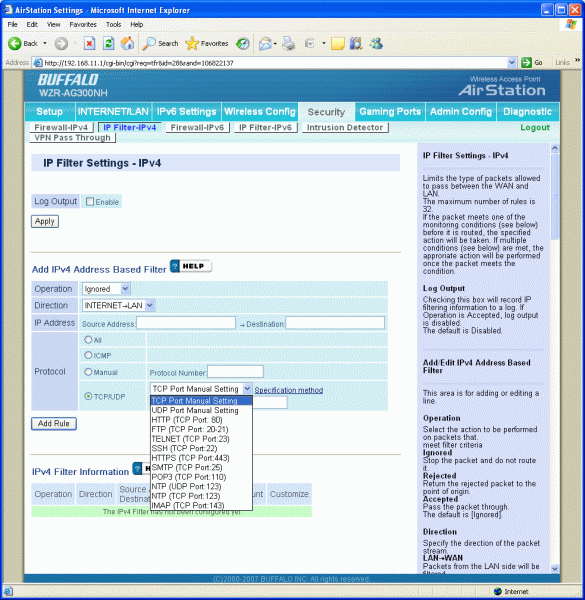
(centre)Dual firewall settings are provided for IPv4 and IPv6 with each using their own filters.(/centre)
—-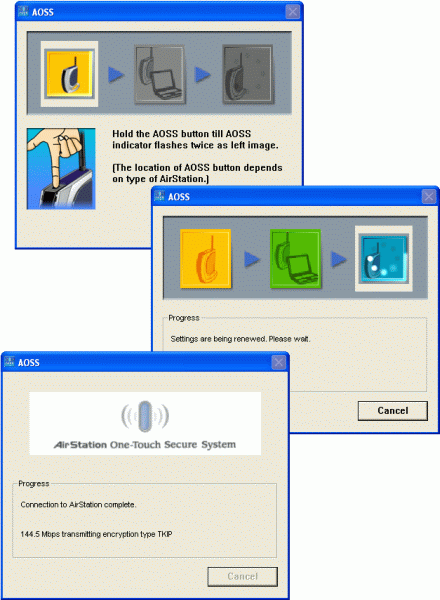
(centre)We had no problems using AOSS which is Buffalo’s preferred method for one-touch wireless connection setup.(/centre)
—-
Trusted Score
Score in detail
-
Value 7
-
Features 7


Editorial independence
Editorial independence means being able to give an unbiased verdict about a product or company, with the avoidance of conflicts of interest. To ensure this is possible, every member of the editorial staff follows a clear code of conduct.

Professional conduct
We also expect our journalists to follow clear ethical standards in their work. Our staff members must strive for honesty and accuracy in everything they do. We follow the IPSO Editors’ code of practice to underpin these standards.
Editorial independence
Editorial independence means being able to give an unbiased verdict about a product or company, with the avoidance of conflicts of interest. To ensure this is possible, every member of the editorial staff follows a clear code of conduct.
Professional conduct
We also expect our journalists to follow clear ethical standards in their work. Our staff members must strive for honesty and accuracy in everything they do. We follow the IPSO Editors’ code of practice to underpin these standards.
