

Verdict


The benighted PC manikin played by Dave Mitchell in Apple’s recent ads must be thinking Robert Webb’s Mac is having yet another coy giggle. Having bubbled on about how much better the software is that’s supplied with a Mac, Apple has decided to offer some of it on the platform of its market-leading rival; it has released the Safari Internet browser for Windows.
After the success of iTunes for Windows, there’s clear logic in offering Safari for the OS too. However, there’s a pressing reason for a Windows Media Player user to run iTunes, that reason being the iPod. There’s no similarly compelling reason for an Internet Explorer user to switch to an alternative browser. We have Internet Explorer 7 and Firefox 2, with Opera and Netscape in the wings, so what’s so hot about Safari?
Safari is the most popular browser on the Mac, but this is hardly surprising, as it’s bundled with every new machine in the same way Internet Explorer is bundled with Windows. Safari for Windows is claimed to be much faster than other Windows-based browsers and to offer significant new features. It’s available free, in its first public beta, from the Apple site and Apple claims over one million copies have been downloaded in its first 48 hours.
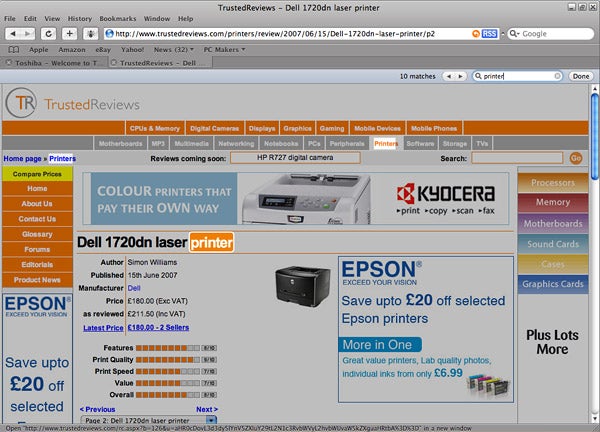
It installs simply enough and you have the choice of installing QuickTime as well as the browser. The main screen is deceptively simple, with a menu bar, address bar and set of tabs along the top. Tabs work as they do in the latest versions of Internet Explorer and Firefox, but can also be reordered by dragging and dropping. You can also pull any open tab off the tab bar and it opens as an extra instance of Safari. It’s a shame, though, that the tabs you create are not remembered between sessions, as they are in Firefox 2.
There’s no bookmark palette down the left-hand side of the screen, but instead a bookmark bar can be turned on, running horizontally across the top of the page pane. This isn’t a bad way to do things, but it does restrict the number of first level groupings for your bookmarks. You can import existing bookmarks automatically and a complete bookmarks screen can be opened, though this annoyingly is built into a Safari tab.
Despite Apple’s reputation for excellent design, the main screen of Safari is far from ideal. The main problem is the colour scheme and font choice. Embossed black characters set on titanium grey menus and tabs in an unfamiliar font (for Windows users) aren’t easy to read. The small text in the status bar at the bottom of the screen is particularly poor.
Mind you, the quality of text in general is nothing to write home about. Safari renders text ‘softly’, which to you and me means fuzzily. It’s similar to IE7’s ClearType option but looks even more aggressive – then again some like it, others don’t.
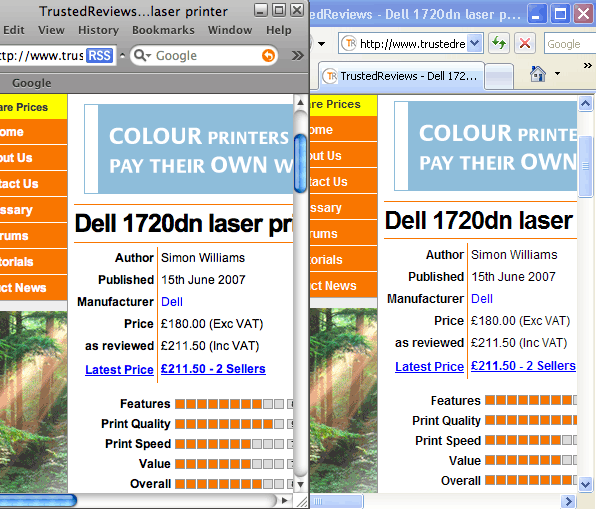
As regards speed, Apple claims Safari’s at least twice as fast as IE7. Even this beta copy is quite nippy. However, we suspect slow updates of Internet pages are far more likely to be caused by a slow connection or an inundated site server, than by a sluggish browser. That said, if you need the ultimate in page redraw speeds, Safari must be a contender.
There are some particularly handy features in the program. One of these is Inline find; a fast search facility which not only finds words and phrases within the currently displayed page, but also highlights each in turn with an eye-catching animation and dims the rest of the text so the search subject really stands out.
Then there’s the RSS feed button in the address bar, which pops up on any site supporting these newswires and displays all the latest stories in a very easy-to-access way.
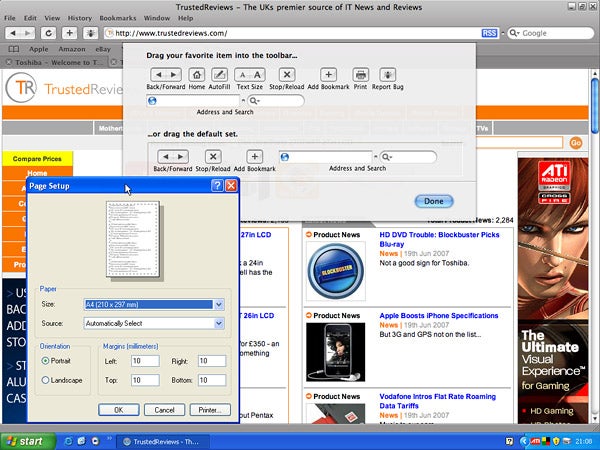
The adaptation of Safari to the Windows environment isn’t completely consistent. Some dialogs flap out from the top of the screen in a distinctly OSX way, while others pop-up in traditional Windows XP colours, looking oddly discordant with the rest of the interface design.
Although it’s not fair to make much comment on the stability of beta code, the Safari beta crashes rather too regularly to be used as your primary browser, at the moment. Most times we hit the RSS button, for example, Safari would ‘need to close’, though oddly not with Apple’s RSS.
”’Verdict”’
Safari is a capable Internet browser, but Apple should perhaps have taken a closer look at the opposition before trying to crash the Windows party. Simple features like IE7’s ability to open a new tab from any bookmark or Firefox 2’s drag-and-drop of site names into the bookmark palette are everyday benefits of these two browsers which Safari, at least in this beta, can’t match.
Trusted Score
Score in detail
-
Features 7
-
Performance 8
-
Usability 6


Editorial independence
Editorial independence means being able to give an unbiased verdict about a product or company, with the avoidance of conflicts of interest. To ensure this is possible, every member of the editorial staff follows a clear code of conduct.

Professional conduct
We also expect our journalists to follow clear ethical standards in their work. Our staff members must strive for honesty and accuracy in everything they do. We follow the IPSO Editors’ code of practice to underpin these standards.
Editorial independence
Editorial independence means being able to give an unbiased verdict about a product or company, with the avoidance of conflicts of interest. To ensure this is possible, every member of the editorial staff follows a clear code of conduct.
Professional conduct
We also expect our journalists to follow clear ethical standards in their work. Our staff members must strive for honesty and accuracy in everything they do. We follow the IPSO Editors’ code of practice to underpin these standards.
