

Verdict


Key Specifications
- Review Price: £128.86
You could be forgiven for not noticing Canon’s new range of PIXMA all-in-one printers, as they all look very similar to their predecessors. Slightly different lines in their silver and black cases are probably not enough to distinguish them from last year’s models, but on the PIXMA MP640 there’s one tell-tale sign; a blue, flashing Wi-Fi logo.
This is a mid-range all-in-one device with several of the niceties Canon builds into its machines, such as twin paper trays and CD/DVD direct print. It is a substantial device, with the company’s unique design which sets the control panel in the scanner lid, protected when not in use by a fold-down cover, which itself contains the machine’s 75mm LCD display.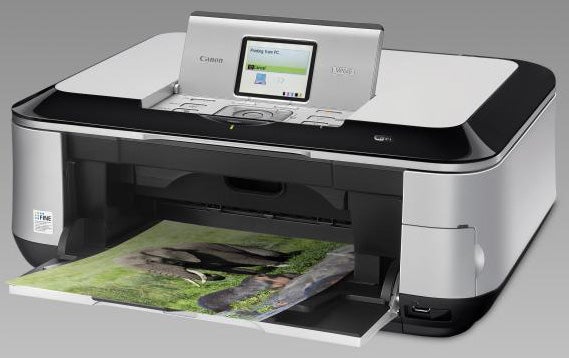
The control panel is particularly well laid out with large, easy-to-use buttons for the main functions, two programmable buttons for context-sensitive entries and Canon’s unique little click-wheel for selecting menu options.
Under the lid there’s a standard flatbed scanner and if you lift the whole of the scanner section up, you get easy access to the five cartridges in the semi-permanent head carrier. As is becoming increasingly standard, there are two blacks, a pigmented one for printing text and a dye-based one for picking out details in photo prints.
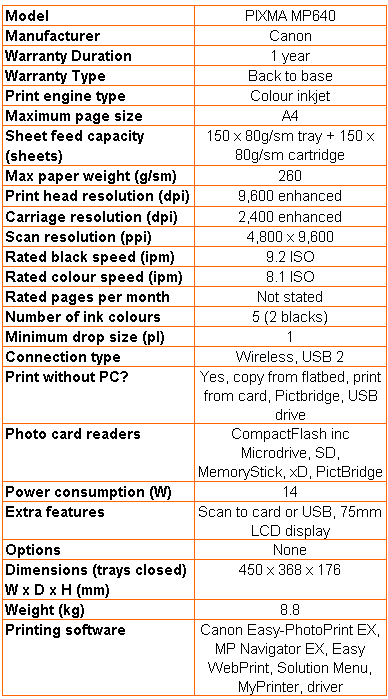
The right-hand front corner includes a curved cover, which hinges open to reveal three memory card slots, adding CompactFlash to the standard SD, MemoryStick and xD mix. Below the slots is a USB socket, which can take USB drives as well as PictBridge cameras.
Paper handling is versatile, with a 150-cassette which slides in under the machine from the front, supplementing a standard 150-sheet upright tray at the back. Canon recommends you use the rear tray for photo blanks and the cassette for plain paper, but both are capable of feeding either media.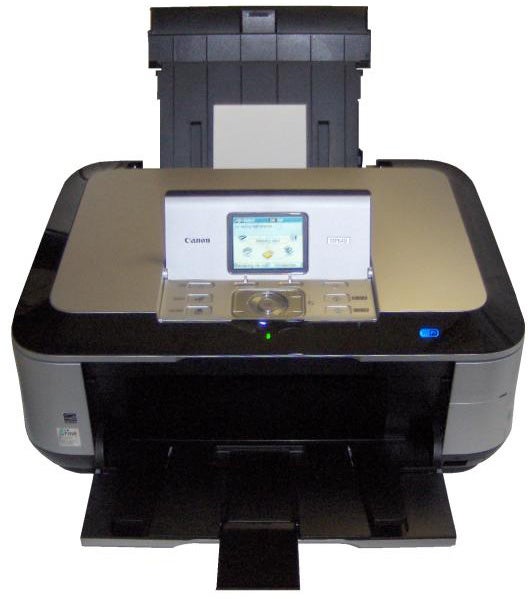
There’s also Canon’s convenient direct CD/DVD print facility, where you load disc blanks into a carrier which slots in from the front, once you’ve pulled down an internal cover.
Canon offers a good selection of support software, including an excellent CD/DVD label design applet. Drivers are provided for both Windows and OS X and install in a simple, workmanlike manner.
Wireless connection is also a straightforward, two-stage process, where the printer is first logged onto the wireless network, using WPA or WPS. The software installation then picks up the newly available printer.
Canon’s speed claims are not nearly as outlandish as they used to be, as the company now quotes ISO print speeds for normal mode printing. Even so, the headline figures on the PIXMA MP640 are 9.2ppm for black print and 8.1ppm for colour.
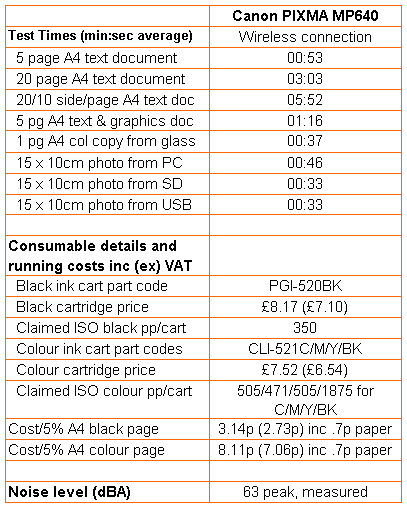
Our five-page black text print returned a speed of 5.66ppm and the longer, 20-page document increased this to 6.56ppm. Our five-page black text and colour graphics print gave 3.95ppm. These speeds are unspectacular, but are in the middle of the range for an inkjet all-in-one in this price range.
Duplex print speeds are better than before, as the paper rests for only a second or so between sides, where some of the machine’s competitors wait as long as 15 seconds before printing the second sides. Our 20-side, 10-page document still took 5:52 to complete, though, giving the machine a real-world duplex speed of 3.41 sides per minute.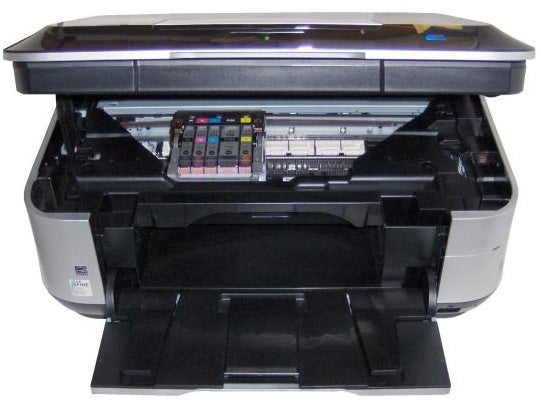
An A4, colour copy took 37 seconds, which is about average for a sub-£150 device. Its appearance was very good in comparison with a direct print, with colours coming out very close to the original. Areas of solid colour are a little mottled, but then they are in the original prints, too and there are no signs of banding. Colours are bright and clear. Black text is dense and generally sharp, though there is occasional feathering of ink into the paper fibres, giving a more fussy appearance.
Photo prints are still among the best we’ve seen from any SOHO machine. Colour blends are smooth and clean and shadow detail is much better than from some rivals. Colours are natural and correspond well to those in original images and foreground detail is sharp and precise. These are some of the best four-colour photo prints you’ll see from a mass-market machine.
The five cartridges are the only consumables in the PIXMA MP640 and they’re all priced reasonably, giving costs of 3.14p for an ISO black page and 8.11p for an ISO colour one, each including 0.7p for paper. These are competitive with machines such as the HP Photosmart Premium C309g, tested recently, but roughly a penny per page higher than for any of the new Kodak ESP machines.
Verdict
What you get if you choose the Canon PIXMA MP640 is a versatile, well-designed, easy-to-use all-in-one. It may not be the cheapest to run, but you do get high quality photo prints, better than average plain paper prints and the facility to set up plain and photo paper simultaneously. You also get the facilities to print on CDs and DVDs and to duplex pages with less speed overhead than from most of its rivals. It doesn’t quite do enough to secure an award, but it won’t disappoint if you do pick one up.
Trusted Score
Score in detail
-
Print Speed 7
-
Features 9
-
Value 9
-
Print Quality 8
Features
| Networking | Ethernet, Wi-Fi |
| Card slot | Secure Digital, Secure Digital High Capacity (SDHC), MMC, MMCplus, miniSD, CompactFlash (CF), Microdrive, Memory Stick, Memory Stick PRO, Memory Stick Duo, Memory Stick PRO Duo |
Printing
| Duplex | Automatic |
| Paper Size | Letter, Legal, Envelope No. 10, 4" x 6", 5" x 7", 8" x 10" |
| Sheet Capacity | 150 sheets |
| Rated Black Speed (Images per minute) | 9 ppmipm |
| Rated Colour Speed (Images per minute) | 8 ppmipm |
Scanning
| Scan Resolution (Dots per inch) | 4800 dpi |


Editorial independence
Editorial independence means being able to give an unbiased verdict about a product or company, with the avoidance of conflicts of interest. To ensure this is possible, every member of the editorial staff follows a clear code of conduct.

Professional conduct
We also expect our journalists to follow clear ethical standards in their work. Our staff members must strive for honesty and accuracy in everything they do. We follow the IPSO Editors’ code of practice to underpin these standards.
Editorial independence
Editorial independence means being able to give an unbiased verdict about a product or company, with the avoidance of conflicts of interest. To ensure this is possible, every member of the editorial staff follows a clear code of conduct.
Professional conduct
We also expect our journalists to follow clear ethical standards in their work. Our staff members must strive for honesty and accuracy in everything they do. We follow the IPSO Editors’ code of practice to underpin these standards.
