

Verdict


Key Specifications
- Review Price: £182.33
The market for photo-oriented all-in-one printers is primarily shared between Canon and HP and HP’s range is extensive. Towards the top of this is the new Photosmart C8180, a machine with all the photo printing bells and whistles and even a DVD-Rewriter for bulk photo storage.
Built into a stylish light grey and ice white case, with silver highlights and panels, the machine has all the standard features we’ve come to expect from an HP all-in-one, but with a few worthwhile extras. For a start, there’s an 89mm touchscreen set into the control panel, which takes over the functions of many of the normal buttons. Indeed, there is some duplication between touchscreen selections and the few remaining physical buttons on the control panel.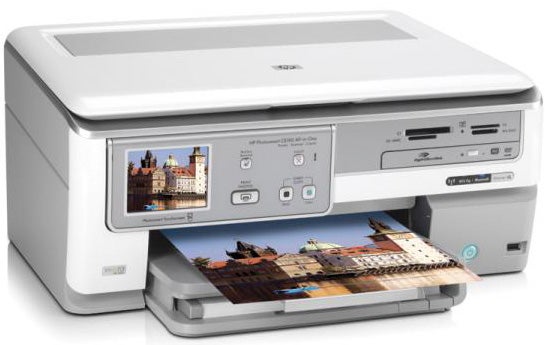
To the right of the controls is a bank of memory card slots, taking all the current types. Below this, though, there’s something much less ordinary, in the form of a notebook-style DVD+/-RW drive, which can be used for both recording and reading photo files through the machine. Further down the front panel is a PictBridge socket and an illuminated power button.
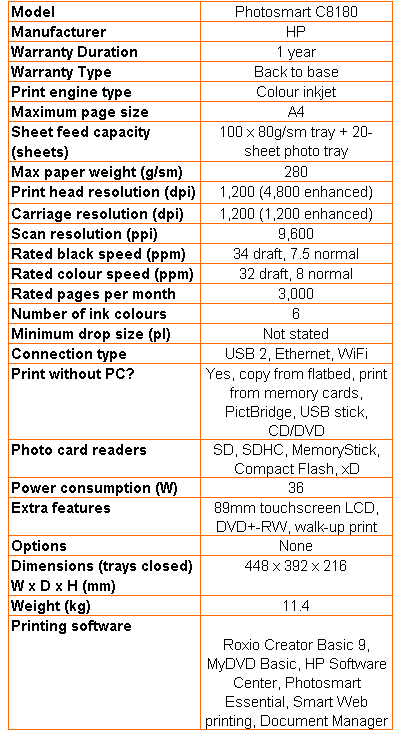
The paper tray can take up to 100 sheets of plain paper and a secondary, powered tray holds up to 20 photo blanks. Both can be filled at the same time. There are sockets at the back for USB 2.0 and Ethernet and the machine is fitted as standard with Wi-Fi, though there’s no sign of an external aerial. There is, however, an external power supply, which is a slightly tacky way of doing things.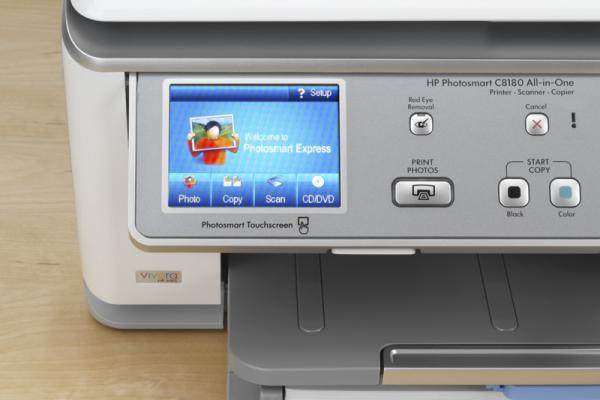
Connecting and running the machine via any of its three connections is straightforward. The Wi-Fi setup, which can be awkward on some machines, is handled here with a Wizard from the printer’s touchscreen, before installing the drivers. HP software includes OCR for scanning text documents and a simplified photo editor to cover basic image tweaks.
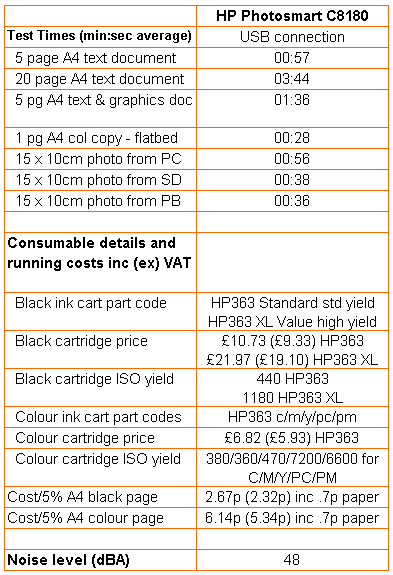
Unusually, HP rates the Photosmart C8180 half a page a minute faster printing colour than black; 7.5ppm against 8.0ppm. Under test, we saw speeds quite a bit slower than these figures. The five-page black text print took 57 seconds, a speed of 5.26ppm and when we ran the 20-page test, it still only crept up to 5.36ppm. Meanwhile, the five-page black text and colour graphics print took 1:36, just 3.13ppm.
Slip a piece of glossy paper into the machine, though, ask for a photo print and the machine hits the nitrous oxide. A 15 x 10cm photo from a PC took 56 seconds, a good deal quicker than most all-in-ones, but as nothing to the 38 seconds when printing from an SD card, or the marginally faster 36 seconds when printing via PictBridge. These really are fast times, so you might expect print quality to suffer.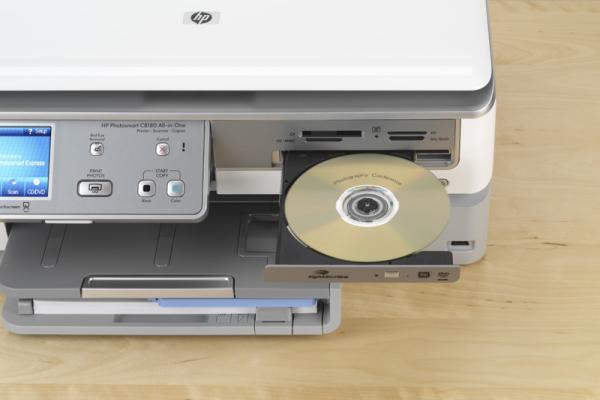
Not so. Photo prints are excellent, with beautifully smooth variations in colour, plenty of detail in areas are bright light, but also shadow detail we don’t often see in our test pieces. Colours are natural, but still manage to show up vividly, when the subject matter warrants it.
Colour prints on plain paper are also generally good, with solid areas of colour and good registration of black text over the top. A photocopy of our black text and colour graphics page showed better colours than many, though there was noticeable feathering of text into the paper, which gives it a fuzzy, spiky appearance. This can also be seen in the straight black text print and is a shame, as it lowers the overall print quality in an otherwise excellent set of test results.
To test the DVD drive we, slightly cruelly, dropped an unformatted DVD+RW disc into the printer’s drive tray and slid an SD card into one of its card slots. The touchscreen asked if we wanted to backup the card and, on clicking Yes, it went off and copied 45, four megapixel pictures (a total of 40MB) to the rewritable disc in four minutes and 52 seconds.
The process is remarkably idiot-proof and, once created, the DVD can be read in any PC fitted with a DVD reader. You can use the same disc as a source to print directly on the Photosmart C8180. It’s the extra simplicity of backup that makes the built-in drive appealing, as most vaguely modern desktop and notebook PCs already have a DVD rewriter, or at least a CD rewriter, built-in.
This is a six-ink printer, using HP’s Vivera inks, which makes maintenance extremely easy. The five colours are available in just one variety, with yield varying from 360 pages for magenta to 7,200 pages for photo cyan. Black is available in 440 and 1,180 page variants and, as usual, we used the high-capacity cartridge in calculating costs.
These come out at 2.67p for black and 6.14p for colour, using ISO test pages and including 0.7p per sheet for paper. These costs are about average for a printer costing just under £200 and the colour cost is quite a bit lower than from some colour lasers, which rarely used to be the case.
Verdict
We were all ready to give the Photosmart C8180 a recommendation, until we saw its black print on plain paper. We should stress this is the same paper stock we always use and is kept in the same conditions, so there’s no reason why output should show the kind of character spikiness we saw. Photo print is superb, photo speeds are exceptional and the simplicity of using the printer’s DVD rewriter and wireless connection make it in other respects a very worthwhile photographers’ all-in-one.
Trusted Score
Score in detail
-
Print Speed 7
-
Features 8
-
Value 8
-
Print Quality 7
Features
| Networking | Ethernet, Wi-Fi, Bluetooth |
| Card slot | CompactFlash, Memory Stick, Memory Stick Duo, Memory Stick PRO, Memory Stick PRO Duo, MultiMedia Card (MMC), SD Card, SDHC Card, xD-Picture Card |
Printing
| Paper Size | A4, A5, B5, DL Envelope, C6 Envelope, A6, 3.94" x 11.81", 8.46" x 24", 5.12" x 7.09", 3.94" x 5.91", Custom Size, 100 mm x 300 mm, 130 mm x 180 mm, 100 mm x 150 mm, 215 mm x 610 mm |
| Sheet Capacity | 120 sheets, 50 |
| Rated Black Speed (Images per minute) | 34 ppmipm |
| Rated Colour Speed (Images per minute) | 33 ppmipm |
Scanning
| Scan Resolution (Dots per inch) | 9600 dpi, 9600 x 9600dpi |


Editorial independence
Editorial independence means being able to give an unbiased verdict about a product or company, with the avoidance of conflicts of interest. To ensure this is possible, every member of the editorial staff follows a clear code of conduct.

Professional conduct
We also expect our journalists to follow clear ethical standards in their work. Our staff members must strive for honesty and accuracy in everything they do. We follow the IPSO Editors’ code of practice to underpin these standards.
Editorial independence
Editorial independence means being able to give an unbiased verdict about a product or company, with the avoidance of conflicts of interest. To ensure this is possible, every member of the editorial staff follows a clear code of conduct.
Professional conduct
We also expect our journalists to follow clear ethical standards in their work. Our staff members must strive for honesty and accuracy in everything they do. We follow the IPSO Editors’ code of practice to underpin these standards.
