

Verdict


Key Specifications
- Review Price: £141.90
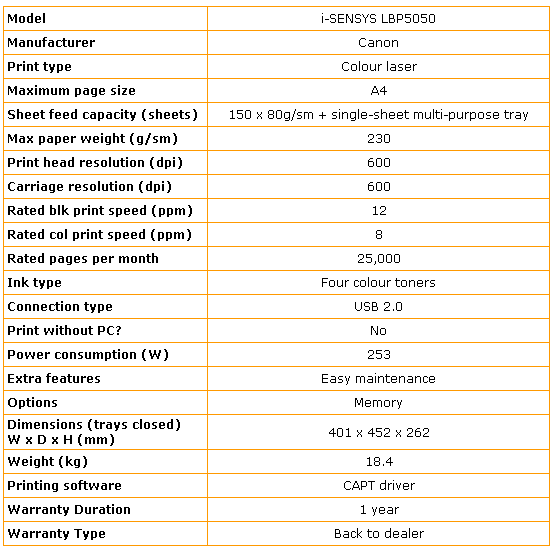
A colour laser printer for under £150 is still unusual and when it comes from a company with a good track record, like Canon, it’s certainly worth a look. It’s also worth another look because it uses the same, Canon-designed, laser engine as the HP LaserJet CP1515n – so how do the two very similarly-priced printers compare?
The i-SENSYS LBP5050 is intended as a home machine. We know because its single paper tray takes just 150 sheets of paper. This is little more than the average for an inkjet printer and half what the twin trays of many of Canon’s PIXMA inkjet range offer. If you print regularly, you’re going to be stuffing paper into this one every few days.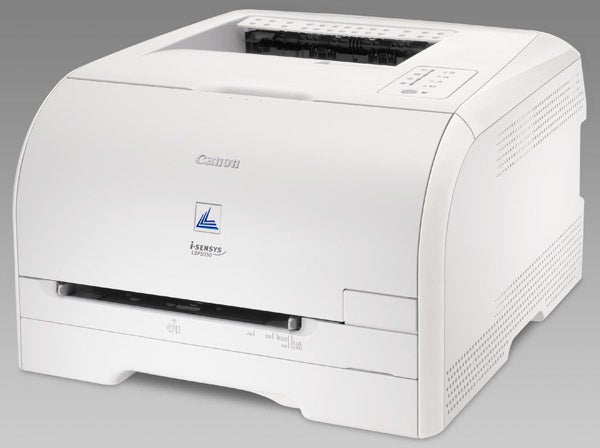
The top surface of the machine has the control panel with eight LEDs set into it, for indicating low toner in the four colour cartridges, as well as paper jams, out of paper and other error conditions. Paper feeds to an inset in the top cover, next to this panel and there’s a purely cosmetic baffle just above the paper exit slot, which is full of oddly-distributed holes.
At the front, above the paper input tray, is a single-sheet feed slot and at the back are sockets for mains power and USB 2.0, the only connection provided. There’s a networkable version of this printer available, but no options to upgrade this one.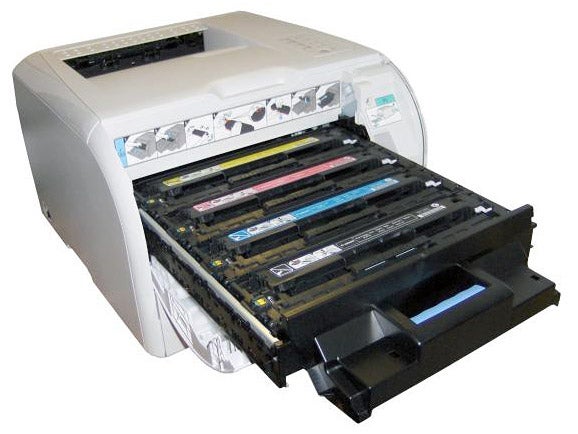
Setup is very straightforward, as the four toner cartridges are all provided in situ and all you have to do is pull the rings at the left-hand ends of them to remove the sealing tapes. There are a couple of spacers that need removing from the feed mechanism at the rear and of course you need to install the software drivers, but the whole process can be completed in under 15 minutes.
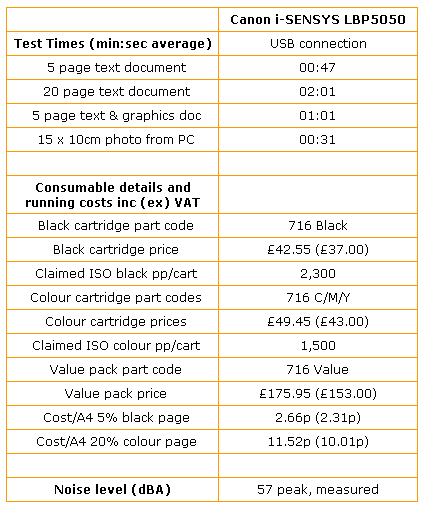
The in-line print mechanism is claimed by Canon to produce a quick first print, but under test it was still taking around 22 seconds before paper started to feed for the first page of a print. This isn’t particularly quick, though we did produce a speed of 6.38ppm overall from the machine with our 5-page black text print test. On the 20-page test, this speed climbed to 9.91ppm. Given that Canon claims 12ppm for the i-SENSYS LBP5050, this is quite a respectable result, marginally quicker than the HP LaserJet CP1515n.
Canon’s spec sheet also says you’ll get 8ppm when printing in colour, but our five-page text and colour graphics print only produced 4.6ppm, so not quite as good. It turned out a 15 x 10cm photo print on an A4 sheet in 34 seconds, which is again reasonable.
The quality of text print from this machine is good, with little spatter and clean, well-defined text at all sizes. Colours are very brightly reproduced though greens and blues are much darker than the originals and there’s some problem with black text registration over some colours as there’s obvious haloing.
Photo reproduction shows a slightly better colour gamut than with some colour lasers though colours once again are darker than they should be and reds look a little over-emphasised.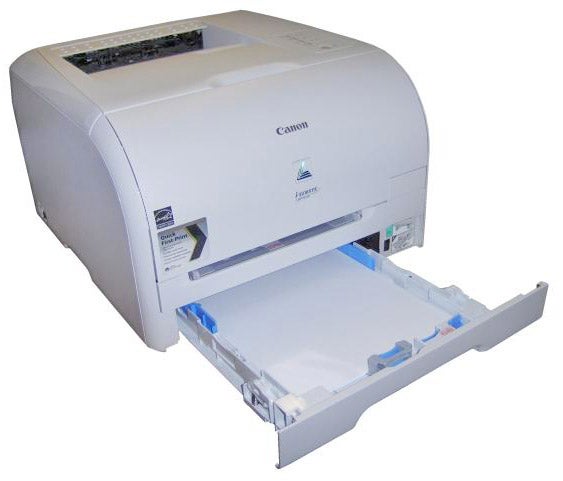
Both the Canon and HP versions of this machine claim noise levels of 47dBA but the only way we can believe these figures is without the peaks when paper is fed from the input trays. At these points, noise reaches around 10dBA higher, which makes these printers quiet in comparison with large workgroup machines but noisy if the alternative is a colour inkjet.
The fourth toner cartridges are rated at 1,500 pages for colour and 2,300 pages for black. Both these capacities are 100 pages higher than their HP equivalents, but it’s not clear whether that’s because they contain more toner or just that they’re measured differently.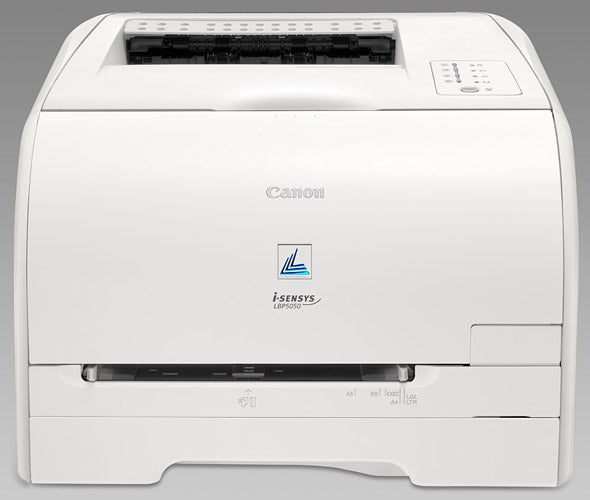
Canon offers all four cartridges in a Value Pack at a slightly lower cost than the individual consumables, so we used this figure for calculating the colour page cost, but stuck to the individual cost for the black cartridge, which is lower than a quarter of the Value Pack price. Using this formula gives a page cost for black of 2.66p, including 0.7p for plain paper, and 11.5p for colour, applying the same 0.7p paper cost.
Again, these figures are lower than the costs for the HP machine, but not by much, and there’s obviously some allowance being made for the low purchase price of the Canon printer itself, by way of the relatively high cost of its consumables.
”’Verdict”’
If you’re considering a colour laser printer for personal use and have both this Canon i-SENSYS LBP5050 and the HP LaserJet CP1515n on your shortlist, you should see slightly quicker and slightly cheaper prints from the Canon machine, but marginally better print quality from the HP, which also provides network capability for a fiver or so more than USB-only LBP5050.
Trusted Score
Score in detail
-
Print Speed 8
-
Features 7
-
Value 9
-
Print Quality 8
Printing
| Paper Size | A4, B5, A5, Legal, Letter, Executive, Statement, Foolscap, 16K, DL Envelope, Com10 Envelope, C5 Envelope, Monarch Envelope, B5 Envelope, Index Card, 76 mm x 216 mm, 127 mm x 355 mm |
| Sheet Capacity | 150 sheets |
| Rated Black Speed (Images per minute) | 12 ppmipm |
| Rated Colour Speed (Images per minute) | 8 ppmipm |


Editorial independence
Editorial independence means being able to give an unbiased verdict about a product or company, with the avoidance of conflicts of interest. To ensure this is possible, every member of the editorial staff follows a clear code of conduct.

Professional conduct
We also expect our journalists to follow clear ethical standards in their work. Our staff members must strive for honesty and accuracy in everything they do. We follow the IPSO Editors’ code of practice to underpin these standards.
Editorial independence
Editorial independence means being able to give an unbiased verdict about a product or company, with the avoidance of conflicts of interest. To ensure this is possible, every member of the editorial staff follows a clear code of conduct.
Professional conduct
We also expect our journalists to follow clear ethical standards in their work. Our staff members must strive for honesty and accuracy in everything they do. We follow the IPSO Editors’ code of practice to underpin these standards.
