

Verdict


Key Specifications
- Review Price: £249.08
We looked at HP’s OfficeJet Pro print mechanism in its (article:HP-OfficeJet-Pro-K5400n-Inkjet-Printer K5400n) printer a few weeks back. That A4 machine is very competitively priced at well under £100. The K8600 is its wide carriage, A3+ sibling and the price doesn’t look quite so attractive at a smidge under £250.
The printer’s black and silver styling, with highlights in high-gloss transparent black, wouldn’t look out of place in a graphic design studio. Handily, if you’re only using the printer’s larger format paper handling on occasions, the input and output trays can be telescoped back, so they protrude only a short way from its front.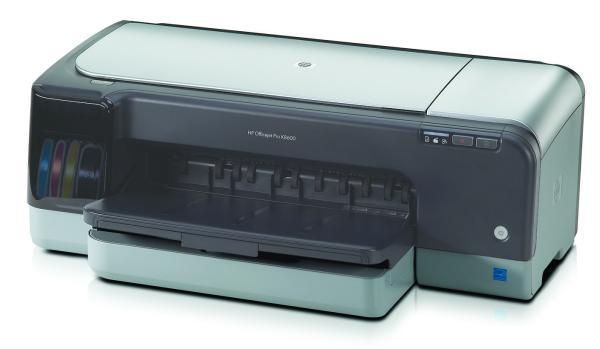
However, the design of the two trays is a little odd and disparate, as the output tray no longer sits like a lid on top of the input one, but is angled up away from it and the telescopic sections of the two trays are different shapes and sizes. This makes the assemblies look rather messy, for no reason that’s readily apparent.
There are indicators at the right end of its front panel for paper jam, cover open and paper out, as well as buttons to cancel a job and feed a sheet through. At the left-hand end of the machine is a pull-down cover for the four separate ink cartridges.
At the rear, there’s a single USB 2.0 socket and one for a low voltage input. It’s fairly amazing that in a printer this size HP can’t fit the power supply inside the case, but instead relies on a fairly substantial ‘black block’ to kick around under the desk. Although you can get JetDirect Ethernet and Wi-Fi external adapters for the printer, there are no options to upgrade with a duplexer or extra paper trays, as there are with the K5400n. There is the OfficeJet Pro K8600dn, which includes duplex and Ethernet as standard, but you have to put up £325 for that.
The initial, physical setup is a two-stage process, as you have to slot in the two-colour heads – one for cyan and magenta and the other for yellow and black – before plugging in the four, separate ink cartridges. The printer then takes around quarter of an hour to charge its ink system and to automatically align its heads.
The software is pretty basic stuff, with HP’s Solution Centre and a reasonable driver, which includes presets for common tasks, such as plain paper printing, photos and duplex, though only manual duplex on this model.
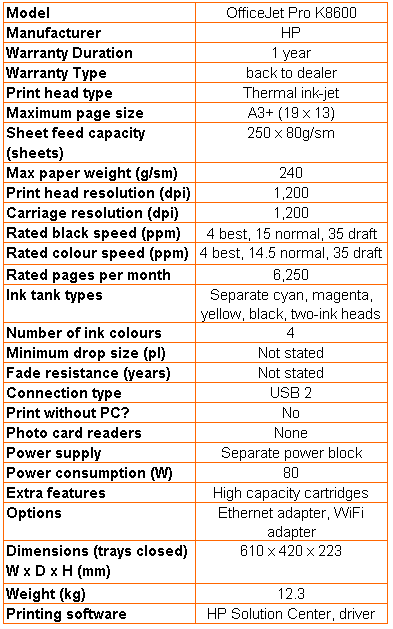
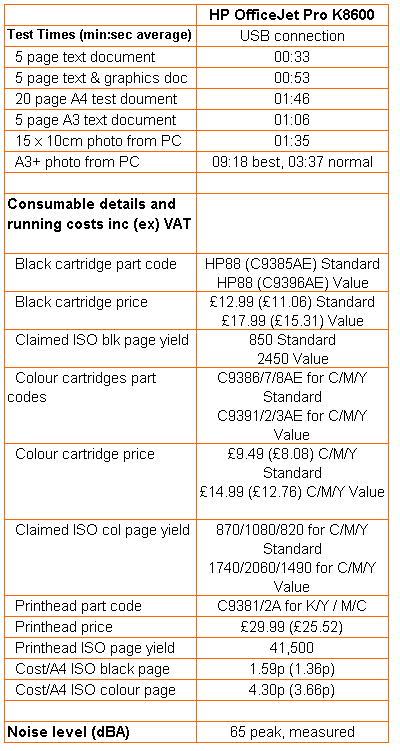
The wide ink swathes of the heads ensure this printer is quick for an inkjet. HP quotes three different print speeds, in Draft, Normal and Best print modes, which begins to show a more accurate picture of its true performance. However, these speeds are still a bit optimistic, as HP quotes 15ppm for black print in normal mode and our five-page text print took 33 seconds, or 9.1ppm. When we increased the page count to 20, we saw a normal mode speed of 11.3ppm, closer to the claimed speed. A five page A3 print took 1:06, or 4.5ppm.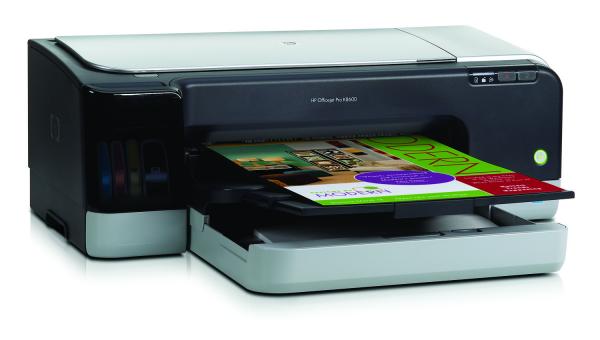
Things weren’t so good when we printed colour, though, as our five page text and graphics print completed in 53 seconds, or 5.7ppm, against the spec sheet figure of 14.5ppm. The printer produced a 15 x 10cm photo in 1:35 and a full bleed 19 x 13 inch (A3+) in 3:37, which is very respectable. That’s in normal print mode; if you whack the printer up to Best mode, the print time increases to 9:18.
Comparing the two prints, though, there little reason to use Best mode, unless print quality is really important for a particular image. Normal mode is very close and both do excellent jobs with colour variation, fidelity of hues and image clarity. The only thing we noticed was a single, slight band near the left-hand edge of the Normal mode print.
Business graphics are cleanly reproduced on plain paper, with good bright colours and excellent registration of black text laid over them. Text itself is clean and shows very little sign of spatter or jaggies, thanks to the printer’s natural resolution of 1200dpi.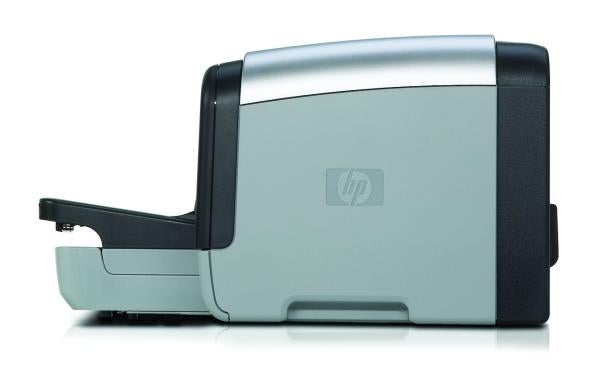
Although you plug the heads in when you install and set up this printer, they can be considered a lifetime component, which means the only consumables are the four ink cartridges. The cheapest prices we could find for these are the same as for the OfficeJet Pro K5400n, giving a cost per page of 1.59p for black text and 4.30p for colour. Both these costs are reasonable, in comparison with other inkjet printers in the same price range and cheaper than most A3 lasers, too.
Verdict
HP’s OfficeJet Pro K8600 is very much a wide-carriage version of the K5400n, but without the upgrade options and with a much higher price. Although the smaller market for A3+ printers puts a certain premium on them, when you look at the actual differences – increased carriage width, a different paper tray and modified firmware – it’s hard to see why this machine should cost £250.
Trusted Score
Score in detail
-
Print Speed 8
-
Features 6
-
Value 6
-
Print Quality 9
Printing
| Paper Size | A3+ - 13" x 19", A3 - 11.69" x 16.54", A4 - 8.27" x 11.69", A5 - 5.83" x 8.27", A6 - 4.13" x 5.83", B4 - 9.84" x 13.90", Letter, Legal, Statement, Executive, Tabloid, Super B, 216 mm x 330 mm, Envelope No. 10, Monarch Envelope, Index Card |
| Sheet Capacity | 250 sheets |
| Rated Black Speed (Images per minute) | 35 ppmipm |
| Rated Colour Speed (Images per minute) | 35 ppmipm |


Editorial independence
Editorial independence means being able to give an unbiased verdict about a product or company, with the avoidance of conflicts of interest. To ensure this is possible, every member of the editorial staff follows a clear code of conduct.

Professional conduct
We also expect our journalists to follow clear ethical standards in their work. Our staff members must strive for honesty and accuracy in everything they do. We follow the IPSO Editors’ code of practice to underpin these standards.
Editorial independence
Editorial independence means being able to give an unbiased verdict about a product or company, with the avoidance of conflicts of interest. To ensure this is possible, every member of the editorial staff follows a clear code of conduct.
Professional conduct
We also expect our journalists to follow clear ethical standards in their work. Our staff members must strive for honesty and accuracy in everything they do. We follow the IPSO Editors’ code of practice to underpin these standards.
