

Verdict


Key Specifications
- Review Price: £105.90
There is something of a problem with reviewing Lexmark inkjet all-in-one printers, as they have very similar print mechanisms, cases and feature sets. The X6575 looks similar to the (article:Lexmark-X9575 X9575) and very similar to the (article:Lexmark-X5470-All-in-One X5470) and the X5495 and all are intended for SOHO use as printers, scanners and copiers. In this case, there’s fax functionality built in, too.
Its white, grey and silver livery gives the X6575 a clean, modern look and the Auto Document Feeder (ADF) is nearly horizontal, fitting in with the sleek lines of the rest the machine. Lift the lid of the Contact Image Sensor (CIS) flatbed scanner and it rises up, so you can scan pages from a book. However, this also means when you lower the lid on a single sheet of paper, it doesn’t fold down cleanly.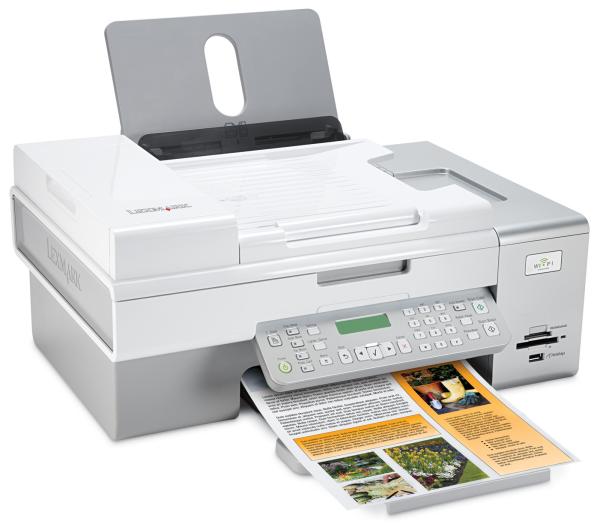
The control panel is well laid out, like most Lexmark panels, and includes a 2-line by 16-character LCD with a decent backlight and a ‘this-train-will-call-at’ way of scrolling messages across the screen, so they can be more than 16 character’s long. There are mode buttons down the left-hand side, including one to quickly select duplex print, and buttons to start colour and black copies at the right-hand side. In between these and the display is a number pad for dialling fax numbers.
Paper feeds conventionally from a near vertical, 100-sheet tray at the rear to a pull-out, horizontal tray at the front. To the right of the output tray are two memory card slots, which take nearly all current types, and a PictBridge socket. At the back is a USB connection, but also a short aerial, so you can connect a printer up wirelessly, through a WiFi link.
Hinge the whole scanner section up and you have access to the twin print cartridge carriers. The printer uses a single black cartridge and second tri-colour one, though the black can be replaced by a photo cartridge, if you want to print in six colours. The two cartridges slip into place with very little effort, though the tapes used to protect their heads in storage leave a surfeit of adhesive on the cartridges, which needs cleaning off before use.
The standard suite of Lexmark software is included, with ABBYY FineReader 6 Sprint OCR integrated well into Lexmark’s own Productivity Suite. There’s a facility to produce PDF files directly from scans and the bundled software also includes the Lexmark toolbar, which makes it easy to print Web pages without losing content down the right-hand side of the page.
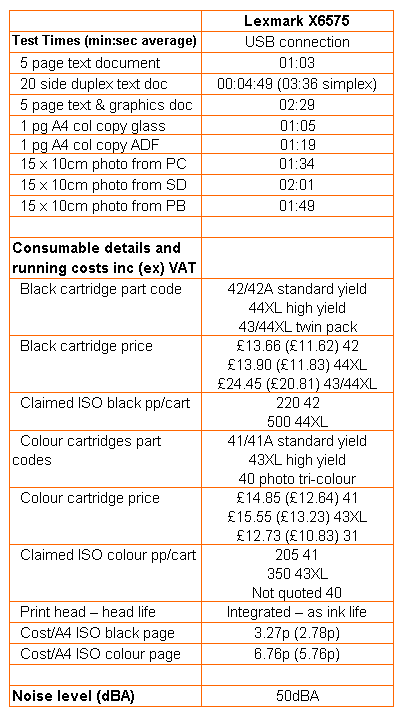
Lexmark has taken to quoting print speeds in both draft and normal modes and gives figures of 28ppm and 10ppm for black print and 24ppm and 4ppm for colour. Our five-page text and text and graphics documents recorded 1:03 and 2:29, respectively, giving real world, normal mode print speeds of 4.76ppm and 2.01ppm for black and colour.
To be fair to the company, we also printed a 20 page black text print in single and double-sided modes, giving times of 3:36 and 4:49, equivalent to 5.55ppm and 4.15ppm – still a long way short of the claims on the spec sheet.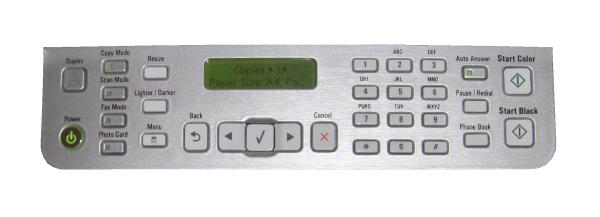
Black text print is reasonable for an inkjet printer, though there’s some evidence of ink spatter around text characters. To the naked eye, this just looks like a slight fuzziness and for home and internal office use should be fine. Colour print is good and dense and registration of black text over colour is pretty precise.
Copies of original prints look quite faded when compared directly with the originals and a single page copy took 1:05 from the scanner glass and 1:19 from the ADF. Where Lexmark gets its figure of two copies per minute from is one of life’s mysteries.
Photo prints on Lexmark’s Premium glossy photo paper are rich and vibrant, but are marred by a sticky feel and scrub marks, as we’ve noted before from Lexmark inkjets, which we presume come from the printer’s feed rollers.
Lexmark sells two different capacities of ink cartridge and the standard capacity cartridge is available in two versions. You can save a couple of pounds through Lexmark’s replacement programme, by promising to return each empty and not bin it or have it refilled.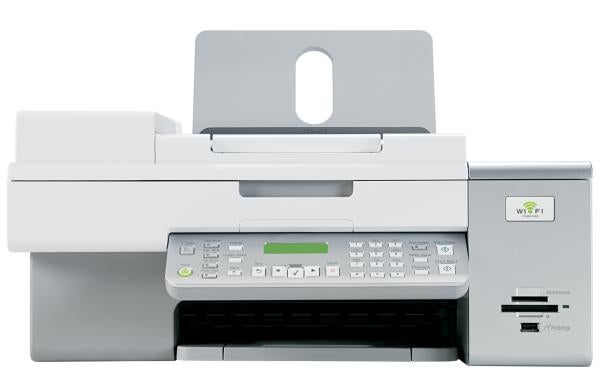
The most cost-effective way of buying cartridges is in a dual pack of the high yield black and colour and using these prices gives a page cost of 3.27p for black and 6.76p for colour. Neither of these page costs is particularly good, but they’re not the highest we’ve seen.
Verdict
With a street price of just over £100, this all-in-one represents reasonable value, but you can get machines for the same price with extra features like dual paper sources and CD/DVD printing, as well as better print quality and lower costs per page. Wireless connectivity may be useful to you, but the lack of a colour LCD display reduces the value of memory card slots. Check our reviews of other all-in-one machines in the same price bracket before making your buying decision.
Trusted Score
Score in detail
-
Print Speed 6
-
Features 8
-
Value 6
-
Print Quality 6
Features
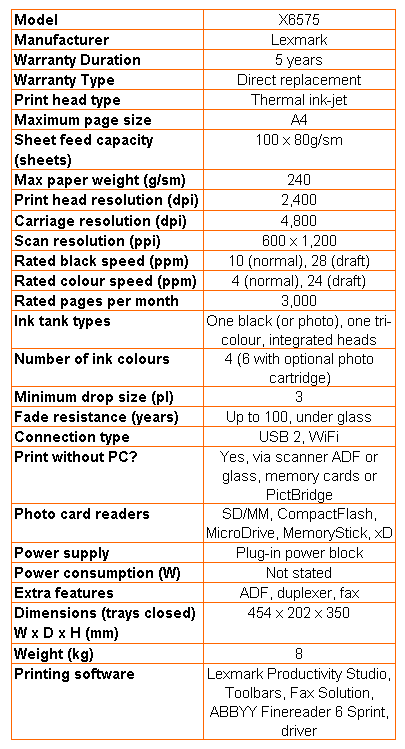
| Networking | Wi-Fi |
| Card slot | CompactFlash Type I/II, Memory Stick, Memory Stick PRO, Secure Digital, MMC, Microdrive, xD-Picture Card, xD-Picture Card Type H, xD-Picture Card Type M |
Printing
| Duplex | Automatic |
| Paper Size | Envelope No. 10, Envelope No. 7 3/4, Envelope No. 9, A4, A5, B5 Envelope, C5 Envelope, DL Envelope, Envelope No. 6 3/4, A2 Baronial, A6 Card, B5, C6 Envelope, Hagaki Card, Index Card, Executive, Legal, Letter, 4" x 6", Statement, L, 2L, Chou 3 Envelope, Chou 4 Envelope, Chou 40 Envelope, Kakugata 3, Kakugata 4, Kakugata 5, Kakugata 6, 5" x 7", 5.12" x 7.09", 3.94" x 5.91", 3.94" x 7.87", Custom Size |
| Sheet Capacity | 100 sheets |
| Rated Black Speed (Images per minute) | 28 ppmipm |
| Rated Colour Speed (Images per minute) | 24 ppmipm |
Scanning
| Scan Resolution (Dots per inch) | 600 dpi |


Editorial independence
Editorial independence means being able to give an unbiased verdict about a product or company, with the avoidance of conflicts of interest. To ensure this is possible, every member of the editorial staff follows a clear code of conduct.

Professional conduct
We also expect our journalists to follow clear ethical standards in their work. Our staff members must strive for honesty and accuracy in everything they do. We follow the IPSO Editors’ code of practice to underpin these standards.
Editorial independence
Editorial independence means being able to give an unbiased verdict about a product or company, with the avoidance of conflicts of interest. To ensure this is possible, every member of the editorial staff follows a clear code of conduct.
Professional conduct
We also expect our journalists to follow clear ethical standards in their work. Our staff members must strive for honesty and accuracy in everything they do. We follow the IPSO Editors’ code of practice to underpin these standards.
