

Verdict


Key Specifications
- Review Price: £215.82
HP’s OfficeJet range of ink-jet all-in-ones is well known, but its OfficeJet Pro machines are less famous. The main difference between the two ranges is the print speed of the OfficeJet Pro, which is a result of the separate ink and print head system used in these more expensive machines.
The OfficeJet Pro L7590 is a substantial machine, a good deal wider and higher than HP’s cheaper, largely home-orientated machines. Coloured in black and cream, with a predominantly silver control panel, the L7590 looks purposeful and approachable, ideal in a small or home office. It has a 50-sheet Auto Document Feeder (ADF) on top of a standard glass flatbed, working across the width of the machine, and a 250-sheet paper feed at the front. Paper makes its usual 180-degree turn, common in HP inkjets, and is fed out to the top of the paper tray.
For the first time we can remember with an HP printer, there was a minor breakage in transit and one off the hinges for the paper tray lid was broken off. This didn’t stop the machine from working, but might indicate the hinge bracket is a bit too flimsy.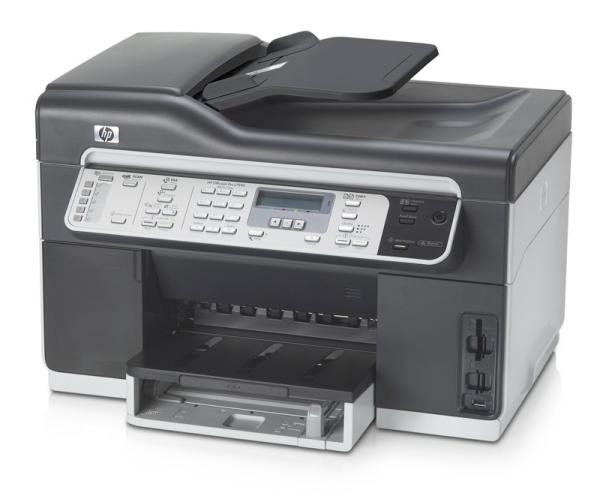
There’s a duplexer supplied as standard and this clips in at the back of the machine, next to the USB 2 and Ethernet network sockets. Four memory card readers are stacked up vertically, in pairs, in the front right corner of its case.
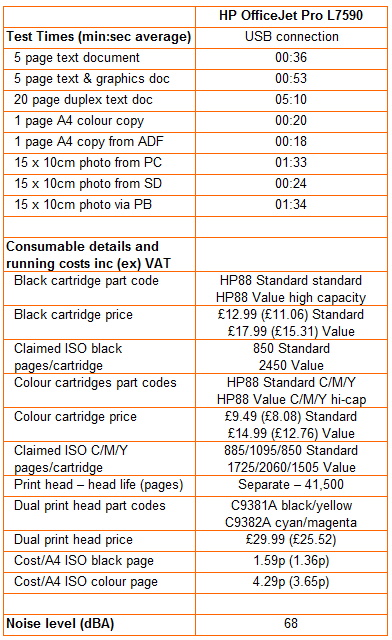
The most unusual feature of the OfficeJet Pro L7590 is its ink-delivery system. Behind a cover on the left-hand side of the paper tray there’s room to slot in the four individual ink cartridges. These are connected by thin, transparent tubes to the print heads, which are also replaceable units. With a claimed service life of 41,500 pages, though, they will be a lifetime component for many customers. Interestingly, each head prints two colours, so black and yellow are paired, as are cyan and magenta.
Charging this whole system with ink is a one-off setup process and takes around 20 minutes. In use, the large volume of ink available means a wider swathe from each head and increases the speed at which documents can be printed. It also means a few more clunking and pumping noises during printing.
HP claims print speeds of 35ppm for black and 34ppm for colour, though it does clearly state that both of these are for printing in draft mode. Just as well, as the normal mode print speeds we saw were around 8.3ppm for black and 5.7ppm for colour. While these are quite fast for real-world inkjet printing, they are an awfully long way off the printed figures. For fun we tried printing our test documents in draft mode, but the black one still took 31 seconds, under 10ppm, and the colour one took 27 seconds, or 11ppm.
In its favour, however, the device produces a pretty good draft print, so it should be possible to use this mode for most of the internal documentation in an office. Against it, the noise level from the machine peaks at 68dBA, noisy for a laser and certainly well above what you’d expect from an inkjet device. As is so often the case, it’s the paper feed mechanism that makes most of the noise, not the print engine.
Normal mode text prints are clean and sharp, with very little overshoot – and with virtually laser-quality blackness, too. Colour graphics are also very well printed, with regular, dense colour tints and smooth variation from the 1200dpi print heads. Text printed over coloured backgrounds shows a little spikiness, indicating some ink run, but it’s still of good office quality.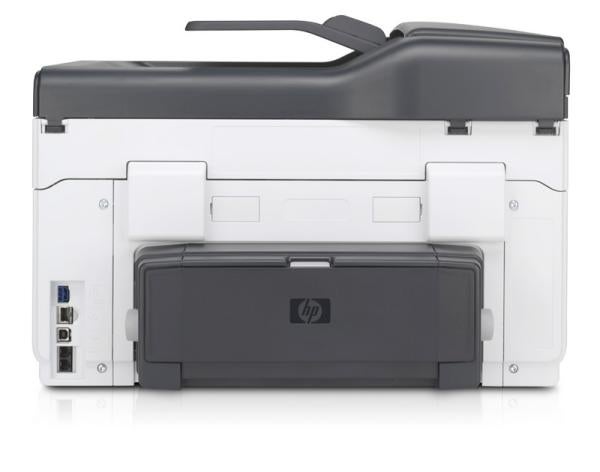
Photographic prints are also fair, though you can see some of the dot patterns in skies and other areas of continuous tone. It’s not that easy to load 15 x 10 centimetre photo blanks, either, as there’s no separate photo tray, as there is with some Photosmart models. However, in a busy office environment, printing small photos is a low priority.
The OfficeJet Pro L7590 comes with a duplexer as standard but, like the high-end Canon PIXMA devices, it’s awkwardly slow, with an 11 second wait for ink drying between printing of the first and second sides of each page. Our 20-page text document took 5:10 seconds to produce, an equivalent of just 0.97ppm.
Copying an A4 page only takes around 20 seconds, though, which is much better, and the copy quality is unusually good, with black text in particular being almost indistinguishable from the original.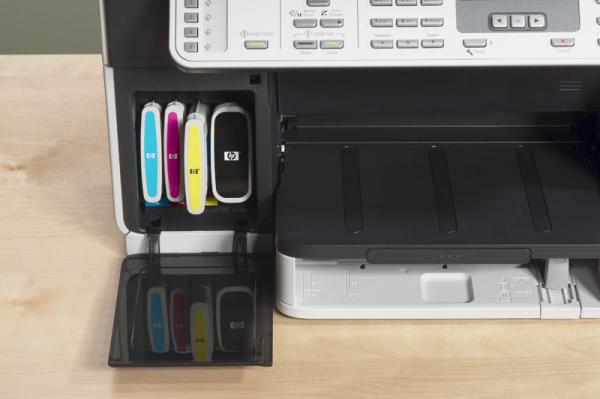
With four separate ink cartridges to consider and the possibility of replacing print heads, calculating print costs can be complex. If the machine is heavily used – its duty cycle is quoted at 7,500 pages per month – you could need to replace the heads. However, we reckon an ISO black page should cost around 1.6p to produce and the colour one should come out at around 4.3p.
Despite the machine’s high purchase price, its running costs only sit in the middle of the cost range with, for example, some quite inexpensive Canon PIXMA all-in-ones beating it on colour print costs. The high-capacity ink cartridges known as the Value range offer nearly 2,500 black pages and over half that in colour, so maintenance levels should be down with those of low-end colour lasers.
Verdict
Slow duplexing excepted this is a quick ink-jet all-in-one with fair running costs, particularly when you consider the maintenance frequency. Output is easily good enough for office use and draft mode is probably all you need for internal documentation. Thus, if you need a good quality all-in-one with a higher than normal duty cycle, you should certainly consider the OfficeJet Pro L7590.
Trusted Score
Score in detail
-
Print Speed 8
-
Features 8
-
Value 8
-
Print Quality 9
Features
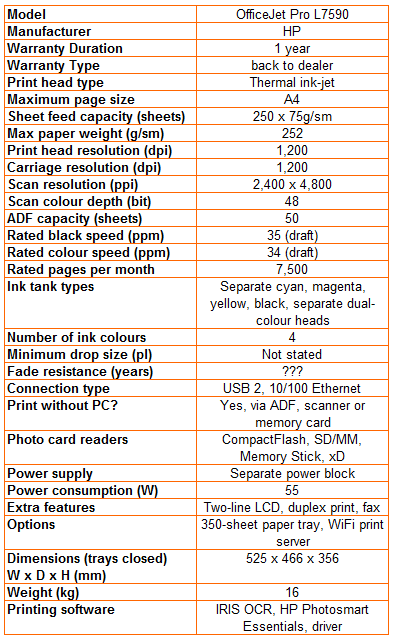
| Networking | Fast Ethernet |
| Card slot | CompactFlash Type I/II, Secure Digital, MMC, Secure Multimedia, xD-Picture Card, Memory Stick, Memory Stick MagicGate, Memory Stick Duo, Memory Stick PRO |
Printing
| Duplex | Automatic |
| Paper Size | Letter, Legal, Statement, Executive, 3" x 5", 4" x 6", 5" x 7", 5" x 8", 4" x 10", 4" x 11", 4" x 12", 8" x 10", Envelope No. 10, Monarch Envelope, DL Envelope |
| Sheet Capacity | 250 sheets |
| Rated Black Speed (Images per minute) | 35 ppmipm |
| Rated Colour Speed (Images per minute) | 34 ppmipm |
Scanning
| Scan Resolution (Dots per inch) | 2400 dpi |


Editorial independence
Editorial independence means being able to give an unbiased verdict about a product or company, with the avoidance of conflicts of interest. To ensure this is possible, every member of the editorial staff follows a clear code of conduct.

Professional conduct
We also expect our journalists to follow clear ethical standards in their work. Our staff members must strive for honesty and accuracy in everything they do. We follow the IPSO Editors’ code of practice to underpin these standards.
Editorial independence
Editorial independence means being able to give an unbiased verdict about a product or company, with the avoidance of conflicts of interest. To ensure this is possible, every member of the editorial staff follows a clear code of conduct.
Professional conduct
We also expect our journalists to follow clear ethical standards in their work. Our staff members must strive for honesty and accuracy in everything they do. We follow the IPSO Editors’ code of practice to underpin these standards.
