

Verdict


Key Specifications
- Review Price: £116.40
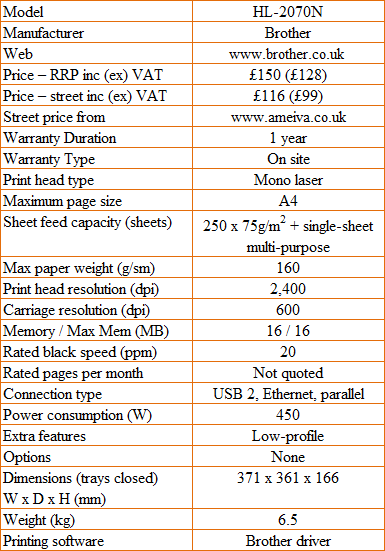
Personal laser printers continue to be a popular choice for those wanting simple, high-definition text and graphics printing. Brother’s HL-2070N has a flexible range of connection options, an unusual desktop profile, and costs little over £100.
The printer has the same depth as a sheet of A4 paper and a similar width, but it’s only 166mm high, which is a remarkably low-profile for even a mono laser printer. Brother has achieved this by slimming down the laser engine inside the machine, while keeping a good 250 sheet capacity to the front-loading paper tray.
Unlike many personal lasers, the paper tray doesn’t stick out the back of the printer; what you see from the side of the printer is its true depth. Above the paper tray is a slot feed for specialist media and all pages feed to the sloping top surface of the machine. There’s a flip-forward support, but with small documents you won’t need to disturb the smooth lines of the machine by using it.
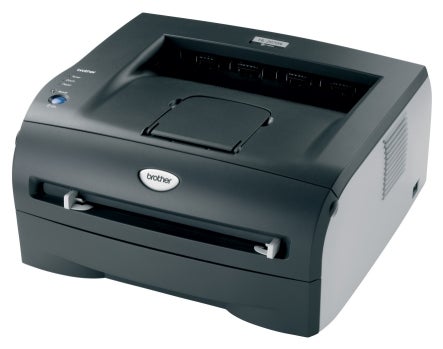
There are four indicators, unusually on the left-hand side of the printer’s top panel, and these indicate the end of toner and drum life, any paper jams and its power state. A single purple button is labelled Go, which variously clears errors, feeds paper, wakes the printer from sleep mode and cancels a current job – more of a Stop, really.
At the rear are three connections, for USB, parallel and Ethernet networking. It’s unusual to find a network connection on a printer at this price point and in some ways hard to see why you would want to network a personal printer like this. One use, however, might be in a home environment, where you’re sharing a network resource between parents’ and kids’ computers.
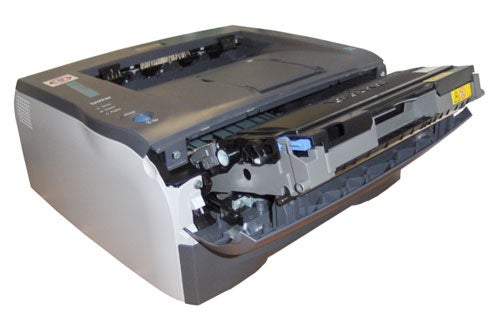
The drum and toner cartridge is a combined unit, which slots into the printer behind a fold-down cover at the top of its front panel. You lift a small purple lever to release the toner cartridge from the combined assembly. All very quick and easy.
Software installation is also easy if you’re using USB, as long as you remember not to connect the printer until told to by the setup routine. Although there are several utilities installed during setup, none of them is an application as such. There are tools such as diagnostics, printer info, a web update for firmware and an uninstall routine, but these are all rather specialist tools.
The printer driver does what you’d expect and supports three resolutions of 300dpi, 600dpi and 1,200dpi, as well as offering watermarks, multiple pages per sheet and manual duplexing, which Brother treats thoroughly, with a number of useful options.
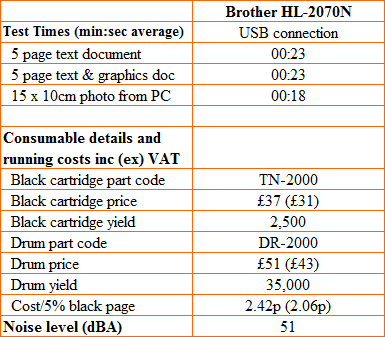
Brother claims speeds of up to 20ppm for the HL-2070N, but as usual, this is wishful thinking. Our five-page text print took 23 seconds to complete, which coincidentally was the time for the text and graphics test, too. This gives a true, real-world speed of 13ppm for this machine, only around 65 per cent of the rather fanciful figure quoted.
In a typical home or small office environment, the speed is probably enough to keep most customers happy and the print quality of the machine will also keep them content. Text is clean with no signs of blur and at the default resolution is well up to mono output from more expensive printers.
We were also impressed with business graphics from this little printer, where the various greyscales were reproduced with little banding or patchiness and with a smooth gradation of tone.
Even the photographic test print, something most mono lasers hate, was better than average. Detail was sharp, the change of tone across the sky was relatively smooth and the only problem was a loss of detail in shadows, which were reproduced pretty black.
It’s easy to work out how much it costs to run the HL-2070N, as there are only two consumables. The drum unit is rated at 35,000 pages and each clip-in toner cartridge should give you 2,500 pages, so you should only need to change the drum every 14 toner changes, or so.
With typical online prices of £40 for the toner cartridge and £50 for the drum, page costs come out at 2.42p for a five per cent text page. This is quite pricey for a laser printer, even a personal one, but then the purchase price of the printer itself is low, so total cost of ownership is in the middle of the field.
”’Verdict”’
This is a neatly-designed, useful little mono laser printer, which despite its low-profile, takes half a ream of paper at a time and prints on it cleanly and reasonably fast. It’s cheap to buy, though not especially cheap to run, but its versatile connection options should see it used in a number of different environments. Ideal as a home laser printer and good in a home or small office too.
Trusted Score
Score in detail
-
Print Speed 8
-
Features 7
-
Value 9
-
Print Quality 9
Features
| Networking | Fast Ethernet |
Printing
| Duplex | Manual |
| Paper Size | Letter - 8.50" x 11", Legal - 8.50" x 14", Executive, A4, A5, A6, B6, B5, Com10 Envelope, DL Envelope, B5 Envelope, C5 Envelope |
| Sheet Capacity | 250 sheets |
| Rated Black Speed (Images per minute) | 20 ppmipm |


Editorial independence
Editorial independence means being able to give an unbiased verdict about a product or company, with the avoidance of conflicts of interest. To ensure this is possible, every member of the editorial staff follows a clear code of conduct.

Professional conduct
We also expect our journalists to follow clear ethical standards in their work. Our staff members must strive for honesty and accuracy in everything they do. We follow the IPSO Editors’ code of practice to underpin these standards.
Editorial independence
Editorial independence means being able to give an unbiased verdict about a product or company, with the avoidance of conflicts of interest. To ensure this is possible, every member of the editorial staff follows a clear code of conduct.
Professional conduct
We also expect our journalists to follow clear ethical standards in their work. Our staff members must strive for honesty and accuracy in everything they do. We follow the IPSO Editors’ code of practice to underpin these standards.
