

Verdict


Key Specifications
- Review Price: £135.00
Canon created a range of useful dye-sublimation printers with its first Selphy releases, but now it has come to refresh them it has to inject new life into what are basically very similar designs. Unlike the ES1, which featured a ‘sit up and beg’ design, the CP750 is small and squat, as earlier Selphys were.
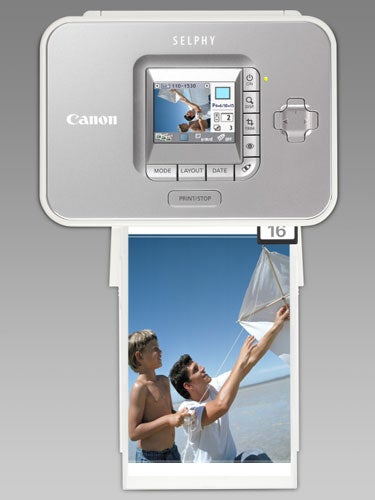
The small printer is styled in white and light grey, with a brushed aluminium top. A 61mm LCD display is set into its top surface and surrounded along its right and bottom edges by a set of seven buttons. There’s also a four-way button-pad. The power button is marked with the word ‘ON’, which is slightly confusing, as it also turns the printer off.
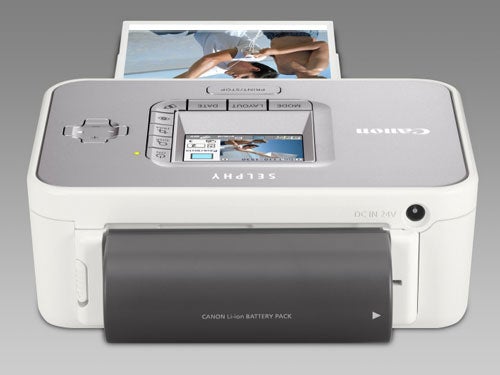
Most of the buttons on the front only work when you have a card inserted into one of the three slots in its front panel. The printer caters for all the common types of memory card, except SmartMedia, which has fallen out of use. There’s an auto-winding PictBridge cable behind a small rubber flap, which connects directly to many PictBridge cameras, but if yours has a cable with a non-standard plug at the camera end, there’s a regular PictBridge socket around the side, as well.
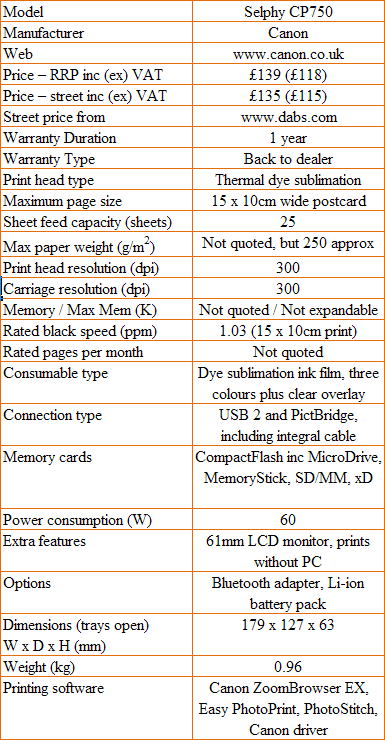
If you want to use the CP750 with your PC, Canon provides a standard USB 2.0 port, where you can also fit an optional Bluetooth adapter to work with phones and PDAs. The printer comes as standard with an infrared connection, so you may not need Bluetooth.
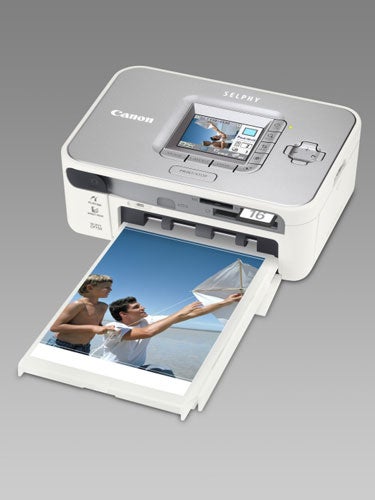
Two new features that improve on earlier Selphy printers are red-eye removal and My Color. Red-eye removal spots the offending pupils and corrects them automatically, while My Color cycles through black and white, sepia, positive, neutral colour and vivid colour effects. These effects don’t preview on the image on the printer’s LCD monitor, which is a shame, just as an icon at the bottom of the picture.
Setting the printer up isn’t difficult, as the thin dye-sublimation film is provided in a cartridge, which simply slots in at the side. The paper cassette can be loaded with up to 25 sheets of 15 x 10cm photo blanks, though only five blanks (and film for five prints) are provided with the CP750. Clipping the cassette into the front of the printer finishes the physical setup.
Canon provides its usual mix of support software, with ZoomBrowser, Easy-PhotoPrint and PhotoStitch as well as the Selphy driver. Together they provide good control of the printer and PhotoStitch provides for the Wide Size panorama paper, which is available as an option.
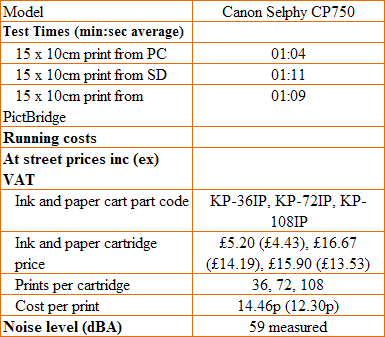
seconds – still considerably quicker than from most ink-jet photo printers. Direct from a PictBridge camera, it took 69 seconds and just two seconds longer for a print from a PC. No complaints, therefore, on print speed.
The photo quality of the prints also leaves little to be desired, with smooth colour transitions, fine detail and natural colours. Dye sublimation, which has far less noticeable dot patterns than an inkjet, produces images that look surprisingly photographic. The only area where the quality dips is in darker, shadowed parts of a shot, where you can lose detail and colours tend to black.
There’s also a slight positional problem; the postcard prints have perforated strips on either end, which tear off when the print is finished, to leave the card completely borderless. When printing, there’s a 2mm border overlapping this perforation and with portrait shots with important detail near the edges of the picture, it’s possible to tear off tops of weather-vanes or bottoms of feet. While you can adjust for this when printing from a PC, it’s harder to do so using the printer’s LCD display and near impossible when controlling print from a PictBridge camera.
Canon sells consumables for the Selphy CP750 in three different packs, enough for 36, 72 or 108 prints. Each pack contains both 15 x 10cm print blanks and dye-sublimation cartridges. Slightly unusually, the best price we could find for these packs was not for the 108-print version, but for the smallest 36-print one. Dividing the cost by the number of prints produces a cost per print of just 14.5p.
This is considerably cheaper than for prints from most of this machine’s ink-jet rivals and breaks with a tradition of dye-sublimation printing being slightly more expensive than its liquid-ink rival. However, Kodak may leapfrog even this price point with its new ink-jet release, which claims a print cost of just seven pence.
”’Verdict”’
Unless the street price of the Selphy CP750 ends up a lot lower than it is at launch, it’s hard to see why you would go for this printer rather than the Selphy ES1, reviewed a couple of months back. This printer has a fixed LCD, a cumbersome paper cassette and lower print resolution than the ES1. It’s cheaper to run, though and the print quality is as good, so its smaller size may be a winning advantage.
Trusted Score
Score in detail
-
Print Speed 8
-
Features 7
-
Value 7
-
Print Quality 8


Editorial independence
Editorial independence means being able to give an unbiased verdict about a product or company, with the avoidance of conflicts of interest. To ensure this is possible, every member of the editorial staff follows a clear code of conduct.

Professional conduct
We also expect our journalists to follow clear ethical standards in their work. Our staff members must strive for honesty and accuracy in everything they do. We follow the IPSO Editors’ code of practice to underpin these standards.
Editorial independence
Editorial independence means being able to give an unbiased verdict about a product or company, with the avoidance of conflicts of interest. To ensure this is possible, every member of the editorial staff follows a clear code of conduct.
Professional conduct
We also expect our journalists to follow clear ethical standards in their work. Our staff members must strive for honesty and accuracy in everything they do. We follow the IPSO Editors’ code of practice to underpin these standards.
