

Verdict


Key Specifications
- Review Price: £229.00
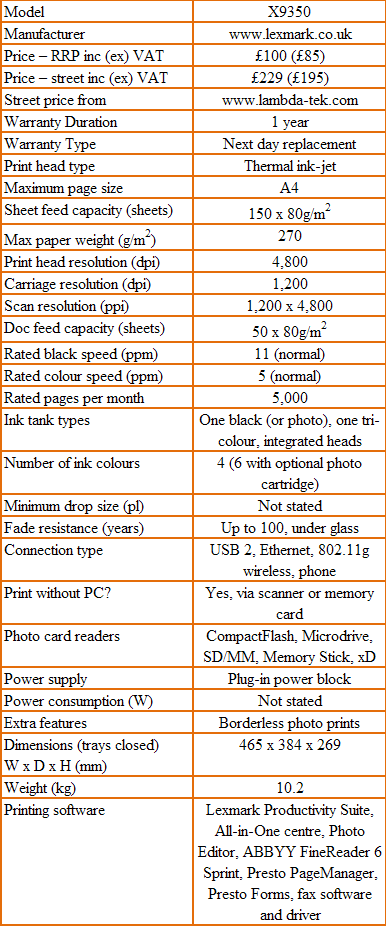
Lexmark has a lot of all-in-ones in its stable, but the newly launched X9350 is the best equipped of the lot. Designed to be a top-end home or home-office device, it should be able to handle a wide cross-section of printing tasks.
Liveried in grey and high-gloss ice-white, the machine is a vaguely brutalist presence on the desktop – everything is a round edge slab, like so many rolls of cloth piled one on the other. The top slab is the auto document feeder, which can take up to 50 page documents. Beneath that is the scanner section, a full A4 flatbed. Directly below, you can hinge the whole top unit up to access the twin ink cartridges.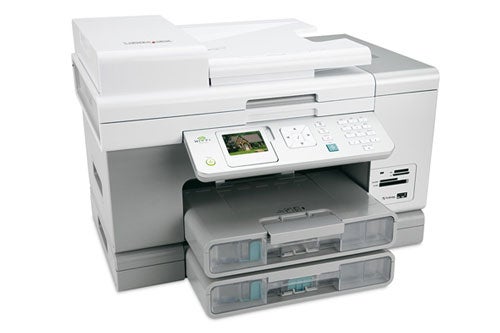
At the base of the machine, another slab sticks out at the front and is a 150-sheet paper cartridge, with sheets feeding to the top of it, once they’ve been printed. To the right of the output tray are four memory card slots and a PictBridge socket for directly connecting a camera.
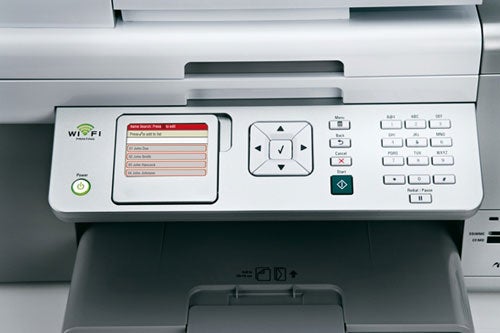
A simple, well-designed control panel projects at an angle from the front of the device and includes a 63mm colour LCD panel, a large, four-way button square for menu navigation, a column of function buttons and a numeric keypad. The design of the LCD display is helpful and no-nonsense, definitely more small business than home user.
Installing the twin ink cartridges, one black and the other tri-colour, it’s simply a question of clipping them into their holders on the printer carriage and clicking their lids shut. Installation of the device itself is a little more complex and depends on the type of connection you wish to use. As well as USB and Ethernet sockets at the back, there’s a Wi-Fi aerial so you can use the device wirelessly.
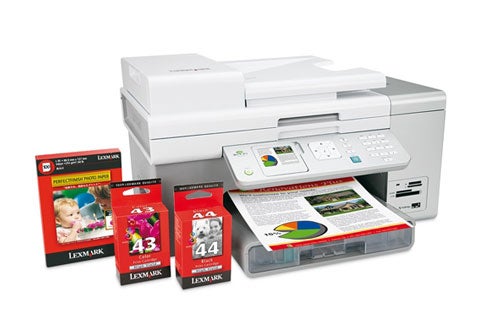
The wireless connection is the most complex to set up, but is still pretty straightforward, thanks to a good installation routine. For this method you need to have a working wireless network and to connect the X9350 temporarily via a USB cable. Once it knows the name and protocols used by your wireless network, you can disconnect the USB cable and, if necessary, reposition the device.
There’s a good suite of application software provided with this all-in-one, including ABBEY FineReader OCR and the Presto PageManager document manager. There’s also Lexmark’s Productivity Suite, which includes basic photo management and editing.
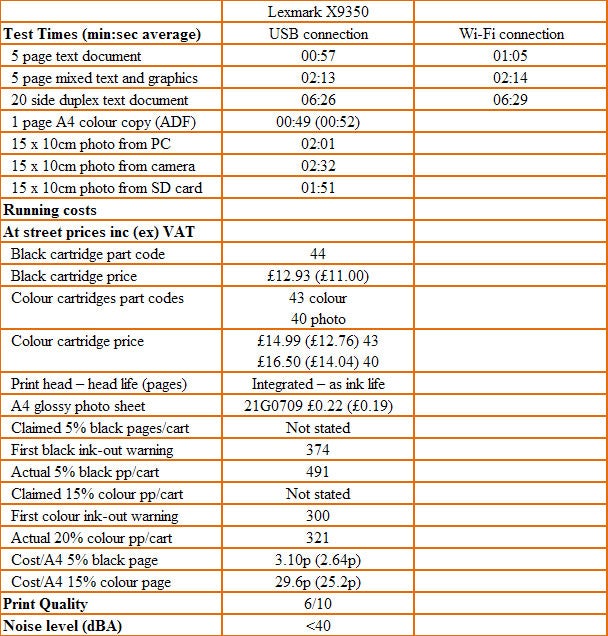
Print speeds aren’t impressive, with our five-page test taking just under a minute to complete and the text and graphics print taking over two minutes. Just over 2ppm for colour print is slow, less than half Lexmark’s claim.
Printing duplex pages is held up by a long pause between the printing of each side of the page. This could be to allow for data transfer or for ink drying, but either way it slows double-sided printing so our 20-side test print took nearly six and a half minutes to complete, equivalent to 3spm (sides per minute).
The prints themselves are not bad. Black text is a little jagged round the edges and there’s evidence of some ink spatter, but for general correspondence, nobody is going to complain. Colour graphics are also well reproduced, with good solid colours and smooth gradations. A colour photocopy loses some of the original’s intensity and gains slight banding, but results are acceptable.
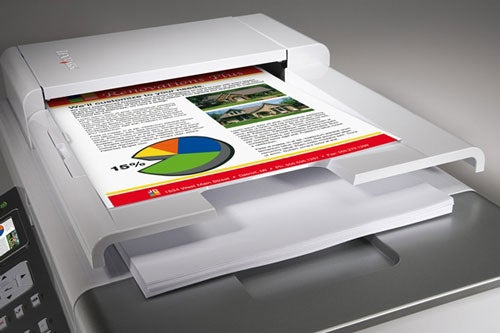
A copy taken from the flatbed glass has a positional offset to the right of around 7mm from one performed on the ADF. An original print sits halfway between the two.
Four-colour photo output from a PC, the memory card slots or a PictBridge connection, is rather over-egged. Striations and banding is apparent and although none of it is unpleasant in itself, colours are also over-vivid and you may have to tweak them to get them looking more natural.
There are two cartridges for the X9350; one black and the other tri-colour. There’s also an optional tri-colour photo cartridge if you want to print six-colour photos – probably a good option. The cheapest we could find the black cartridge for was just under £13, which gives a cost per page for black print of 3.1p. This is at the high end of the range for ink-jets, but not excessively expensive.
Colour print, where we saw 321, 20 per cent colour pages from the £15 cartridge, comes out at 29.6p, including Lexmark’s Premium Glossy Photo Paper. This is better than average and is due largely to the relatively low cost of the photo paper which, as usual with ink-jet photo prints, swamps the cost of the ink.
”’Verdict”’
The X9350 has all the bells and whistles of a top-of-the-range multi-function: duplex print, wireless, network and USB connections, LCD display, fax and auto document feed. All this works well, but the fundamentals, like print speed and photo quality, are still not up with its rivals. If you can live with these shortcomings, the machine is a delight to use.
Trusted Score
Score in detail
-
Print Speed 6
-
Features 9
-
Value 8
-
Print Quality 7


Editorial independence
Editorial independence means being able to give an unbiased verdict about a product or company, with the avoidance of conflicts of interest. To ensure this is possible, every member of the editorial staff follows a clear code of conduct.

Professional conduct
We also expect our journalists to follow clear ethical standards in their work. Our staff members must strive for honesty and accuracy in everything they do. We follow the IPSO Editors’ code of practice to underpin these standards.
Editorial independence
Editorial independence means being able to give an unbiased verdict about a product or company, with the avoidance of conflicts of interest. To ensure this is possible, every member of the editorial staff follows a clear code of conduct.
Professional conduct
We also expect our journalists to follow clear ethical standards in their work. Our staff members must strive for honesty and accuracy in everything they do. We follow the IPSO Editors’ code of practice to underpin these standards.
