

Verdict


Key Specifications
- Review Price: £273.00
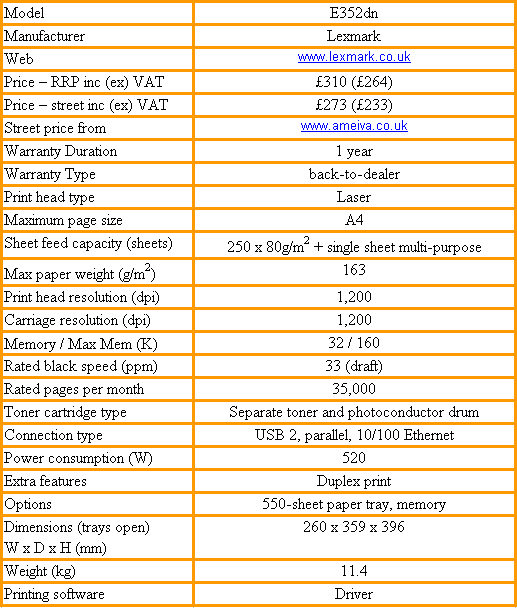
Well before it started making inkjet printers and all-in-ones, Lexmark was known for its high-quality laser printers, having originally been the printer division of IBM. It has gone on producing good laser printers, from personal, through small workgroup, to departmental models and the E352dn is marketed as a small workgroup machine.
Decked out in light and dark grey, the E352dn is a squat machine with an economical footprint for its class. At the bottom is a 250-sheet input tray and you can buy a second, optional, 550-sheet tray to sit under it. Above the paper tray is a multi-purpose feeder, though this can only take a single sheet at a time. Print jobs finish up in a recess in the printer’s top cover.
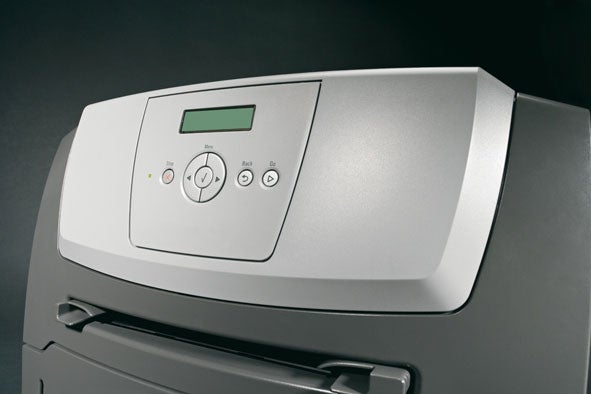
At the top of the front panel is a backlit, two-line by 16-character LCD display and a simple set of control buttons. These include menu navigation controls and Stop and Go buttons. Stop can be used to cancel a running print job from the printer.
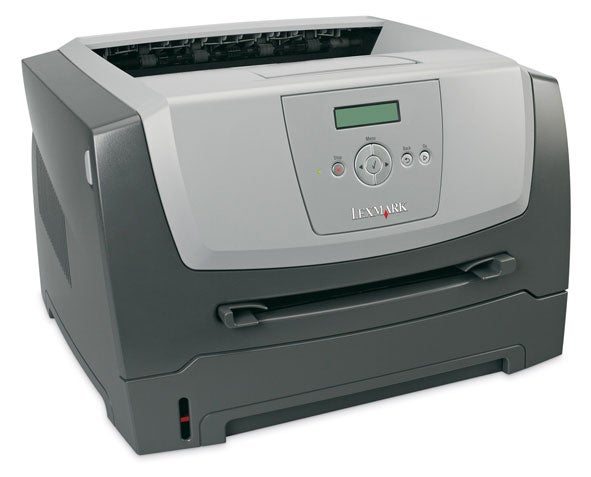
The ‘d’ and ‘n’ in the printer’s model number stand for duplex and network. It has an Ethernet port at the rear, along with its USB 2.0 port and can be set up as a standalone network device.
When switched to duplex mode, to print on both sides of the paper in a single job, the paper briefly ejects from the output slot, before being rolled back in to have its second side printed. The whole process is handled very smoothly and makes less impact on print speed than with some rival models.
The drum and toner cartridge is a two-piece consumable, where the toner cartridge clips into the drum tray. The combined unit then slides into the printer from the front, once you’ve pulled down the front cover. You have to align arrows on the inside of the printer with others on the drum tray, before sliding it into the machine. This is a bit awkward and you can’t change the toner without removing the complete tray assembly.
There’s very little software to install, as all you get is a driver, but this is comprehensive, offering control of multi-page, booklet and poster printing, and of watermarks. There are standard ‘draft’ and ‘confidential’ style watermarks, but you can also add your own.
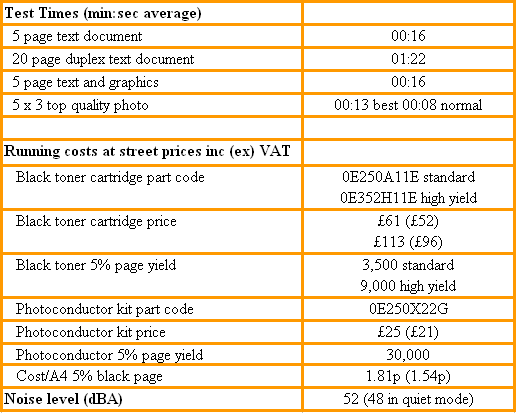
The E352dn is a quick printer for its class and is rated at 33ppm. In tests it completed both our five-page text print and five-page text and graphics print in 16 seconds, giving a real life print speed of an impressive 19ppm. Even duplex printing couldn’t hold it back, with a 20-side test print completing in one minute 22 seconds, or just under 15spm.
Text quality, as we’ve come to expect from Lexmark printers, is very good. It’s dense, but precise, so characters are well-formed and there’s no spatter discernible to the naked eye. Business graphics are also clean and sharp, though in our test print a shadow in the heading went missing and greyscale tones, representing coloured graphics, were rather coarse.
The specifications for the E352dn show a 1,200dpi print mode and another with ‘2,400dpi print quality’. Our photo image, printed in ‘best’ quality, should have been 2,400dpi, but looking at the printed output, the dot pattern is very obvious and doesn’t appear to us to be anywhere near that resolution. There are also noticeable stripes across the picture, so the overall image quality is not good.
Lexmark publicity highlights a quiet mode for the printer, but even its own figures, showing 52dBA in normal mode and 48dBA when quiet, don’t indicate much of an improvement. We certainly couldn’t hear a lot of difference, though even in normal mode it’s never noisy.
There are two components to the consumables cost in this machine: toner and the photoconductor drum. Surprisingly, the drum is the cheapest component, coming in at just £25 and rated at 30,000, five per cent pages. You can buy sufficient toner for 3,500 or 9,000 pages and using the higher capacity cartridge, which typically costs a touch under £100, produces a cost per page of 1.81p.
This is a reasonable page cost, but by no means the best we’ve seen recently from a mono laser, or even a colour one. Dell’s Laser 3110cn, for example, prints a mono page for 1.42p and Epson’s EPL-N2550 does so for 1.61p.
”’Verdict”’
The E352dn is a high-end personal or small workgroup laser printer, ideal when most of the output will be text. It’s not quite so good at line and block graphics and photos look decidedly dotty. It’s reasonably inexpensive to run and prints more quickly than many other printers in its category. The built-in duplex facility is a useful extra and the printer is quiet and unobtrusive in use. A good partner in a busy office.
Trusted Score
Score in detail
-
Print Speed 9
-
Features 7
-
Value 8
-
Print Quality 7


Editorial independence
Editorial independence means being able to give an unbiased verdict about a product or company, with the avoidance of conflicts of interest. To ensure this is possible, every member of the editorial staff follows a clear code of conduct.

Professional conduct
We also expect our journalists to follow clear ethical standards in their work. Our staff members must strive for honesty and accuracy in everything they do. We follow the IPSO Editors’ code of practice to underpin these standards.
Editorial independence
Editorial independence means being able to give an unbiased verdict about a product or company, with the avoidance of conflicts of interest. To ensure this is possible, every member of the editorial staff follows a clear code of conduct.
Professional conduct
We also expect our journalists to follow clear ethical standards in their work. Our staff members must strive for honesty and accuracy in everything they do. We follow the IPSO Editors’ code of practice to underpin these standards.
