

Verdict


Key Specifications
- Review Price: £120.00
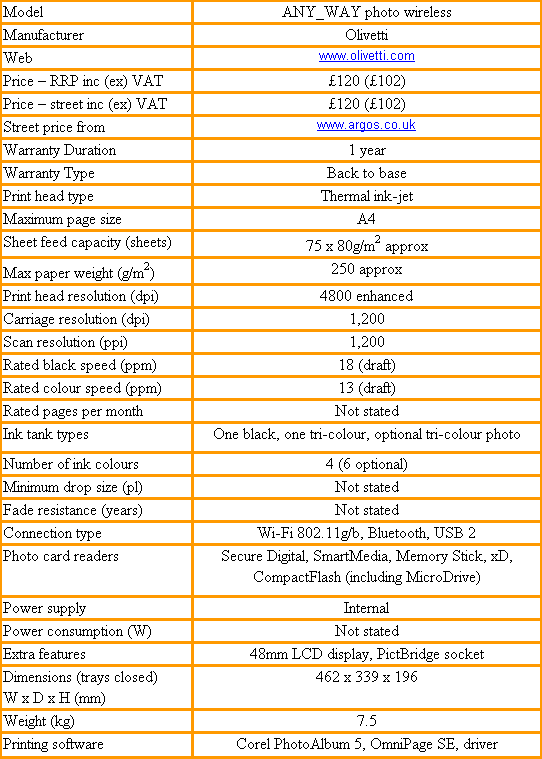
It has been a while since Olivetti marketed an ink-jet printer, but with the ANY_WAY it has launched into the home multi-function market with a range of smart-looking devices. The ANY_WAY photo wireless is at the top of the range and, as its name suggests, it’s designed to print photos and to work with a wireless connection.
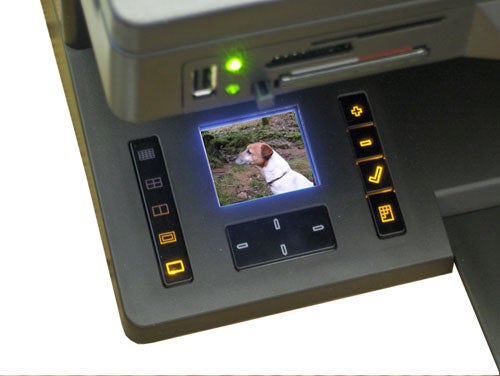
First impressions are all good. The angular, all-black design is broken by a strip of indicators and buttons along the front edge of the scanner section and by an LCD display set into the machine’s foot. Buttons arrayed around this display only light up when you insert a memory card into one of the slots, again in the scanner edge. The machine provides for all the common card types, including xD and MicroDrive.
The base of the device is an odd place to put an LCD display and it’s easy to see why all other manufacturers choose to set them higher up on their all-in-ones; you can view them close up. On the ANY_WAY, you have to be at a pretty low angle for the top of the screen not to be obscured by the scanner housing, positioned above it. You also have to be quite a way away, which makes the screen awkward to use for viewing photos.
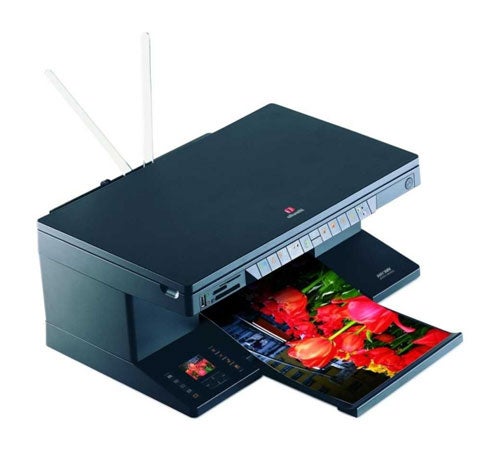
A pair of supports rise like little antennae from the rear of the machine to support around 75 sheets of paper at a time in the input tray. Prints feed through to a telescopic output tray at the front and the machine can handle paper from A4 down to 15 x 10 photo blanks and beyond.
There are three ways to connect the ANY_WAY photo wireless to other devices, apart from memory cards and a PictBridge camera link. The most conventional is a USB 2.0 link at the back, but the device also offers Bluetooth and 802.11b/g Wi-Fi. In each case, you install the software and then connect the ANY_WAY.
The Wi-Fi setup is a bit fiddly, as you have to get the correct wireless settings to the printer before disconnecting the USB cable, to force it to communicate through the ether. Bluetooth works in a similar way, but you can’t have both Wi-Fi and Bluetooth activated at the same time, which is a shame. With Bluetooth selected, you can print from a Bluetooth-equipped camera-phone or camera.
All buttons and lights on the control panel use icons and not all of these are obvious. The job cancel button, for example, uses a big C, when X is more common, and the scan button uses an icon that’s supposed to look like a raised scanner lid, but which actually looks more like a greetings card.
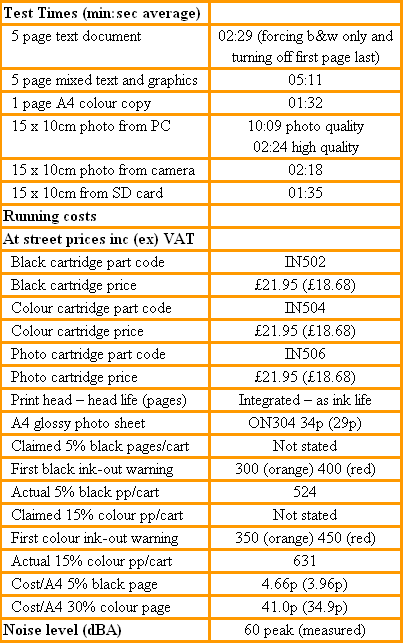
This machine took two minutes 29 seconds to print our five-page text piece, just over 2ppm. That’s against a rated speed of 18ppm. Even given that we print in normal mode and Olivetti (like all other printer manufacturers) quotes a speed in draft mode, it bears so little relation to what you’re likely to see in normal use, it’s pretty useless as a specification.
You may say we’re being unfair, as the ANY_WAY is sold as a photo machine, specialising in printing images from digital cameras, not printing plain A4 pages. So we printed a 15 x 10cm image, borderless on 15 x 10cm Olivetti paper, in the machine’s photo mode, the highest quality mode the machine can produce.
How long to print a 15 x 10cm image? 10 minutes 09 seconds. We were worried the paper might have jammed inside, it took so long. We tried a print in high quality mode (one step down), which took two minutes 25 seconds, a more reasonable time but at visibly lower quality. All these times were using the USB 2.0 interface, which is always quicker than either Wi-Fi or Bluetooth. Unusually, prints from PictBridge and from an SD card were much quicker, with a fastest time of one minute 35 seconds. Definitely the way to go, if you’re in a hurry.
The long PC print times might be acceptable if the print quality was superb. The photo mode print is reasonable, but not as good as the best available from Canon or HP. The high quality print is also fair, but there’s a noticeable band running vertically down it, and some of the dithering is obvious. These are all four-colour prints; we couldn’t test six-colour printing as, despite our request, a photo cartridge wasn’t forthcoming.
There are two ink cartridges used by the ANY_WAY, black and tri-colour, and you replace the black with a second tri-colour photo cartridge when printing photos. We’ve assumed the same use for photo ink as for standard colour in calculating the cost of colour prints.
We printed 524, five per cent black text pages before we saw a visible drop off in print quality, giving a page cost of 4.66p. For colour, we printed 631 pages, giving a page cost of 41p, for 30 per cent cover. This cost included Olivetti photo glossy paper, which we found at £11.75 for a pack of 35, A4 sheets. Page costs are very reasonable for this class of device.
”’Verdict”’
This machine is good in parts. It looks great – a stylish piece of Italian design – but the good external design doesn’t extend to the photo print controls and positioning of the LCD. The ANY_WAY’s print engine looks to be behind the leaders in the field, too and you certainly don’t want to print in photo mode from a PC, unless you batch print overnight
Trusted Score
Score in detail
-
Print Speed 5
-
Features 9
-
Value 7
-
Print Quality 6


Editorial independence
Editorial independence means being able to give an unbiased verdict about a product or company, with the avoidance of conflicts of interest. To ensure this is possible, every member of the editorial staff follows a clear code of conduct.

Professional conduct
We also expect our journalists to follow clear ethical standards in their work. Our staff members must strive for honesty and accuracy in everything they do. We follow the IPSO Editors’ code of practice to underpin these standards.
Editorial independence
Editorial independence means being able to give an unbiased verdict about a product or company, with the avoidance of conflicts of interest. To ensure this is possible, every member of the editorial staff follows a clear code of conduct.
Professional conduct
We also expect our journalists to follow clear ethical standards in their work. Our staff members must strive for honesty and accuracy in everything they do. We follow the IPSO Editors’ code of practice to underpin these standards.
