

Verdict


Key Specifications
- Review Price: £142.00
With the steady increase in sales of notebook PCs, the demand for portable printers to take with them is also growing. Canon has just such a printer in its latest PIXMA range, the iP90, designed to offer quality print in a very compact envelope. Using a similar mechanism to that of its Selphy DS700 photo printer but with the addition of a separate black cartridge, the iP90 still ends up as a very compact unit.
The silver and black case is slightly longer and thicker, but less deep, than a mid-range notebook. Fold up the top cover and it becomes a paper feed tray for up to 30 sheets of regular office paper. A small cover underneath drops down at the same time, so paper can exit from the front of the printer to the desk surface.
The only controls are power and paper feed buttons in the centre of the printer’s top surface and there’s a single green led which shows power on and data reception when in use.
Down the left-hand side are sockets for a USB 2.0 cable and the low-voltage input from the separate small-brick power supply. On the right-hand side is a connector for a PictBridge camera and an infra-red transceiver. There’s an optional Bluetooth dongle that can be used with the device, too.
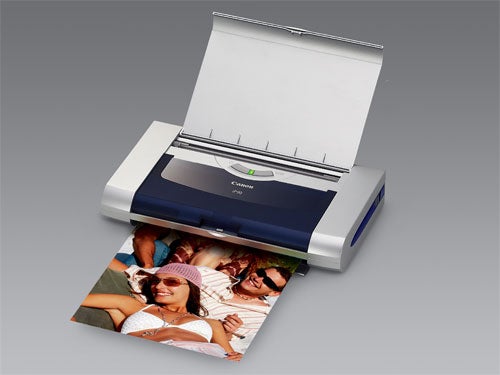
Although the iP90 is designed as a portable printer, a battery pack isn’t included. This optional extra costs a hefty £65 at street prices and doesn’t fit inside the printer case, connecting instead via a small socket at the rear of the device. This is a cumbersome solution – a shame the pack couldn’t be designed to slot in somewhere.
Setting the printer up is very simple. Lift the secondary, black top cover and the print-head carrier slides to the centre of the carriage, where you can service the cartridges. Black and tri-colour cartridges clip into place very easily and the printer automatically primes them once you’ve closed the cover again.
Canon supplies a good suite of software to support the iP90, with its Easy PhotoPrint, PhotoRecord and the useful Easy-WebPrint utilities. Easy-WebPrint automatically adjusts the width of web pages so that they fit the page width of the paper you’re using.
The Canon driver provides good coverage of the features of the iP90, including manual duplexing, stamps and watermarks and simple photo effects. There’s also the Print Advisor, a quick way to set up the correct parameters for common print tasks, such as printing plain text or photos.
Print quality for a portable printer is really very good. Canon’s FINE print technology produces ink drops as small as two pico litres and whether it’s this or the high-precision ink-placement, the overall result is exceptionally smooth colour transitions and sharply defined edges in photo images.
Text is also very sharp and clean-cut, providing high contrast for text pages. Colour graphics are bright and clean with no visible banding and good colour fidelity. A very impressive result from a compact printer like this.
Although you might expect a portable printer to produce painfully slow print, we were impressed by the results we achieved. While the printer is slower than equivalent desktop machines, it still managed to reproduce our five page text print in just 51 seconds, giving a print speed of around 6ppm. Our mixed text and graphics page completed in 35 seconds, or just under 2ppm.
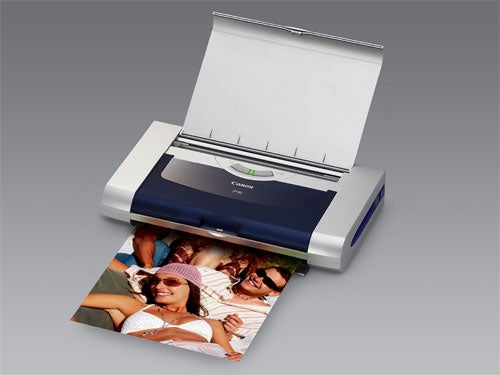
It’s not surprising Canon has started selling the BCI-15 and BCI-16 cartridges in twin packs. Because of the necessarily small size of the cartridges, they don’t contain a lot of ink. Canon claims eighty five per cent pages of black or a hundred 20 per cent pages of colour. In our tests, we saw 122 and 98 pages, respectively, so not far out. Bear in mind, though, that printing black text uses colour ink too, to pre-load the paper and get denser black.
Using our page yield results, we calculate a black page to cost 5.8p and a colour one to cost 53p, though the majority of the colour cost is from Canon’s PP-101 glossy photo paper, which we couldn’t find for less than £7.99 including VAT (20 A4 sheets). The black text figure is on the high side. For comparison, the Canon PIXMA iP8500, tested earlier this year, cost 2.2p per page. You pay in consumables for the compact size of the iP90.
”’Verdict”’
Canon’s PIXMA iP90 is a good attempt at a more compact ink-jet that you can take with you. Little is sacrificed in terms of print quality and the speed of the machine is also good, given is small size. It’s not that cheap to run, though and we would have liked to see more attention given to power provision. Carrying round a separate power supply – and possibly a separate external battery pack – doesn’t make for a true Print ‘n’ Go life.
(table:table)
(table:costs)
Trusted Score
Score in detail
-
Print Speed 7
-
Features 8
-
Value 7
-
Print Quality 9
Printing
| Type | Inkjet |
| Sheet Capacity | 30 |
| Rated Black Speed (Images per minute) | 16 ppmipm |
| Rated Colour Speed (Images per minute) | 12 ppmipm |


Editorial independence
Editorial independence means being able to give an unbiased verdict about a product or company, with the avoidance of conflicts of interest. To ensure this is possible, every member of the editorial staff follows a clear code of conduct.

Professional conduct
We also expect our journalists to follow clear ethical standards in their work. Our staff members must strive for honesty and accuracy in everything they do. We follow the IPSO Editors’ code of practice to underpin these standards.
Editorial independence
Editorial independence means being able to give an unbiased verdict about a product or company, with the avoidance of conflicts of interest. To ensure this is possible, every member of the editorial staff follows a clear code of conduct.
Professional conduct
We also expect our journalists to follow clear ethical standards in their work. Our staff members must strive for honesty and accuracy in everything they do. We follow the IPSO Editors’ code of practice to underpin these standards.
