

Verdict


Key Specifications
- Review Price: £32.99
Predictably, after bringing to market optical and laser incarnations of its Wireless Desktop 3000 keyboard and mouse sets, Microsoft has updated the line to include its new BlueTrack sensor technology. Join us as we find out if this cordless combo really is one of the better-value sets around.
Unpacking the Desktop 3000 reveals a compact keyboard, mouse and dongle. Setup is a pinch, as you merely insert the four provided AA batteries into both the keyboard and mouse, plug in the pre-paired transceiver and you’re off. 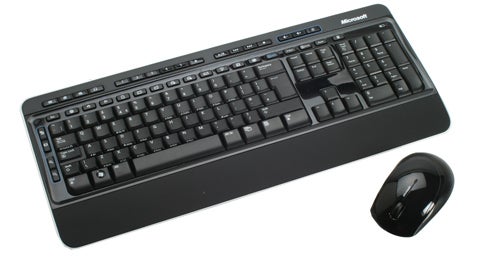
To get the most out of the set you’ll also want to set up Microsoft’s software for Windows or Mac, which when installed divides into Microsoft Mouse (IntelliPoint) and Microsoft Keyboard (IntelliType). It offers a range of functionality for the mouse, including a nice animated diagram to show each button as you select it, and though the keyboard side of things is more restrained, at least the driver lets you assign functions to various keys here too.
Back on the hardware front, the mouse of this set is Microsoft’s Wireless BlueTrack Mouse 5000 which we reviewed a short while ago. The only difference is that the glossy black plastic strip at the peripheral’s base is now white, as are the two side buttons for thumb and pinky-finger (which were silver on the standalone mouse). We preferred the look of the separate 5000, but the white trim here goes with that around the outside edge of the keyboard.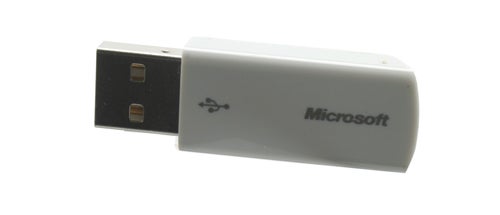
If you want a detailed examination of the 5000’s ergonomics and performance we’d recommend a quick read through that review, but for those who don’t want to bother here’s what the mouse is like in a nutshell.
Its symmetrical shape and button layout make it ambidextrous, but also prevent it from being as comfortable as mice sculpted to fit a specific hand. Rubberised sides do help, but a glossy top shows up fingerprints and dust. 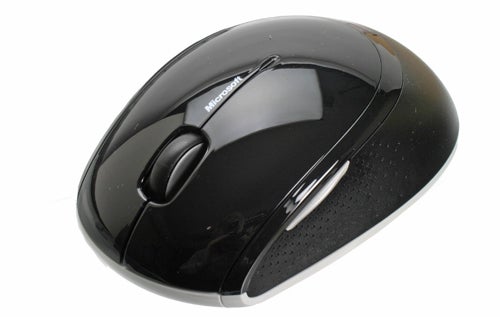
The mouse has five buttons, all of which offer crisp feedback. The four-way scroll wheel isn’t notched so scrolling is consistently smooth, which of course isn’t ideal for the odd game. There’s also a slight concern with the wheel’s build quality. Aside from this the 5000 is generally well-constructed and its BlueTrack sensor gives excellent tracking performance across almost any surface.
Since the 2,4GHz RF transceiver that comes with the Desktop 3000 is the same size as the one provided with the standalone 5000, it still fits into the recess in the mouse’s base for easy travelling.
Getting onto the Wireless Keyboard 3000 V2.0, it’s a fairly attractive affair: a relatively sleek and compact rectangle with rounded edges. Aside from the white trim it sports an appealing mix of matte and glossy black. Matte keys are set into a glossy surround for the main typing area, while the shiny shortcut keys are shown off against a matte background.
A permanently-attached wrist rest is coated in a pleasant soft-touch material, though personally I found the angle too low to be particularly comfortable. There’s no way to raise the keyboard’s front either, since the ingenious removable feet found on Microsoft’s excellent Wireless Laser Desktop 7000 have been done away with – a pity since it was a unique feature that (literally) lifted Microsoft’s keyboard above the competition. 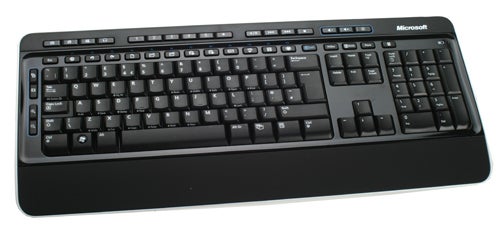
Nevertheless the 3000s’ keyboard is generally quite comfortable, as you would hope from a company with the experience Microsoft has in this area. Its low-profile keys are shaped well and offer what is among the best feedback of any keyboard at this kind of price point. Just the right amount of travel combines with a positive click for every key to make typing a pleasure – if we had to choose we’d say Microsoft just about beats Logitech in this regard. With the exclusion of the spacebar, typing is also less noisy than on many rivals.
Along the top edge of the keyboard are 17 shortcut and multimedia keys arranged in four groups. The first one consists of home, chat, Skype and email buttons, the second offers six favourites buttons, the next group controls playback while the last section has volume controls. Of course each of these can be re-assigned, as can the zoom and document controls along the keyboard’s left side.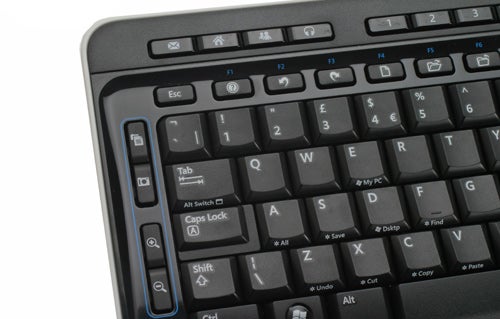
In addition to the dedicated shortcuts at the keyboard’s top, the F1-F12 keys also double as shortcuts – in fact the F-functions are set up as secondary, and need to be enabled by an F-lock button found above backspace. Rather than being grouped in threes or fours as on other keyboards, here the F-keys are all equally-spaced, which combines with the small function labels (the main ones on the keys being shortcut-icons) to make it far too easy to accidentally press the wrong one. Come on Microsoft, there’s a good reason these keys are grouped on most keyboards!
Other extras worth mentioning are the ever-essential calculator shortcut and a low-battery status indicator LED above the number pad. The 3000 Keyboard is also spill-resistant, with built-in drainage channels should that cup of coffee empty itself into your precious peripheral.
As far as value goes, the Wireless BlueTrack Desktop 3000 makes quite a case for itself since it’s available for an eminently reasonable £33. Excellent value on its own merits, but with its price tag putting it right up against Logitech’s Cordless Desktop S520, currently demanding £35, let’s see how it fares. 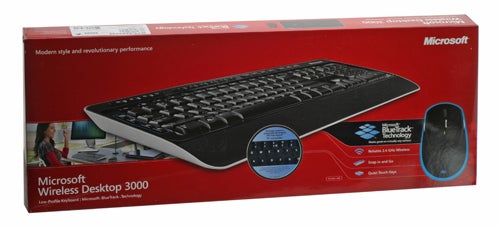
Both sets offer a cordless experience with a compact, spillproof keyboard and ambidextrous mouse. As far as the dongle goes, Microsoft gets the first point with a far sleeker transceiver which can be stored in the mouse’s base.
When it comes to mice Logitech’s LX5 effort might be slightly more comfortable and thankfully lacking that glossy finish, but the 5000 has two more buttons and a superior battery insertion system. The LX5 offers notched feedback on its scroll-wheel, but Microsoft’s rodent uses superior BlueTrack technology, which allows it to be used on almost any surface, so depending on your needs we’d say the maker of Windows wins this one too. 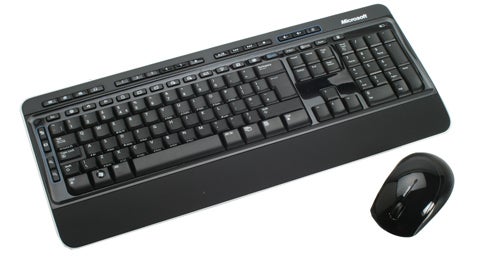
Finally in the keyboard department, Logitech’s effort is slimmer and has a more supportive wrist-rest, which combines with the keys’ zero-degree tilt to offer superior comfort. Actual key feedback is far better on the 3000 V2.0 though, as the keys on the S520 feel comparatively light and lose. We’d call it a draw here, though if you can raise the front of Microsoft’s keyboard (using a gel wrist-rest, for example) it definitely receives the win. Overall then, we declare the Desktop 3000 the well-deserved champion.
Verdict
Overall, decent build quality and ergonomics together with Microsoft’s exclusive BlueTrack sensor technology means you’re getting a lot for your money here. Quite simply, if you’re on a strict budget you’re unlikely to find a better cordless mouse and keyboard combo than the Wireless BlueTrack Desktop 3000 right now.
Trusted Score
Score in detail
-
Value 10
-
Features 8
-
Design 7


Editorial independence
Editorial independence means being able to give an unbiased verdict about a product or company, with the avoidance of conflicts of interest. To ensure this is possible, every member of the editorial staff follows a clear code of conduct.

Professional conduct
We also expect our journalists to follow clear ethical standards in their work. Our staff members must strive for honesty and accuracy in everything they do. We follow the IPSO Editors’ code of practice to underpin these standards.
Editorial independence
Editorial independence means being able to give an unbiased verdict about a product or company, with the avoidance of conflicts of interest. To ensure this is possible, every member of the editorial staff follows a clear code of conduct.
Professional conduct
We also expect our journalists to follow clear ethical standards in their work. Our staff members must strive for honesty and accuracy in everything they do. We follow the IPSO Editors’ code of practice to underpin these standards.
