

Verdict

Key Specifications
- Review Price: £59.99
We didn’t take too kindly to the Microsoft SideWinder mouse. While it boasted plenty of features, such as on-the-fly sensitivity adjustment, real-time macro-recording and, let us not forget, vertical(!) ‘back’ and ‘forward’ buttons it fell short on the ergonomics front. Sadly its successor, the X5, was little better.
Luckily, with the X6 keyboard, Microsoft managed to save the SideWinder brand some face by being very good. And the X8 mouse proves that to be a trend, rather than an anomaly.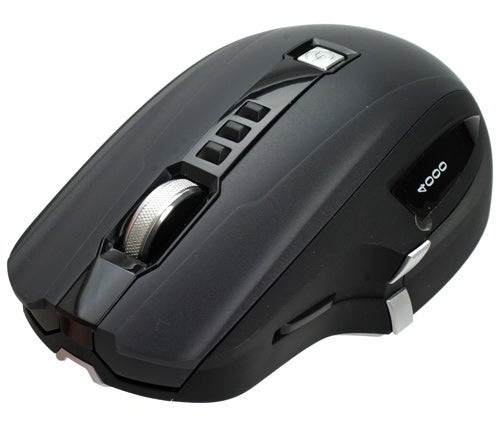
The most obvious reason why the X8 succeeds where its SideWinder predecessors failed is immediately apparent. The X8 sports a much more ergonomic design, eschewing the strange ‘hump’ of previous models in favour of a smoother design which fits the hand more comfortably. Having used the X8 almost every day for close to a month now, I’m more than pleased with the complete lack of aches and pains in my wrist and hand.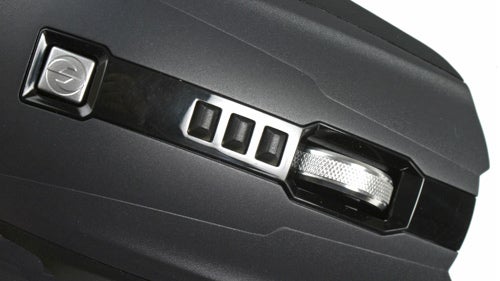
Assisting this improved hand position, the vertically mounted navigation buttons are now flat and angled inwards towards the thumb – a huge improvement over the rounded, protruding examples on the previous SideWinder mice. As a result, it is now possible to use both with only small movements of one’s thumb, without repositioning it – something the previous design didn’t cater for.
The four-way scroll wheel’s metal surface offers plenty of grip and there’s a reassuring ‘click’ while scrolling, although sideways movement feels a tad less secure – certainly enough to cause some annoyance. Three dpi-changing buttons are positioned just behind the scroll wheel. When pressed, these light up temporarily and the sensitivity assigned – via Microsoft’s IntelliPoint software – is displayed on the mouse’s LCD screen, just above the thumb position.
Another of the X8’s party tricks is that it is both a wired and a wireless mouse. Primarily, the X8 operates cable-free, but flip it over and three magnetic contact points at the nose, a power switch and a battery compartment are revealed. Those contacts marry directly with the magnetic contacts at the end of the cable connector which, in turn, joins to an ice hockey puck-shaped wireless transceiver/cable tidy that connects to a PC via USB.
I can’t overstate how brilliantly simple the concept is. The ability to continually use a wireless mouse when the battery has run down by powering it over USB is a great albeit obvious idea. If I had a penny for every time Riyad has shouted a string of expletives at his wireless mouse for failing to find its own way to its charging dock overnight, I’d be a rich man.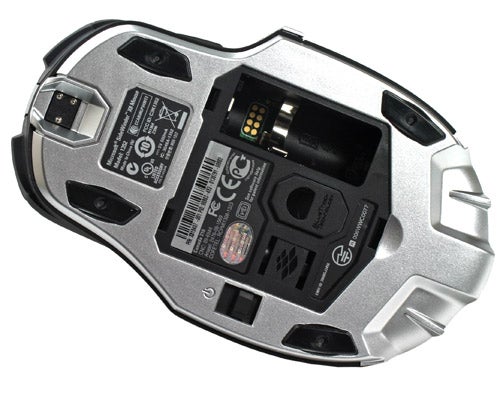
Furthermore, with its charging cable connected, the X8’s wireless functionality will continue to operate even if the rechargeable battery has been removed – handy if you prefer using a lighter mouse. The ‘puck’ also stores two additional feet for the X8 of varying slickness should such customisation be desired.
Microsoft rates the mouse for 30 hours of unwired use and I easily survived a weekend of gaming without having to charge. The LCD screen flashes and displays a charging icon, while a red light pulsates from a slit at the rear of the X8 – it’s rather soothing really.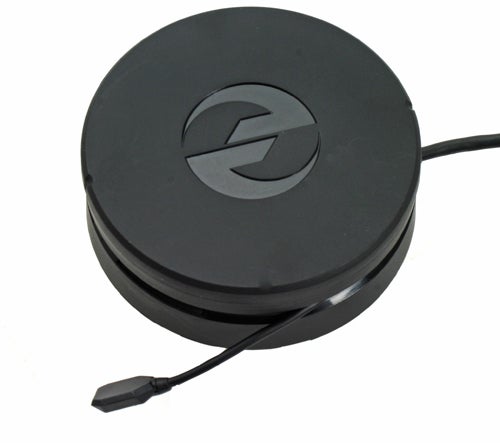
Gaming ‘purists’ might argue that an advantage of a wired connection is that it ensures there is no delay between mouse movements being made and a game being made aware of those movements. However, I can’t say I noticed any difference between the X8 or my previous, wired, Razer Copperhead; but maybe that’s just me. My Team Fortress 2 skill certainly didn’t seem to suffer for using the X8, at any rate.
What makes the X8 such a joy to use is the technology powering it. Like the Explorer mouse, the X8 uses BlueTrack technology, which is – as experience shows – a notable improvement on optical and laser.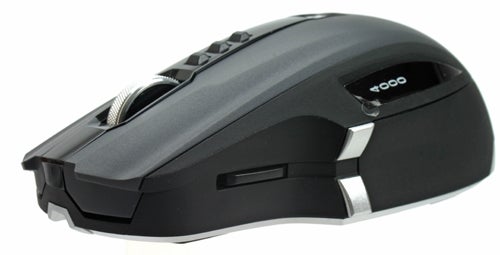
But why the improvement? Well for a start, BlueTrack’s blue LED light has a shorter wavelength than red light which can thus resolve detail to a greater degree. The blue light is also diffused and broader which helps not only to illuminate more of the surface, more evenly but also in effect increases the contrast between features and textures within that surface. This combined with a sensor and lens that can distinguish the finer differences in reflected light make BlueTrack mice more accurate as well as functional on a variety of surfaces, including smooth shiny ones.
However, what’s really important is how the X8’s 4,000dpi sensitivity translates into actual use. My first thought, on reading the original press release for the X8, was definitely “who on earth needs 4,000dpi” but having used the mouse I’m a sceptic no longer – the precision afforded is simply fantastic. Even if – and Microsoft agrees here – the max acceleration of 75g and 120in/s movement speed with which the X8 can cope are more than anyone could ever produce.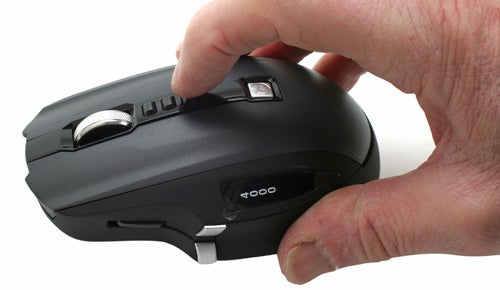
Gaming is an absolute pleasure with the X8. Its high-sensitivity gives great responsiveness in first-person shooters and that isn’t lost when more precision is needed, say after pulling out a sniper rifle. Being able to script a macro to switch weapon ”and” sensitivity at the same time is just icing on the cake.
Mice are tricky, highly subjective products to try and rate, but I’d definitely pick the X8 over the Steel Series Ikari which is going for around the same money, or my previous mouse of choice: Razer’s Copperhead.
Verdict
Microsoft’s SideWinder X8 combines the best aspects of both wired and wireless mice, adds its funky, high-sensitivity BlueTrack technology and wraps it up in a slick, ergonomic package. Put simply, the X8 is the gaming mouse we’ve been waiting for Microsoft to make.
Trusted Score
Score in detail
-
Value 9
-
Features 10


Editorial independence
Editorial independence means being able to give an unbiased verdict about a product or company, with the avoidance of conflicts of interest. To ensure this is possible, every member of the editorial staff follows a clear code of conduct.

Professional conduct
We also expect our journalists to follow clear ethical standards in their work. Our staff members must strive for honesty and accuracy in everything they do. We follow the IPSO Editors’ code of practice to underpin these standards.
Editorial independence
Editorial independence means being able to give an unbiased verdict about a product or company, with the avoidance of conflicts of interest. To ensure this is possible, every member of the editorial staff follows a clear code of conduct.
Professional conduct
We also expect our journalists to follow clear ethical standards in their work. Our staff members must strive for honesty and accuracy in everything they do. We follow the IPSO Editors’ code of practice to underpin these standards.
