

Verdict


Key Specifications
- Review Price: £88.97
Revolutions; socioeconomic, political, in literature, language and culture. Revolutions tend to be things that affect entire countries, the thinking of nations, or whole segments of an industry. In stable regions, they tend to be infrequent and slow to get going. In the technology world, however, and especially the computer industry, revolutions seem to be not just frequent, but the order of the day.
Compared to other segments, though, the progress of our input devices has been relatively modest and certainly not revolutionary. Apart from a few ground-breaking peripherals like the Novint Falcon and the 3Dconnexion SpaceNavigator 3D Mouse, the classic keyboard and mouse combo hasn’t really changed that much from the days when they were first invented. We still move mice in pretty much the same manner as always, while keyboards largely retain the same layout they’ve had since the days they were typewriters. Does Logitech’s latest cordless desktop, the MX 5500 Revolution, deserve its revolutionary tag line?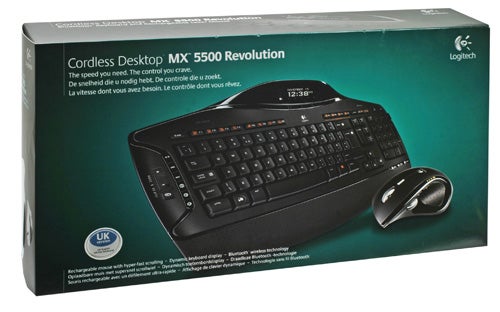
Quite apart from all the usual gizmos you’d expect to find at this price-point, Logitech does throw in a few unique (compared to the competition) features. Its reasoning seems to go something like this: if one wheel on a mouse is good, two must be better (a viewpoint I personally couldn’t agree more with), and while we’re at it, two screens are better than one so let’s add one to the keyboard.
But let’s see how it all works out in practice. Upon opening the box, you get the keyboard, mouse, charging station and Bluetooth dongle, together with software and documentation. It’s all beautifully presented and co-ordinated, and makes you feel like you’re getting your money’s worth. 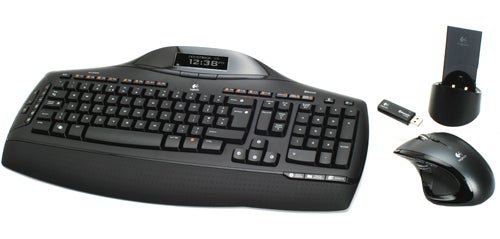
Logitech’s ‘Quick Start Guide’, meanwhile, is an example to other manufacturers of how it should be done. An A3, full colour fold-out manual with clear, step-by-step instructions – accompanied by large, unambiguous photographs – deals in detail with setup and troubleshooting. If you’re reading this article, you are unlikely to need it, but plenty of consumers will find it a blessing.
The flip-side of the ‘Quick Start Guide’ gives a comprehensive overview of all the special keys on both keyboard and mouse, their operation and application, and the various functions of the keyboard’s LCD – which do need some illuminating, as there are a few.
Of course, to get the most out of these fancy peripherals, you need to install the included SetPoint software. As you’ll know if you’re a regular reader, SetPoint has gone from being annoying bloatware to being rather good over the last few years. Setup couldn’t be simpler, after which you can customise the heck out of any Logitech peripheral.
But let’s find out what the Cordless Desktop MX 5500 Revolution is actually like to use. ‘The speed you need. The control you crave’, Logitech claims on the side of the box, making for some funky rhyme and alliteration. Thankfully, it’s not just fun wordplay, but mostly true.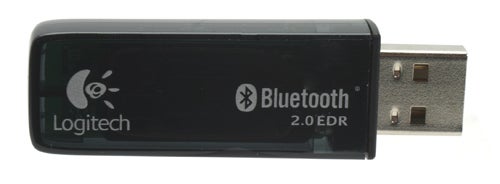
Starting with the least interesting bit, the dongle is fairly unremarkable, featuring a small ‘connect’ button you will only need to use for troubleshooting. It will also act as a hub for any Bluetooth device.
The mouse, meanwhile, is probably responsible for the ‘Revolution’ addition to the name, as it is virtually identical to the excellent Logitech MX Revolution Mouse, which, if you follow the link to our comprehensive review, you’ll see we really liked. The only differences between that and our current model are a few minor cosmetic changes, and that it’s now Bluetooth instead of RF.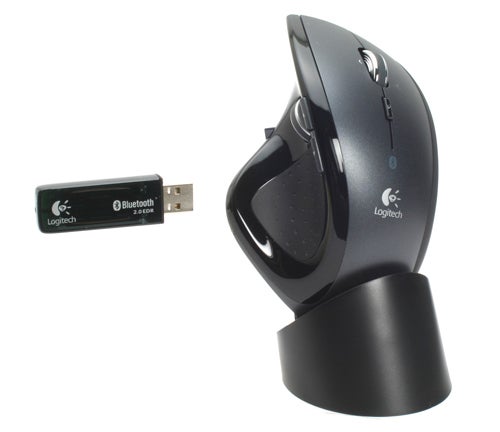
In case you haven’t read about it already or don’t like links, here’s a short overview. The Revolution MX is an 11-button, laser engine, dual-wheel rodent. For office purposes, it’s probably the nicest mouse I’ve used, with the possible exception of the MX1000. It glides across the desk much more smoothly than the recently reviewed Microsoft Laser 6000 thanks to increased size and better distribution of the Teflon feet, though the 6000’s shape allows for a slightly more relaxed hold.
Its main innovation, however, is ‘hyper-fast scrolling’ using its MicroGear Precision wheel. What this basically allows you to do is scroll through lengthy documents at a flick of the wheel, which “free spins” until you stop it. Amazingly, with Logitech’s software installed it switches intelligently between this and normal, notched scrolling depending on your application. The software also allows you to set a huge number of customizable shortcuts and key-bindings to the Revolution MX’s 11 buttons, making programs like Photoshop much easier to use.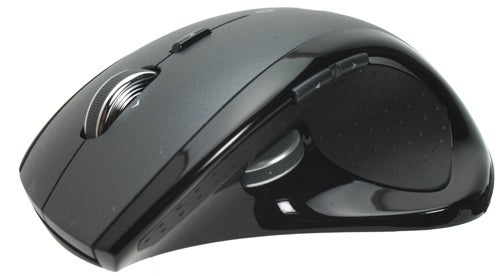
Unfortunately, however, the Desktop MX 5500 is not designed for gaming, and the mouse is where you are most likely to notice. Though its moulded contours (yes, it’s right-handers only) are very comfortable for normal use, they don’t lend themselves to fingertip game-play. There’s also some lag when fragging, making the Revolution mouse for casual gamers only.
When it comes to the keyboard, it is unique to this set, so we’ll spend a bit more time on it. Funnily enough, this keyboard is an evolution of the one used for the Cordless Desktop MX 3200, rather than the Desktop MX 5000. And frankly, that’s a good thing. It means that it not only adopts an attractive, black colour scheme, but also an LCD screen reminiscent of Logitech’s G15.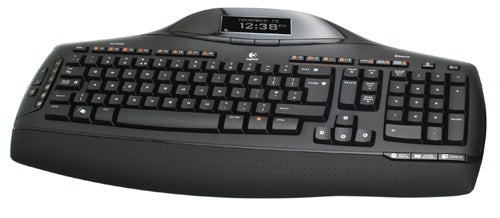
The screen offers some interesting feedback. It supposedly allows you to monitor ambient temperature, though this seemed to give much warmer figures than was realistic. There’s a key counter (to see how many keys you’ve pressed – employees beware), which will keep count until doomsday if you remember to always leave one battery in contact while changing them.
However, the only genuinely useful features are that it shows you the date and time, media information for your music, warns you about new emails in your inbox, and provides a separate calculator. The media function gives you the artist’s name, the track’s title and length, and an indicator bar showing you how far along you are. It pops up automatically if you start any tune. 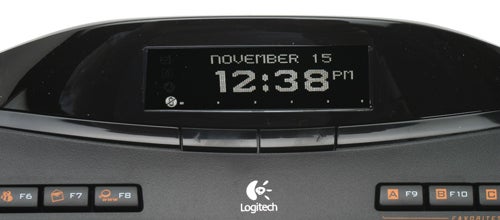
When it comes to email alerts, I realized the MX5500 was even more (r)evolutionary than I had initially assumed when it bleeped at me. Yes, this keyboard not only has its own screen, but its own speaker, leading me to predict that soon – after they’ve condemned our PCs to obsolescence – keyboards will commence taking over the world.
But most useful of all (accountants and number-fetishists rejoice) is the integrated calculator mode. At the press of a dedicated key, the LCD screen and number-pad become your playground. There’s even a ‘clear calc’ button. It works rather well, especially since the display is large and easily legible. One thing this LCD display lacks, though, is any level of customisation as supported by the G15. This may not disturb many, but it’s a shame that this version isn’t at least backwards compatible with the various community made plug-ins of the G15.
Thankfully, though, Logitech has gone back on its inaccurate touch-sensitive controls of other recent desktop efforts. Instead, all the media keys are arranged in a vertical line on the left of the keyboard, within reasonably easy reach of your little finger. Although this layout is much more compact and visually appealing than on pre-touch iterations such as the MX3000, it’s not quite as intuitive, nor as easy to operate without looking.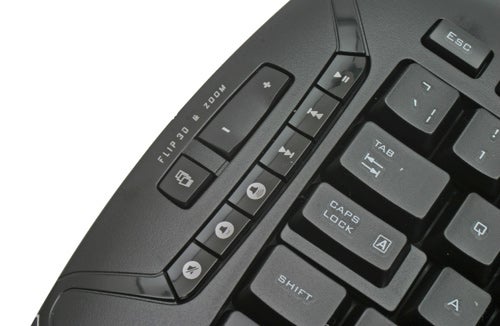
Of course, all its neat features would be pointless were it not for the fact that typing on the MX 5500 is an absolute joy. It has the same soft response found on both the Logitech Wave and the Alto, with crisp yet cushioned feedback that requires only the slightest pressure to get the desired result.
Likewise, the wrist rest uses the same ‘perforated’ material as the Wave, which means it’s solid and comfortable. Compared to Logitech’s previous generations of keyboards, these new wrist-rests really are a revolution, with the flimsy detachable pieces of plastic of the past replaced by comfortable, elegant, and secure wrist rests that provide excellent support.
The only problem Logitech faces is competition from itself. With Keyboard and mouse combos like the MX 3200 offering a similar design while costing less, the real question becomes whether you’re willing to pay for the extra features, chief of which would be MicroGear scrolling. And, at around £30 more for the MX 5500, you really need to want those features to make it worthwhile.
”’Verdict”’
As long as you want a set for serious work, not serious play, the Logitech Cordless Desktop MX 5500 Revolution is probably as close to revolutionary as you can get. You do pay for the privilege, however; whether it’s worth it depends on if you need or want its features, especially those of the included MX Revolution Mouse.
Trusted Score
Score in detail
-
Value 8
-
Design 9


Editorial independence
Editorial independence means being able to give an unbiased verdict about a product or company, with the avoidance of conflicts of interest. To ensure this is possible, every member of the editorial staff follows a clear code of conduct.

Professional conduct
We also expect our journalists to follow clear ethical standards in their work. Our staff members must strive for honesty and accuracy in everything they do. We follow the IPSO Editors’ code of practice to underpin these standards.
Editorial independence
Editorial independence means being able to give an unbiased verdict about a product or company, with the avoidance of conflicts of interest. To ensure this is possible, every member of the editorial staff follows a clear code of conduct.
Professional conduct
We also expect our journalists to follow clear ethical standards in their work. Our staff members must strive for honesty and accuracy in everything they do. We follow the IPSO Editors’ code of practice to underpin these standards.
