

Verdict


Key Specifications
- Review Price: £34.97
The humble mouse has become a ubiquitous part of our daily lives. Anyone who works with a computer every day probably spends many hours with a mouse in their hand, clicking icons, opening drop down menus and selecting tools – the mouse is an integral part of pretty much every operating system and application. Of course mouse technology has moved on massively since the early days of rubber balls and sticky buttons, and most “serious” PC users will have a specific choice of mouse – the TR office is generally split between Logitech and Razer users for instance. But one thing remains constant, your mouse does pretty much everything.
Dconnexion SpaceNavigator 3D Mouse on white background” width=”300″ height=”279″ class=”align size-medium wp-image-170760″ srcset=”https://www.trustedreviews.com/wp-content/uploads/sites/54/2008/02/6742-IMG1355s-1.jpg 500w, https://www.trustedreviews.com/wp-content/uploads/sites/54/2008/02/6742-IMG1355s-1-300×279.jpg 300w, https://www.trustedreviews.com/wp-content/uploads/sites/54/2008/02/6742-IMG1355s-1-320×298.jpg 320w” sizes=”(max-width: 300px) 100vw, 300px” />
Having suffered in the past from mouse-induced RSI, I’m well aware that the amount of mouse work you do can have very nasty results, so being able to cut down on the amount of mouse movements can only be a good thing. The most obvious solution is to adopt an encyclopaedia of keyboard shortcuts, thus cutting down on all those drop down menu selections. But even keyboard shortcuts can’t save you from having to use your mouse for navigation as well as editing in an application like Photoshop.
This is where 3Dconnexion comes in – a company dedicated to make heavy mouse users more efficient with its range of 3D mice. 3Dconnexion is actually an arm of Logitech, which is no real surprise considering Logitech’s standing in the mouse market. Most of 3Dconnexion’s products are aimed at the high-end CAD or computer animation user, by combining the 3D mouse technology with a range of buttons that can be mapped to keyboard shortcuts. The result is a setup that requires almost no use of the keyboard, and leaves the standard mouse free to handle editing duties while the 3Dconnexion device deals with all the navigation and selection duties.
Dconnexion SpaceNavigator 3D Mouse in packaging” width=”300″ height=”266″ class=”align size-medium wp-image-170763″ srcset=”https://www.trustedreviews.com/wp-content/uploads/sites/54/2008/02/6742-IMG1354s-1.jpg 500w, https://www.trustedreviews.com/wp-content/uploads/sites/54/2008/02/6742-IMG1354s-1-300×266.jpg 300w, https://www.trustedreviews.com/wp-content/uploads/sites/54/2008/02/6742-IMG1354s-1-320×284.jpg 320w” sizes=”(max-width: 300px) 100vw, 300px” />
But the underlying technology behind 3Dconnexion’s products can also bring benefits to general users, or keen hobbyists. As such, the SpaceNavigator is a far more affordable option, pretty much doing away with all the shortcut buttons and offering just the 3D navigation. OK, so you do get two shortcut buttons, but you’re not going to be mapping all your keyboard shortcuts to those.
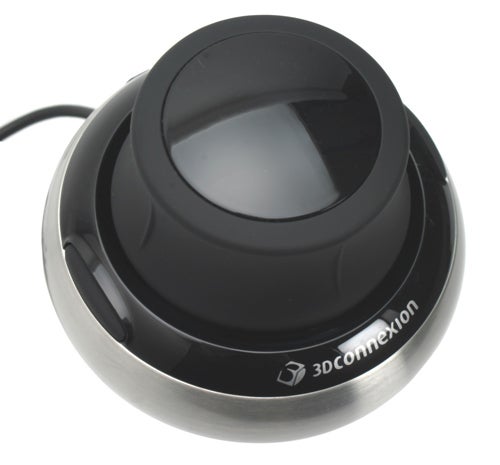
Unlike a conventional mouse, the SpaceNavigator doesn’t move. In fact, you’ll have a tough time moving it, since the solid metal base makes the device very heavy. The base needs to be heavy because one axis is vertical – so you can pull the SpaceNavigator up away from the desk, and push it down towards the desk. You also get complete movement on a horizontal plane – forwards, backwards, left and right. Add to this tilting movement across the same four axis, and a twisting movement left and right, and it’s clear that there’s a lot of functionality squeezed into that black rubber dial.
There’s not a great degree of movement in any direction, but you don’t really need it. The SpaceNavigator is extremely sensitive, and only requires the slightest movement on any axis. You can of course tailor the sensitivity using the supplied utility. The buttons can also be mapped to keyboard shortcuts for each application that you use the device with.
The idea is that you still use your standard mouse in your right hand (assuming you’re right handed) and use the SpaveNavigator in your left. This takes a bit of getting used to at first, since you’re generally not as delicate or accurate with your left (read not dominant) hand. You’d be surprised what you can do with your left hand once you start using it though – I’m not saying that I’d want to use a conventional mouse in my left hand, but working with my mouse in my right hand and the SpaceNavigator in my left becomes surprisingly intuitive, surprisingly quickly.
Dconnexion SpaceNavigator 3D mouse on white background.” width=”300″ height=”216″ class=”align size-medium wp-image-170767″ srcset=”https://www.trustedreviews.com/wp-content/uploads/sites/54/2008/02/6742-IMG1356s-1.jpg 500w, https://www.trustedreviews.com/wp-content/uploads/sites/54/2008/02/6742-IMG1356s-1-300×216.jpg 300w, https://www.trustedreviews.com/wp-content/uploads/sites/54/2008/02/6742-IMG1356s-1-320×230.jpg 320w” sizes=”(max-width: 300px) 100vw, 300px” />
But the big question is whether the average PC (or Mac) user actually needs the SpaceNavigator. Well a large part of the answer to that question is what you consider the average PC user to be. If you happen to be a keen amateur photographer, complete with a copy of Adobe Photoshop CS3 on your machine, then the SpaceNavigator will appear quite attractive. With digital cameras producing seriously large images these days, it’s hard to fit a whole image on your monitor when editing, even if you’ve got a 30in model. This means that you have to move around the image or zoom in and out to edit it, thus leaving you to resort to using the mouse for navigation as well as editing, even if you’re a keyboard shortcut maestro. However, With the SpaceNavigator in your left hand you can happily zoom in and out of the image and pan up, down left and right, leaving your main mouse to handle editing duties. 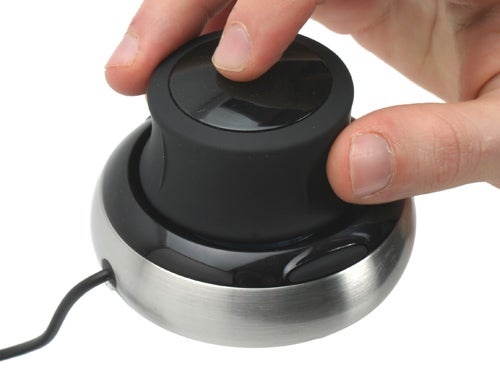
Then there’s the 3D aspect to CS3, to which the SpaceNavigator lends itself beautifully, but you’re really bordering on the professional user here who’s likely to be looking at one of the more fully featured 3Dconnexion devices. For the casual 3D designer, the SpaceNavigator works brilliantly with Google SketchUp allowing you to easily navigate around your creation while building it. Even if you’re not a budding architect, SketchUp is great fun to mess around with.
Talking of having fun, the SpaceNavigator also works very well with Google Earth. Now, if you’ve played around with Google Earth you’re well aware of how addictive it can be – you can’t help but look for just one more landmark, or check out one more of your friends’ homes. The SpaceNavigator allows for far more fluid navigation of Google Earth – the vertical axis is used to zoom in and out of the planet, the horizontal axis will move you across the surface, tilting will change the pitch and rotating will rotate the compass. You’ll probably find yourself struggling at first and even thinking that you’d be quicker just clicking and grabbing with a normal mouse, but persevere and you’ll be rewarded.
Dconnexion SpaceNavigator 3D Mouse with blue illumination.” width=”300″ height=”293″ class=”align size-medium wp-image-170774″ srcset=”https://www.trustedreviews.com/wp-content/uploads/sites/54/2008/02/6742-IMG1619s-1.jpg 500w, https://www.trustedreviews.com/wp-content/uploads/sites/54/2008/02/6742-IMG1619s-1-300×293.jpg 300w, https://www.trustedreviews.com/wp-content/uploads/sites/54/2008/02/6742-IMG1619s-1-320×313.jpg 320w” sizes=”(max-width: 300px) 100vw, 300px” />
Traversing Google Earth with the SpaceNavigator is probably as close as you’ll get to flying around the virtual globe. Once you get the hang of it, you’ll soon find yourself whizzing from place to place, without the need for double clicks, or the constant hassle of picking up your mouse and replacing it on the mat. If you’re one of the many that’s addicted to Google Earth, then the SpaceNavigator makes a very good case for itself.
And that’s the problem really. The SpaceNavigator is a device that will be welcomed by those who frequently use applications that it works with. This is why the high-end versions have a very strong user base – the devices are certified for any number of CAD and 3D modelling programs. But for the general consumer the argument is less solid, and even my earlier example of using Photoshop CS3 is tempered by the fact that it too is a very expensive piece of software.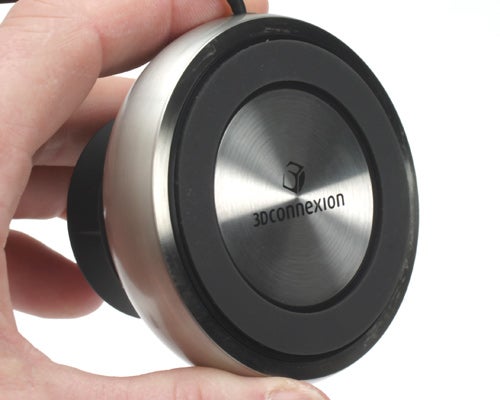
If there’s one thing in the SpaceNavigator’s favour, it’s that there is an SDK available, allowing software developers to implement support for the device. This could potentially open up completely new markets for 3Dconnexion, not least of which is gaming. A device like this would be a huge benefit when playing a large scale real time strategy game such as Supreme Commander or World in Conflict. Whether game developers choose to recognise what 3Dconnexion has created, remains to be seen, but I do feel that the SpaceNavigator could be a great PC gaming peripheral.
The version of the SpaceNavigator I’m looking at is the Personal Edition, which is aimed at end users, rather than businesses. This distinction means that this is a very affordable bit of kit, going for around £40 on the street. That’s a very reasonable price for something as innovative and well built as the SpaceNavigator, but ultimately any purchase prospect will rely on whether you actually need a device like this in the first place.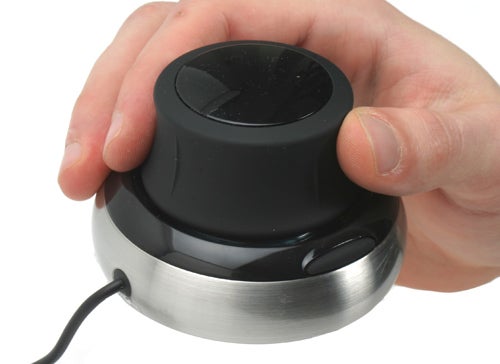
”’Verdict”’
3Dconnexion has definitely created something different in the SpaceNavigator, and although its talents are obvious for professional computer designers everywhere, there’s a lot of potential for consumer use too. That said, end user application support is somewhat limited at present, so you’re going to have to be a serious amateur photographer, Google Earth addict or SketchUp fiend to justify a purchase.
Trusted Score


Editorial independence
Editorial independence means being able to give an unbiased verdict about a product or company, with the avoidance of conflicts of interest. To ensure this is possible, every member of the editorial staff follows a clear code of conduct.

Professional conduct
We also expect our journalists to follow clear ethical standards in their work. Our staff members must strive for honesty and accuracy in everything they do. We follow the IPSO Editors’ code of practice to underpin these standards.
Editorial independence
Editorial independence means being able to give an unbiased verdict about a product or company, with the avoidance of conflicts of interest. To ensure this is possible, every member of the editorial staff follows a clear code of conduct.
Professional conduct
We also expect our journalists to follow clear ethical standards in their work. Our staff members must strive for honesty and accuracy in everything they do. We follow the IPSO Editors’ code of practice to underpin these standards.
